Repository navigation
Home
Saitama is free, open-source firmware that turns a LoRa handheld into a standalone MeshCore messenger. You get encrypted channels and direct messages, a list of every station you hear, repeater and region tools, and (on the T-Deck) offline maps. No phone, internet or subscription is needed.
Highlights:
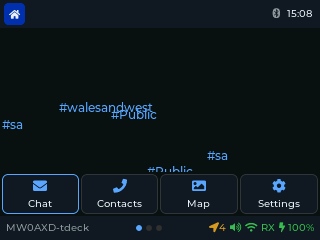
- Full touchscreen on the T-Deck. Tap, swipe and scroll on every screen, like a phone, with the keyboard and trackball still there when you want them.
- Verified direct messages. A green padlock shows a DM really came from that person and wasn't faked.
- Messages that get through. Clear delivered / not-delivered ticks, automatic resends that find a new route when the old one breaks, and routes remembered across restarts.
- No phone, no internet, no subscription. Everything runs on the device.
New to all this? Start with Why a mesh?, Why Saitama? and The apps explained.
This guide covers release 1.6.2 on both supported devices:
| LilyGo T-Deck Plus | M5Stack Cardputer ADV | |
|---|---|---|
| Status | Main target, hardware-tested | Beta, hardware-tested |
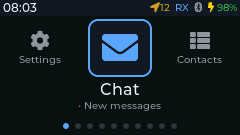
| Screen | 320 × 240, full touch support | 240 × 135, no touch |
| Input | Keyboard, trackball, touchscreen | Keyboard only |
| Radio | Built-in SX1262 | Cap LoRa-1262 module |
| GPS | Built-in | On the Cap LoRa-1262 |
| Firmware files | saitama-t-deck-plus-X.Y.Z.bin |
saitama-cardputer-adv-X.Y.Z.bin |
Start here
- Why a mesh? Why MeshCore?: what this is all for
- Why Saitama?: touchscreen, verified DMs, and what makes it different
- Getting your message through: routing and delivery, explained
- The apps explained: every app in plain English
- Glossary: the jargon, explained
How-to guide
- Installing Saitama: download a release and flash it
- First setup: name, radio preset, storage password, clock
- Controls: keys, trackball and touch on each device
- The launcher: finding your way round the apps
- Chat and channels: messages, DMs, channels, replies
- Contacts, Repeaters and Heard: people and repeaters on your mesh
- Regions and scopes: meshes whose repeaters only forward scoped traffic
- Network tools: Finder, Trace, Signal and the radio tools
- Map and GPS: offline maps (T-Deck) and GPS status
- Settings reference: every row in Settings
- Terminal commands
- Backup and security: the SD card, storage password, Bluetooth PIN
- Troubleshooting
The same identity, keys, contacts and settings work on both devices: the SD card's
/ops/ folder can move from one to the other.