Repository navigation
Launcher
The launcher has three pages. Swipe left or right, or roll the trackball past the edge of a page, to change page.
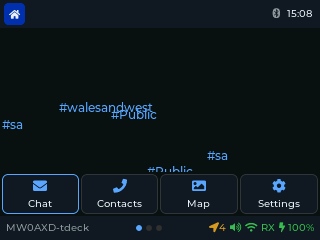
Home page. The stations you've heard this session fall like rain in the background, coloured by signal strength, with channels in blue. When a message arrives, a line joins it to its channel, the station it replies to, or the DM recipient. In front are four big buttons: Chat, Contacts, Map and Settings. The clock and battery are at the top; a moon beside the clock means Night Mode is on.
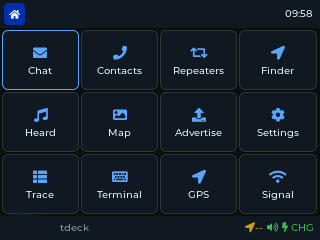
Apps page 1: Chat, Contacts, Repeaters, Finder, Heard, Map, Advertise, Settings, ChanScan, Terminal, GPS, Signal.
Apps page 2: MP3, Files, Spectrum, Trace, SigGen, Power, Snake, 2048, PCAP, BT Foxhunt, Pic Viewer, Regions.
The Cardputer has fewer apps (it has no PSRAM, so the radio tools, games and media apps are left out, and the map is a lighter version):
Chat, Contacts, Repeaters, Heard, Finder, Regions, Signal, GPS, Map, Terminal, Settings.
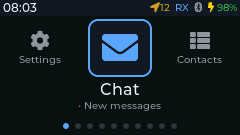
Carousel (the default): one big icon at a time, with its neighbours at the sides. Left and Right move round it, Enter opens the app. The line under the icon shows something live for that app: unread messages, the number of contacts or repeaters, the GPS fix, and so on.
Menu: Settings > Launcher switches between Carousel and Menu, a plain list of the apps.
The Cardputer has no Advertise app: adverts are in Settings > Advert, and the
Terminal advert command sends one straight away.
After the Screen Timeout (Settings) the screensaver starts. Settings > Screensaver picks what it shows:
- T-Deck: a clock, or Saitama (an animated mesh).
- Cardputer: a clock, or Mesh rain (the default): channels, stations and the clock fall down the screen, joined by a line when a message arrives.
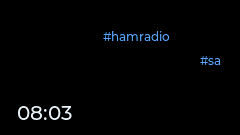
Settings > Screen Off turns the backlight off after a further delay. The radio keeps listening, and messages still arrive.