Repository navigation
Contacts Repeaters and Heard
MeshCore nodes announce themselves with adverts. Saitama sorts what it hears into three apps:
- Heard: every station heard since the device was switched on.
- Contacts: people (companion nodes) you've saved. Up to 250 on the T-Deck, 100 on the Cardputer.
- Repeaters: repeaters you've saved. Up to 250 on the T-Deck, 60 on the Cardputer.
Contacts and repeaters are saved to the SD card (/ops/contacts.json and
/ops/repeaters.json) and survive a reflash.
A live list of stations, newest first. Each row shows C (companion) or R (repeater), the name, signal bars for the last packet heard, and (T-Deck only) the time it was last heard.
Select a row for its details: name, identity, signal and, for a repeater, its owner information (asked for over the air; it can take a few seconds). Save adds it to Contacts or Repeaters; Update refreshes a saved one. Clear List (top right) empties the list.
Any of these work:
- Automatically: Settings > Auto Add Contacts saves nodes as their adverts arrive.
- From Heard: select the station and choose Save.
- From a message: select the bubble in Chat and choose Add Contact.
- QR code: Settings > Share My Contact shows your own QR code for another device or the MeshCore phone app to scan.
-
Terminal:
cardprints your business card;import <card>adds someone else's.
The list shows a star beside favourites, signal bars, and a speech-bubble button that opens a DM straight away. Type to filter the list by name.
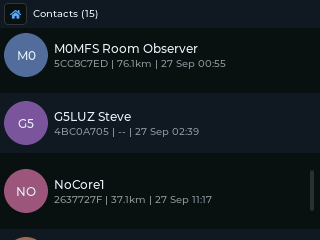
Select a contact for its options:
| Direct Message | |
| Share QR | Details |
| Favourite / Remove Favourite | |
| Set Path | Reset Path |
| Delete Contact | Block Contact |
- Details: ID, when last heard, signal, hop count, route, distance and position (if they share it), and their public key.
- Set Path / Reset Path: fix the route DMs take, or forget it so the next DM floods and a new route is learned.
- Block Contact: their DMs and channel messages are dropped and no longer shown.
The same layout as Contacts. Select a repeater for:
| Admin Login | |
| Add / Remove Favourite | |
| Set Path | Reset Path |
| Trace Repeater (T-Deck) | Delete Repeater |
If you know a repeater's admin password you can manage it from the device.
- Choose Admin Login and type the password.
- Tick Remember password to keep it for next time (sealed with your storage password on the SD card). On the Cardputer, press Down to reach the tickbox and Enter to tick it.
- Press Enter, or choose Login.
If the login fails you can Retry, or Reset & Retry, which forgets the stored route so the login floods across the mesh.
Once logged in, the admin panel has:
- Status: battery, radio, packet counts, airtime, uptime and any sensor readings.
- Neighbours: the repeaters it can hear, with names.
- Change Password, Access Control (who may log in), and Regions (which region scopes it serves).
Any other repeater command can be sent from the Terminal with repadmin <cmd>.