Repository navigation
Audio Mixer
modular-av-audio-mixer is a window for your own voice: which effects
run on it, in which order, where in the channel, and how loud. A GM also
uses it to see the table's voices and change them for a scene.
Manifest URL:
https://raw.githubusercontent.com/Affid/modular-av/manifests/modular-av-audio-mixer/module.json
The mixer holds no effects. It mixes the effect modules your world has turned on: Noise cancellation and the voice effects (reverb, echo, EQ, the radio and the mic boost). With none enabled, it says so.
Open it from the dock's voice panel, the Voice tab of the voice and video settings window, or the mixer's own entry in Foundry's module settings.
On top, your voice's path as cards, place by place:
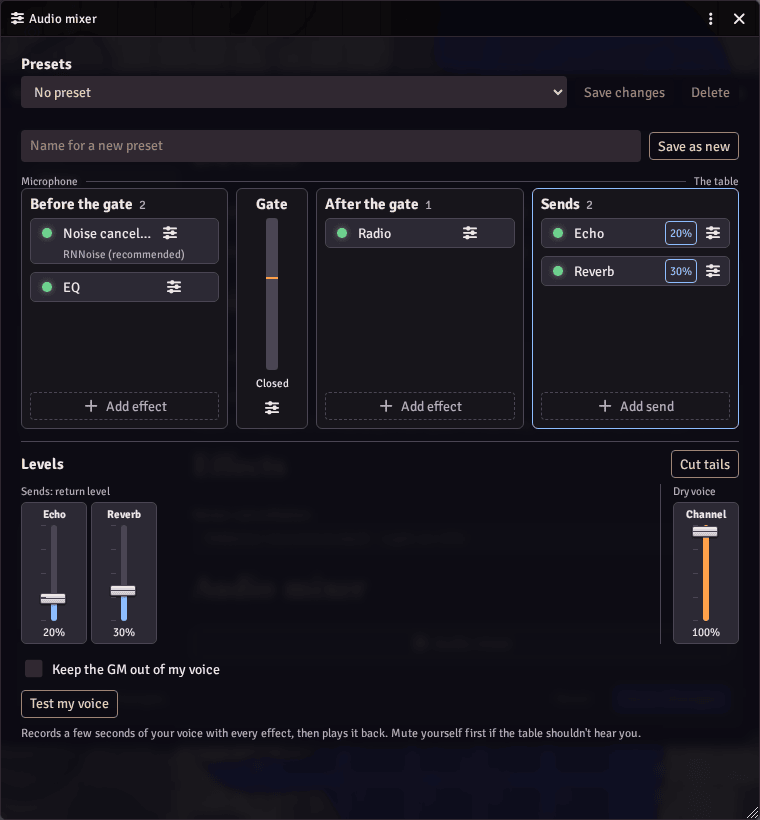
| Place | What runs there |
|---|---|
| Before the gate | What cleans up your voice before the voice gate listens: noise cancellation, EQ, mic boost |
| The voice gate | Opens while you speak, with its live level. It is the core's, always there |
| After the gate | What shapes your voice once the gate has let it through: the radio |
| Sends | What rings on beside your voice after you stop speaking: reverb, echo. The gate closing doesn't cut them off unless you choose so |
- + in a place adds an effect from a list you can search.
- A card's dot turns that effect off and keeps it in the chain. Remove, in its settings, takes it out.
- Drag a card to move it within or between places.
- A card's settings button opens that effect's own settings, its place and its noise model where it has one.
By keyboard: the arrows move between cards, Space switches a card, Enter opens its settings, Alt and the arrows move it, Delete removes it, and L goes to its level.
Below, Levels has every fader of the chain on one row: each send's return level, and Channel pinned on the right, which is how much of your voice goes out dry beside the sends. Cut tails stops reverb and echo as soon as your microphone closes.
The window warns you about what will sound wrong, such as a reverb ahead of the gate (it holds the gate open, then the gate cuts it off), and says when an effect failed.
Everything works by keyboard and with screen readers.
Test my voice records a few seconds of what you send, with every effect, and plays it back to you. Nothing feeds back, so you need no headphones. Mute yourself first and the table hears nothing while you test.
Save your chain as a preset, switch between presets, and update or delete them. A mark shows when the chain differs from the saved preset.
- A preset holds each effect's on or off, place, level and settings, the order, and Channel. It leaves out your devices, voice mode, input sensitivity and Cut tails.
- Presets are kept with your Foundry user, so they follow you to any device. Up to 32.
- An effect missing from a world, or that your browser can't run, is skipped, and the window names it.
- Foundry's Configure Controls has keys for the next and previous preset, unset at first.
A GM's window has a second tab, The table. Pick a player to see their chain as they see it, with each effect's settings as text, their warnings, and whether they took your change. It is read only: only that player can change their own setup.
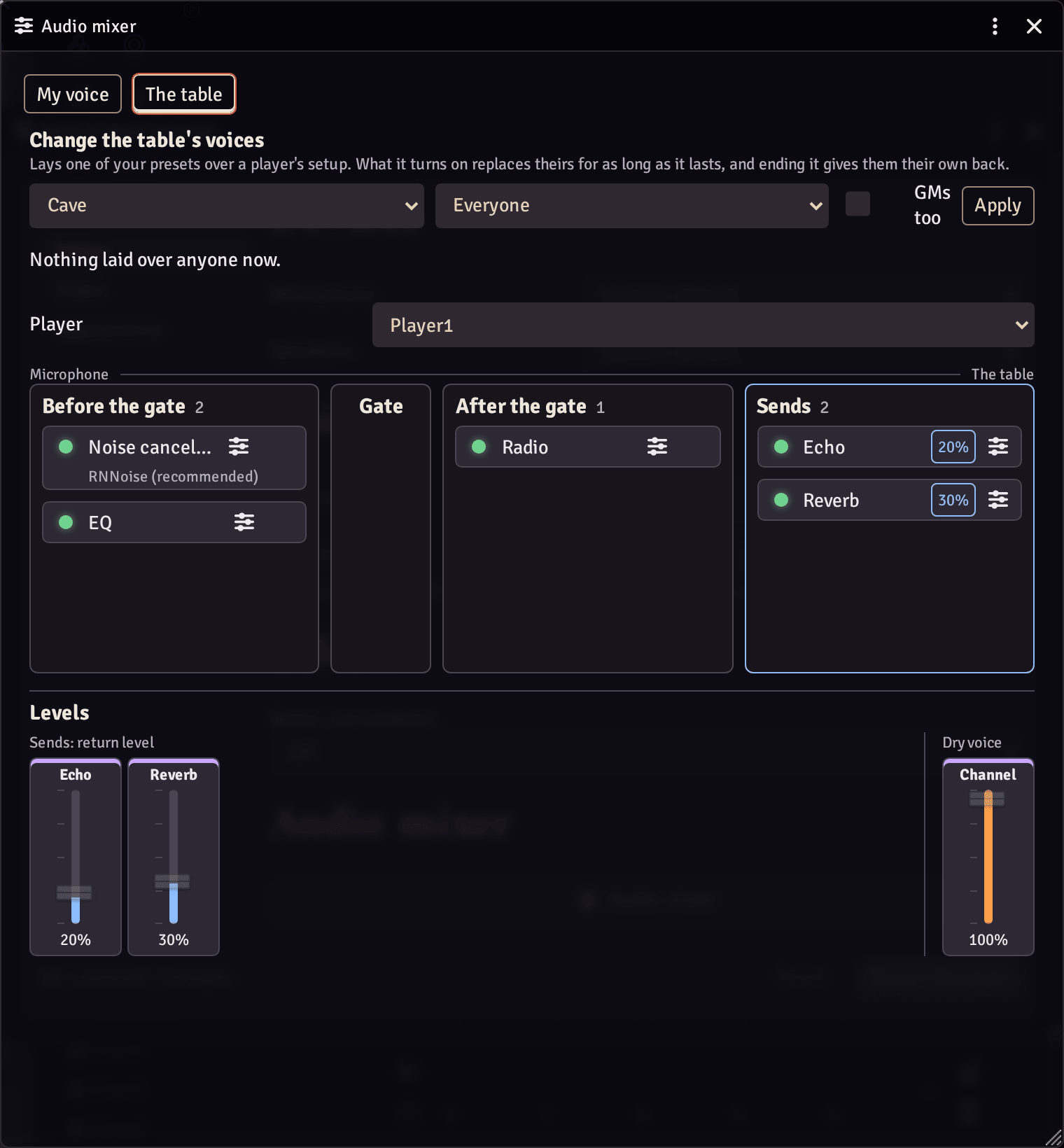
Change the table's voices lays one of your saved presets over a player's setup, such as a cave echo for a scene underground:
- Save a preset on your own voice first.
- Pick it, pick Everyone or one player, and tick GMs too if you want it on GMs as well.
- Apply. It applies at once, and On now lists it.
- End gives each player their own setup back exactly.
What the preset turns on replaces the player's own for as long as it lasts. A player who reloads or joins later gets it too.
The same from a macro:
const mixer = game.modules.get("modular-av-audio-mixer").api;
await mixer.layers.apply("Cave"); // everyone
await mixer.layers.apply("Cave", { includeGMs: true }); // GMs too
await mixer.layers.apply("Cave", { user: "<user id>" }); // one player
await mixer.layers.end({ user: "<user id>" });
await mixer.layers.end();
await mixer.presets.apply("Narrator"); // your own voiceA player sees a notice when a GM changes their voice, and the window marks what the change holds. They can:
- Not for me: refuse that one change, and Use it to take it back;
- Keep the GM out of my voice: refuse every change, now and later.
A GM sees in The table who refused.
MIT.