Repository navigation
Camera Background
modular-av-cam-background blurs or replaces your camera's background in
your browser, with MediaPipe's selfie segmentation. Turn it on in the
voice panel or the voice and video settings (Camera background). It
needs Chrome, Edge or another Chromium browser; elsewhere it isn't
offered and your camera works without it.
Manifest URL:
https://raw.githubusercontent.com/Affid/modular-av/manifests/modular-av-cam-background/module.json
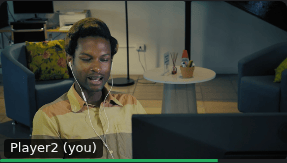
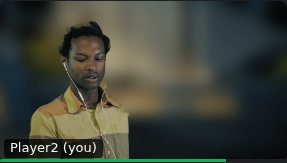
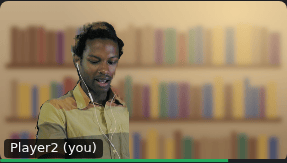
| As it is | Blur | Replace |
|---|---|---|
 |
 |
 |
- Blur, with a strength from light to strong.
- Replace, with one of its own images, Foundry's backgrounds, or an image you choose: from Foundry's files if you may browse them, or by its address. An image on another server is loaded by your browser from that server, which needs to allow it.
- Quality: Standard (the default) or High, which is cleaner around hair and takes a little more of your graphics card. High needs graphics acceleration in your browser; without it, Standard is used.
It runs in a background thread and on your graphics card, so your page stays as responsive as without it. Its files come with the module; your video goes nowhere for it.
While the effect starts, if it stops (a hidden tab may pause it), or if it can't run, your camera is kept off and the dock says why. Turn the effect off to send your camera as it is.
The dock's reasons, and what to do:
| The dock says | Try |
|---|---|
| its files couldn't load | Reload; check that nothing blocks the module's files |
| it didn't start in time | Reload; close other heavy tabs |
| the graphics card stopped it | Turn the effect off and on; update your graphics driver |
| this browser can't draw it | Turn on graphics acceleration in your browser's settings |
| this browser can't run it | Use Chrome, Edge or another Chromium browser |
| its image couldn't load | Pick another image, or one from Foundry's files |