Repository navigation
Plan Your Modules
Plan your modules is the core's window for GMs: it shows every Modular A/V module, which ones this world runs, and walks you through installing and turning on the rest. Open it from the core's module settings, or from the Voice & Video Settings window.
Nothing changes in the world until you apply your plan.
The call is drawn as a chain of stages, with what the world runs now (On air) beside your next setup:
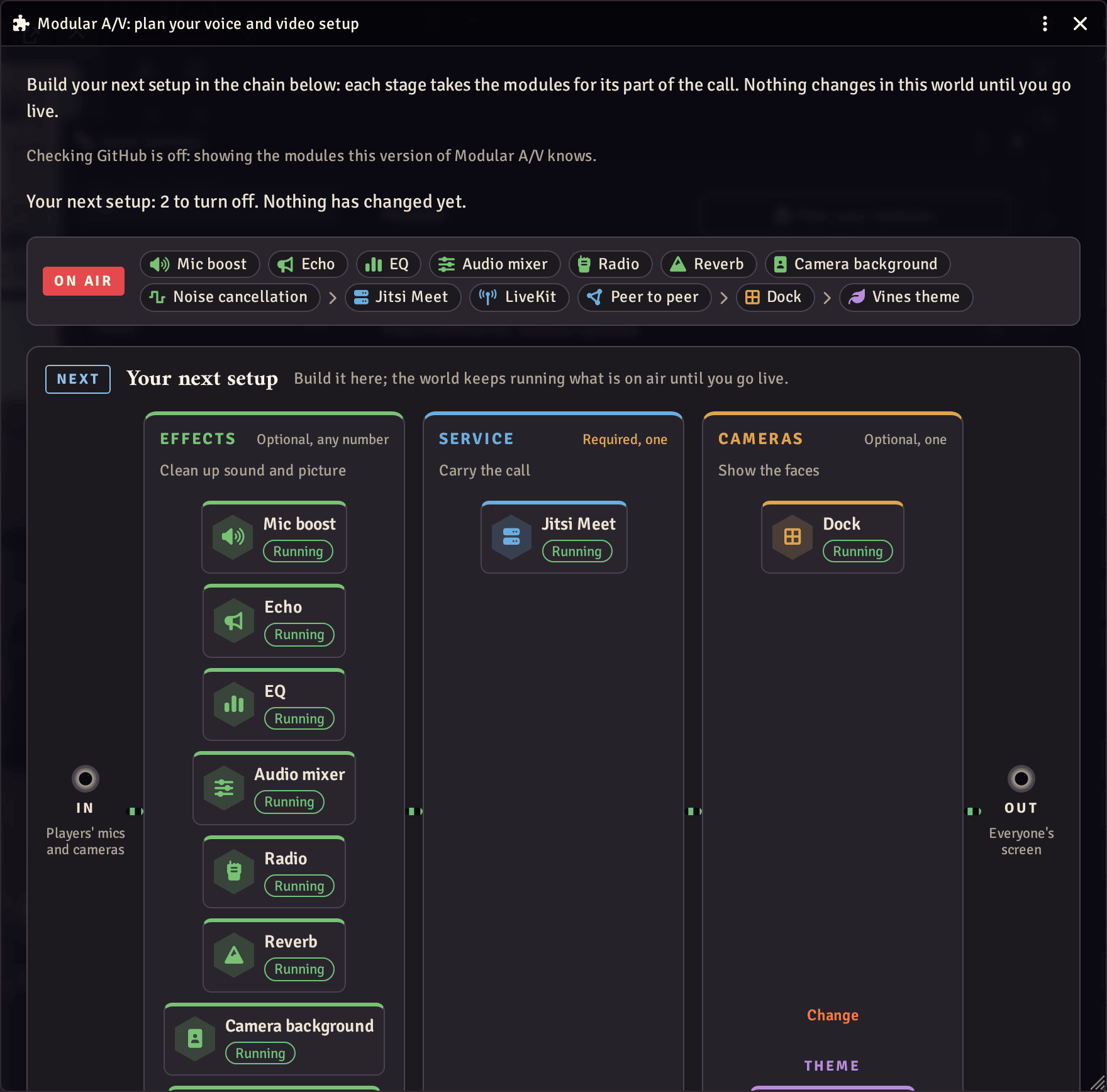
| Stage | Takes | For |
|---|---|---|
| Effects | Optional, any number | Clean up sound and picture, shape the voice, mix it |
| Service | Required, one | Carry the call |
| Cameras | Optional, one | Show the faces |
| Theme | Optional, one | Dress the dock |
The Audio mixer is planned with the effects.
Each module is shown as running, installed but off, not installed, or built in (Foundry's own camera dock).
Or fill the chain in one click, then change any stage:
| Build | Modules | Table size | Setup |
|---|---|---|---|
| Just our browsers | P2P, dock | Up to 6 players | Nothing to set |
| LiveKit | LiveKit, dock, noise cancellation | Any size | Address and key |
| Our own Jitsi Meet | Jitsi, dock | What your server handles | Address and app secret |
- Install (whoever runs your Foundry server). The window lists the links for what is missing: copy them, save them as a file, or send them to your own chat as a whisper for your host. Links don't follow you to Setup, so take them first; Return to Setup then leaves the world (connected players are disconnected until you launch it again). Your plan stays saved in the world, and the window tells you on your return what arrived and what is still missing.
- Apply (you, as GM). Turns the planned modules on and off at once and makes the chosen service the world's. Everyone's page reloads once, so you may prefer to do it after the session. A service stays on until its replacement is installed, so calls keep working.
You can undo the last change, or go back to what is on air.
Once you are on air, Soundcheck lists the settings to check for the modules you run, and opens each one where it is set.
To tell you about updates and new modules, the GM's browser fetches the
list of modules from GitHub (raw.githubusercontent.com) when this
window opens, and at most once a day when a GM loads the world. Turn
Check GitHub for module updates off in the core's settings and the
window shows the modules your installed version knows. Players never
make this request. More in Privacy and security.