Repository navigation
Supported Controllers
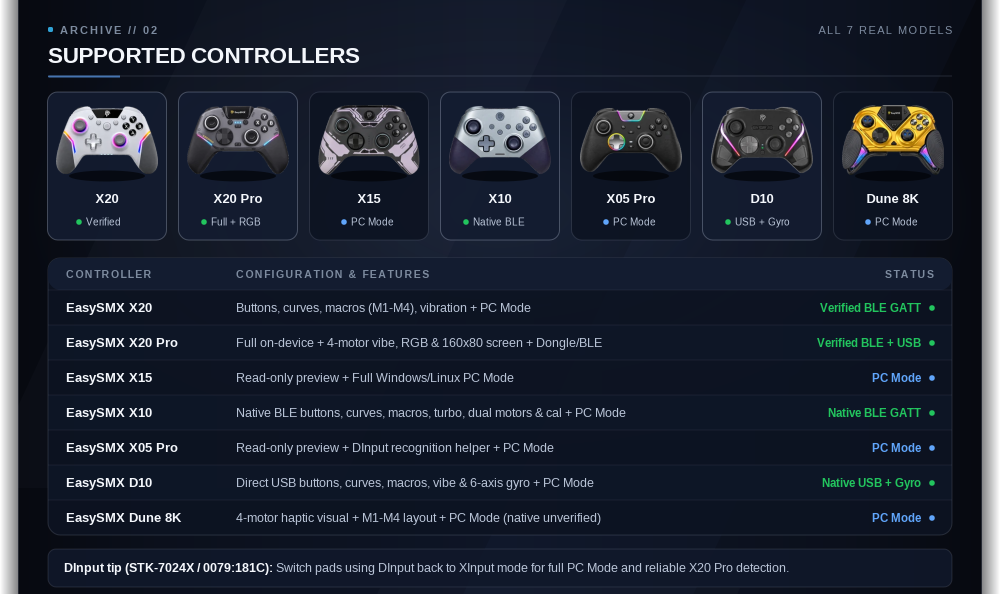
X20CTL supports 7 EasySMX hardware models plus any Generic XInput gamepad in PC Mode. Native on-device editing is enabled only where the wire protocol has been decoded and verified; every other pad gets full Windows/Linux PC Mode support.
| Controller | Native On-Device Config | PC Mode | Connection & Notes |
|---|---|---|---|
| EasySMX X20 Pro | Buttons, curves, macros (M1-M6), 4-motor vibration, RGB Studio, 160x80 screen |
Yes | Verified BLE + USB serial (160x80 screen). Supports simultaneous 2.4 GHz dongle (413D:2131) + unpaired BLE when PC Bluetooth is on. |
| EasySMX X20 | Buttons, curves, macros (M1-M4), vibration |
Yes | Verified KeyLinker BLE GATT + read-back verification. |
| EasySMX X10 | Buttons, curves (deadzones, outer limits, X/Y invert), macros (M1-M2), hardware turbo, dual motors, calibration, factory reset |
Yes | Full bidirectional KRLY BLE GATT + read-back verification (X10 Native tab). See EasySMX X10 Native Guide. |
| EasySMX D10 | Buttons, curves, macros, vibration, 6-axis IMU Motion (D10 Motion)
|
Yes | Direct USB (WinUSB) based on Murphy605/PadLab (GPL-3.0) over wired (EP81/EP83/EP02) and 2.4 GHz (C0/5A + C0/5C, requires PadLab's modified receiver firmware). Built-in driver switcher & recovery. No native RGB. See EasySMX D10 USB & Motion Guide. |
| EasySMX X15 | Read-only preview | Yes | Full Windows & Linux PC Mode remapping, curves, macros, keyboard & mouse. |
| EasySMX X05 Pro | Read-only preview | Yes | Full PC Mode + DInput recognition helper in Write scan. |
| EasySMX Dune 8K | 4-motor haptic visual + M1-M4 layout (native unverified) |
Yes | Full PC Mode remapping, curves & trigger rumble. |
| Generic XInput | N/A | Yes | Works with PC Mode, Keyboard, Mouse, Diagnostics, Hardware Lab & Community Hub (PC Mode setups). |
Warning
DInput Trap (STK-7024X / 0079:181C): If Windows or Steam labels your EasySMX controller as STK-7024X, your controller is in DirectInput mode. Switch the physical controller back to XInput mode for reliable X20 Pro detection and full PC Mode support.
- Simultaneous 2.4 GHz Dongle + BLE (X20 Pro): You do not need to disconnect the 2.4 GHz receiver to change RGB or settings. Leave your PC's Bluetooth turned on (no manual Windows Bluetooth pairing required), and X20CTL sends lighting and supported commands over unpaired BLE while gameplay stays on 2.4 GHz.
- Model Mismatch Guard: If Windows reports a different EasySMX model than the card you chose, X20CTL asks whether to Enter Studio as <detected>, Continue as <chosen>, or Cancel. Native BLE writes always re-verify hardware identity before touching device memory.
-
Community Hub Device Filtering: The Community Browser automatically filters setups, screen art, RGB profiles, and curves to match your active controller and mode (
NativevsPC Mode) so you never accidentally install an incompatible config.