Pokémon Team Analyzer
Pokémon Team Analyzer displays and analyses a team of up to six Pokémon directly on your TRMNL device.
Select a game generation, enter your Pokémon and optionally add their current levels and moves. The plugin uses generation-specific data to identify types, move categories, STAB, evolution conditions, shared weaknesses, defensive checks, offensive coverage, and potential matchup problems.
Pokémon Team Analyzer is an independent community plugin and is not affiliated with Nintendo, Game Freak, The Pokémon Company, PokéAPI, or TRMNL.
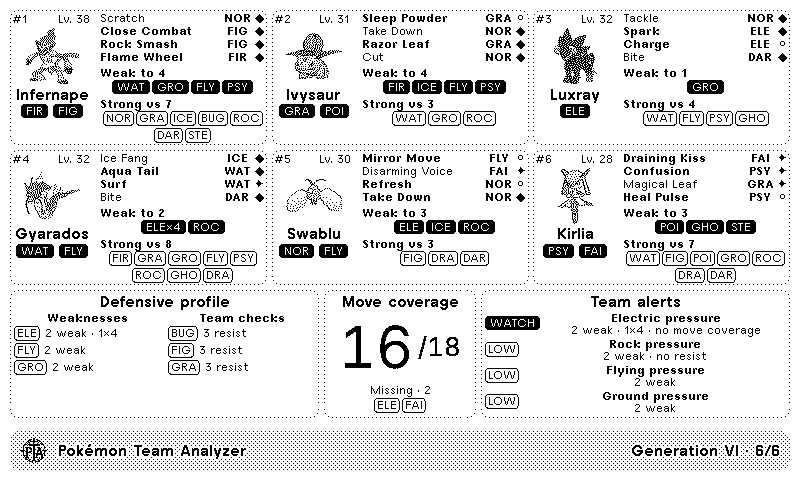
Depending on the selected layout and the information entered, the plugin may display:
- Up to six Pokémon
- Current level
- Pokémon types
- Generation-appropriate sprites, when available
- Up to four moves per Pokémon
- Move type
- Physical, Special, or Status category
- STAB moves
- Moves unavailable in the selected generation
- Moves the Pokémon cannot learn in the selected generation
- Next available evolution
- Evolution conditions
- Shared team weaknesses
- Severe
×4weaknesses - Shared resistances and immunities
- Offensive type coverage
- Types not currently covered
- Team alerts and matchup warnings
Compact layouts display a reduced selection of this information.
Before installing the plugin, you will need:
- A TRMNL account and compatible device
- The English names of the Pokémon in your team
- Optionally, the current level of each Pokémon
- Up to four English move names for each Pokémon, recommended for complete move and coverage analysis
No Pokémon account, API key, game connection, or save-file access is required.
- Open the Pokémon Team Analyzer plugin page on TRMNL.
- Click Add to TRMNL.
- Select the game generation whose rules should be used.
- Enter at least one Pokémon.
- Optionally, enter its current level.
- Optionally, enter up to four moves.
- Repeat this process for the remaining team slots.
- Save the plugin.
- Run Force Refresh from TRMNL.
The public installation link will be added here once the plugin is published.
Select the generation whose Pokémon, types, moves, learnsets, sprites, evolution methods, and battle mechanics should be used.
Supported generations:
- Generation I
- Generation II
- Generation III
- Generation IV
- Generation V
- Generation VI
- Generation VII
- Generation VIII
- Generation IX
The selected generation applies to the entire team.
For example, selecting Generation IV means that:
- Only Pokémon introduced by Generation IV are accepted
- Generation IV Pokémon typings are used
- The Generation IV type chart is used
- Generation IV move availability and learnsets are checked
- Physical and Special move categories follow Generation IV rules
- Evolutions available by that generation are considered
The plugin works at generation level rather than targeting one particular game.
A move is considered learnable when PokéAPI records it for the Pokémon in at least one supported official game within the selected generation.
Enter the English Pokédex name used by PokéAPI.
Examples:
infernape
gyarados
mr-mime
mime-jr
type-null
Names containing multiple words should preferably use hyphens.
Do not enter:
- A nickname
- A translated Pokémon name
- A Pokédex number by itself
- A complete Pokédex URL
- The Pokémon's level
- Additional notes
At least one Pokémon is required. The remaining five slots are optional.
The current level is optional.
Enter a number from 1 to 100.
For example:
42
The level is used to add context to level-based evolutions.
For example, the plugin may distinguish between:
Lv. 36
and:
Level up · ready at Lv. 42
Leaving the level blank does not prevent the Pokémon from being analysed.
Moves are optional, but they are strongly recommended for a complete offensive coverage analysis.
Enter up to four English move names, with one move in each field.
For example:
Move 1: close-combat
Move 2: flame-wheel
Move 3: rock-smash
Move 4: scratch
Use hyphens for move names containing multiple words.
Examples:
close-combat
flame-wheel
ice-fang
magical-leaf
Do not include:
- Translated move names
- Move types
- Move descriptions
- More than one move in the same field
- Multiple moves separated by commas
- Complete PokéAPI URLs
For each entered move, the plugin checks:
- Whether the move exists
- Whether it existed in the selected generation
- Whether the Pokémon could learn it in that generation
- Its type in that generation
- Whether it is Physical, Special, or Status
- Whether it receives STAB
- Whether it contributes to offensive coverage
Game Generation: Generation IV

Pokémon 1: infernape
Current Level: 42
Move 1: close-combat
Move 2: flame-wheel
Move 3: rock-smash
Move 4: scratch

Pokémon 2: roselia
Current Level: 31
Move 1: giga-drain
Move 2: cut
Move 3: stun-spore
Move 4: grass-whistle
Each Pokémon retains the position in which it was entered.
For example:
#1
#2
#3
Empty slots are ignored.
When a level has been entered, it is displayed as:
Lv. 42
Otherwise, the plugin may display:
Level not set
The plugin uses the Pokémon's typing in the selected generation.
This is important for Pokémon whose typing changed between generations.
The plugin attempts to use a sprite associated with the selected generation.
If a generation-specific sprite is not available, a default PokéAPI sprite or artwork image may be used instead.
Moves may be classified as:
- STAB — valid damaging move matching one of the Pokémon's types
- COVER — valid damaging move that does not receive STAB
- STATUS — non-damaging Status move
- UNAVAILABLE — the Pokémon cannot learn the move in the selected generation
- LATER GEN — the move did not exist in the selected generation
- NOT FOUND — the move name could not be found
Invalid or unavailable moves do not contribute to move coverage.
In Generations I–III, the Physical or Special category is determined by the move's type.
From Generation IV onward, each move uses its own Physical, Special, or Status category.
When available, the plugin displays the Pokémon's next possible evolution and its requirements.
Evolution conditions may include:
- Reaching a particular level
- Using an evolution item
- Trading
- High friendship
- High affection
- Time of day
- Holding an item
- Knowing a particular move
- Knowing a move of a particular type
- Being at a particular location
- Having another Pokémon in the team
- Having a Pokémon of a particular type in the team
- Gender
- Relative Attack and Defense values
- Weather
- Number of steps
- Other special evolution conditions
When the Pokémon has no further evolution available in the selected generation, the plugin displays:
Final stage
and:
No further evolution in this generation
Some Pokémon have more than one possible evolution. When available, the plugin may show multiple evolution options.
A weakness is considered shared when two or more Pokémon are weak to the same attacking type.
For example:
ICE · 3 weak
A severe weakness may also show the number of team members with a ×4 weakness:
ICE · 3 weak · 1×4
The plugin prioritises the most significant shared weaknesses.
Team checks identify attacking types against which two or more team members have a resistance or immunity.
For example:
GROUND · 1 resist · 1 immune
These Pokémon may provide defensive alternatives when another member is threatened by that type.
A team check does not necessarily mean that every Pokémon listed is a safe switch in every battle situation.
Move coverage shows how many defending types can be hit super effectively by at least one valid damaging move entered for the team.
For example:
14 / 18
means that the entered moves can hit 14 of the 18 types super effectively.
Move coverage only includes:
- Moves that exist in the selected generation
- Moves the corresponding Pokémon can learn
- Physical or Special damaging moves
It does not include:
- Status moves
- Moves marked as unavailable
- Moves introduced in a later generation
- Moves that could not be found
- Moves that were not entered in the settings
If moves are left blank, the coverage score will naturally be low or empty.
When the team cannot hit some types super effectively, the plugin lists the missing defending types.
For example:
Missing · 4
NOR · ELE · PSY · FAI
The total number of available types depends on the selected generation.
For example, Fairy is only included from Generation VI onward.
The plugin combines defensive weaknesses and offensive coverage to produce team alerts.
Possible alert levels include:
- HIGH
- WATCH
- LOW
- GOOD
An alert may consider:
- How many team members share the weakness
- Whether any member has a
×4weakness - Whether the team has a resistance or immunity to that type
- Whether the entered moves provide super-effective coverage against that type
For example:
HIGH — Ice pressure
3 weak · 1×4 · no resist · no move coverage
If no major shared weakness is found but some types are not covered offensively, the plugin may show:
WATCH — Coverage gaps
If no major shared weakness or offensive gap is detected, it may show:
GOOD — Balanced team
The alerts are intended as a quick team overview, not as a complete competitive-battle evaluation.
They do not account for:
- Individual stats
- Natures
- Abilities
- Held items
- EVs or IVs
- Move power or accuracy
- Speed tiers
- Weather or terrain strategies
- Opponent-specific sets
- Competitive formats or clauses
The Full layout provides the most detailed team overview.
Depending on the available space, it may include:
- Pokémon sprites
- Levels and types
- Entered moves
- Move categories
- STAB indicators
- Evolution information
- Shared weaknesses
- Team checks
- Move coverage
- Team alerts
The Half Horizontal layout provides a condensed overview suitable for a wide, shorter area.
Larger TRMNL devices may display additional details or sprites.
The Half Vertical layout is optimised for a narrower vertical area.
It focuses on the Pokémon team and the most important analysis results.
The Quadrant layout provides the most compact overview.
It displays fewer details and prioritises shared weaknesses, move coverage, and team alerts.
The exact amount of visible information may vary depending on the TRMNL device and screen size.
Pokémon Team Analyzer does not connect to a game or save file.
When your in-game team changes:
- Open the plugin settings in TRMNL.
- Update the Pokémon, levels, or moves.
- Save the configuration.
- Run Force Refresh.
Pokémon Team Analyzer uses official generation data supplied by PokéAPI.
It does not contain specific data for ROM hacks or fan games.
ROM hacks may change:
- Available Pokémon
- Pokémon types
- Moves
- Learnsets
- Evolution methods
- Type effectiveness
- The generation in which a move is available
Because of this, the analysis may not match games such as Pokémon Gaia or other modified games.
You may still use the plugin as a general guide by selecting the generation that most closely matches the ROM hack, but warnings and evolution information may differ from the game.
Check that:
- At least one Pokémon has been entered.
- The Pokémon name is written in English.
- Multiword names use the PokéAPI format.
- The Pokémon existed in the selected generation.
- The field does not contain a nickname or additional information.
- The plugin configuration has been saved.
- You have run Force Refresh.
- PokéAPI is not temporarily unavailable.
The entered name could not be found in PokéAPI.
Use the English PokéAPI identifier.
For example:
mr-mime
rather than:
Mr. Mime
Special forms may require their specific PokéAPI identifier.
The Pokémon was introduced after the selected generation.
Either:
- Select a later generation
- Remove the Pokémon
- Replace it with a Pokémon available in the selected generation
The same generation applies to every member of the team.
Check that:
- The move is written in English.
- Multiword names use hyphens.
- The spelling is correct.
- Each move is entered in a separate field.
- Only one move has been entered in each field.
- No more than four moves were entered.
The move was introduced after the selected generation.
Select a later generation or replace the move with one available during the selected generation.
The move exists, but PokéAPI does not record the selected Pokémon as being able to learn it in any supported official game within that generation.
Possible explanations include:
- The Pokémon could not officially learn the move
- The move was only available in another generation
- The game being played uses a modified learnset
- The Pokémon form requires a different PokéAPI identifier
- PokéAPI does not contain the expected learnset record
Unavailable moves are excluded from offensive coverage.
Evolution information may be missing when:
- PokéAPI could not retrieve the species or evolution chain
- The Pokémon has no further evolution
- The evolution was not available in the selected generation
- The Pokémon form uses a separate identifier
- The evolution method differs in the game being played
The plugin works at generation level and uses the evolution data available from PokéAPI.
Individual games within the same generation, remakes, special forms, and ROM hacks may behave differently.
Check that:
- Moves have been entered
- They are damaging moves rather than Status moves
- They are written correctly
- They existed in the selected generation
- The corresponding Pokémon can learn them
- The team has moves capable of hitting different defending types super effectively
Pokémon Team Analyzer can continue loading valid team members when some entries are incorrect.
Warnings may be generated for:
- Pokémon that could not be found
- Pokémon introduced after the selected generation
- Moves that could not be found
- Moves introduced in a later generation
- Moves unavailable to that Pokémon
- Evolution data that could not be loaded
Correct the affected fields, save the configuration, and run Force Refresh.
Half and Quadrant layouts have less space and therefore display fewer details.
Use the Full layout for the most complete analysis.
Sprites are loaded from PokéAPI.
Some generations, forms, or newer Pokémon may not have a matching generation-specific sprite. A fallback image may be used when available.
Temporary image-loading problems may resolve during a later refresh.
PokéAPI may be temporarily unavailable or may have taken too long to respond.
Wait briefly and run Force Refresh again.
Pokémon Team Analyzer does not require:
- A Pokémon account
- A username
- A password
- An API key
- An authentication token
- Access to a game
- Access to a save file
The configured Pokémon, levels, and moves are not private credentials.
However, never publish unrelated private information in a GitHub Issue, such as:
- TRMNL webhook URLs
- Authentication tokens
- Email addresses
- Screenshots containing private account information
Pokémon, types, moves, learnsets, sprites, species, and evolution information are provided by PokéAPI.
The availability and accuracy of this information depend on PokéAPI.
Generation-level analysis may not represent every difference between individual official games in the same generation.
Before reporting a problem:
- Confirm that the correct generation is selected.
- Check the English spelling of every Pokémon and move.
- Confirm that the Pokémon and moves existed in that generation.
- Save the plugin configuration again.
- Run Force Refresh.
- Remove all private information from screenshots.
Report a Pokémon Team Analyzer issue
When reporting an issue, include:
- Your TRMNL device
- The selected layout
- The selected generation
- The affected Pokémon
- The entered moves
- Which information is missing or incorrect
- Whether you are using an official game or a ROM hack
- A screenshot with all private information removed
- Whether the issue continues after using Force Refresh