WoW Character Dashboard
WoW Character Dashboard displays your World of Warcraft Retail character profile and progression directly on your TRMNL device.
The plugin retrieves character information from Raider.IO. You only need to enter your region, realm, and character name. No Battle.net or Raider.IO account connection is required.
WoW Character Dashboard is an independent community plugin and is not affiliated with Blizzard Entertainment, World of Warcraft, Raider.IO, or TRMNL.
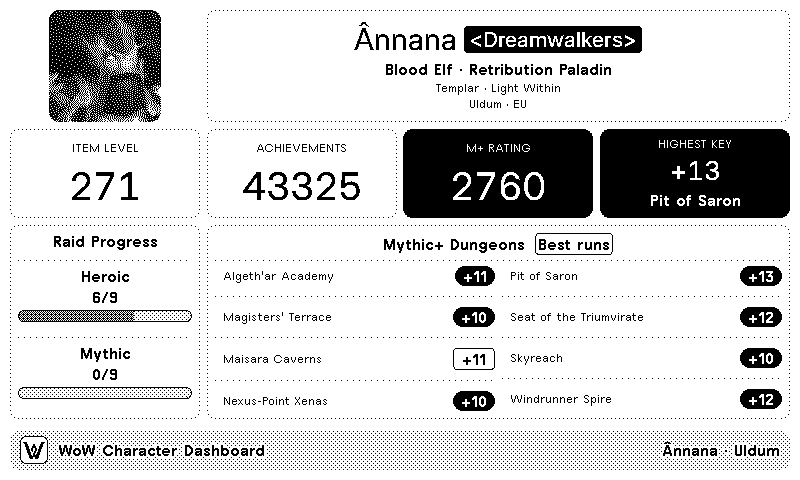
Depending on the selected TRMNL layout and the data available for the character, the plugin may display:
- Character portrait
- Character name
- Realm
- Guild
- Level
- Race
- Faction
- Class
- Active specialization
- Equipped item level
- Achievement points
- Active Hero Talent tree
- Selected Apex Talent, when available
- Current Mythic+ score
- Highest completed Mythic+ key
- Best result for each current-season dungeon
- Current raid progression
- Data update time
Compact layouts display a reduced selection of this information.
Before installing the plugin, you will need:
- A World of Warcraft Retail character
- Your character's region
- Your character's realm
- Your exact character name
- A TRMNL account and compatible device
No Battle.net or Raider.IO account connection is required, and you do not need to manually synchronize your character with Raider.IO.
The plugin supports the following World of Warcraft regions:
-
EU— Europe -
US— Americas -
KR— Korea -
TW— Taiwan
Make sure the selected region matches the region where your character is located.
- Open the WoW Character Dashboard plugin page on TRMNL.
- Click Add to TRMNL.
- Select your World of Warcraft region.
- Enter your realm.
- Enter your character name.
- Save the plugin.
- Run Force Refresh from TRMNL.
The public installation link will be added here once the plugin is published.
Select the region associated with your character and realm.
For example, a character on a European realm should use:
EU
Selecting the wrong region will normally cause the character lookup to fail.
Enter the name of the realm where your character is located.
For example:
Uldum
Enter only the realm name. Do not include:
- The region
- The character name
- A Raider.IO URL
- A World of Warcraft profile URL
Enter the character name exactly as it appears in World of Warcraft.
For example:
Ânnana
Character names containing accents or special characters must preserve those characters.
Do not include:
- The realm
- The region
- A hyphen followed by the realm
- A Raider.IO URL
- A World of Warcraft profile URL
For the character Ânnana on Uldum EU, the configuration would be:
Region: EU
Realm: Uldum
Character: Ânnana
The Full layout provides the most complete character overview.
It may include:
- Character identity and portrait
- Class, specialization, level, and item level
- Achievement points
- Hero and Apex Talent information
- Mythic+ score and highest key
- Current-season dungeon results
- Raid progression
The Half Horizontal layout provides a condensed dashboard while retaining the main character and progression information.
The Half Vertical layout is optimized for a narrower vertical area and focuses on the character profile and the most relevant progression statistics.
The Quadrant layout provides a compact character summary designed for smaller playlist areas.
The amount of information displayed may vary depending on the TRMNL device and screen size.
WoW Character Dashboard automatically retrieves the current Mythic+ information available for the character.
You do not need to select a season or configure the dungeon list manually.
The plugin may display:
- Current Mythic+ score
- Highest completed key
- Best result for each current-season dungeon
- Whether the best run was completed in time
A dungeon may have no result when the character has not completed it during the current season.
The plugin displays the current raid progression available for the character.
Progress may be shown for different difficulties depending on the character's recorded kills and the information available from Raider.IO.
A missing raid section does not necessarily indicate an error. The character may not yet have recorded progression for the current raid.
When available, the plugin may display:
- The active Hero Talent tree
- The selected Apex Talent
These fields depend on the character's current specialization and the information available from Raider.IO.
If the information is unavailable, the dashboard may omit the field or display –.
WoW Character Dashboard does not connect directly to the World of Warcraft game client.
The update process is:
- Character information becomes available through World of Warcraft services.
- Raider.IO retrieves and processes the character information.
- WoW Character Dashboard requests the latest available data from Raider.IO.
- TRMNL displays the information during its next refresh.
Changes made in the game may not appear immediately.
A Force Refresh in TRMNL requests the data again, but it cannot force Raider.IO to update information that is not yet available through its service.
Check the following:
- Confirm that the correct region is selected.
- Confirm that the realm is entered correctly.
- Confirm that the character name is entered exactly.
- Preserve accents and special characters in the character name.
- Remove spaces before or after the realm and character name.
- Confirm that the character belongs to World of Warcraft Retail.
- Search for the character on Raider.IO to check whether its data is available.
- Save the TRMNL configuration again.
- Run Force Refresh.
Enter the exact character name, including every accent or special character.
For example:
Ânnana
is not the same as:
Annana
Check that:
- The selected region is correct.
- The realm name is spelled correctly.
- You entered only the realm name.
- You did not add the region or character name.
- You did not paste a complete URL.
First, search for the character on Raider.IO and check whether the updated information appears there.
If Raider.IO still shows the previous information, the TRMNL plugin may also display the previous information.
After Raider.IO updates:
- Wait briefly for the new data to become available.
- Run Force Refresh in TRMNL.
The displayed item level is based on the latest equipment information available from Raider.IO.
Recent equipment changes may take some time to appear.
Possible reasons include:
- Raider.IO has not yet processed the latest run
- The character has no recorded score for the current season
- A new Mythic+ season has recently started
- Seasonal information is temporarily unavailable
Wait for the character data to update and run Force Refresh again.
A dungeon may not show a result when:
- The character has not completed it during the current season
- Raider.IO has not yet processed the run
- The selected layout does not have enough space to display every dungeon
- Seasonal data is temporarily unavailable
Possible reasons include:
- The character has no recorded kills in the current raid
- Raider.IO has not yet processed the latest kill
- The selected layout only displays a shortened raid summary
- Raid information is temporarily unavailable
This information may be unavailable when:
- The character has not selected the relevant talents
- The character is below the required level
- Raider.IO has not yet received the latest talent configuration
- The information is temporarily unavailable
Its absence does not necessarily indicate an error.
Character portraits are loaded from external World of Warcraft data.
Temporary image-loading problems may resolve automatically during a later refresh.
Raider.IO may be temporarily unavailable or rate-limited.
Wait briefly and run Force Refresh again.
WoW Character Dashboard does not require:
- A Battle.net password
- A Battle.net API key
- A Raider.IO API key
- An authentication token
The plugin only uses the character information identified by the selected region, realm, and character name.
Never publish private information in a GitHub Issue, such as:
- Passwords
- Authentication tokens
- TRMNL webhook URLs
- Email addresses
- Screenshots containing private account information
Character, Mythic+, raid, equipment, and talent information is provided by Raider.IO.
The availability, accuracy, and update frequency of the information depend on Raider.IO and the World of Warcraft services from which its data is obtained.
Before reporting a problem:
- Search for the character on Raider.IO.
- Confirm that the correct region, realm, and character name are configured.
- Check whether the incorrect or missing information also appears on Raider.IO.
- Save the TRMNL plugin configuration again.
- Run Force Refresh.
- Remove all private information from screenshots.
Report a WoW Character Dashboard issue
When reporting an issue, include:
- Your TRMNL device
- The selected layout
- The selected World of Warcraft region
- The affected realm and character
- Which information is missing or incorrect
- Whether the correct information appears on Raider.IO
- A screenshot with all private information removed
- Whether the problem continues after using Force Refresh