Repository navigation
Latency Analysis
This project's main focus was its real-time responsiveness, so it was important for the team to quantitatively assess the timing of the code and how it related to its application. Before starting this analysis, it was important for the team to classify what kind of real-time system was being made. This classification was based on the definition of real-time systems which can be found in [1]. They define two categories for real-time systems: critical real-time systems and non-critical real-time systems (also referred to as hard and soft real-time systems, respectively) [1].
A hard real-time system is one in which the failure to execute code within a set deadline(s) results in total failure of the system, whereas a soft real-time system can still be considered successful even if it sometimes misses deadlines [1][2]. Hard real-time systems tend to be safety-critical, such as airbags, whereas soft real-time systems are not safety related [1][2]. With these definitions, it was clear that we were designing a soft real-time system. If a bird lands, the image is captured and classified, and the Tweet misses the deadline by 2s, the user will not be significantly effected by this. They will still get the full benefit of the product and would likely not notice the delay since it would take their Twitter app time to refresh their timeline.
Log files were created so that the team could run a lot of tests and get a good dataset to study. First, several tests were performed consecutively when there was no bird in front of the camera. These test was performed 141 times and all of the C++ code modules had a 100% success rate for meeting their deadlines. The same was done to test the latency of the PHP script which was compiled every time a user refreshes the web page. Due to this being reliant on a wireless connection, the latency results were less consistent than the other code but it still never missed its deadline. The time taken to transmit a UDP packet (C++) was logged 2,867 times and showed very little variance, taking no more than 13ms 99.4% of the time.
The length of time the code took to classify an image was also determined. This was done 141 times with no bird in front of the camera and 10 times with a bird in front of it (to avoid exceeding the Twitter rate limit: https://developer.twitter.com/en/docs/rate-limits). For both of these setups, the deadline was met 100% of the time.
In order to test the latency of the Twitter script, a toy bird had to be placed at the bird feeder. Again, less samples had to be taken for this test because of the rate limits associated with the Twitter API (more information on this can be found at https://developer.twitter.com/en/docs/rate-limits). The tests with the bird in front of the camera were performed 10 times and the Twitter script met its deadline 100% of the time. It is worth noting that this is a significant improvement on v0.2, which used a different way of running the Twitter script from the C++ code. In v0.2, the C++ function system() was used to run the Python script from the command line (http://www.cplusplus.com/reference/cstdlib/system/) [3]. This did not work with the GUI, so Python.h was used to run the Python script from the C++ code (more information can be found at the following links: https://docs.python.org/3/c-api/intro.html and https://www.codeproject.com/Articles/820116/Embedding-Python-program-in-a-C-Cplusplus-code) [4][5]. Latency analysis was performed 86 times for the Twitter script execution time for v0.2 (before the rate limit was exceeded) and all of these runs took longer than the average time recorded for the adapted code with Python.h. The average time for the new Twitter code was 888ms faster than the original method.
The deadlines established for each individual module of the code can be seen in the table below:
| Code Module | US Sensor Detecting Object (C++) | Camera Taking Photo When Object is Detected (C++) | UDP Transmit (C++) | Web Page (PHP) |
|---|---|---|---|---|
| Deadline (s) | 1.5 | 1 | 0.5 | 0.5 |
| Success Rate | 100% | 100% | 100% | 100% |
| Code Module | Photo Classification (No Bird) (C++) | Photo Classification (Toy Bird) | Twitter Upload (Python) | Overall Run Deadline |
|---|---|---|---|---|
| Deadline (s) | 0.5 | 0.5 | 7 | 11.5 |
| Success Rate | 100% | 100% | 100% | 100% |
| Code Module | GUI Start Button (C++) | GUI Stop Button (C++) | GUI Photo Viewer (C++) | Web Page (PHP) |
|---|---|---|---|---|
| Deadline (s) | 10 | 10 | 10 | 0.5 |
| Success Rate | 100% | 100% | 100% | 100% |
As is seen in the table above, latency analysis was also performed for the GUI elements of the code. The deadlines for the GUI buttons were based on [6], which outlines three different timings for a GUI: 0.1s for the user to feel like the GUI is "instantaneous", 1s to not let the user be distracted, and 10s seconds for the user not to want to do something else while the GUI is loading [6]. From this, the team set deadlines of 10s for each GUI button, and these were passed 100% of the time with 141 samples. The start and stop buttons were also executed within 0.1s 100% of the time. The photo viewer did exceed 0.1s 41.1% of the time, but this was to be expected since a window has to be opened when this button is pressed. Having said that, the maximum time for the photo viewer button was 210ms, still 9.79s below the deadline.
The PHP script that was providing the web page for the user was also tested to make sure that the page was loaded in good time. The results for these were more spread out than other graphs on this page, but this was to be expected since this was dependent on wireless communication.
As well as timing individual components of the code, it was important that the team confirmed how long the code takes to run every time a bird visits the feeder. This could only be tested reliably without the GUI, and therefore the deadline of 11.5s was based on the rest of the deadlines from the US sensor to the completion of the Tweet. This was passed 100% of the time with 10 samples.
The graphs below show more details about the various latency tests performed.
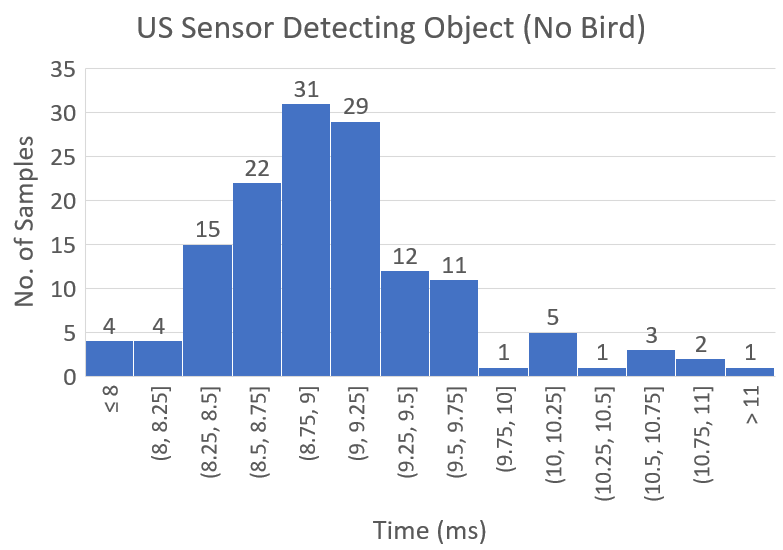
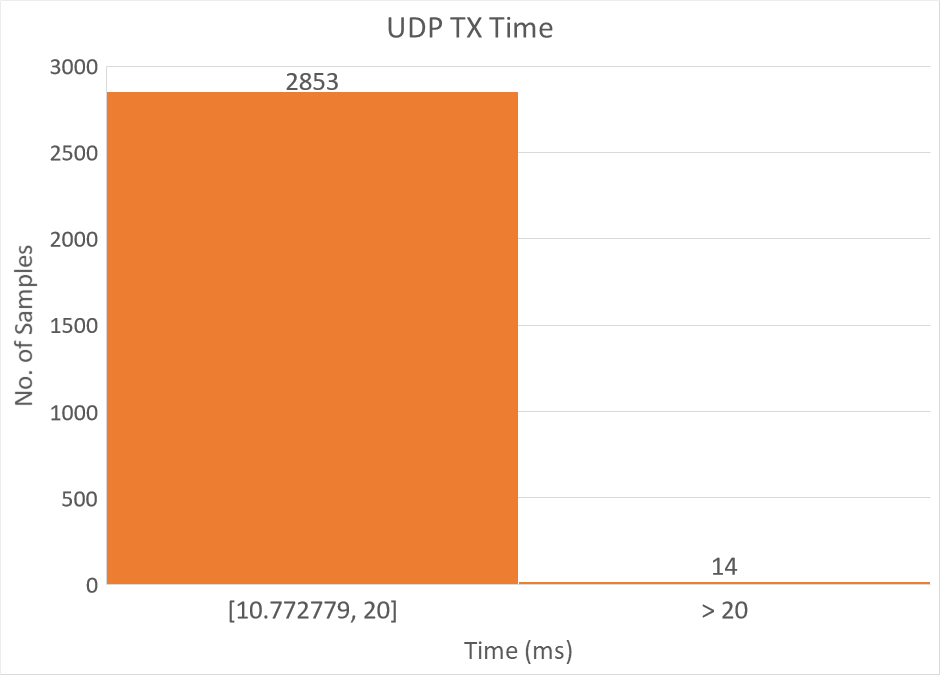
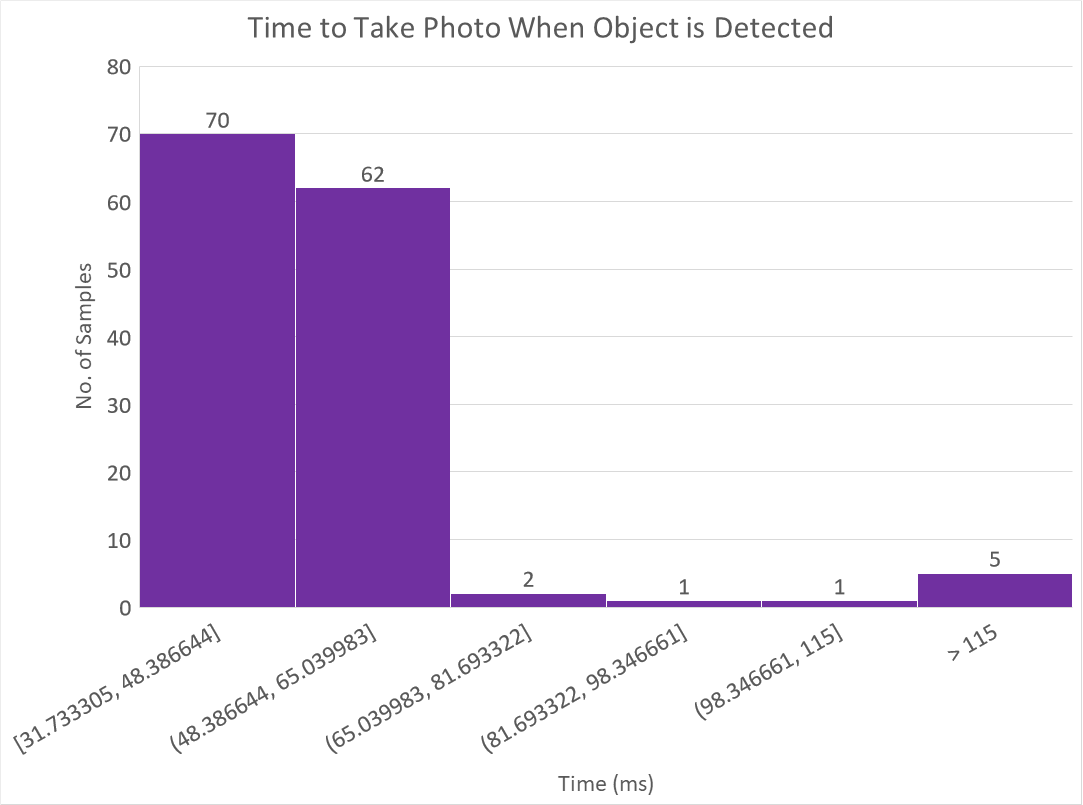
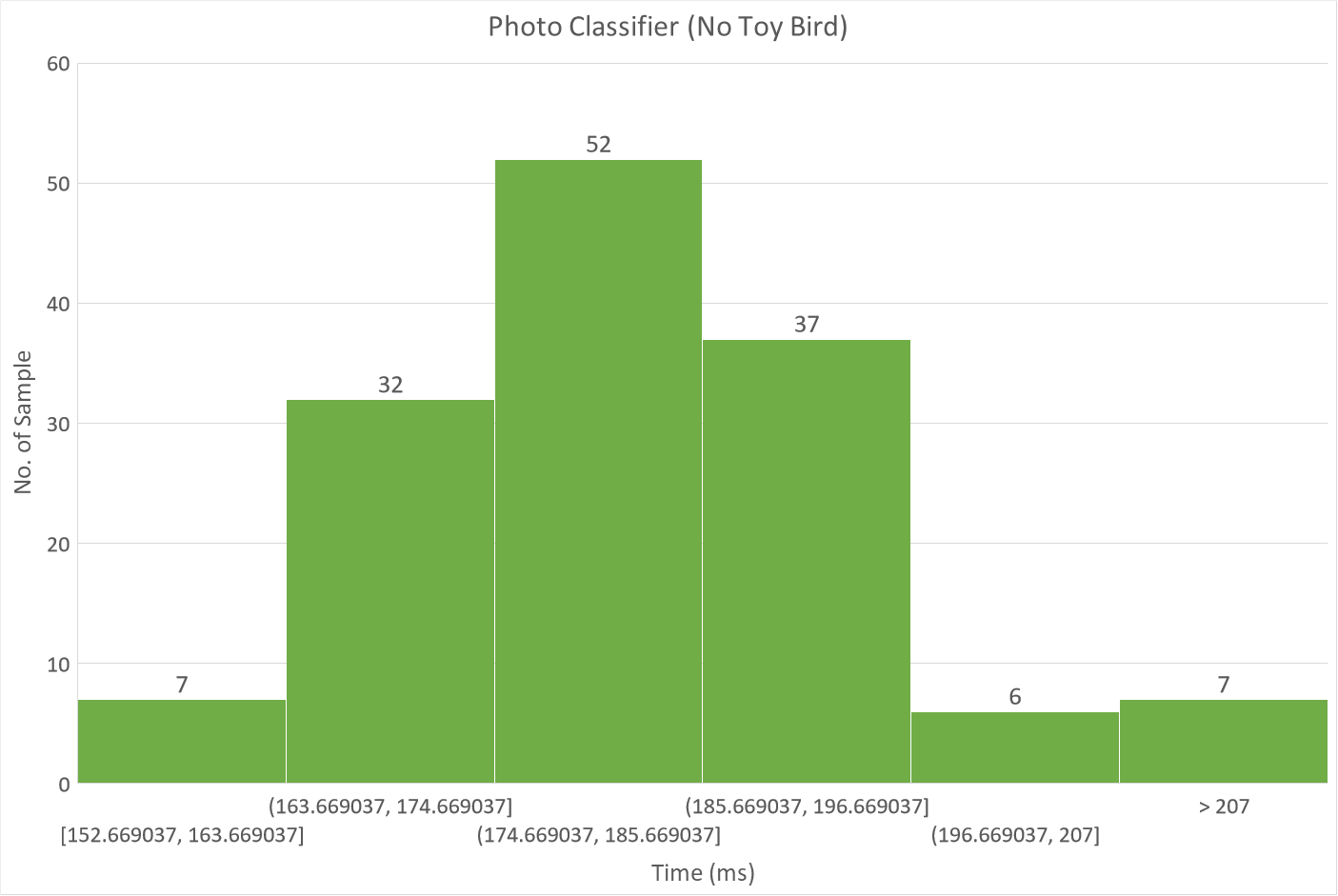
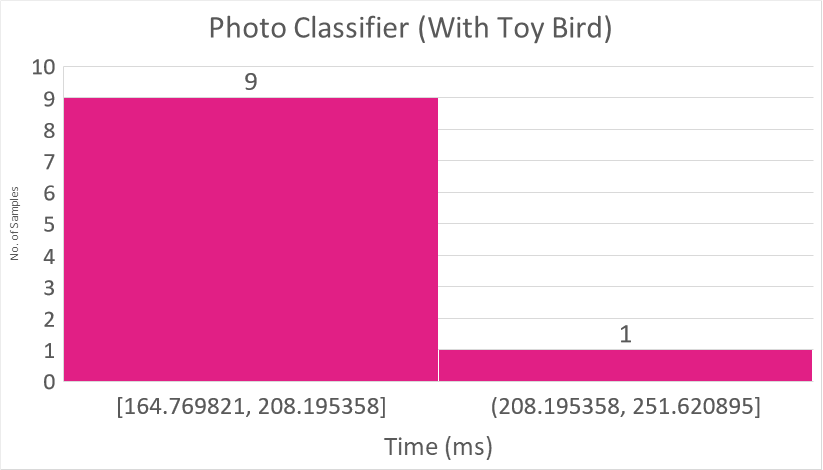
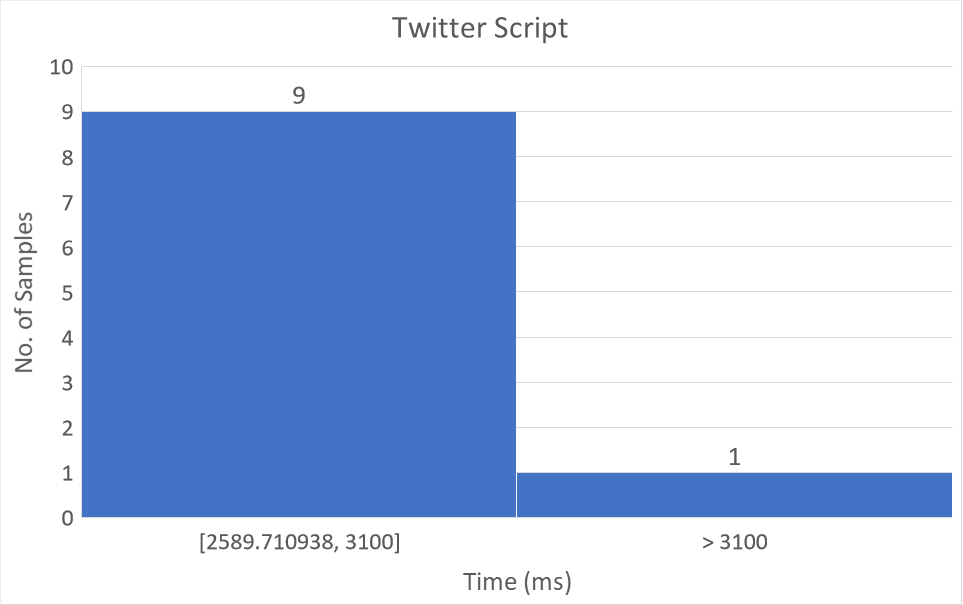
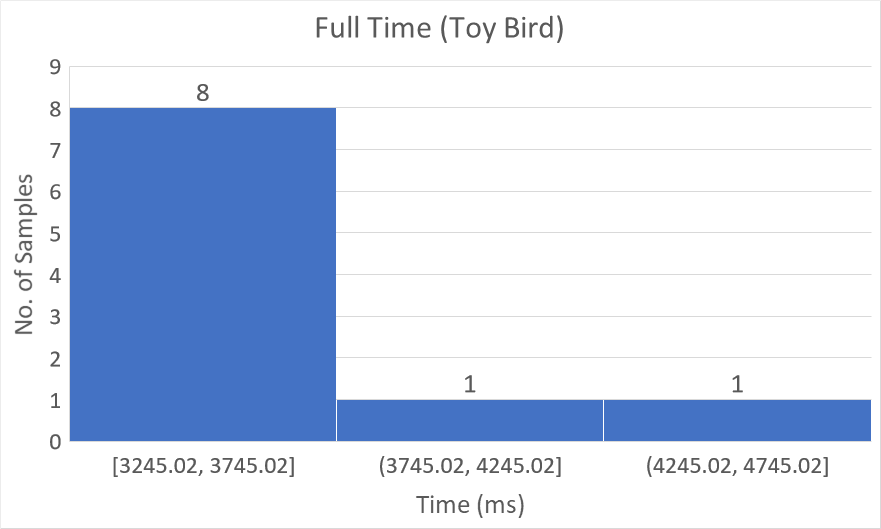
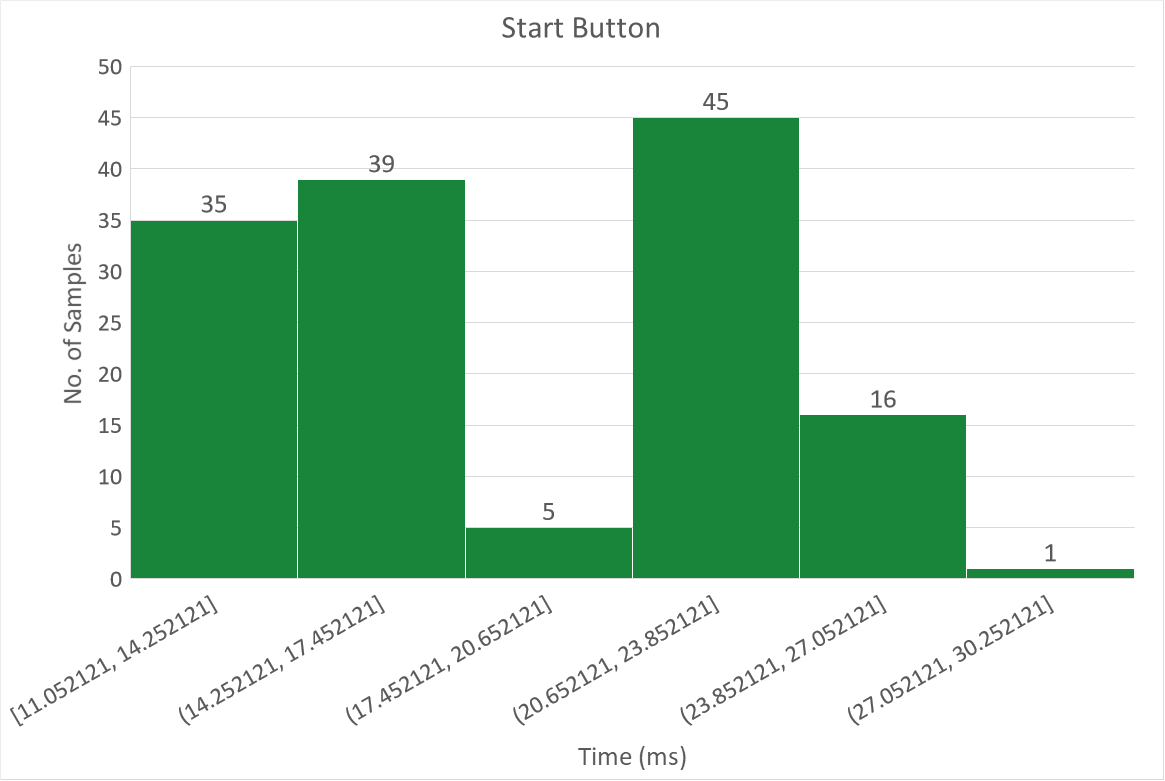
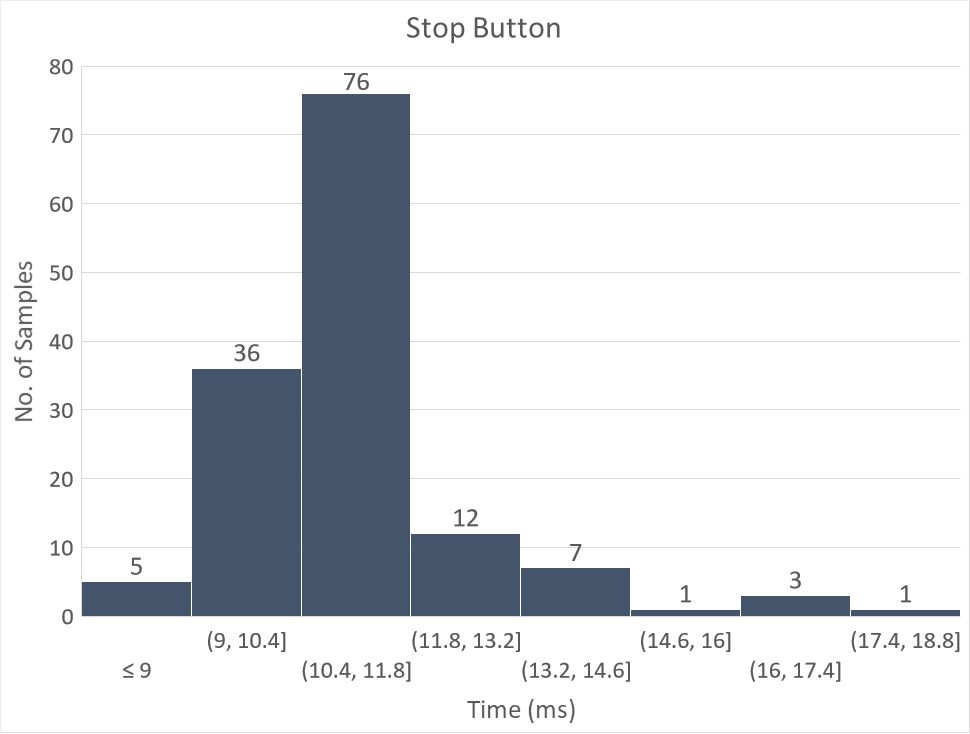
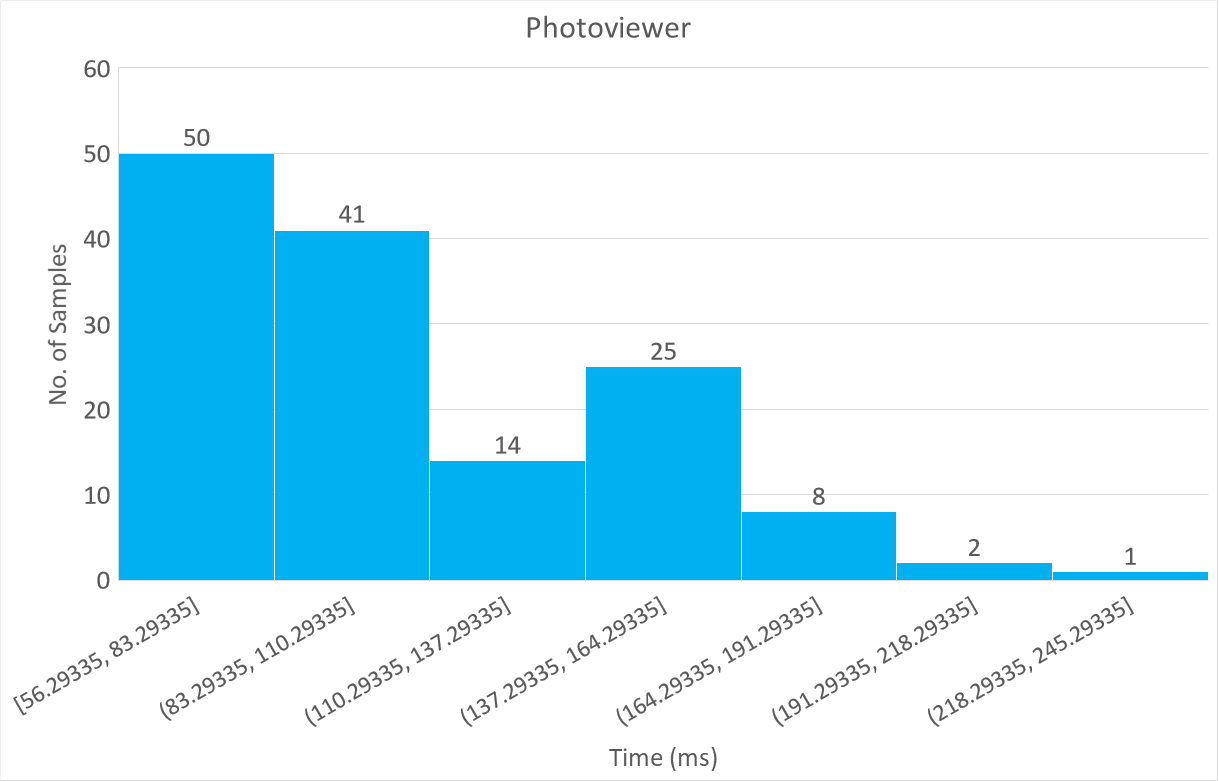
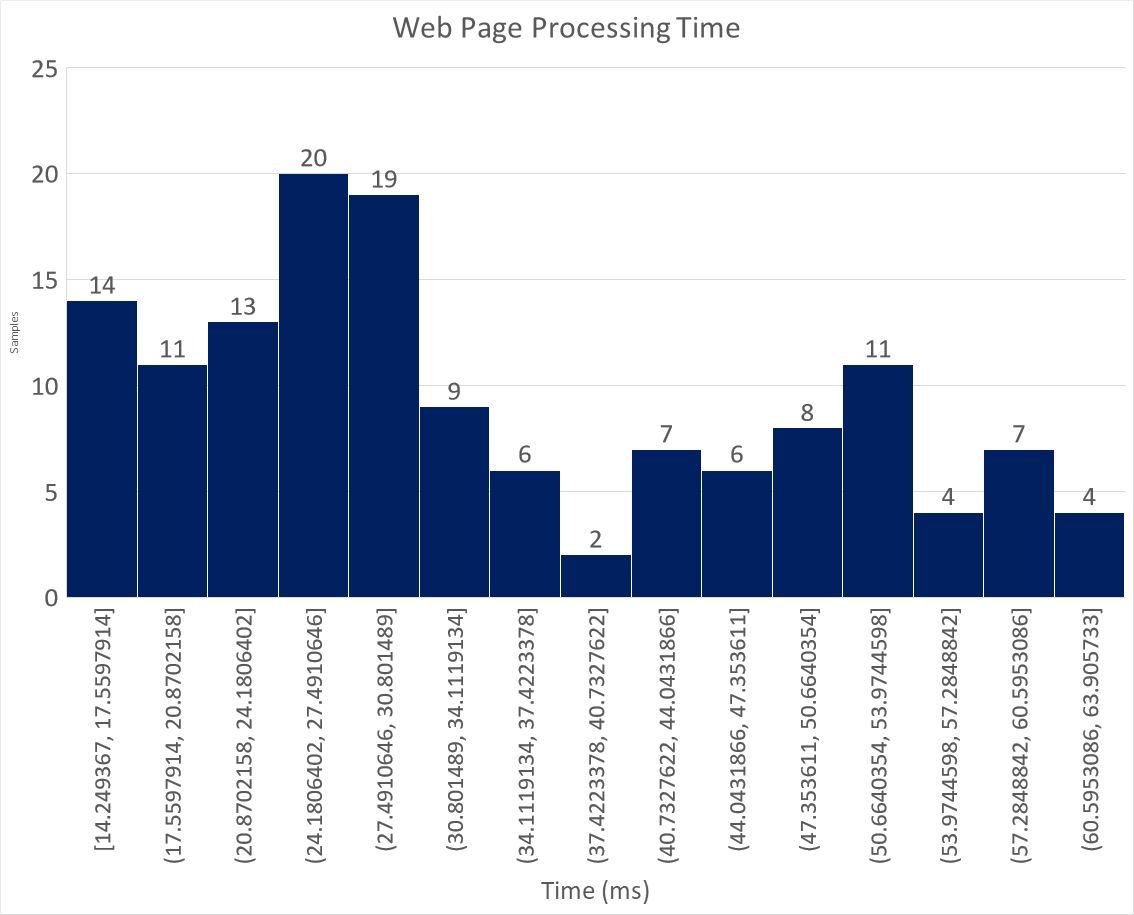
It is clear from the graphs above that the most varied sources of latency are the ones which either rely on a physical input (e.g. the click of a button) or an internet connection (UDP socket) which makes sense. The US sensor also had a relatively varied spread compared to some of the other modules, but still had a distinct peak between 8.75ms and 9.25ms. This variance could likely be attributed to the fact that this code was reliant on hardware which was subject to a non-perfect environment. The GUI start and stop button presses were able to demonstrate an "instantaneous" response to a user input 100% of the time as per the definition discussed earlier [6]. The web page loading time was difficult to measure purely from the user perspective since these tests were being performed on a slow browser over a remote connection to the Raspberry Pi. This meant that the code had to be compiled in the command line for timing to be performed properly. The code was also written such that the UDP socket opened by index.php to receive a packet times out after 3s and registers a closed session. This was because the UDP transmit function from C++ was placed within a thread with the US sensor tracking how many visits had occurred. This execution on a thread meant that, even when a bird was detected, a UDP packet would still be sent out extremely frequently during an open session.
This latency analysis showed that the system the team designed fulfilled the real-time requirements of the application consistently. This validated the approach of using threads in an event-driven approach as oppose to a linear one. The validity of these results were due to the vast number of tests performed on each of the modules. The team is confident that the code is ready to be used by others with rare (if any) lapses in real-time performance.
*Please note that to run the latency timers in the code, this must be done using ./birdcafe_raspicam in the drivers/build folder, not from the GUI.
[1]: A. M. Zambrano, X. Calderón, S. Jaramillo, O. M. Zambrano, M. Esteve, and C. Palau, “3 - community early warning systems,” in Wireless Public Safety Networks 3, D. Câmaraand and N. Nikaein, Eds., Elsevier, 2017, pp.39–66, ISBN:9781785480539. DOI: https://doi.org/10.1016/B978-1-78548-053-9.50003-2 [Online]. Available: https://www.sciencedirect.com/science/article/pii/B9781785480539500032, [Accessed: 11.04.2021].
[2]: D. Abbott, “Chapter 17 linux and real-time,” in Linux for Embedded and Real-Time Applications (Fourth Edition), D. Abbott, Ed., Fourth Edition, Newnes, 2018, pp. 257–270, ISBN: 9780128112779. DOI: https://doi.org/10.1016/B978-0-12-811277-9.00017-1. [Online]. Available: https://www.sciencedirect.com/science/article/pii/B9780128112779000171, [Accessed: 11.04.2021].
[3]: cplusplus.com, function system, cplusplus, [Online]. Available: http://www.cplusplus.com/reference/cstdlib/system/, [Accessed: 18.04.2021]
[4]: A. Mukhopadhyay, Embedding Python program in a C/C++ code, Code Project, Sep. 21, 2014, [Online]. Available: https://www.codeproject.com/Articles/820116/Embedding-Python-program-in-a-C-Cplusplus-code, [Accessed: 18.04.2021].
[5]: docs.python.org, Python/C API Reference Manual, python.org, Apr. 18, 2021, [Online]. Available: https://docs.python.org/3/c-api/intro.html, [Accessed: 18.04.2021].
[6]: J. Nielson, Response Times: The 3 Important Limits, Nielson Norman Group, Jan. 1, 1993, [Online]. Available: https://www.nngroup.com/articles/response-times-3-important-limits/, [Accessed: 18.04.2021]. Excerpt from the following book: J. Nielsen, Usability engineering. Morgan Kaufmann, 1994.
