Repository navigation
Lab Demo Monitoring Stack
Needs no cloud account and costs nothing. You need Docker with Compose (Podman with its Docker-compatible socket also works), a clone of the repository, an internet connection to pull three container images once, and about 30 minutes. Every number on every panel is invented by a small generator script. No real host, connector, address or cloud account is involved. The lab is in
labs/demo-monitoring/and is driven byscripts/demo_monitoring.sh.
Prerequisites: Reading a dashboard as an operator (the predict-then-check page this lab makes runnable), Multiple sites and identity.
Reading about a silent site is not the same as watching one. This lab runs the part of the stage 2 design that can run on a laptop: a Prometheus, a Grafana and a generator that pretends to be two sites with two connectors each. You look at dashboards that work for any number of sites, make one site go silent on command, and watch the alert and the dashboard say so.
| Piece | What it does | Image (exact version, checked to exist 2026-10-16) |
|---|---|---|
generator |
A short Python script that serves the connector metrics (twingate_inbound_bytes_total{transport}, twingate_outbound_bytes_total{transport}, twingate_connector_uptime_seconds) on /connector and a slice of standard node exporter metrics on /node, for four fake hosts |
python:3.12.11-slim |
prometheus |
One scrape job, twingate-ztna, over eight targets (each host has a node-exporter and a connector-metrics endpoint), every 15 seconds. Records the expected-target inventory and evaluates the two alert rules |
prom/prometheus:v3.5.0 |
grafana |
One data source and the repository's own importable dashboards from dashboards/, mounted read-only: CAH: Sites overview and CAH: Droplet health. Nothing is copied, so the lab shows what you would import |
grafana/grafana:12.1.0 |
The sites are site-tor1 (provider digitalocean) and site-tor2 (provider aws). Each target carries the identity labels from the design: site, region, provider, role, instance and endpoint. The instance values are documentation-range addresses (192.0.2.11, 198.51.100.11 and so on), which are reserved for examples and never route anywhere.
Grafana and Prometheus listen on 127.0.0.1 only. Anonymous viewing is off. The Grafana admin password is never in a file in the repository: up writes an untracked .env with a random one, or you set GRAFANA_ADMIN_PASSWORD in your shell.
scripts/demo_monitoring.sh upOpen http://127.0.0.1:3300, log in as admin. The password is the GRAFANA_ADMIN_PASSWORD in your shell if you set one, otherwise the one up wrote to labs/demo-monitoring/.env (the command prints which), and open CAH: Sites overview. Give it two minutes: rates need a few scrapes. scripts/demo_monitoring.sh test runs the alert rules' unit tests with promtool (no stack needed), and scripts/demo_monitoring.sh status shows the containers and any firing alert.
The scrapes and panels are the lesson, so open Prometheus too (http://127.0.0.1:9190) and look at Status, Target health: eight targets in the twingate-ztna job, all UP, two per host and four per site.
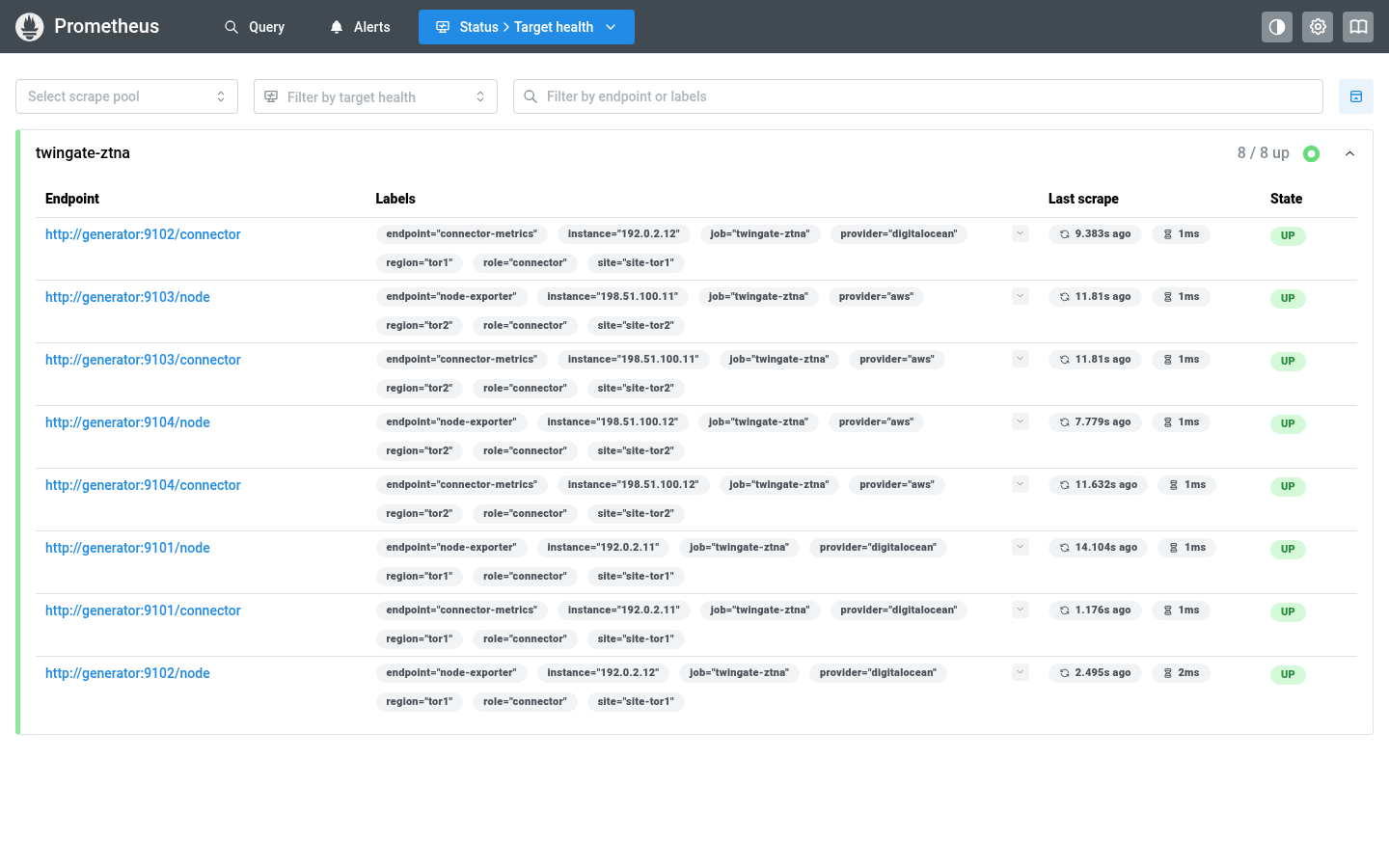
Eight targets, all up, before any site is silenced. Grafana 12.1.0 and Prometheus 3.5.0 from the lab's own containers, captured 2026-10-19. All data is the lab's synthetic generator output; nothing in it is real.
The lab reuses the two Prometheus dashboards in dashboards/; Grafana dashboards describes all three and how to import them. These panels carry the lesson:
| Panel | Query idea | What to notice |
|---|---|---|
| Targets up per site | healthy targets, or a zero for each site in cah_expected_targets
|
The inventory supplies the site, so a silent site reads 0, not "no data". |
| Targets down per site | expected minus healthy, never below zero | The comparison the alert rules make, shown as a number. |
| Targets that are not up |
up == 0 as a table |
Lists the endpoint, instance and provider that stopped. |
| Target state per instance |
up per (site, instance, endpoint)
|
A silent site goes red on all four of its rows at once. |
| Scrape duration, samples scraped | Prometheus's own scrape_* series |
Collection health, separate from whether the host is healthy. |
| Connector inbound and outbound traffic by path |
rate() of the connector counters, sum by (site, instance, endpoint, transport)
|
Counters are rate()d, never graphed raw. Direct versus relay is the connector's own split. |
| Share of traffic through a relay | relay rate over total rate, per site | A rising relay share means tunnels stopped going direct. |
| Connector uptime | twingate_connector_uptime_seconds |
A short bar is a recent restart. |
| CPU, memory, swap, disk, network (Droplet health) | node exporter series for one site and instance | Host panels group by (site, instance, endpoint), so a host name reused in two sites cannot merge. |
Both dashboards take their data source and their site and instance variables from the same place, so adding a third site to targets.json and the inventory makes it appear with no dashboard change.
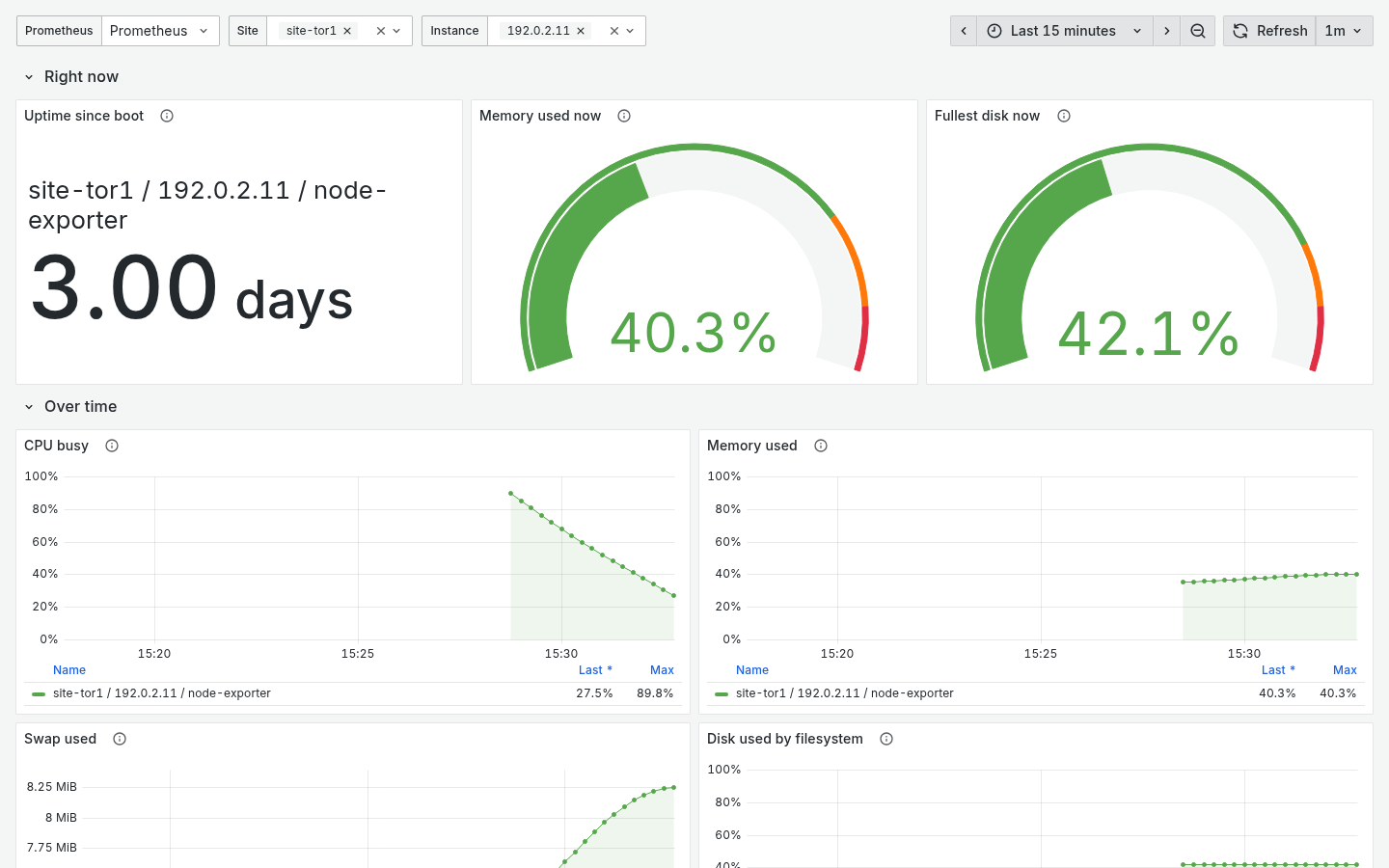
Droplet health for one instance of site-tor1. Grafana 12.1.0 and Prometheus 3.5.0 from the lab's own containers, captured 2026-10-19. All data is the lab's synthetic generator output; nothing in it is real.
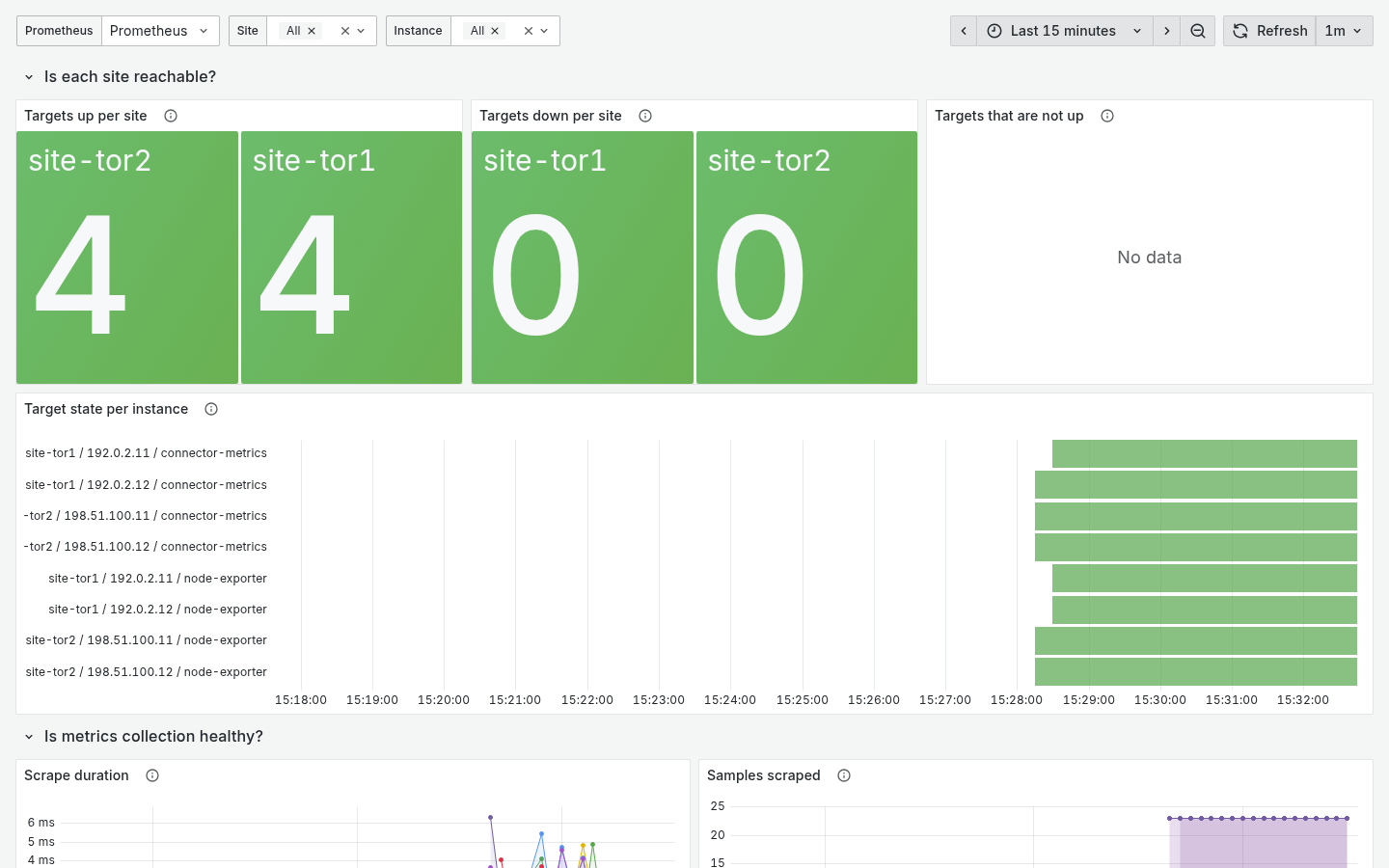
The sites overview with every target up, top of the page. Grafana 12.1.0 and Prometheus 3.5.0 from the lab's own containers, captured 2026-10-19. All data is the lab's synthetic generator output; nothing in it is real.
-
On paper, write what each of these will show for
site-tor2one minute after it stops answering, and whetherCloudSiteSilentwill have fired yet: the Targets up per site stat, the Targets down per site stat, the Targets that are not up table, the Target state per instance bars, the Connector uptime bars. -
Run it:
scripts/demo_monitoring.sh silent-site site-tor2
-
Watch the overview for about two minutes. The generator answers every scrape for that site with HTTP 503, so Prometheus records
up == 0. The series still exist, which is exactly whyabsent()could not catch this. The up stat drops to 0, the down stat rises to 4, the table fills with the foursite-tor2endpoints, and after the rule's one-minute waitCloudSiteSilentfires forsite-tor2only. Openhttp://127.0.0.1:9190/alertsto see it. -
Compare with your prediction. Which line stopped, which went to 0, and which kept looking healthy?
-
Bring it back with
scripts/demo_monitoring.sh restore-siteand watch the alert resolve.
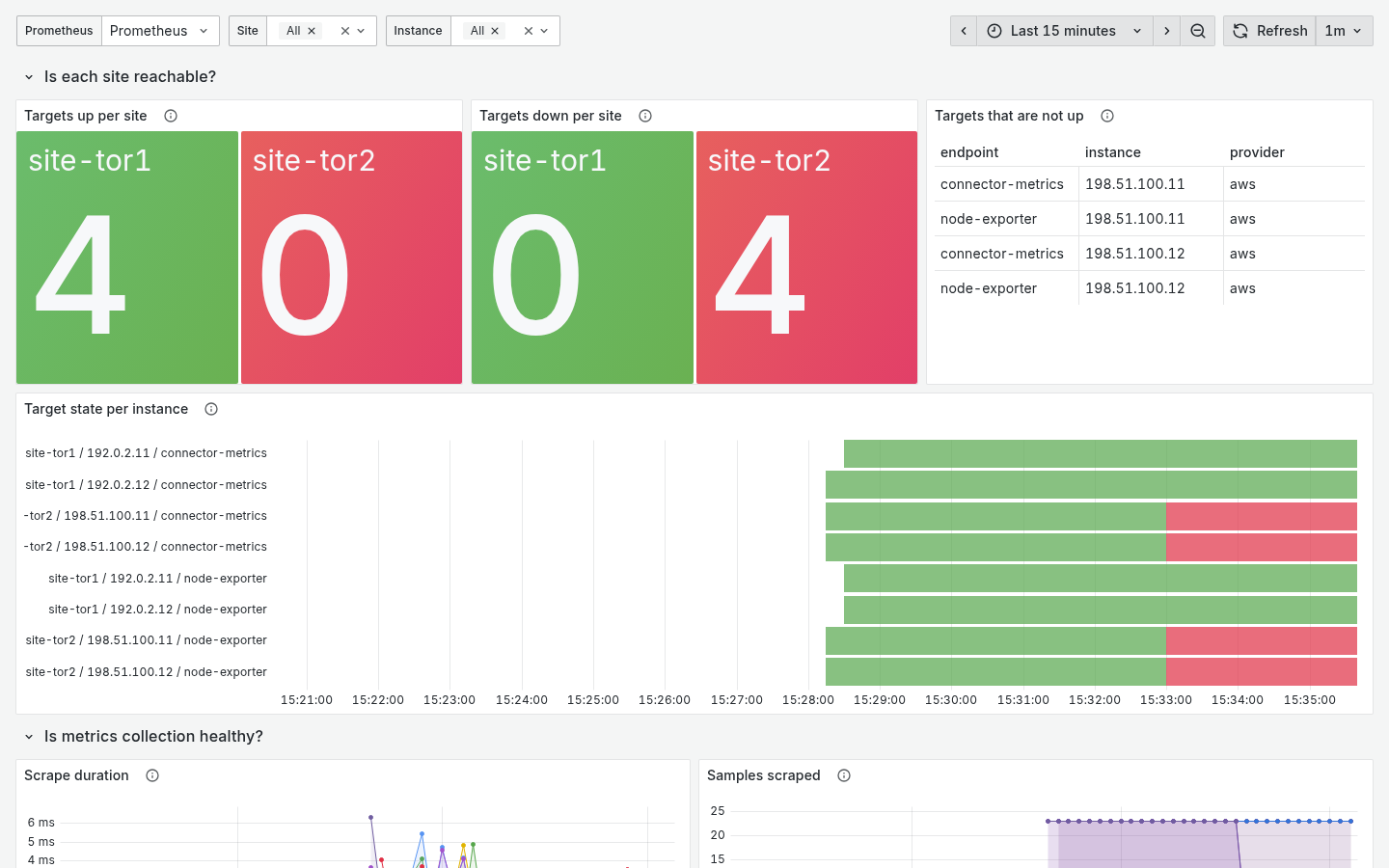
The overview about three minutes after silent-site site-tor2. Grafana 12.1.0 and Prometheus 3.5.0 from the lab's own containers, captured 2026-10-19. All data is the lab's synthetic generator output; nothing in it is real.
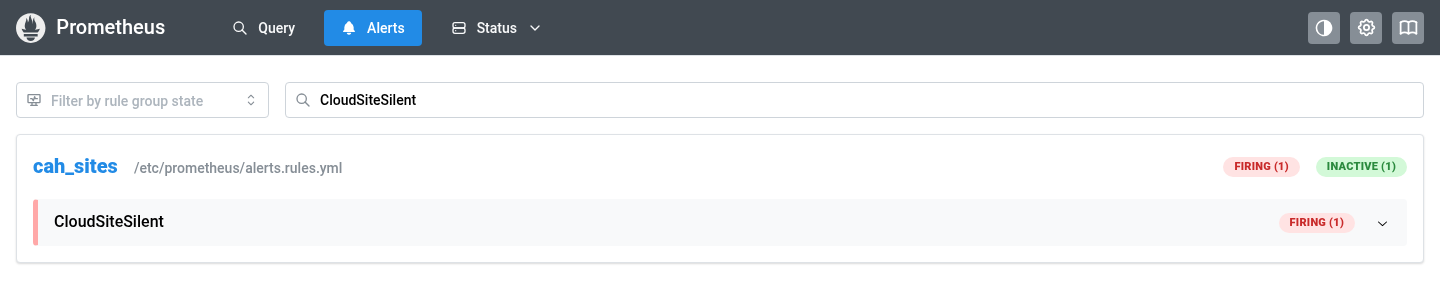
The firing alert in Prometheus. Click the rule to see its expression, the one-minute wait and the labels. Grafana 12.1.0 and Prometheus 3.5.0 from the lab's own containers, captured 2026-10-19. All data is the lab's synthetic generator output; nothing in it is real.
Variations: edit labs/demo-monitoring/prometheus/alerts.rules.yml, delete == 1 from the Silent rule, run scripts/demo_monitoring.sh test, and read which fixture fails (the every-target-down one). Then try DEMO_SILENT_SITE=site-tor1 in .env before up.
labs/demo-monitoring/prometheus/tests/ holds the 2-sites-by-2-hosts-by-2-endpoints fixtures for promtool test rules: all healthy; one host down at one site, both endpoints (CloudSiteDegraded for that site only); only one endpoint of one host down (CloudSiteDegraded too, because the inventory counts endpoints); a whole site's series missing while the other stays healthy (CloudSiteSilent for that site only); every target at up == 0; every target of every site down; and a site removed from the inventory (nothing fires). One thing the tests showed that the design text did not say: a comparison written with on(site) keeps only the site label, so a CloudSiteDegraded alert carries no job label while CloudSiteSilent does.
scripts/demo_monitoring.sh downThis stops the containers and deletes their volumes. Delete labs/demo-monitoring/.env if you want a fresh password next time.
| In the lab | In the design |
|---|---|
generator on four fake hosts |
Four real connector droplets across two sites, each exposing connector metrics and node metrics as two scrape endpoints (Twingate, Cloud telemetry) |
targets.json with identity labels and the endpoint label (target file shape) |
The file_sd target files generated by stage 2 (stack 20) from its output |
inventory.rules.yml (vector(4) per site: two connectors times two endpoints) |
The generated expected-target inventory, one entry per configured site (Reading a dashboard) |
alerts.rules.yml, one-minute wait |
The same two rules, five-minute wait in the design |
| Grafana in a container on your laptop | The home Grafana, or the learner's own cloud mini SOC (Build your own mini SOC) |
What the lab does not show: the Twingate path between Prometheus and the connectors, Wazuh, or logs. The Wazuh agents dashboard is not rendered here (an OpenSearch and a Wazuh manager would be heavier than everything else in the lab); a separate offline test, tests/test_wazuh_dashboard_synthetic.py, runs its queries and site filter against invented alert documents for the same two sites. That checks field names and the site filter, not what Grafana draws; see Grafana dashboards. It teaches the reading of a multi-site dashboard and the inventory alert, not the data's journey.
Next: Build your own mini SOC. Back to the Reading order.