Repository navigation
Content Studio
Content Studio is the browser front end of the active UO item-authoring path (tools/uo-content). It turns a 3D
item, a bundled starter or a configured template into fitted, animated equipment on the shared UO_Model3D v13 body,
renders it in Blender and packages it for UOFiddler and classic clients.
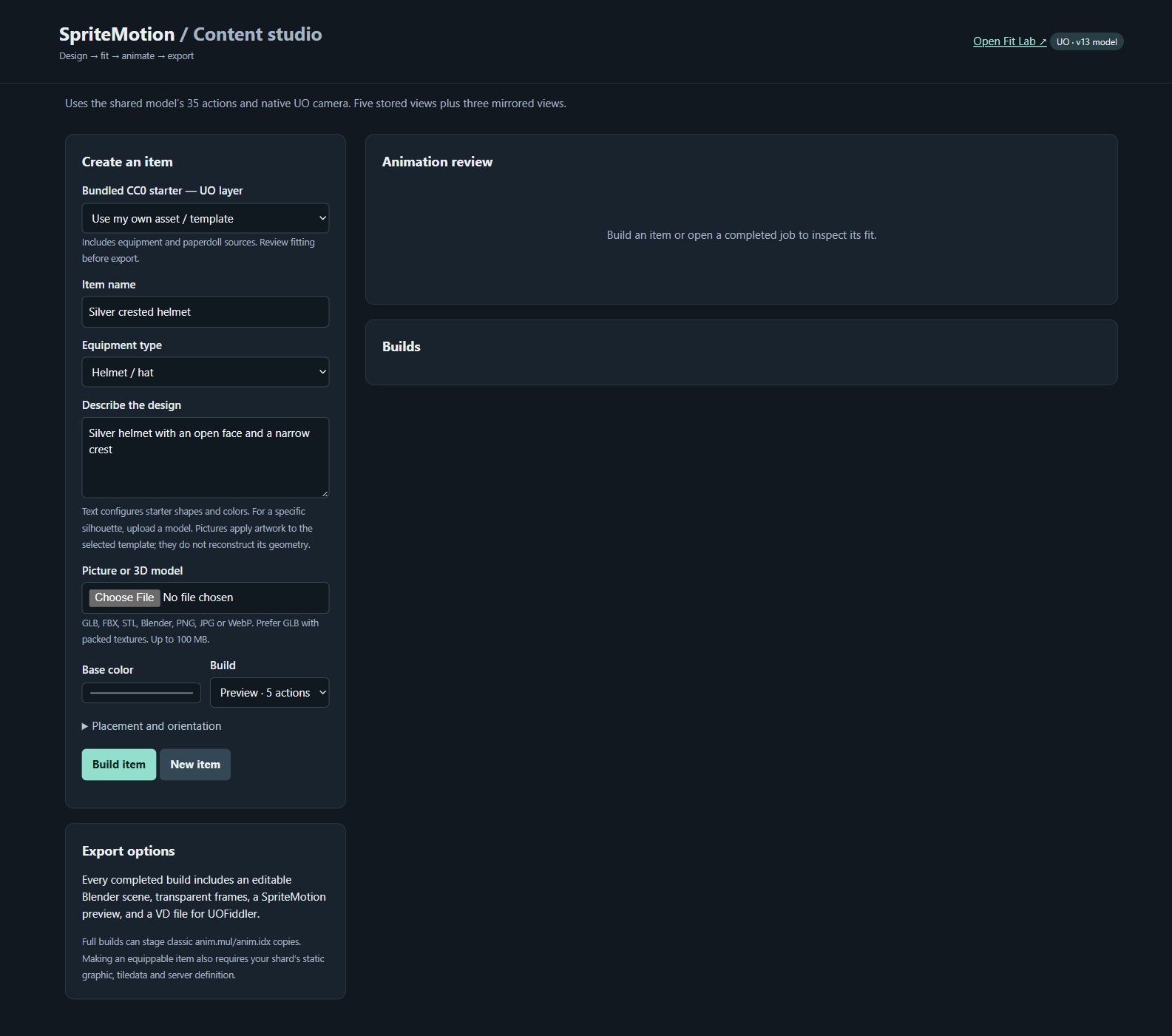
Source guide: tools/uo-content/README.md.
launchers/editor/content-studio.batsh launchers/editor/content-studio.sh
# or: python tools/uo-content/studio.pyOpen http://127.0.0.1:8772. Requires the installation steps, in particular the model setup
(pipeline.py setup --source <UO_Model3D folder>). To run it together with Fit Lab use the
workbench.
| Panel | What it does |
|---|---|
| Create an item | Choose a bundled CC0 starter (by UO layer) or Use my own asset / template; item name; equipment type; design description; picture or 3D model upload; base color; Build mode; Placement and orientation; Build item / New item. |
| Export options | Every completed build includes an editable Blender scene, transparent frames, a SpriteMotion preview and a VD file for UOFiddler. |
| Animation review | Plays a finished job: action, direction, frame slider, Original body and New item toggles. |
| Builds | One row per job with Load settings, Review, VD, Import package, Blender scene, Validation and Build log. |
| Stage classic-client animation | Creates patched copies of client files for a full build (see client staging). |
| Input | What happens | Limits |
|---|---|---|
| 3D model (GLB, glTF, FBX, OBJ, STL, Blender mesh) | Flattened at its current shape, placed at the selected body region and bound to the canonical rig. Helmets are rigidly weighted to the head; clothing uses surface-weight transfer; cloaks and skirts use the supplied cloth templates. | The uploader accepts self-contained GLB/FBX/STL/BLEND up to 100 MB. Use the CLI for OBJ/glTF with adjacent texture/bin files. Include only the item meshes. |
| Picture (PNG, JPG, WebP) | Applied as material artwork to a fitted template. | Not single-image 3D reconstruction. Use a cropped texture/design image. |
| Text | Selects and configures a procedural template, recognizes named base colors, supports a helmet crest. | Not an unrestricted generative model. The visible controls decide type and placement. |
| Asset-pack parts | Fitted through that pack's mapping (source_files, palette, pack_mapping in job settings). |
See Asset Packs. Licensed packs stay in your local sidecar. |
| Bundled CC0 starter | Pick from the dropdown and click Build item. No download or file selection needed. | Starting fits only, not approved game-ready exports. |
Equipment types (templates): Helmet / hat, Chest armor, Arm armor, Gloves, Leg armor, Boots, Robe, Cloak, Skirt, Sword / weapon, Shield, Bow, Quiver.
Placement and orientation: Fit to equipment region (automatic, a starting placement) or Keep supplied world coordinates (when you have already fitted the object in Blender in the body's rest pose). Rotation, scale and offset controls refine either one.
Agent-assisted work: the repository includes a uo-content-build skill so a coding agent can generate artwork or
author Blender geometry and feed it through the same tested pipeline. No external 3D-generation service or account
is assumed.
| Mode | Actions | Frames |
|---|---|---|
| Preview · 5 actions | 0 walk, 4 idle, 9 one-handed slash, 22 death forward, 25 mounted idle; 5 stored directions | 25 blocks |
| Game export · all 35 | All 35 actions, 5 stored directions | 175 blocks, 1,050 frames |
Jobs run serially and never mix frames from earlier designs. Review shows eight facings by mirroring three stored views. Clipping and empty frames are reported, not hidden.
python tools/uo-content/pipeline.py build --spec tools/uo-content/example-helmet.json
python tools/uo-content/pipeline.py build --spec <item-settings.json> --asset <helmet.glb>
python tools/starter-assets/run.py weapon-sword          # build one CC0 starter
python tools/starter-assets/run.py --list                # every slot and its route
python tools/starter-assets/run.py boots --smoke         # quick idle / direction-0 render
Settings fields: rotate_x/y/z (degrees), offset_x/y/z (metres), scale (uniform multiplier), fit
(auto or preserve), mode (preview or full). Every job stores its resolved settings, the original prompt
and the input hash. Fit-aware settings (fit_item, fit_adjustments, actions, blocks) follow
schemas/fit-build.schema.json.
Each job lives in workspace/ultima-online/content-studio/jobs/<id>/:
| File | Use |
|---|---|
item.blend |
Item mounted on the rig, editable, images packed |
item.vd |
UOFiddler people/equipment animation export |
render/clothing/ |
Transparent PNGs and vdtool-compatible canvas metadata |
review/ |
256 px atlases and a local animation viewer |
inventory.png, contact-sheet.png
|
Inventory art and an overview sheet |
validation.json |
Independent alpha/anchor check of every VD frame |
import-package.zip |
Everything a collaborator needs |
Next: Blender Build Pipeline for how frames are rendered and staged, or Fit Lab to tune the fit.