Appearance Language and Sessions
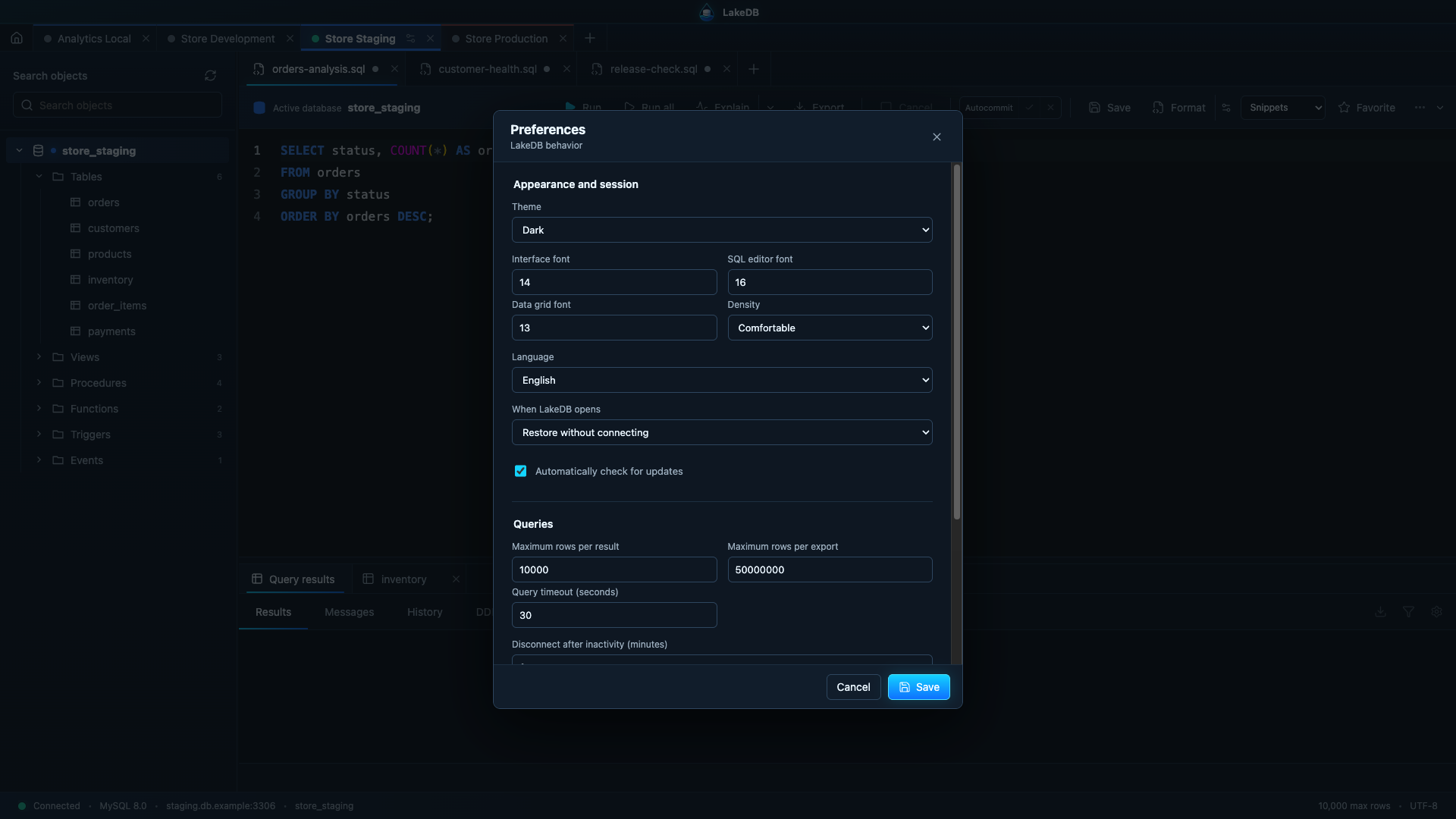
Choose a dark, light or system theme; independent interface, SQL editor and grid font sizes; comfortable or compact density; and application zoom. LakeDB currently includes English and Spanish under Preferences → Language. Menus and workspace text update when the preference is saved, and the translation structure is ready for additional languages.
Choose whether LakeDB restores the visual workspace without connecting, reconnects non-production connections, or starts clean. Production connections never reconnect automatically.
LakeDB can preserve tabs, unsaved SQL, cursor and scroll position, selected databases, table filters/sorting/page, and panel layout. Query results and passwords never enter the session snapshot.
The workspace is saved while you work, when the window is hidden and when it closes normally. If the previous process did not shut down cleanly, LakeDB reports that it recovered the saved workspace on the next launch. SQL tabs are restored without reconnecting to production automatically.
Enable or disable background release checks with Automatically check for updates. This setting only requests public release metadata from GitHub; LakeDB does not send connection or query data.
You can also configure maximum rows per result, idle disconnection, history retention and whether potentially sensitive queries may be stored.