Connections SSL and SSH
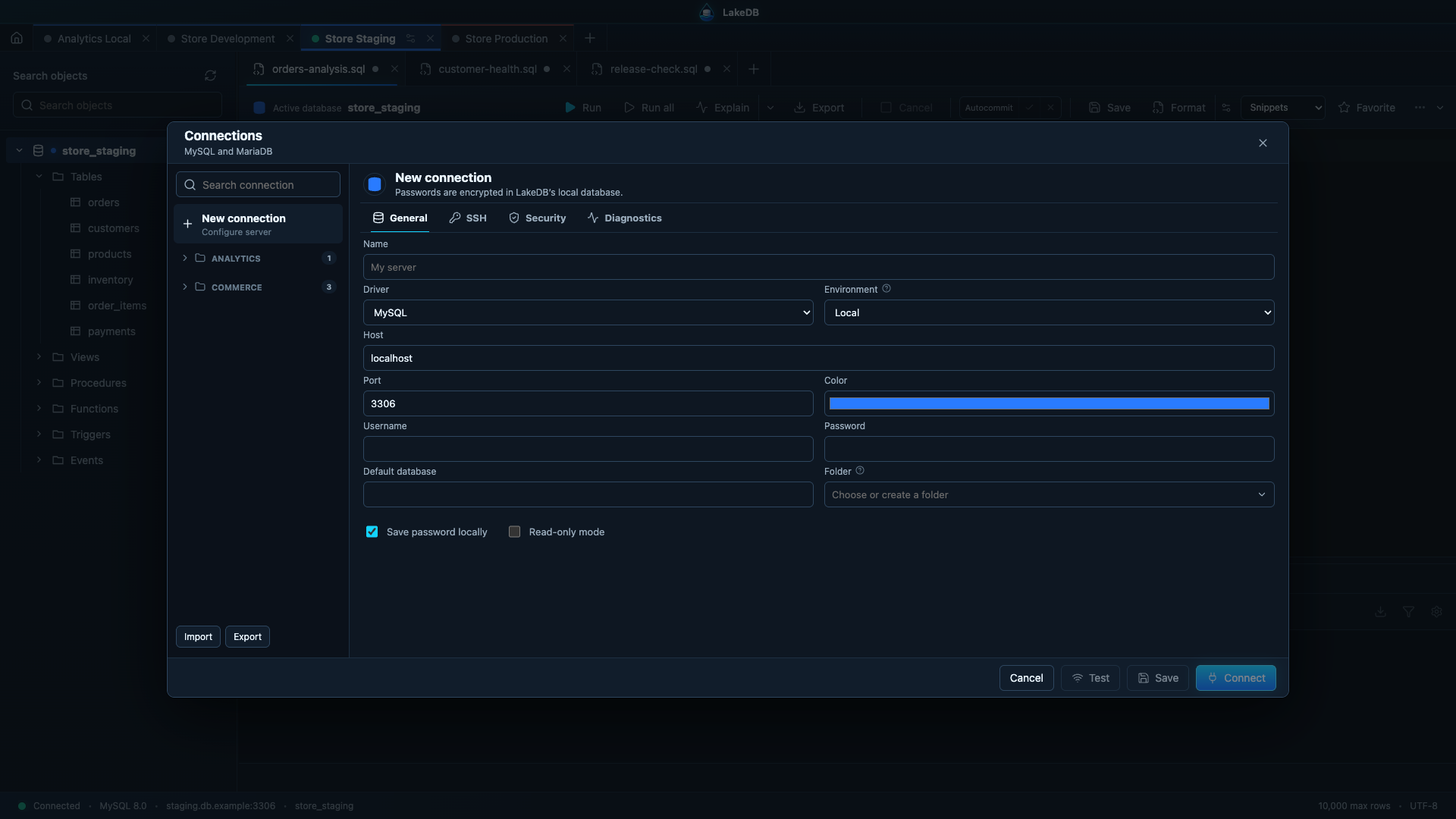
Save unlimited connections, assign colors and organise them in folders. Each open connection keeps an independent workspace. Saved passwords are encrypted in LakeDB's main process and are never exposed directly to its web-based renderer. Duplicating a connection does not copy its password.
Select the + beside the connection tabs to open the compact connection picker. Recent connections and folders are available there without leaving the workspace; use New connection when you need the complete editor. Long connection and folder lists scroll independently.
LakeDB does not create folders from connection names during normal use. Select New folder, enter the name you want and choose the saved connections that belong there. The assignments are saved immediately and remain after restarting LakeDB.
If you have connections but no folders, Auto-generate groups is also available. It suggests a group from each connection name, applies the suggestions only when you explicitly confirm the action and persists the result. Once a folder exists, this shortcut disappears so your manual organisation remains in control.
Connections without an assigned folder are always available under the virtual Unclassified group on Home. This group is only a view: opening it does not write a folder name or modify the saved connections.
- Disabled: connect without TLS.
- Preferred: use TLS when the server provides it.
- Required: refuse non-TLS connections.
You can provide a PEM certificate authority and control server certificate verification. Use required TLS with verification enabled for sensitive environments.
Enable Use integrated SSH tunnel and enter the SSH host, port, username, optional private-key path and keepalive interval. LakeDB uses the operating system's ssh binary and a temporary local port. Keys protected by a passphrase must already be available through ssh-agent.
LakeDB can reopen a session after selected network errors. It never automatically re-runs a failed query or write, preventing accidental duplicate operations.
The import assistant supports DBeaver, SQLyog, LakeDB JSON/CSV and SQL files containing MySQL or JDBC URLs. Every format opens a review table before anything is saved. Select the rows you want, edit connection names or users, apply one password to the selection or enter passwords individually, and choose how duplicates should be handled.
For SQLyog INI files, LakeDB tries the supported modern and legacy password formats. If a password cannot be recovered safely, LakeDB marks it as unsupported and leaves it empty instead of storing undecodable ciphertext. Enter a shared or per-connection password in the review table before importing when required.
The review is the final step before saving: deselected rows are not imported, and Cancel leaves the saved connection list unchanged.