Feature Gallery

Treat every gallery entry as part of a workflow: find the capability, open its named surface, review the exact scope, and keep the resulting evidence.
This page maps 67 named, user-facing visual functions and states to a one-screenshot-per-function acceptance gallery. Every view uses synthetic accounts, repositories, issues, pull requests, workflow runs, logs, and artifact metadata; no personal path, credential, or account identifier belongs in the image set.
For this catalog, a function is a distinct visual workflow or result that a user can open or reach. Internal commands, background services, and transient safeguards are documented through their owning settings, progress, result, or recovery surface. Every tracked gallery PNG is assigned to exactly one row below, every row renders exactly one distinct PNG, and the automated catalog contract rejects missing, duplicate, or unassigned assets.
Publication status: The gallery includes the July 14, 2026 Actions cache and headless pagination evidence, the Pages accessibility/clipping gate, the inspected July 16 adaptive customization set, the profile app-identity workspace, the clone-style Add Submodule release, the repository-contextual GitHub API Explorer, filtered notification bulk triage, and configurable bottom-right error notices, runtime tab search, History commit actions, and true-bottom Repository Tools scrolling. It now also includes the safe custom repository-logo studio, named API app functions, temporary submodule repository context, bounded repository folder discovery, explicit cheap-LFS preparation before the final branch commit, and the M21 local, pushed, and remote-only tag lifecycle workspace. Exact build, interaction, and privacy receipts are retained in
HANDOFF.md; each promoted release records its own main, CI, Pages, and wiki verification without implying that later maintenance work is complete.
The July 18–19 temporary-submodule and refreshed six-image set passed its local
ten-pass off-screen inspection. A final 1440×960 post-build regression reopened
the child, verified its read-only boundary, and returned to the root; a later
fresh-bundle race regression synchronously exercised duplicate Open and Back,
preserved one persisted repository and tab, restored the root once, and showed
no error. The gallery assets and owned headless-resource cleanup are complete.
The six refreshed assets were delivered byte-identically by Pages; initial
remote CI withheld a release after a macOS error-ordering failure, and correction
98d93ccc passed the full matrix and published
v3.6.3-beta3-b0000000165. Exact publication receipts are in HANDOFF.md.
The verified adaptive customization maintenance release adds profile app identity, favorite/portable tabs, folder-drop opening, guarded tab close/arrange, Actions cancellation, reviewed rebase, repository-account propagation, bounded OAuth scopes, and compact Repository Tools, Remote Manager, and Regex Builder corrections. Its exact production source, safety checks, off-screen interaction review, and responsive geometry are recorded with the inspected captures below.
The GitHub API Explorer adds a complete searchable catalog of 1,206 REST operations, including exactly 10 operations discovered since the prior pinned 2026-03-10 catalog, alongside a REST/GraphQL request builder. Requests stay on the selected repository account and provider host, mutations require an explicit review, and response content is bounded and credential-redacted before display.
The temporary submodule context shows an initialized child in the normal workspace without adding it to the repository list, Recent, or persisted last selection. Its Back control returns to the persisted root and follows the active profile's style, label, and explicit language mode.
| Asset | Guided workflow shown |
|---|---|
material-app-identity-workspace.png |
Restart-restored profile app identity and favorite repository tab |
material-welcome.png |
Material first-run task card and responsive workspace preview |
material-customization.png |
Editor anchored beside its actual visual owner with burst-coalesced persistence, dedicated Git history, and repository path |
material-repository-logo-studio.png |
Layered custom repository-logo studio with live preview and safe transfer controls |
material-toolbar-overflow.png |
Measured narrow toolbar with Build & Run and Commit & Push in More |
material-tab-appearance-word.png |
Word-style tab typography, alignment, and independent color palettes |
material-tab-arrange.png |
Pinned/manual movement and one-shot tab ordering controls |
material-tab-search.png |
Runtime tab search across names, aliases, paths, and clone URLs |
material-actions-cancel.png |
Exact workflow-run cancellation review with ref, actor, and commit context |
material-rebase-review.png |
Reviewed current→target rebase with ahead/behind state and commit preview |
material-pull-preview.png |
Freshly fetched ordinary pull review bound to one exact upstream OID |
material-shallow-clone-safe.png |
Reviewed shallow clone with a bounded commit depth |
material-clone-account-fallback.png |
Generic HTTPS clone completed through exact-origin signed-in account fallback |
add-submodule-dialog.png |
Clone-style Add Submodule review with source, checkout path, and branch |
material-submodule-context.png |
Initialized submodule opened temporarily with context and Back to the persisted root |
material-pull-all-account-fallback.png |
Pull all with per-repository results and exact-origin account retry |
material-sparse-checkout-safe.png |
Persistent guided review with the locked editor and exact normalized selection |
material-history-deepen.png |
Deepen-history result without exposing the account used |
material-remote-manager.png |
Reviewed named-remote administration |
material-native-pull-request.png |
Native pull-request creation with bounded metadata |
material-stash-manager.png |
Repository-wide stash selection and exact-entry actions |
advanced-workflows.png |
Tag lifecycle inventory with local-only, pushed, and remote-only states and bounded actions |
material-actions-job-log.png |
Searchable in-app Actions job log |
material-github-api-explorer.png |
Repository-bound REST/GraphQL API Explorer with mutation review and bounded responses |
material-api-app-functions.png |
Named repository-bound API functions extending the app through reviewed contracts |
material-actions-artifact-download.png |
Bounded artifact download with a locally computed digest |
material-actions-cache-manager.png |
Actions cache usage, inventory, refs, and deletion controls |
material-actions-pagination-headless.png |
Headless Actions run pagination and page-two sentinel |
material-actions-artifacts-headless.png |
Headless bounded artifact inventory |
material-actions-sentinel-headless.png |
Headless wrapped sentinel evidence with no clipping |
material-github-releases.png |
Repository-bound Releases dashboard, status summary, metadata, and assets |
material-github-issues.png |
Issue detail, comments, and reviewed lifecycle controls |
material-provider-triage.png |
Account- and repository-bound provider triage |
material-repository-tools.png |
Named Repository Tools administration hub |
material-repository-tools-scroll.png |
Short-height Repository Tools scrolled to its reachable final results surface |
material-workspace-changes.png |
Material Changes workspace and commit flow |
material-history.png |
Core History browsing and selected-commit inspection |
material-history-context-actions.png |
Selection-aware History commit More/right-click actions and button hint |
material-settings.png |
Responsive Material Settings dialog |
settings-history-manager.png |
Git-backed Settings history side sheet |
material-repositories-sheet.png |
Repository navigation side sheet |
material-branches-sheet.png |
Branch navigation and status side sheet |
regex-builder.png |
Block-based regular expression builder and live tester |
material-gitignore-manager.png |
Reviewed .gitignore template catalogue |
material-automation.png |
Layered automation schedules and account overrides |
material-notification-center.png |
Git-backed notification centre |
material-notification-bulk-actions.png |
Filtered Local notification selection and bulk triage |
material-error-notice.png |
Scoped stale Git lock recovery from a bottom-right error notice |
material-github-notifications.png |
Account-aware GitHub notifications |
material-provider-accounts.png |
GitHub, GitLab, and Bitbucket account controls |
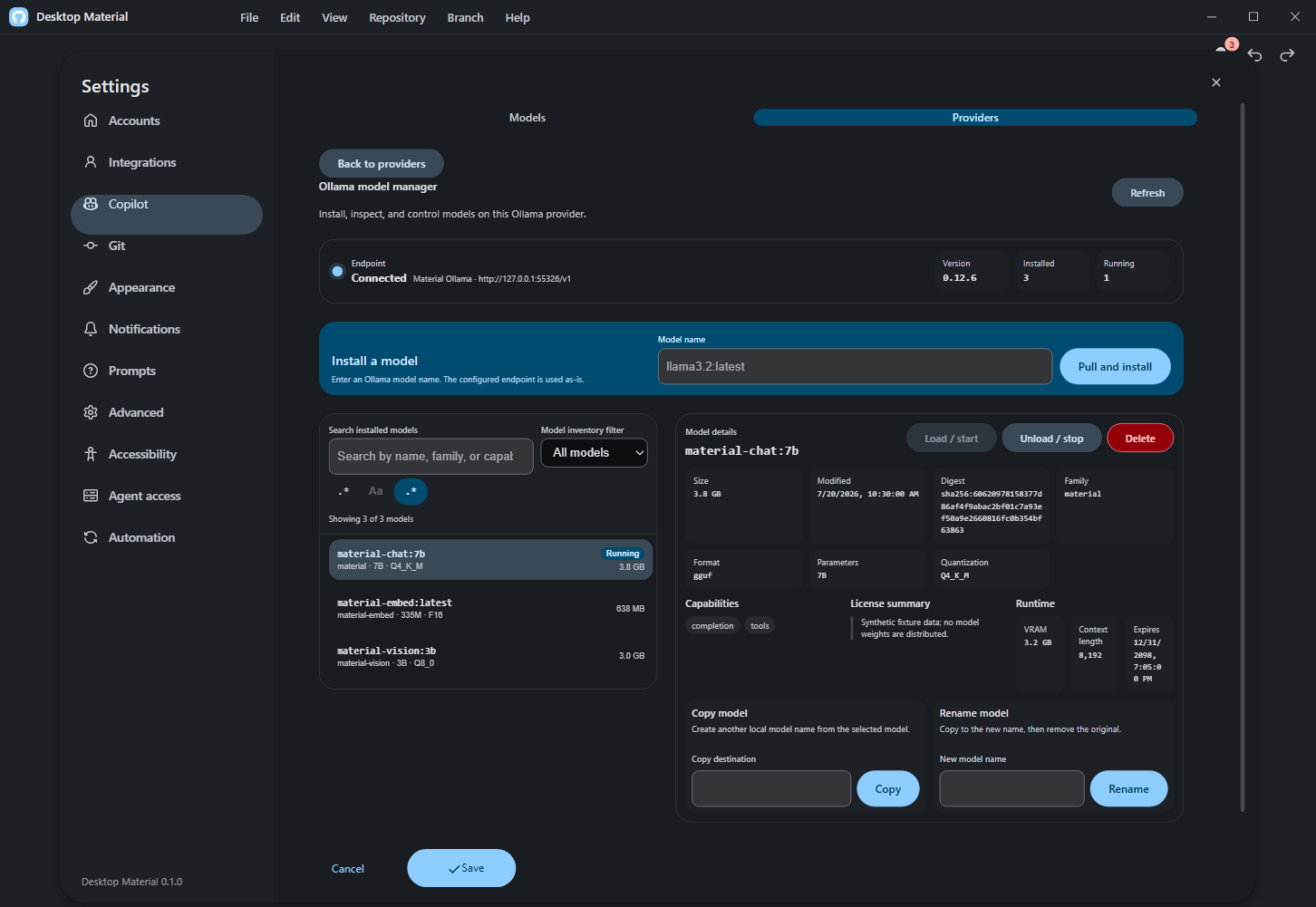
material-ollama-model-manager.png |
Ollama health, installed/running inventory, model details, and guarded lifecycle actions |
material-agent-access.png |
Local MCP and REST agent access controls |
material-multi-window-menu.png |
Open repositories and worktrees in another window |
material-scale-200-autofit.png |
200% requested scale safely auto-fitted at minimum size |
material-responsive-overflow-fixed.png |
Exact-size responsive overflow regression proof |
material-history-power-tools.png |
Searchable History and commit ancestry graph |
material-branch-merge-all.png |
Merge All branches/worktrees with per-target state |
material-create-pull-request.png |
Native pull-request completion state |
material-effective-branch-rules.png |
Effective protection and ruleset policy |
material-actions-artifacts.png |
Artifact digest and attestation-presence context |
material-actions-pagination.png |
Workflow-run pagination retained across refresh |
material-actions-artifact-page-two.png |
Wrapped artifact page-two sentinel |
material-actions-jobs-pagination.png |
Attempt-aware job pagination and retry |
material-actions-pending-deployments.png |
Deployment environment review and history |
material-history-deepening.png |
Full-history state after a verified deepen |
material-shallow-clone.png |
Shallow-clone commit-depth controls |
material-sparse-checkout.png |
Persistent three-step sparse-checkout guide in its disabled Choose state |
The active profile can customize the in-app logo/name and rich name typography, with a live preview and clear/reset actions. Favorites, drag-to-open repository folders, current-tab session import/export, and appropriate right-click customization/history context use the same profile/repository ownership model.

The ordinary toolbar and application-menu Pull actions fetch before opening a bounded review of the exact local/upstream identities, incoming commits, changed files, and integration route. Dirty or conflicted worktrees cannot confirm. The final preflight rejects a stale identity and integrates only the reviewed upstream OID without another fetch; scheduled and local-agent automation remain noninteractive.


Oversized files are prepared and uploaded through release-backed cheap LFS before
Git creates the branch commit. New uploads use raw bytes, retain one asset when
it fits the release limit, and use ordered raw ranges when it does not. The
composer names hashing, release preparation, upload progress, and verification
separately, then reserves Committing to branch for the small pointer
commit. An isolated trusted GitHub CLI exact-range transport runs first so the
crash-prone Electron upload pipe is not opened when gh is available; its
bounded reconciliation scans the full asset inventory
once and then polls only one exact asset ID. The adjacent Manual upload
action remains the explicit recovery: it stops the automatic transfer, opens one
temporary folder containing every remaining whole-file or ordered .partNNN
asset, reports throttled hash/staging progress after a worst-case temp-space
preflight, and resumes only
after newly detected browser uploads and all local sources pass SHA-256
verification.
The repository rail's direct Large files manager lists and searches the original nested pointer paths, pins reviewed files, and materializes one or all pointer files without sending users through GitHub Releases.
Every repository bucket is bounded to GitHub's 1,000-asset Release limit.
Whole multipart files and whole manual batches roll together from assets to
assets-2, assets-3, and later exact pointer tags; processing assets count
toward capacity but cannot be downloaded until GitHub marks them uploaded.

The current Remote Manager layout preserves readable semantic columns and stacks a row before its name, fetch/push URLs, or controls collapse. Repository Tools owns short-window vertical scrolling so Diagnostics and later results stay reachable. Repository settings → Submodules → Add submodule… opens the same provider/URL chooser as Clone, then reviews the safe relative destination and optional tracked branch before Git starts. The wider settings surface also shows the profile-wide Back preview; right-clicking it opens that element's editor beside it, with edits staged until the settings dialog is saved. An initialized row or changed/new submodule commit card's Open temporary viewer action opens that child read-only without adding it to the repository list. The context bar's visible Close viewer action clears the temporary state and returns to the parent, while the adjacent Subtrees tab embeds add, pull, push, and split management; stale, invalid, or escaping targets fail closed. The reviewed current-branch rebase uses searched target selection, ahead/behind context, a bounded commit preview, fresh safety/ref checks, and the existing conflict continue/abort path; it never force-pushes automatically.


The repository rail now includes a hideable, functions-first GitHub API surface for expert integration work. Eligible repositories receive safe, repository-bound read functions automatically, and Repository tools → API functions provides the same actions as runnable buttons. The complete REST and GraphQL operation catalog remains available through the explicit advanced builder for custom functions. Requests use only the account and provider host bound to the selected repository; every mutation stops for exact-request review, while returned headers and bodies are bounded and credential-redacted before display.
Named API functions turn a reviewed REST or GraphQL definition into a reusable app extension. Each function is versioned in the active profile, fingerprinted, bound to the exact repository/provider/account context, and revalidated before execution; malformed definitions and credential-bearing inputs fail closed.
For queued, running, waiting, or pending workflow runs, the current Actions surface adds an exact-run cancellation review with available ref/actor/commit context. Repository/account/run identity and live status are revalidated before one normal cancel request, duplicate submission is suppressed, and polling continues to a terminal state with explicit authentication, SSO, and conflict recovery.


Settings → Copilot → Providers → Manage models opens a bounded workspace for one configured Ollama endpoint. Health/version, installed inventory, running state, search/filter, and model details stay separately refreshable. Pull shows streamed progress and supports cancellation; copy and copy-then-delete rename, load/unload, and exact-name confirmed deletion keep partial and failure states visible. Successful inventory changes synchronize installed names back to the provider's selectable Copilot models.
Management accepts only an exact loopback /v1 provider base. The manager
derives that loopback origin and appends fixed native /api/* routes; every
remote HTTP or HTTPS host, arbitrary prefix, saved /api base,
credential-bearing URL, query, and fragment fails validation. The complete
surface follows English, playful Hong Kong Cantonese, and bilingual language
modes, with keyboard access and live status announcements.
The accepted 1452×1001 synthetic-only capture passed original-resolution privacy review. Its geometry receipt reports the manager, Preferences shell, and lifecycle controls contained above the footer, with zero overlaps and no horizontal overflow.
Provider Triage now consumes the canonical repository-account key saved by
Repository Settings and reacts to binding changes without reopening the
repository. Unique exact matches may bind only an unassigned repository;
multiple matches require Use this account, and signed-out, permission, or
organization-SSO states do not masquerade as unbound. GitHub browser sign-in
uses the bounded repo user workflow notifications read:org feature scopes and
excludes unrelated destructive/admin families.

The Word-style per-tab appearance surface combines typography, alignment, and independent text/background palettes. The original regex close action remains; the inverse literal close flow adds live counts/preview and cannot confirm empty or zero-match input. Pinned/manual/keyboard arrangement plus stable one-shot label/opened/status sorts persist without continuously reacting to later status changes. Every visual editor is anchored beside its actual owner and opens that owner's independent local Git history; ordinary Appearance preferences remain separate. Feature entry points own independent highlight settings rather than a global body switch. The custom repository-logo studio composes bounded mark and text layers, transforms and colors in a live preview with undo/redo and safe JSON transfer; a repository can inherit or edit its profile default without accepting executable SVG. Measured toolbar overflow remains unchanged.
High-frequency visual controls now collapse each synchronous burst into the
latest normalized owner value before one durable write and notification. Queued
get() reads, flushes, and History remain ordering barriers, so the responsive
path does not weaken the dedicated audit timeline.


The Settings rail now includes Clone queue as a first-class destination. Each signed-in account owns a readable card with a folder picker, parallel/sequential selector, enabled switch, live status, and a bounded safety note; empty-account and invalid-directory states remain explicit. Agent access keeps its Mobile connection card discoverable in every mode, then enables one action only when Paired LAN mode is running. That action replaces the old pairing code and opens a fresh one-use fragment link in the default browser. Both surfaces supply English, playful Hong Kong-style Cantonese, and compact bilingual copy and remain vertically reachable in the Settings scroll owner.


At compact and zoomed sizes, Regex Builder reflows the category/token layout, scrolls its body vertically, and keeps its live tester and footer actions reachable without page-level horizontal clipping.


Local notifications can be searched and filtered by type, selected as the currently visible result set, and triaged with one history-backed mark-read, mark-unread, or delete operation. Clear all requires an inline confirmation and leaves the Git-backed history available for restoration. Acknowledgement-only errors use the profile's selected presentation: a dismissible red bottom-right notice by default, or the legacy blocking dialog. Errors that require a retry, authentication choice, or remediation remain decision dialogs.


