Repository navigation
Detail Window
Opens with a left click on a status icon (view "This pack") or with the "Conflicts" button (view "All packs"). In Packed Packs also with the right-click item "Show conflicts".
The window always shows the order in the pack screen, also if it is not applied yet, and it updates while it is open (for example after a marking). "Done" or Esc takes you back to the pack screen: same order, same scroll position, nothing applied, nothing reloaded.
- "This pack": pack picture, name, status icon and status name. If the pack is not in the current order any more: "Not active in this order".
- "All packs": "Packscope – all packs" and "N conflicts (M intended), K completely covered".
- Buttons "This pack" and "All packs" switch the view. Each view keeps its own scroll position and its own open and closed sections.
- Search ("Search path, namespace, key ..."): filters the rows by path, namespace or language key, in any case. In "All packs" it also finds pack names. While you search, matching sections open by themselves.
- Filter ("Show: All"): click to go to the next file type, Shift-click to go back: All, Textures, Models (models and blockstates), Language, Sounds, Other. Only in "This pack".
Every section and group can be opened and closed with a click on its row. Long lists stay smooth; only the visible rows are drawn.
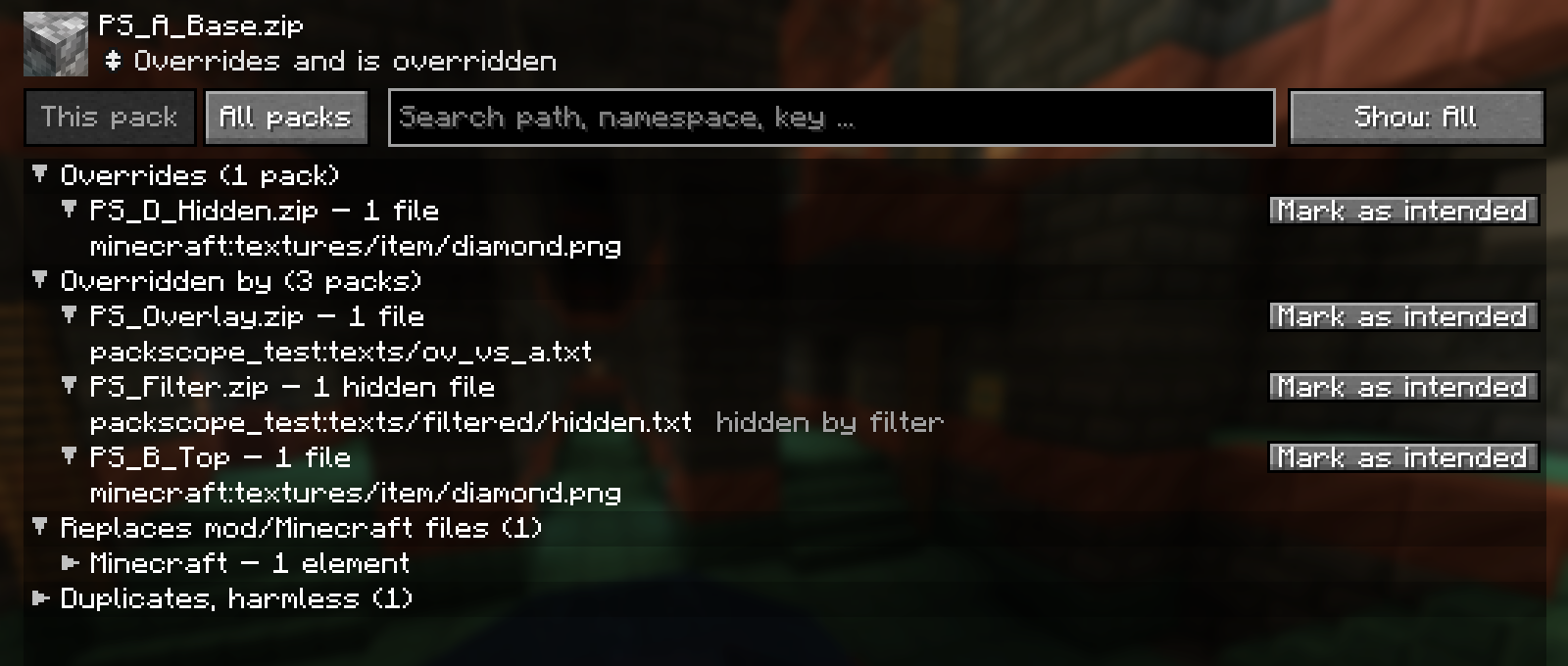
Sections, top to bottom (empty ones are left out):
| Section | Content |
|---|---|
| Warnings (n) | The red and yellow lines of the tooltip: completely covered or only copies, against marking, replaced sounds |
| Overrides (n packs) | One group per lower pack this pack wins over |
| Overridden by (n packs) | One group per higher pack whose version reaches the game |
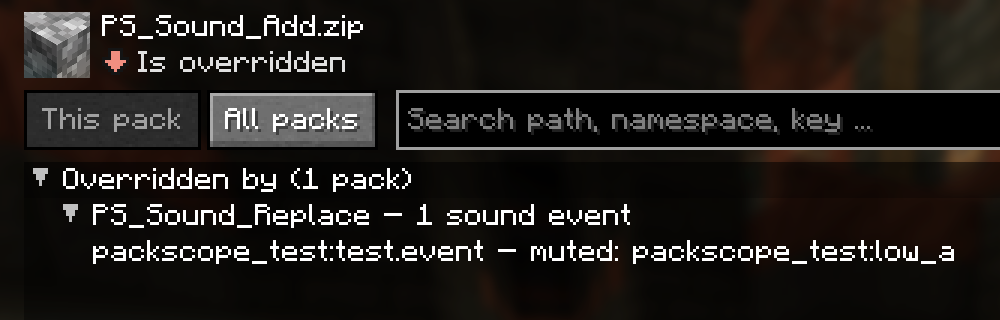
| Replaced sound events (n) | event – replaces Pack, muted: sound, sound |
| Hides with its filter (n) | Files this pack hides in lower packs with the filter in its pack.mcmeta: file – hidden in Pack
|
| Replaces mod/Minecraft files (n) | Info, grouped by mod ("Minecraft" for the vanilla resources): Mod – 12 elements, then the files. Language files are one row each with the number of entries |
| Duplicates, harmless (n) | Byte-identical files: file – copy of Pack or file – also in Pack (identical). Closed by default |
Each group in "Overrides" and "Overridden by" is one pack pair: Pack – 3 files, 2 language entries. Biggest groups
first, marked groups at the end.
- Button "Mark as intended", or "Remove marking" if the pair is marked (see Intended conflicts).
- A marked group is grey, says intended and shows the note of the marking in quotes. It is closed by default.
- A reversed pair says ⚠ against marking.
- Rows in a group:
-
Files: the path,
namespace:path. Blockstates carry the note merged per block state in game. -
.mcmetawithout effect: an animation or texture.mcmetaof a lower pack whose texture is replaced, so it never applies. It is a row of its own and does not count as a file. - Hidden files: hidden by filter.
-
Language entries:
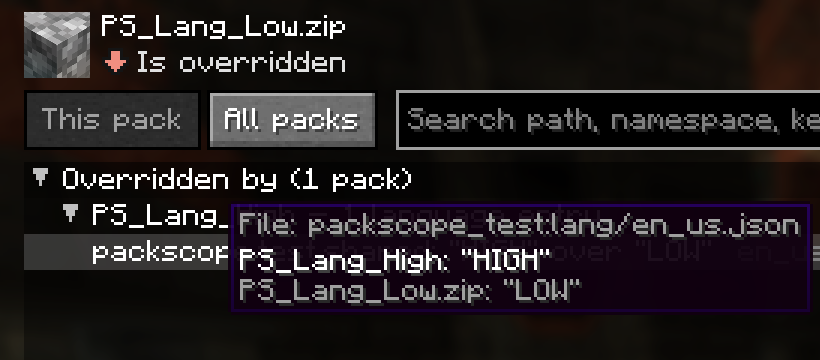
key: "text of the winner" over "text of this pack", with the language code. Hover over the row to see the language file and the full text of every pack. -
Sound events:
event – muted: sound, sound.
-
Files: the path,
In the mod section, rows of a pack that lies below a mod are marked the mod wins (and the group says how many).
Click a texture row (a .png in a textures folder). Below the list you see every version of this texture, side
by side in load order: each pack that has the file, down to the mod or Minecraft version. The version that reaches the
game comes first, with a green frame and a green name.
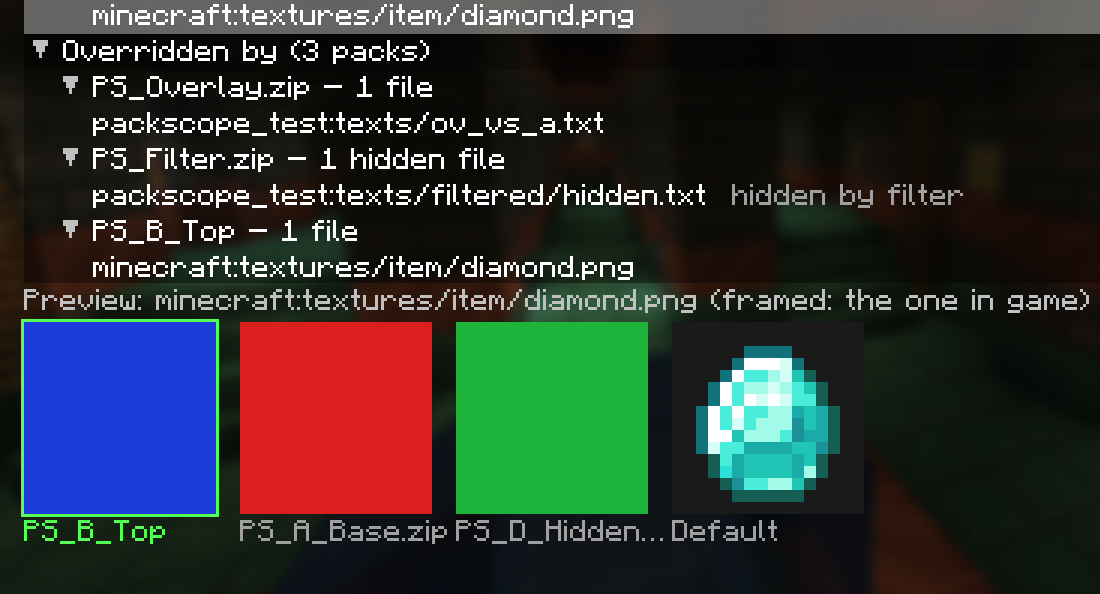
- Each picture is read straight from the pack file, not from the game's texture atlas (where only the winner is).
- Pixel sharp, size from
previewSize(default 64 px, smaller if the window is too low). - Animated textures: the first frame.
- Pictures wider or higher than 1024 px: "too big (w×h)". Broken files: "cannot be read". If not all versions fit in one row: "+ n more".
- The pictures are released again when you pick another row or close the window.
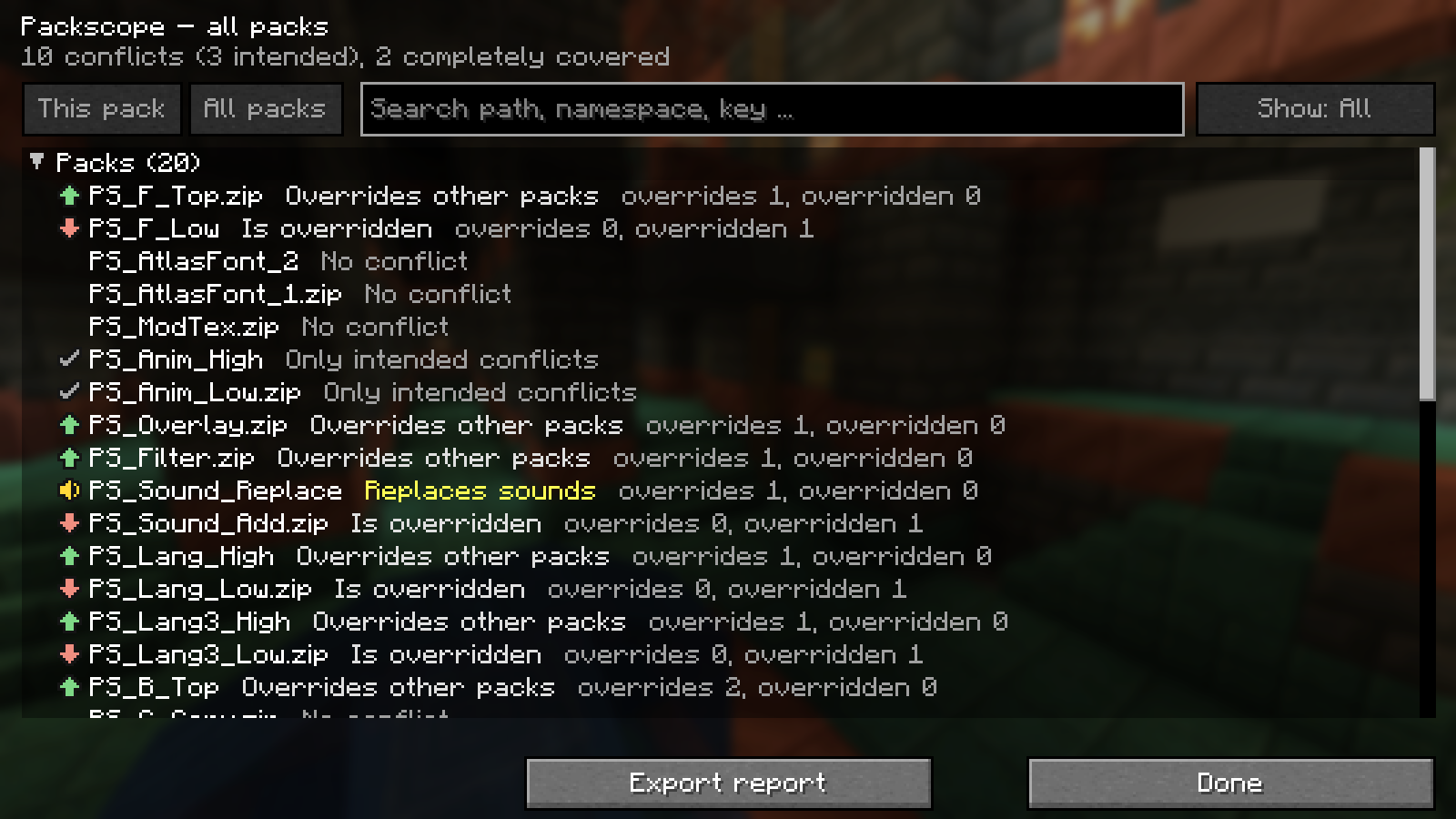
| Section | Content |
|---|---|
| Packs (n) | Every active resource pack, top first, with status icon, status and "overrides x, overridden y". Click a row to open "This pack" for it |
| Pack against pack (n) | Every pair: Upper over Lower – counts, with intended or ⚠ against marking, and the button "Mark as intended" / "Remove marking". Open pairs first, biggest first |
| Completely covered (n) | Red, with "only copies of …" or "overridden by …" |
| Against marking (n) | ⚠ Against marking: A should be above B |
| Markings (n) | Every marking of packscope-intended.json with its state and a "Remove" button (see Intended conflicts). Without markings: "No markings yet. Mark a pair in the view of a pack." |
| Replaces mod/Minecraft files (n packs) | Info per pack: elements of mods and Minecraft it replaces, by mod. Closed by default |
Pack names are cut after 40 characters; packs without an entry in the screen show "(hidden)" or "(injected)".
| Button | What it does |
|---|---|
| Mark all as intended | ("This pack" only) marks every not yet marked conflict pair of this pack, in the current direction. When all pairs are marked, the button becomes Remove all markings and removes every marking that names this pack |
| Export report | Writes packscope/reports/packscope-report.md and .json for the order in the pack screen (see Reports and commands) |
| Done | Back to the pack screen |

The line above the buttons shows "Writing the report ...", then "Report written: packscope/reports/packscope-report.md", with "(order not applied yet, noted in the report)" if you have not pressed "Done" in the pack screen yet.