Repository navigation
Packed Packs
Packed Packs by fishstiz is a new resource pack screen with profiles, folders and drag and drop. It has no conflict view of its own. If it is installed (version 2.3 or newer, tested with 2.4.0), Packscope hooks into its screen through the public Packed Packs API. Without Packed Packs, none of this is loaded and Packscope works in the vanilla screen alone.
Packed Packs replaces the vanilla pack screen by default, so with Packed Packs installed this is the screen you will use. Its "Original Pack Screen" button opens the vanilla screen, where Packscope works as described on Pack screen.
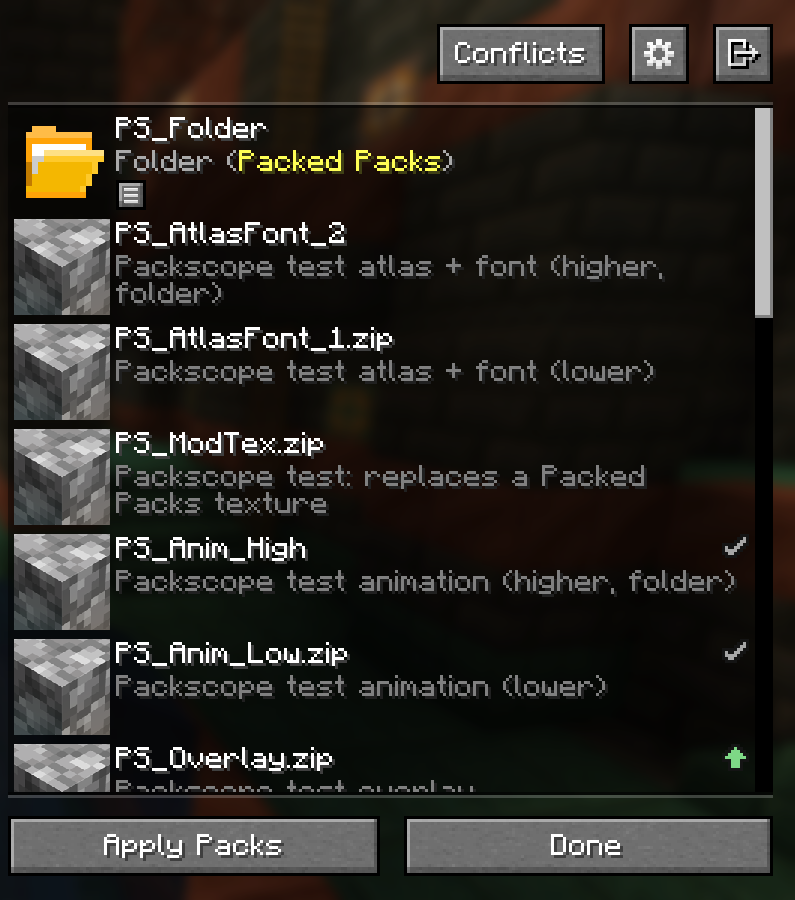
- Every active pack (right list) gets the same icon as in the vanilla screen, in the top right corner of its entry. Inactive packs, "Default" and "Mod Resources" get none.
- Hover over the icon: the same tooltip as in the vanilla screen (see Pack screen).
- Left click on the icon opens the detail window. "Done" brings you back to Packed Packs with your unsaved changes and the scroll position.
- Live: dragging, moving, activating and deactivating packs updates the icons at once, before "Apply Packs" or "Done".
Right click on an active pack. Packscope adds up to three items to the Packed Packs menu:
| Item | Shown when | What it does |
|---|---|---|
| Show conflicts | always (active packs) | Opens the detail window of this pack |
| Mark all as intended | the pack has conflict pairs that are not marked | Marks every such pair in its current direction |
| Remove all markings | a marking names this pack | Removes every marking with this pack |
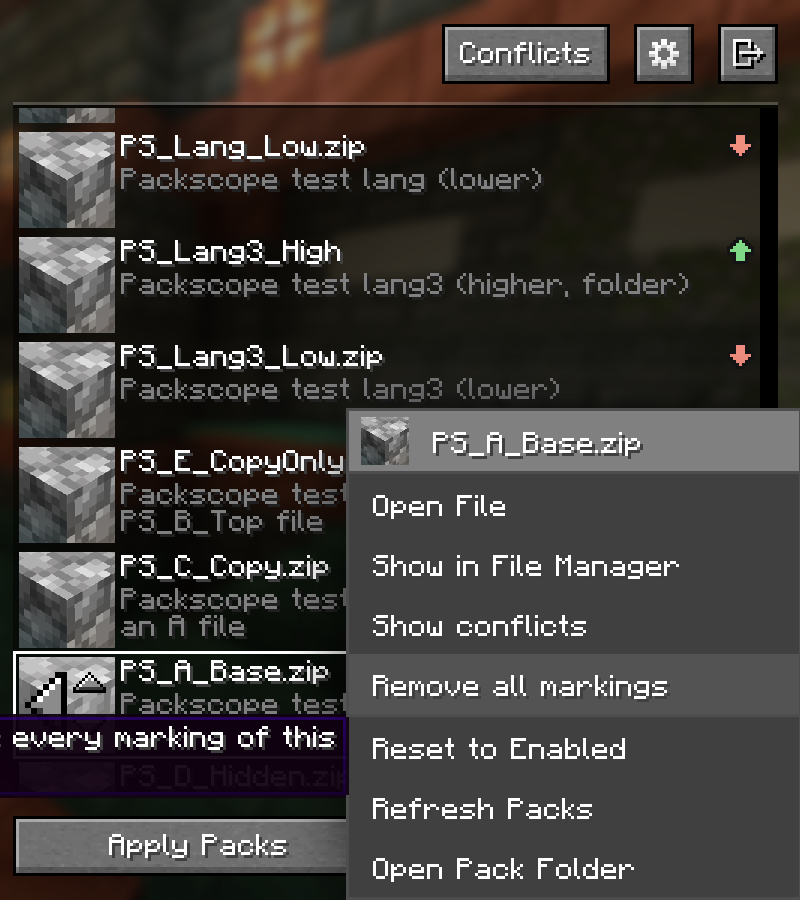
Markings work as on Intended conflicts; the icons change at once.
In the header, between the profile title and the Packed Packs buttons. It opens the detail window in the "All packs" view. In a narrow window it is only an icon.
- Packs inside a Packed Packs folder are normal packs with their own id; Packscope rates each of them.
- A folder entry has no icon of its own, also a locked folder that is active as a whole. Open the folder to see the icons of the packs inside.
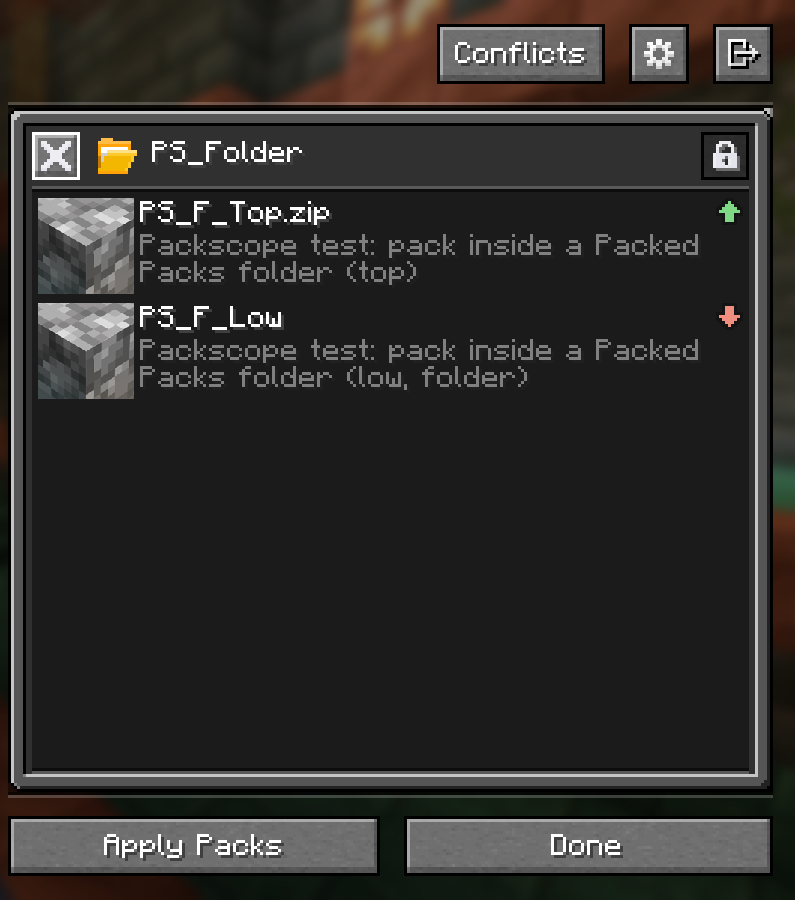
Since Packed Packs 2.4, a folder can show packs that lie directly in resourcepacks/, without moving them. List their
ids under packIds in the folder's packed_packs.folderpack.json:
{
  "module": false,
  "packIds": ["file/MyTextures.zip", "file/MySounds.zip"]
}
Nothing is moved: the id stays file/MyTextures.zip, so options.txt, your default options and your
markings stay valid. Packscope rates these packs like every other pack, with icon, tooltip and
right-click items, also inside an opened locked folder. The report lists them under their own ids.
What Packed Packs allows here:
- Only packs that lie directly in
resourcepacks/and built-in packs. Packs that are already in another folder and folders themselves are ignored. - A pack listed by two folders shows up in only one of them (Packed Packs logs a warning).
- The folder itself has to exist in
resourcepacks/. It does not need a pack of its own inside. - Edit the file while the Packed Packs screen is closed; Packed Packs reads it when the screen opens.
- An active unlocked folder shows its packs one by one in the right list, as usual. A locked folder activates all its packs together at the place of the folder, so the listed packs move with the folder, and Packscope's icons follow.
- Packs that a profile hides are still active and loaded. Packscope keeps rating them; in tooltips and in the detail window they appear as "Pack (hidden)".
- Switching the profile changes the order, and the icons follow.
Packed Packs can replace the datapack screen too. Packscope recognises it and stays out: no icons, no menu items, no button.
showInPackedPacks = false removes icons, menu items and the button from the Packed Packs screen; the vanilla screen
keeps them (see Configuration).
Packed Packs cuts a long title only at the edge of the entry, and its API offers no way to make the title narrower. With a very long title the icon therefore covers the "..." at its end. The title itself stays readable.
