pipeline_overview
Runing the Pipeline module is the first step in your Sequential Fish analysis.
The different steps of quantification presented below must be run in order however individual script inside a step can be run in any order.
If you end modifying pipeline parameters and re-runing a script you must re-run also all scripts from subsequent steps.
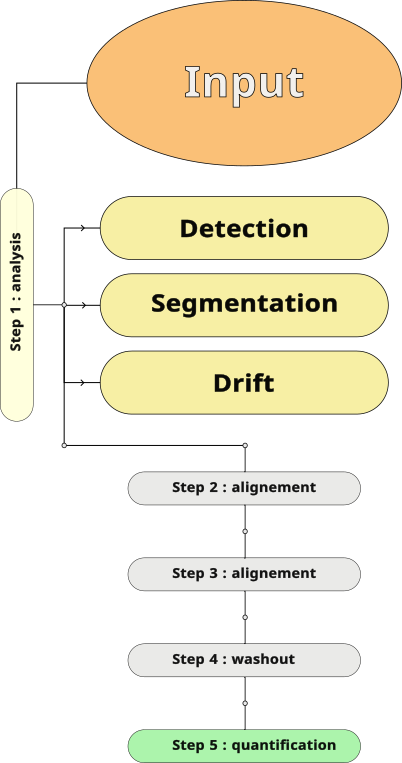
This step is critical and will allow the pipeline to read your data, mapping all your images stacks and associating cycles with the targeted single molecule. To this end you need to organize your working directory in the way described in the input documentation. If you are using a stable version of the pipeline once this step is sucessful all the subsequent steps will work.
In this step is performed the spatial quantification of your data. At this end of this step the position of every single molecules, the delimitation of cells and the drift occuring between imaging cycles will be quantified.
In this script single molecules are detected in 3D using a LoG + Threshold algorithm, bright regions are deconvoluted to better estimate the number of single molecules in dense regions. Finally a DBscan algorithm is run to perform a clustering of detected spots. Spots can be detected using different wavelength to maximize All results are extracted in the Spots table.
Note : To this date there is no subpixel fitting for detection but this might be included later to the pipeline.
In this script nuclei and cytoplasm are segmented using default or custom model from cellpose 4.+. This can be achieved in 2D or in 3D in both cases it is highly recommanded to set up a GPU for this task to reduce computing time. To avoid segmenting every cycles only the reference cycle is segmented, downstream quantification will then align detected spots to this cycle.
Masks are saved on the hard-drive
In this script a cross-correlation analysis is performed in Fourrier space to detect drift between cycles. This aims at correcting a drift induced by the imaging system whose camera might not return exactly to the same position cycle after cycles. Rotations or cell deformations are not corrected.
This step has a fast computation time and is meant to correct artifacts induced by subsequent rounds of chemical washout and correcting detected spots coordinates.
Stack are not actually aligned to not modify or duplicate raw data, however single molecules coordinates are shifted so all positions match the reference cycle. Note that when signal needs to be shifted (for quantification or viewing purpose) the drift information is retrived from the drift quantification step and the array is accordingly shifted.
After a few rounds of imaging chemical washouts can leave residual signal from previous cycles and induce false detections. To this end detection is also performed during washout cycle and positions with residual signal are excluded. More informations on this algorithm.
The final step of the pipeline using all the information previously acquired to perform cell to cell quantification computing all the bigfish package spatial features and assigning all detected spots to segmented cells through a cell id.
All the cells informations are exported to the Cell table.
After activating your Sequential_Fish environnement you can run the pipeline using the commands presented below. You can monitor pipeline progression with the run_log.log file created in your working directory.
- To launch the entire pipeline
python -m Sequential_Fish pipeline "path_to_my_working_directory"All scripts from pipeline will be run in correct order. If a script fails the other scripts from same steps will be run after which the pipeline will stop.
- To launch a specific script (i.e detection)
python -m Sequential_Fish pipeline detection "path_to_my_working_directory"Here only the detection script will be run
- To launch a set of scripts in specified order
python -m Sequential_Fish pipeline input detection segmentation "path_to_my_working_directory"Here first input is run, then detection and finally segmentation. Note that if one script fails following scrip will still be ran, keep in mind to check script sucesses in run log.