Frequently Asked Questions (FAQ)
Table of Contents
- Where do I report issues?
- Where does the app store it's config, log, and language files?
- Mod manager
Preferably here on GitHub if you have an account: Issues
Or on NexusMods, you can write a comment or create a bug post.
If you are writing about a bug on NexusMods, please specify the version of the app and provide log files. You can use the "Open the log file" button in the settings:

If the app doesn't start or you cannot find a way to open the log file, see below to see where log files are stored.
The app stores it's configuration and log files under:
- Windows:
C:\Users\<your name>\AppData\Local\Fallout 76 Quick Configuration - Linux:
/home/<your name>/.config/Fallout 76 Quick Configuration
You can access this folder from the app by clicking "Explore" → "App configuration folder".
- The configuration file is called
config.json. - The language files are stored in the
languagessub-folder. - The log files are called
Fallout 76 Quick Configuration.logandFallout 76 Quick Configuration_2026-06-08_17-34-50.log(with a timestamp).
Mod files are stored in the game's directory under Mods by default.
Yes, you can download the AppImage and run it natively. It has full feature parity with the Windows build.
If you want to use Archive2 to work with *.ba2 files (create, extract, etc.), you need to install wine using your distro's package manager.
No. Windows 10 might work, but older Windows versions are no longer supported.
If you cannot upgrade your Windows version to Windows 11, you could use version 1 of the app instead.
For Steam, look under
C:\Program Files (x86)\Steam\steamapps\common\Fallout76\- or
X:\SteamLibrary\steamapps\common\Fallout76\
(X:\ being whatever drive you added to Steam)
or on Linux:
-
~/.steam/steam/steamapps/common/Fallout76(usually points to~/.local/share/Steam/steamapps/common/Fallout76) - or
~/.var/app/com.valvesoftware.Steam/data/Steam(for Flatpak) - or
~/snap/steam(for Snap, e.g. on Ubuntu)
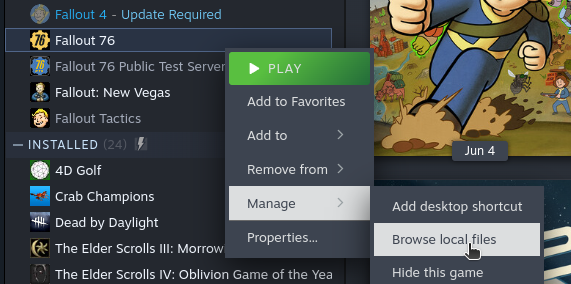
If you can't find it, you can also open the folder via Steam:
- Right-click the game in the Steam library and select "Manage" → "Browse local files".
For Microsoft Store / Xbox Game Pass, look under
X:\XboxGames\Fallout 76\Content- or
X:\Program Files\ModifiableWindowsApps\Fallout 76\
(X:\ being the drive you installed the game to)
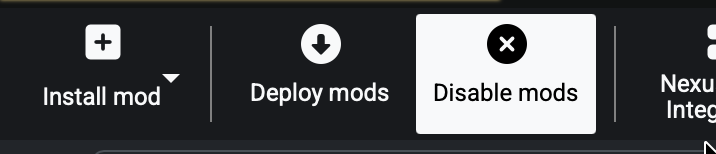
Click "Disable mods" in the mod manager's tool row to toggle it and then click on "Deploy mods". All mods will be removed.
The app shouldn't touch these mods. You can change the load order from the "Resource List" tab in the mod manager.
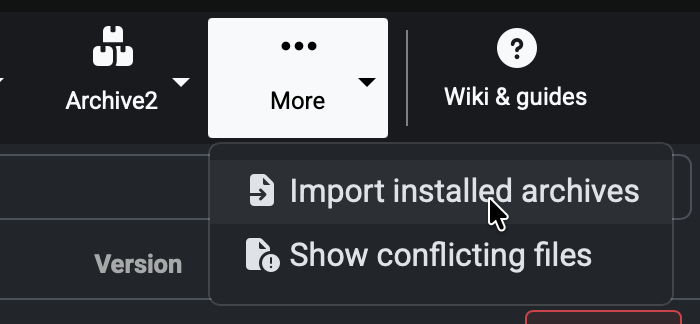
If you want to manage *.ba2 archives as a mod, you can also import them: More → Import installed archives
The app is designed to be used standalone. Using it in combination with other mod managers might not work well.
You can import existing archives into the mod manager. See also: What happens to mods I've installed manually?