Releases: FrittePlayz/FS25_MiningLayers
Release list
v1.6.0.0 — Layers everywhere, the target height becomes a tool, Portuguese

Video tutorial: https://www.youtube.com/watch?v=kR0h1_S8oHc — 29 minutes, from installation to the dozer, with subtitles in English, German, French, Polish, Italian and Portuguese.
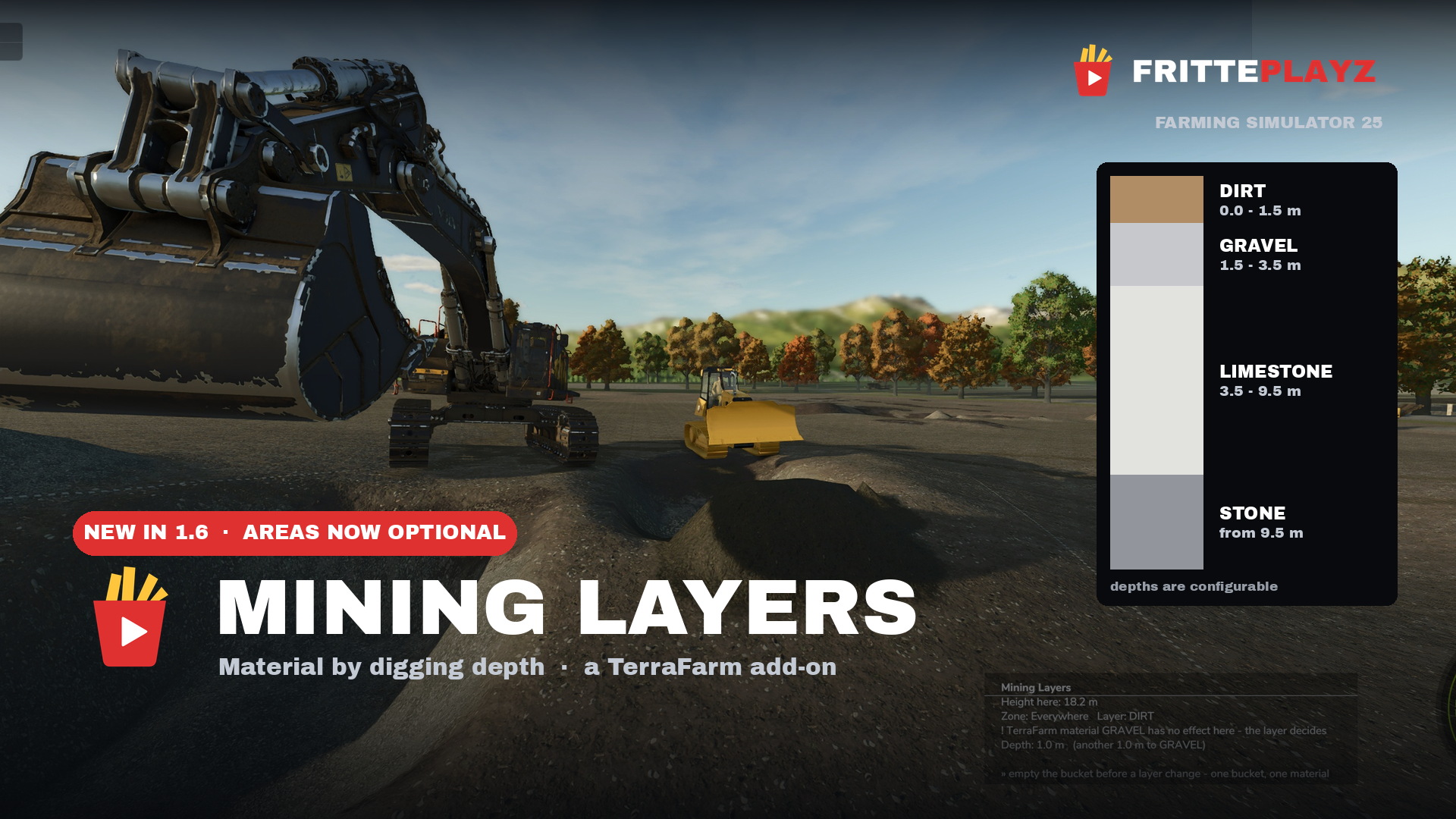
You no longer need to draw an area. Until now a TerraFarm polygon had to exist and be assigned to your machine before anything happened at all — the single most common reason people concluded the mod was not working. Layers now apply anywhere on the map: the surface reference grid from 1.5.0 freezes the height of the undisturbed ground the first time a bucket touches a spot, so the boundaries follow the terrain without a fixed height being written anywhere.
Set it on the layers page: target "Everywhere (no area needed)" → Mining Layers → save. A fresh install has it on. An existing installation keeps its behaviour until you flip it — an update should not change a running game. Switching it back off keeps your layers instead of discarding them.
A drawn area still wins wherever one is assigned, and both deliberate exits are unchanged: an area set to enabled="false" and an area with a hand-set material get no layers. Building sites and pipe trenches stay clean with the global mode on.
The target height becomes a tool. Level a pad at ground level, cut a berm halfway up the pit wall, grade a ramp at a fixed slope — the dozer holds that line now instead of digging through it. This was impossible before, because the mod pulled the height down by itself whenever it sat near ground level. Reported by TacticalOreo: "it was digging to china when i set the height. I was making a pad but it was not paying attention to the target height."
autoTargetHeight is off by default from now on, and existing installations get it switched off once with a line in the log saying why. Where your target height cuts off the lowest layer, the mod says so and leaves the decision to you. Want the old behaviour back? Set autoTargetHeight="true". Step 9 in the README shows the whole thing with a dozer.
⚠️ A freeze that reached you without you changing anything
With the bucket rammed deep into the ground or working against a steep wall, the mod threw a Lua error every frame: the log grew by ~10,000 lines per second, FS25 climbed to ~215% CPU, and the game had to be killed from outside. This affected 1.4.3.0 and 1.5.0.0. The setting behind it, freeDumpHeight, is on by default.
Cause: TerraFarm guards ground-dumping twice — once for the bucket being inside the ground, once for the 0.5 m height check. We meant to lift only the height check and lifted both. Verified A/B/A/B on the same machine against the same wall: three freezes with the guard removed, zero errors across 3,825 log lines with it restored, including a deliberate ram.
Staying on an older version? Set freeDumpHeight="false" in miningLayers.xml.
Portuguese — thank you, Alicopower
Portuguese (pt) and Brazilian Portuguese (br), contributed by Alicopower in issue #7. Mod page, layer editor and map report now speak seven languages.
Slot diagnosis with your map's real numbers
The startup report states how many ground slots your map has, how many are taken and how wide its channel is: "This map has 63 ground slots (6 channels) — 63 in use." Both numbers are read from the running game. When they are full, the mod says so — that is the actual cause behind material that digs and sells but will not tip back onto the ground. Measured on two maps: a 6-channel map at 63 of 63 with three mining materials rejected, a 7-channel map at 83 of 127 with none.
Also fixed
- Switching off a named area no longer wipes its layers. Switch it back on and your setup is still there. The global target always behaved that way — the identical switch in the identical menu had two different outcomes.
- A disabled global zone no longer vanishes from your configuration on the next save.
- The depth display no longer goes quiet outside a drawn area, and no layer is guessed before the ground has been touched — on a spoil pile or someone else's pit edge it says the reference height is not set yet.
- The display no longer prints
globalZoneat you. It shows the word the editor uses:Zone: Everywhere Layer: DIRT. - "TerraFarm decides: the map's material" was wrong. The normal case is the material set on your machine; the map's own takes over only when the map ships resources and map resources are on both globally and on the machine.
- A refusal to dump now prints what the startup check said about that same material, fill type index included, and states plainly whether the two agree. Where they disagree, the log calls it a bug in this mod instead of blaming your map.
- The yellow scope line under the editor, the "no input area" message and the disabled-zone wording all told half-truths about the new target. All corrected, in all seven languages.
Requirements
TerraFarm by scfmod (GitHub only — keep the folder named FS25_0_TerraFarm) and at least one machine with a TerraFarm configuration. PC/Mac only, script mods do not run on consoles.
Full detail in the changelog.
v1.5.0.0 — Layers follow the terrain, Italian, and a correction we owed you
Live-tested by Tommy on Keno City, RGC Yukon Back Country and Lone Hills.
Layers now follow the terrain instead of one flat plane. Until now the reference height was a single plane fitted over your area, so above a crest or below in a hollow the layer boundary sat at the same absolute height everywhere — near the surface on the high ground, metres deep in the dip. The mod now freezes the height of the undisturbed ground in a 2 m grid the moment the bucket first reaches a spot, and measures every boundary from the height at that spot.
Measured on a natural 3.3 m step, one pit, DIRT depth="1.5":
| surface | depth | to gravel | total | |
|---|---|---|---|---|
| upper level | 154.9 m | 0.2 m | 1.3 m | 1.5 m |
| lower level | 151.6 m | 0.4 m | 1.1 m | 1.5 m |
Before, the upper spot reported "filled above reference height" — no layer at all. On flat ground nothing changes: measured on Yukon, surface 16.8 m, depth 0.0 m, 1.5 m to gravel, exactly as before.
Before — the upper level of that step. The readout says filled above reference height: the layer boundary sat below the ground here, so there was no layer at all.

With 1.5.0 — the same spot. Zone: terrasse 2 · Layer: DIRT · Depth 0.2 m (another 1.3 m to GRAVEL) — the configured 1.5 m, measured from the surface right there.

The frozen grid is stored per savegame (modSettings/FS25_MiningLayers/surfaceMemory<index>.xml). Without it the first bucket after a restart would take the pit floor for grown ground and the geology would sink along with the pit. Verified across a restart: 99 cells written, 99 loaded, 191 after the following session, with both plateaus held apart — 55 cells at 151.58 m, 36 at 154.94 m.
Italian, contributed by marcols13 (Discussion #1). All 133 of his strings went in unchanged; we added the 21 keys for features that landed after his file, following his wording. Five languages now, manual included.
The 63-material limit — we had it wrong
The mod stated in several places that FS25 caps ground materials at 63 as a hard engine limit. That is not correct, and every text has been rewritten — 24 strings across four languages, all READMEs and the mod description.
Capacity comes from the map, occupancy from your mod list. The map sets the channel width of its height density map, and the slot count follows 2^n−1: 63 at 6 bit, 127 at 7 bit, 255 at 8 bit. The base game takes 48, the map's own materials register next, your mod list gets the rest. Measured with one identical mod list: one map stopped at 63 and rejected ten materials, another registered 83 without a single rejection. grep addDensityMapHeightType log.txt names every material a map turned away.
So "remove mods" is no longer advised where the map has room. The map report on the mod's menu page tells you which case you are in — verified across three maps: 0 of 39 missing on a 7-channel map, 10 of 29 on a 6-channel map with the names listed, 0 of 18 on a third.
Changed
- The display toggle moved from Numpad 5 to Numpad /. Numpad 5 is the base game's front work light, so our default sat on an occupied key. Measured against the base game plus a 348-mod list, exactly two numpad keys are free: Num / (toggle) and Num ✱ (move).
⚠️ Existing installs keep their old binding — a new default only applies to profiles that do not know the action yet. If the toggle or the move mode has no key on your setup, assign it once under Options → Controls → Mining Layers.
Fixed
- The depth display calculated on the old plane while digging already used the grid, so "zone" and "layer" came from one source and "depth" and "x m to go" from the other. The depth rings had the same fault. Both now read the grid.
- The periodic write of the reference grid never triggered when cells arrived in a block, so nothing reached disk until you quit. A crash would have cost the whole grid.
- The direct key fallback still polled Numpad 5 after the default changed — on installations where that path carries the toggle, Num / would have done nothing and Num 5 would have switched both the display and the work light.
- No slot warning when a material is simply absent from the map: the verdict now follows what cannot be dumped, not what is missing. The wrong warning appeared in the log and on the menu page.
Known, not fixed here
- On ground never dug before, the display names a slightly different depth than after the first bucket (fallback plane → grid). Technically correct, worth an honest line — candidate for 1.5.1.
- A second ceiling exists at 255 fill types, hit on a dedicated server with a large mod list. Comes with the slot diagnosis in the next version.
- Multiplayer: the mod runs on a dedicated server (zones, layers, spoil memory across a restart). The client side has not been tested yet.
Thanks: marcols13 for Italian · TacticalOreo for the first dedicated-server log · losthope24 and Nonnus for the channel-width discussion that led to the correction above.
v1.4.3.0 — Map-aware materials, map report, free dump height
Live-tested by Tommy on the 243 Quarry map and RGC Yukon Back Country V2.
The mod now knows what your map can do. On map load it checks every material against the running session — is it registered, does it have a ground slot? The layer editor only offers what your map actually provides, and anything you can dig and sell but not dump back onto the ground is marked (!) with the reason spelled out. A map report on the Mining Layers page tells you where you stand, starting with what works.
Why this matters: FS25 allows only 63 materials that can lie on the ground, and the base game alone uses 48 of them. Map and mods share the remaining 15 — whoever loads first wins. That is not something any mod can change, but from now on you can see it instead of guessing. Rule of thumb: fewer mods = more free slots = more materials you can dump.
Fixed
- Custom ground textures survived the editor — now they really do. Saving in the layer editor silently discarded any hand-set
paintLayer. Cause found and fixed. - Dumping no longer refused just because the bucket sits low. TerraFarm blocks ground-dumping when terrain is within ~0.5 m below the bucket edge. That check is now lifted — dumping works at any height. Materials without a ground slot are still refused honestly by the game, with a log line naming the material, instead of silently dropping 0 litres.
freeDumpHeight="false"inminingLayers.xmlrestores the original behaviour. - The pay seam no longer falls back to PAYDIRT blindly — it picks the next usable material from your map's own pool. On maps without PAYDIRT this used to produce a pit with no seam at all.
- Layers whose material is unknown on the current map are kept, not dropped. Taking a savegame to a different map no longer clears your configuration.
Thanks to @TacticalOreo and the RGC crew for the logs and the persistence — most of this release came out of that.
Contributors

Assets 3
v1.4.2.0 — Movable HUD, free-dump protection, hardened key fallbacks (DRAFT, in test)
Live-tested by Tommy on the 243 Quarry map — all test points green (movable HUD, free-dump fix, key-path verification).
Highlights (full details in CHANGELOG.md):
- Movable display: Num * opens move mode — click to pick up, click to drop (auto-saves, resolution-independent), right-click resets. Drag&drop mechanics inspired by HappyLooser's HL Hud System — own implementation, no code copied.
- Dumping no longer silently blocked when a layer zone is the machine's TerraFarm output area (found live on the 243 Quarry map).
- Display polish: title band, darker tip ticker band, width capped at the F1 help menu, tips rotate slower (20s).
- **"No input area assigned" hint — the number one support cause, now stated directly in the display.
- Third key-registration path (HappyLooser pattern) with per-path log lines — the large-modlist binding experiment.
- Handshake timing edges fixed, fallback key resolution hardened (modifier combos, explicit unbind), complete input-state reset on map exit.
- Docs: new FAQ in all four READMEs — the mod adds no fill types to any map; PAYDIRT correctly listed as non-base-game (itch.io user question).
v1.4.1.6 — Toggle key works: vehicle API + direct fallback
v1.4.1.6 — Toggle key works: vehicle API registration + direct fallback
The Numpad 5 depth-display toggle finally works — live-tested (toggle + rebinding).
What was wrong
The evening's diagnosis builds (1.4.1.4/1.4.1.5, never released) proved the mod's action
registration was fine all along: success=true, real event id, correct VEHICLE context,
binding present in the profile — and the callback still never fired, on any key binding.
On large mod lists the game's binding resolution simply drops the event (suspicion: load
order — TerraFarm loads early as FS25_0_*). Root cause inside the game, not the mod. Open.
What 1.4.1.6 does
- Registration now uses the vehicle's own
addActionEvent(TerraFarm's proven pattern). - Direct fallback: if a key press is not handled by the action system within a second,
the mod reads the key itself and toggles on release. Self-calibrating — on installations
where the action system works, the fallback stays silent and nothing changes. - Rebinding works in both paths — the fallback re-resolves your bound key from the
input system after every menu close. - The log states once when the fallback is active, and every registration is logged with
counter, success flag, event id and input context (capped at 25 lines) — that is our
remote diagnosis in every user log.
Known limits (fallback path only)
- Keyboard only — no gamepad buttons in the fallback.
- No F1-help entry on installations where the action system drops the binding.
- The key also toggles on foot there (harmless: without a machine there is no display).
- Tap the key, don't hold it. Two small timing edges in the 1-second handshake between
the two paths are known and queued for 1.4.2: holding the key longer than a second can
cancel its own toggle, and on fallback installations a second tap within one second is
ignored. Normal tapping is unaffected — exactly what the live test covered.
Built and diagnosed locally by Dredd, live-tested by Tommy, reviewed and released by Percy.
v1.4.0.0 — Selectable pay seam · French & Polish
What's new
Added
- Selectable pay seam — the seam below the overburden is no longer hardwired to PAYDIRT. Pick COAL for a coal mine, LIMESTONE and STONE for a gravel pit, or GRAVEL, SAND, DIRT, SOIL. In the editor the seam is the fixed last row: material selectable, thickness and position fixed, bedrock below stays fixed. Requested by Tazweb on itch.io — thanks!
- Seam layers are marked
seam="true"inminingLayers.xml, so hand-written configs with a non-PAYDIRT seam survive the editor round-trip. Old configs load as before (PAYDIRT above the bedrock counts as the seam). - Fallback: if the map does not know the chosen seam material (COAL and LIMESTONE are not base-game fill types), the seam reverts to PAYDIRT with a log line instead of silently producing a pit with nothing in it.
Changed
- Minimum layer thickness enforced in the editor — 1 m for the top layer, 1.5 m for every layer below; the thickness selector simply starts at the minimum for the selected layer. Thinner layers break spoil pile pickup; with big machines 2 m is the better choice (hint added to editor and manual).
- Help texts (editor hint, quickstart, manual) now describe the selectable seam.
Fixed
- Version string in the log said 1.3.7.0.
Translations
- French and Polish added — full UI and in-game manual (
l10n_fr.xml,l10n_pl.xml), machine-translated; native-speaker corrections welcome via PR or the language poll.
Install: put FS25_MiningLayers.zip (below) and TerraFarm unpacked into your mods folder, enable both. Full instructions in the README.
Mining Layers 1.3.7.0
Added: new tip with screenshot in the in-game help — reaching the second layer with a dozer blade alone (mode Flatten, no rear ripper).
Added: help note on how layer textures resolve on any map (automatic fallback, paintLayer override).
Fixed: version string in the log said 1.3.5.0.
Install: drop FS25_MiningLayers.zip into your mods folder — TerraFarm is required, see the README.
Mining Layers 1.3.6.0
Changed: STONE now paints a loose-stones ground texture (MOSS_STONES / FOREST_STONES) instead of a bare rock face where the map provides one. Maps without those layers fall back to MOUNTAINROCK/ROCK as before, and custom paintLayer settings are unaffected.
Everything else is unchanged from 1.3.5.0.
Install: drop FS25_MiningLayers.zip into your mods folder — TerraFarm is required, see the README.
Mining Layers 1.3.5.0
First public release.
Requires TerraFarm — install it first, do not rename its folder (FS25_0_TerraFarm). Setup and pitfalls are in the README.
What it does
- Material comes from digging depth: topsoil → gravel → paydirt → rock
- Geology per pit — each TerraFarm area can have its own layer stack, set in the in-game editor
- Spoil piles remember what you dumped, with crater-cheat protection
- Automatic pit floor, slope and waterline handling
- In-game menu page with a graphical layer editor and the full manual (EN/DE)
- Overburden is configurable; the paydirt seam and rock below are set by the mod — deliberate mining gameplay
Notes
- Areas with a material set behave like plain TerraFarm (no layers). Path areas are never layered.
- A small sponsor sign stands at the pit edge;
sponsorSign="false"inminingLayers.xmlremoves it instantly.
Install: drop FS25_MiningLayers.zip into your mods folder, enable both mods in your savegame.