Actions Reference
All plugin actions appear under Actions → Enphase Envoy in Indigo's action group editor.
Action ID: refreshData
Device Filter: Any plugin device
Polls all enabled Enphase devices immediately. Equivalent to the Plugins → Enphase Envoy → Manually Refresh menu item.
Use case: Force an immediate update after a change in your system (e.g. clouds rolled in and you want fresh data now).
Action ID: refreshDataForDev
Device Filter: Any plugin device
Polls a single selected device immediately.
Action ID: refreshBatteryData
Device Filter: EnphaseEnvoyBatteryDevice
Forces an immediate refresh of the battery device by pulling current data from the first online EnphaseEnvoyDevice.
⚠️ Requires an installer-level JWT token. Owner tokens return HTTP 401/403 and the action will fail gracefully with a log message.
Action ID: enablePowerProduction
Device Filter: EnphaseEnvoyDevice
Sends PUT /ivp/mod/603980032/mode/power with {"length": 1, "arr": [0]} to the Envoy, enabling all inverter output.
State updated: powerProductionEnabled → "Enabled"
Action ID: disablePowerProduction
Device Filter: EnphaseEnvoyDevice
Sends PUT /ivp/mod/603980032/mode/power with {"length": 1, "arr": [1]}, disabling all inverter output.
State updated: powerProductionEnabled → "Disabled"
Use case:
- Comply with utility curtailment requests.
- Prevent export during maintenance.
- Automate production shutoff at night (though the Envoy handles this automatically).
⚠️ Requires an installer-level JWT token.
Action ID: enableDpel
Device Filter: EnphaseEnvoyDevice
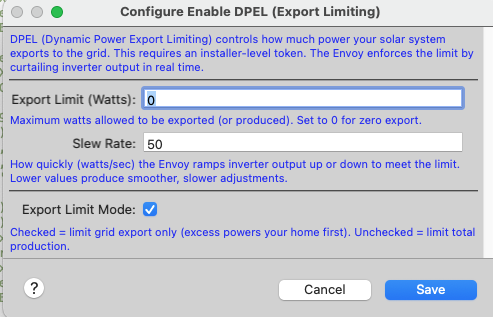
Configures the Envoy's Dynamic Power Export Limiting via POST /ivp/ss/dpel.
| Parameter | Type | Default | Description |
|---|---|---|---|
| Export Limit (Watts) | Number | 0 |
Maximum allowed export (or production) in watts. Set to 0 for zero-export. |
| Slew Rate | Number | 50 |
How fast (W/s) the Envoy ramps inverter output. Lower = smoother transitions. |
| Export Limit Mode | Checkbox | ✅ checked | Checked = limit grid export only (home load is always served first). Unchecked = limit total production. |
States updated:
-
dpelEnabled→"Enabled (Export Limit)"or"Enabled (Production Limit)" -
dpelLimitWatts→ the configured watt limit
Example — zero export:
Set Export Limit = 0, Export Limit Mode = ✅. The system will use all solar locally and never export.
Example — 5 kW export cap:
Set Export Limit = 5000, Export Limit Mode = ✅. Solar up to 5 kW is exported; anything beyond feeds the home only.
Action ID: disableDpel
Device Filter: EnphaseEnvoyDevice
Removes export limiting — the system can export unrestricted.
State updated: dpelEnabled → "Disabled"
These actions use the Enphase tariff API (
/admin/lib/tariff). They work best with an installer-level token. Some firmware versions may accept owner tokens.
Action ID: setStorageModeSelfConsumption
Device Filter: EnphaseEnvoyBatteryDevice
Sets the battery to Self-Consumption mode: charge from excess solar, discharge to cover home load. The default everyday mode.
State updated: storageMode → "self-consumption"
Action ID: setStorageModeSavings
Device Filter: EnphaseEnvoyBatteryDevice
Sets the battery to Savings mode (also called "Time of Use" or "Cost Savings" in the Enphase app). Charges during cheap-rate periods, discharges during peak-rate periods.
State updated: storageMode → "savings"
Action ID: setStorageModeFullBackup
Device Filter: EnphaseEnvoyBatteryDevice
Sets the battery to Full Backup mode: keeps batteries fully charged for emergency backup. Solar energy goes to the grid rather than the battery.
State updated: storageMode → "backup"
Action ID: enableChargeFromGrid
Device Filter: EnphaseEnvoyBatteryDevice
Allows the battery to charge from the grid in addition to solar. Useful during off-peak electricity rate windows.
State updated: chargeFromGrid → True
Action ID: disableChargeFromGrid
Device Filter: EnphaseEnvoyBatteryDevice
Disables grid charging — battery only charges from solar.
State updated: chargeFromGrid → False
Action ID: setReserveSOC
Device Filter: EnphaseEnvoyBatteryDevice
Sets the minimum state of charge the battery will keep in reserve for emergency backup.
| Parameter | Type | Default | Range |
|---|---|---|---|
| Reserve SOC (0-100%) | Number | 20 |
0–100 |
State updated: reserveSOC → the configured percentage
Example: Set to 30 to always keep 30% charge available for outages.
Trigger on a schedule or external API signal to enforce zero export during peak feed-in restriction windows:
Action Group: "Enforce Zero Export"
  1. Action: Enable DPEL (Export Limiting)
     Device: My Envoy-S
     Export Limit Watts: 0
     Export Limit Mode: ✅ (export limit)
     Slew Rate: 50
Action Group: "Start Off-Peak Charge"  [runs at 11 PM]
  1. Action: Enable Charge from Grid
     Device: My Battery

Action Group: "Stop Off-Peak Charge"   [runs at 7 AM]
  1. Action: Disable Charge from Grid
     Device: My Battery
  2. Action: Set Storage Mode: Self-Consumption
     Device: My Battery
Trigger: Weather variable "Storm Approaching" = True
Action Group: "Prepare for Storm"
  1. Set Storage Mode: Full Backup
  2. Set Battery Reserve Percentage = 100
  3. Enable Charge from Grid
Trigger: Variable "GridCurtailment" changed to "True"
Action Group: "Apply Grid Curtailment"
  1. Enable DPEL
     Limit: 0 W (zero export)
     Mode: Export Limit

Trigger: Variable "GridCurtailment" changed to "False"
Action Group: "Remove Curtailment"
  1. Disable DPEL
