Repository navigation
Reference Health Connect Permissions
Status: External Health Connect design reference. This is background material, not OpenVitals implementation policy.
Your app's Settings screen should provide users with options to manage their
connection to Health Connect. This gives users control over data
synchronization and access to their data.
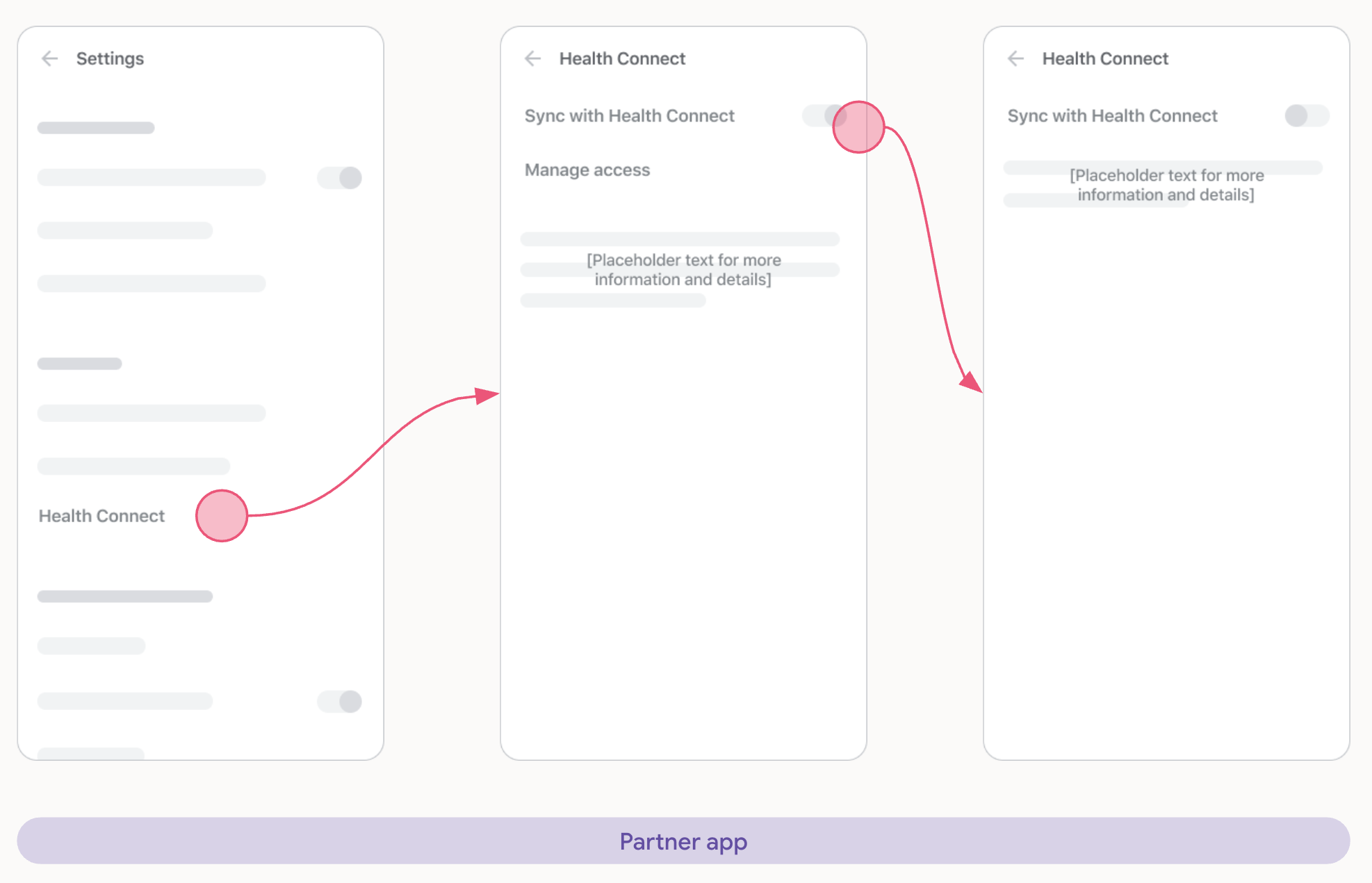
This toggle provides a way for users to pause or resume data synchronization between your app and Health Connect.
- When toggled on: Your app actively reads and writes to Health Connect, as per the permissions granted by the user.
-
When toggled off: Your app should stop all data synchronization with Health Connect. If you programmatically revoke permissions using
revokeAllPermissions(), explain to the user that the changes aren't immediately reflected in Health Connect without an app restart. To avoid a confusing user experience, give users the option to go to Health Connect settings to revoke permissions there.
The Manage access button should provide a direct link for the user to manage your app's permissions from within the Health Connect app. This gives the user full control and transparency.
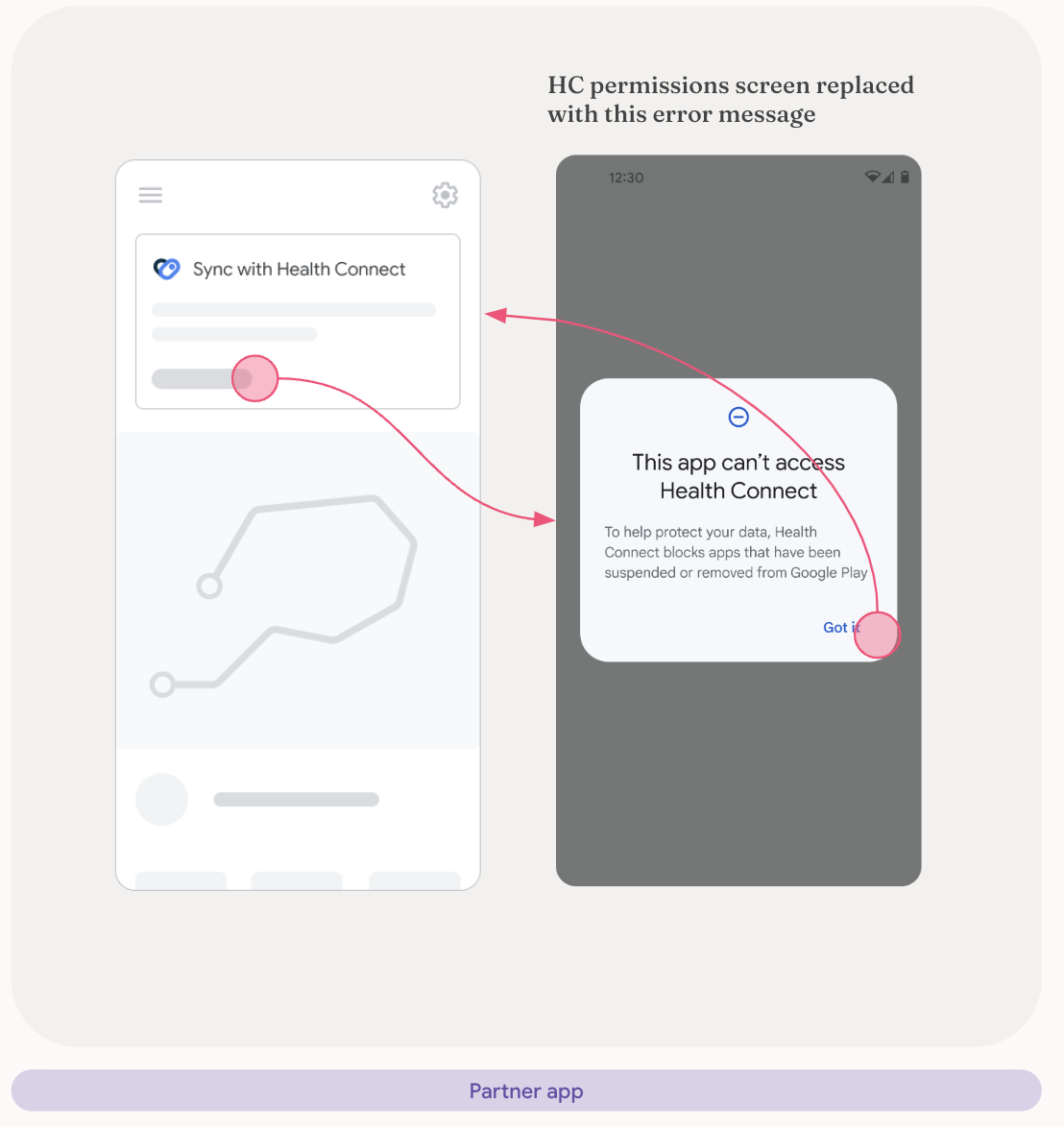
If your app has insufficient Health Connect access, users should be presented
with the following screen across all entry points:
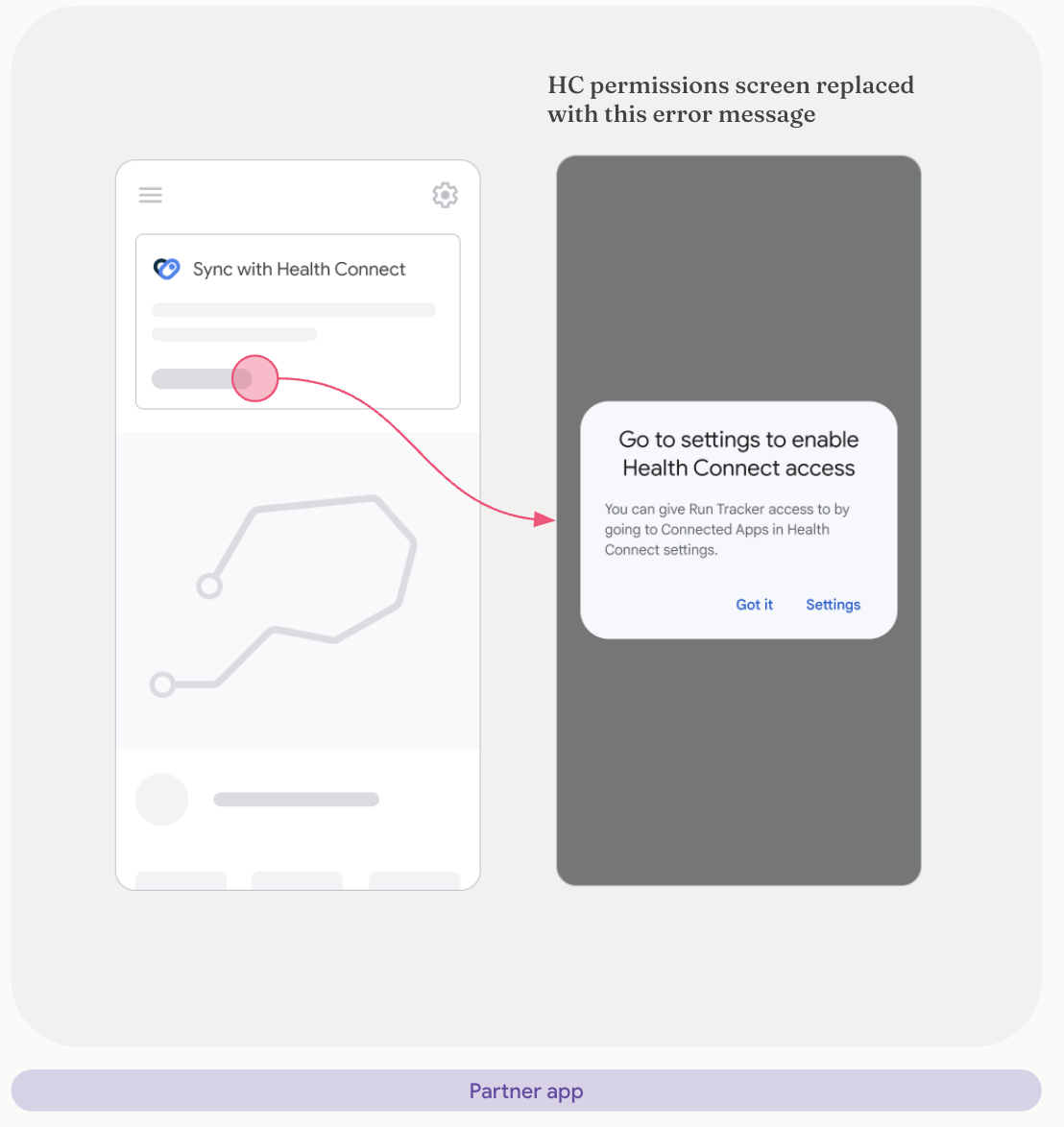
If the user selects Cancel on the permissions request screen twice in a
row, your app should present the user with a screen similar to the following:
Note
Note: Once this screen is displayed, users need to re-enable permissions from within the Health Connect Settings menu.
Generated from docs/reference/design/permissions.md. Edit it there; changes made here are overwritten.
This wiki mirrors the Markdown in Hale-MTU/OpenVitals on every push to main.
Features
- Features
- Achievements
- Activity And Training Plans
- Activity Metrics
- Apple Health Import
- Beverage Logging And Caffeine
- Bluetooth LE Sensors
- Body Energy
- Body Metrics
- CoMaps Navigation Context
- CSV Import
- Cycle Tracking
- Daily Readiness
- Elevation Correction
- Feature Map
- FIT Files Import
- Food Logging
- GPX/KML/KMZ/TCX Route Import
- Health Connect Metrics Dashboard
- Health Report Export
- Heart And Vitals
- Heart Rate Recovery
- Home Screen Widgets
- Hydration
- Manual Entry Of Metrics
- Medical Records
- Metric Detail Customization
- Mindfulness
- Non Health Connect Metrics Dashboard
- Nutrition
- Offline Maps Support
- Onboarding And Permissions
- Preloaded Beverage Nutrition Reference
- Privacy, Support, And Diagnostics
- Recording Of Activity
- Reminders
- Settings And Preferences
- Sleep Score And Recovery
- Sleep Tracking
- Statistics
- Sync With Another Phone
How-to
App
- App Guide
- FAQ
- Getting Started
- Health Connect
- Install
- Local And Connected Editions
- Permissions
- Privacy
- Screenshots
- Support
Reference
- Design Reference
- Reference
- Design Guidelines for Offline & Sync
- OpenVitals UI Notes
- Reference: Data Capture
- Reference: Data Display
- Reference: Health Connect Matchmaking
- Reference: Health Connect Onboarding
- Reference: Health Connect Permissions
- Reference: Health Connect UX
- Reference: Promoting Health Connect
Engineering
- Code Analysis
- Engineering
- Flutter ↔ Kotlin test-parity matrix
- apple-health-import
- Architecture
- body-cycle-recovery
- Design system conformance
- Development
- Feature Playbook
- Flutter -> Kotlin test parity: domain/data/core/contract/state/navigation/di/bootstrap/l10n/widget_test
- Flutter → Kotlin test-parity matrix: features section
- Flutter → Kotlin test-parity matrix: ui / goldens / integration / fixtures
- Flutter-to-Kotlin test-parity matrix — dashboard + devicesync
- manual-entry
- Translations
Proposals
- Proposals
- Activity Start Flow Analysis
- Activity Start Flow Simplification Proposals
- Caffeine Detail And Future Sleep Insights
- Cycle Tracking: Design and Status
- Medical Records Through Health Connect
- Medical Records: What Is Left
Releases
- OpenVitals 2.16.0
- OpenVitals 2.15.2
- OpenVitals 2.15.1
- OpenVitals 2.15.0
- OpenVitals 2.14.5
- OpenVitals 2.14.4
- OpenVitals 2.14.3
- OpenVitals 2.14.2
- OpenVitals 2.14.1
- OpenVitals 2.14.0
- OpenVitals 2.13.0
- OpenVitals 2.12.0
- OpenVitals 2.11.2
- OpenVitals 2.11.1
- OpenVitals 2.11.0
- OpenVitals 2.10.1
- OpenVitals 2.10.0
- OpenVitals 2.9.1
- OpenVitals 2.9.0
- OpenVitals 2.8.0
- OpenVitals 2.7.3
- OpenVitals 2.7.2
- OpenVitals 2.7.1
- OpenVitals 2.7.0
- OpenVitals 2.6.6
- OpenVitals 2.6.5
- OpenVitals 2.6.4
- OpenVitals 2.6.3
- OpenVitals 2.6.2
- OpenVitals 2.6.1
- OpenVitals 2.6.0
- OpenVitals 2.5.0
- OpenVitals 2.4.1
- OpenVitals 2.4.0
- OpenVitals 2.3.2
- OpenVitals 2.3.1
- OpenVitals 2.3.0
- OpenVitals 2.2.8
- OpenVitals 2.2.7
- OpenVitals 2.2.6
- OpenVitals 2.2.5
- OpenVitals 2.2.4
- OpenVitals 2.2.3
- OpenVitals 2.2.2
- OpenVitals 2.2.1
- OpenVitals 2.2.0
- OpenVitals 2.1.0
- OpenVitals 2.0.4
- OpenVitals 2.0.3
- OpenVitals 2.0.2
- OpenVitals 2.0.1
- OpenVitals 1.9.0
- OpenVitals 1.8.0
- OpenVitals 1.7.7
- OpenVitals 1.7.6
- OpenVitals 1.7.5
- OpenVitals 1.7.4
- OpenVitals 1.7.3
- OpenVitals 1.7.2
- OpenVitals 1.7.1
- OpenVitals 1.7.0
- OpenVitals 1.6.3
- OpenVitals 1.6.2
- OpenVitals 1.6.1
- OpenVitals 1.6.0
- OpenVitals 1.5.1
- OpenVitals 1.5.0
Project