Repository navigation
Reference Promoting Health Connect
Status: External Health Connect design reference. This is background material, not OpenVitals implementation policy.
Showcasing Health Connect in your app depends on the UX patterns and conventions established in your UI.
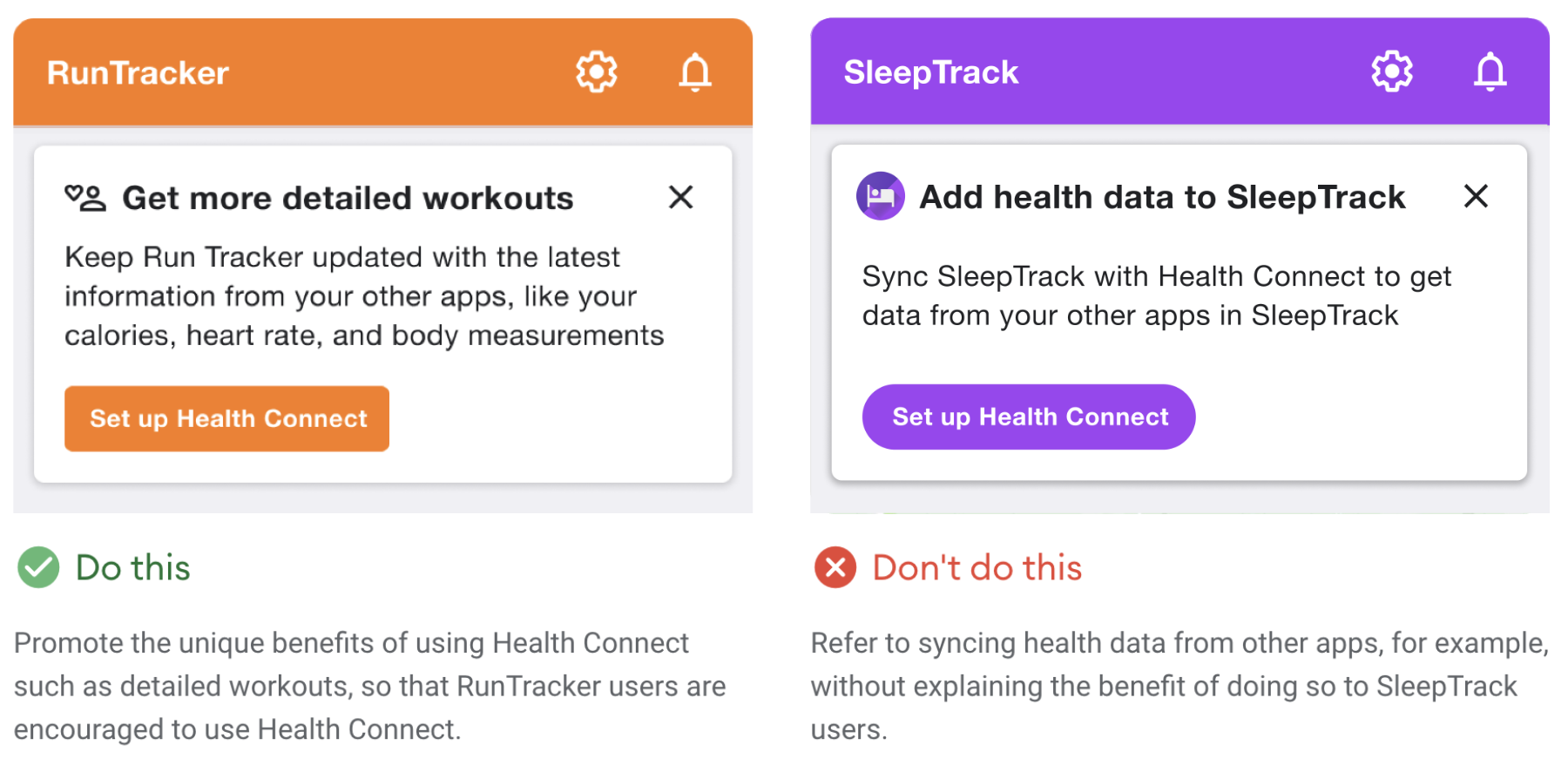
The first time you introduce Health Connect to users, provide a meaningful reason for them to set it up.
Rather than describing Health Connect's features, tailor your
message to how a user benefits from those features.
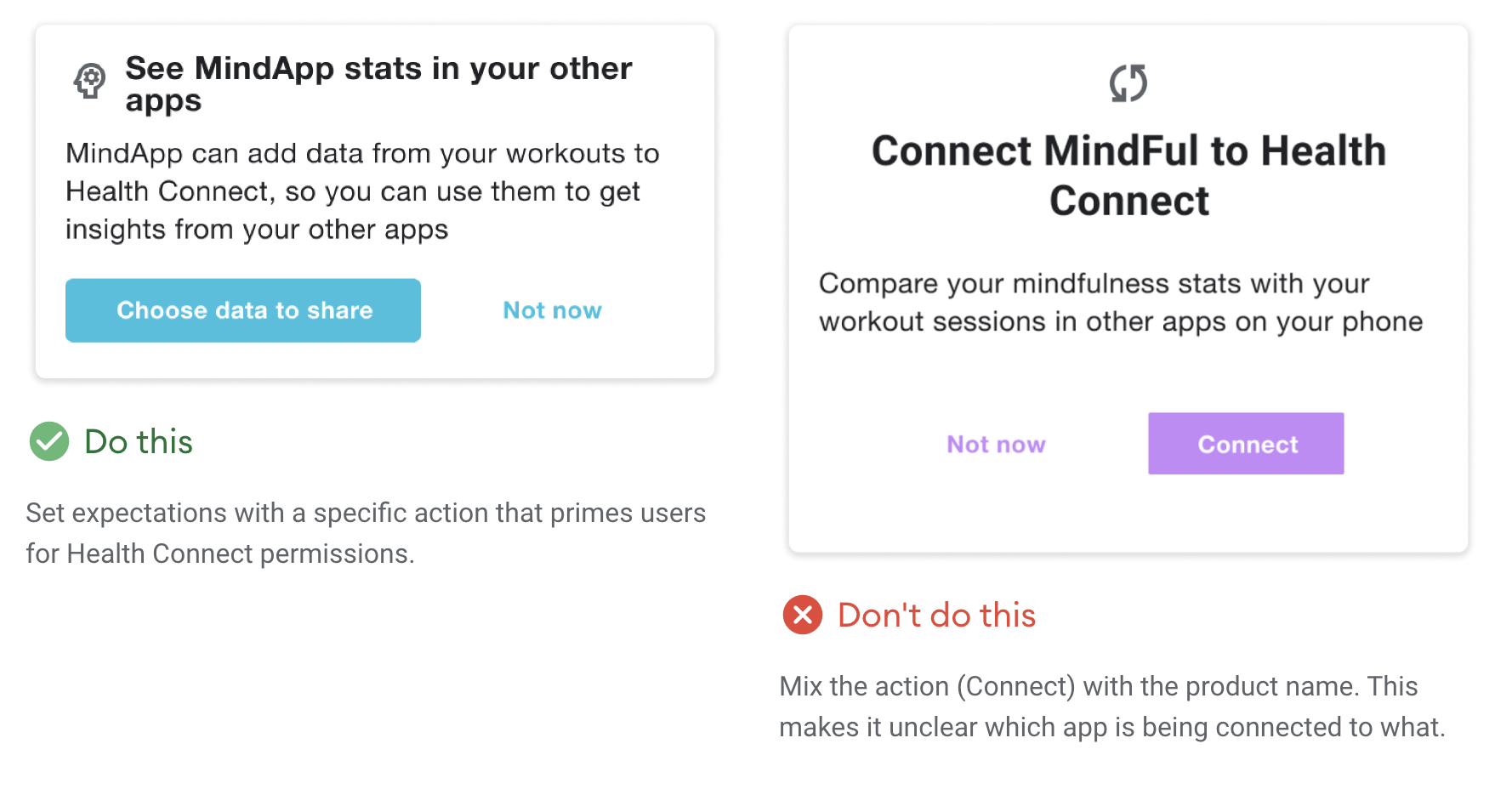
Don't ask users to "Connect to Health Connect." This is a jarring sentence and may also confuse a user's understanding of the relationship between apps in the Health Connect ecosystem.
Your UX should help users form an idea of how Health Connect interacts with your app, so it's important to consider which button labels work best toward achieving that goal.
Try using verb phrases like "set up" or "get started" on your button labels.
Or, if you're launching the permissions view, use more specific button
text, like "Choose data to share."
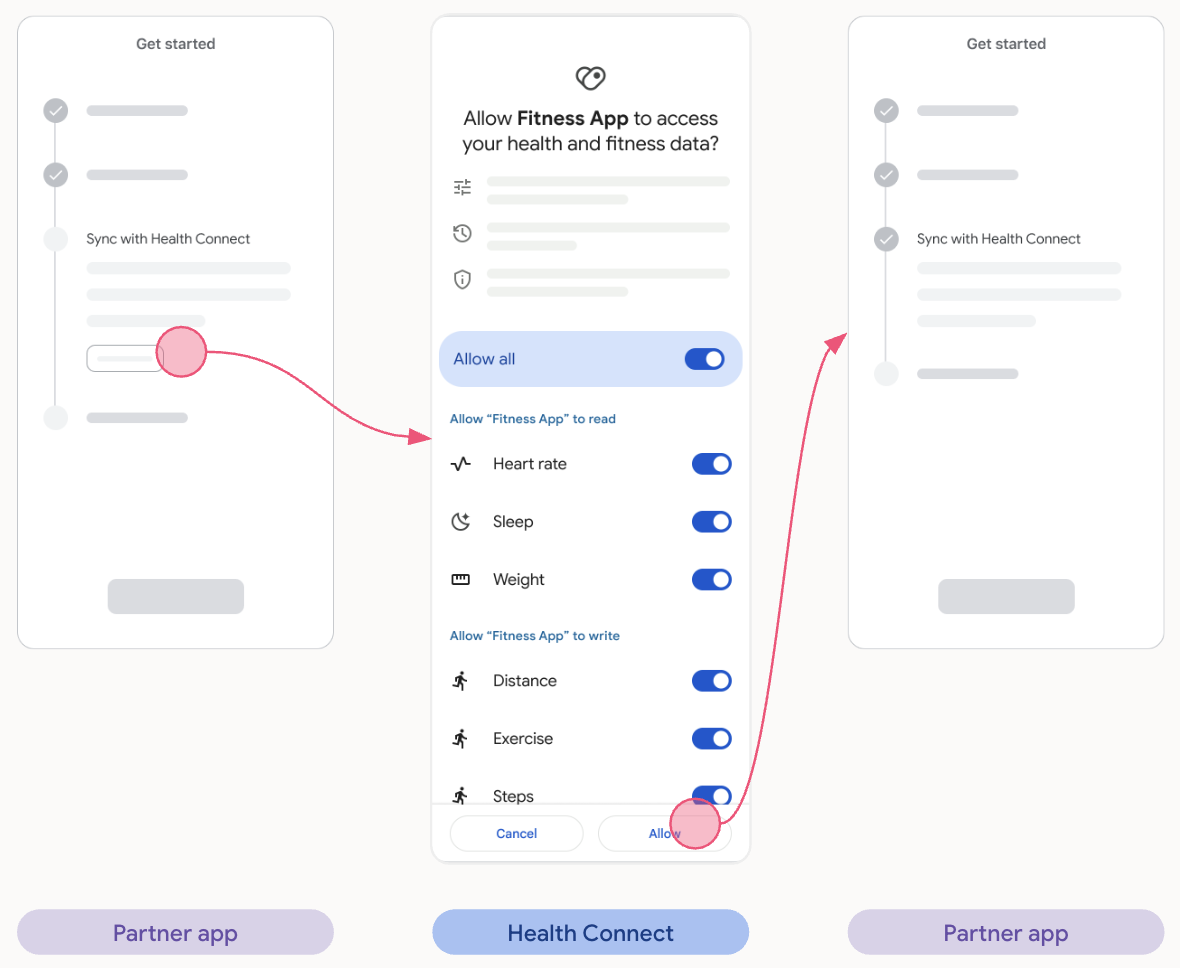
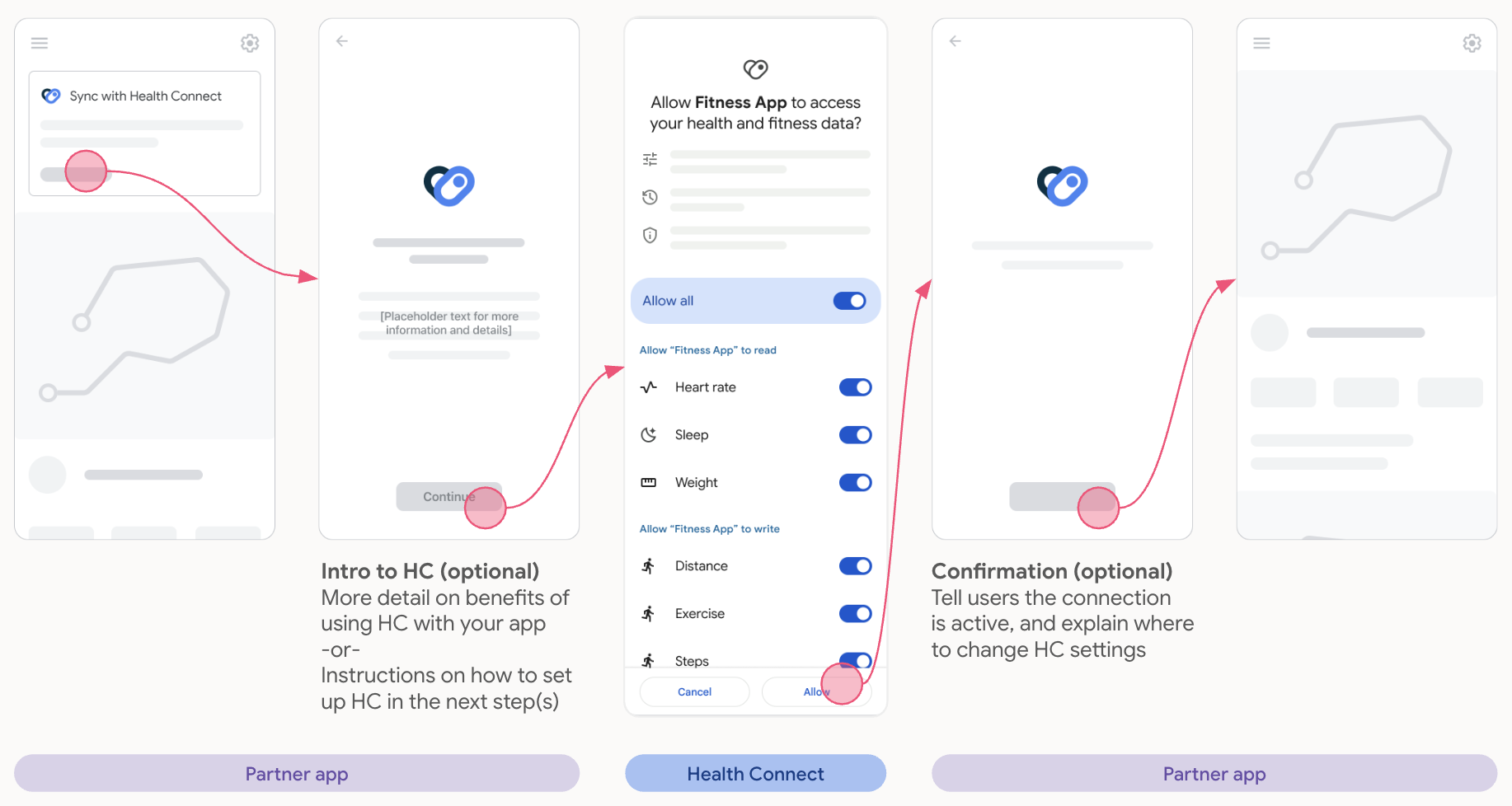
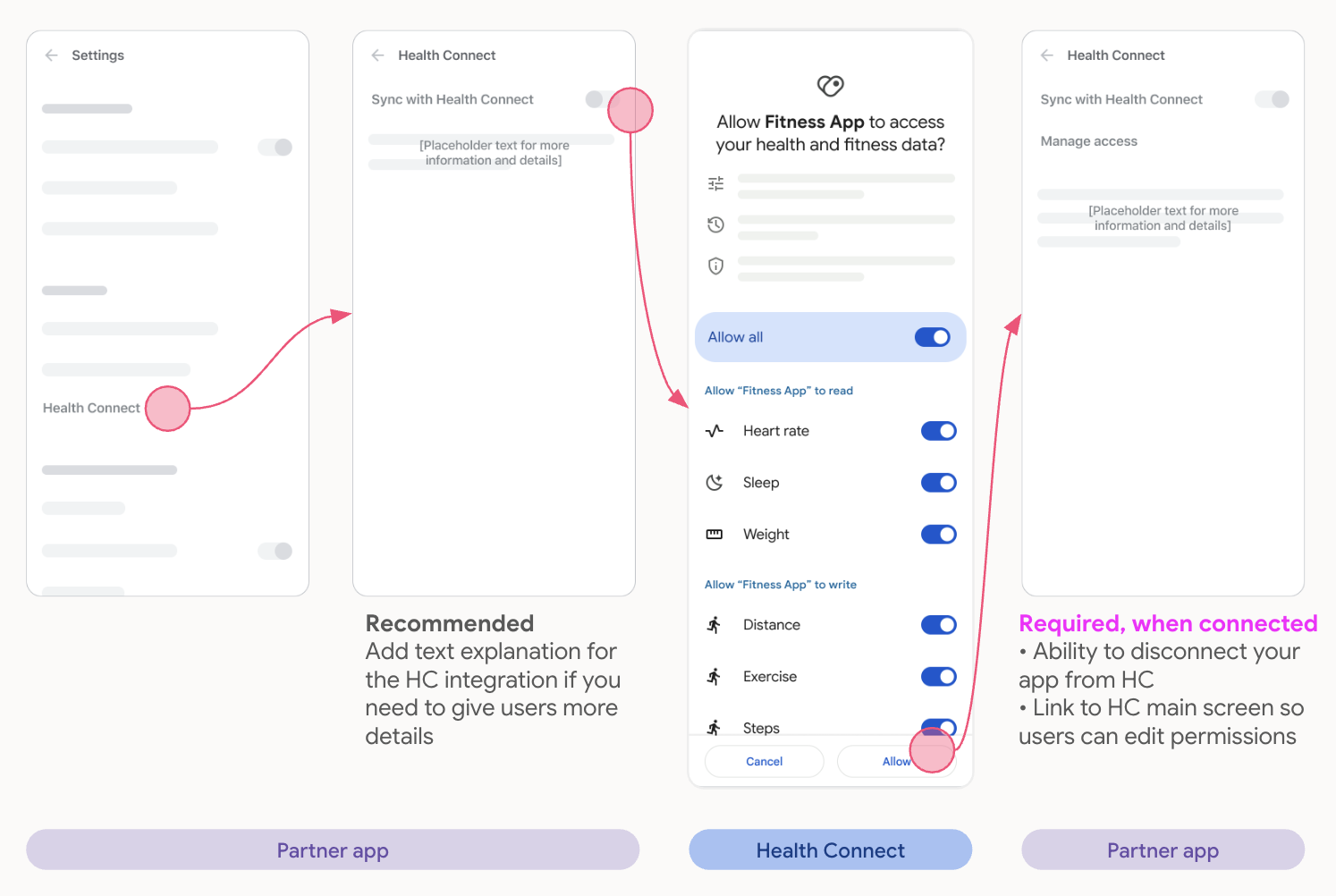
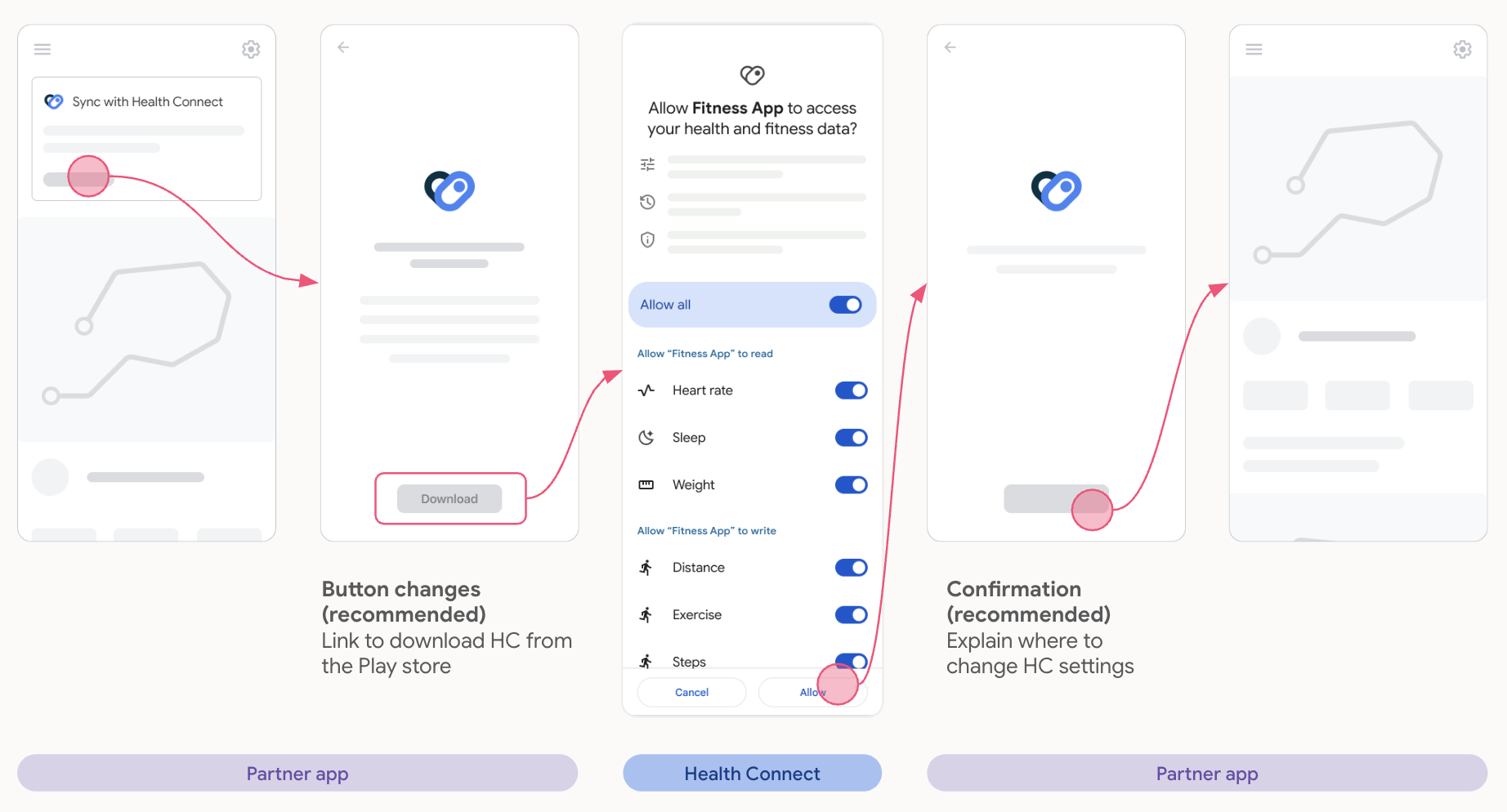
Here are a few ways you can promote Health Connect in your app:
- As part of your app's setup flow.
- With a card in your app's home screen.
- Through an entrypoint within a Settings screen.
- With an Android 13 APK download button for Android 13 versions and lower.
- When promoting new data types.
- With a modal or dialog when updating the app, similar to the app's setup flow.
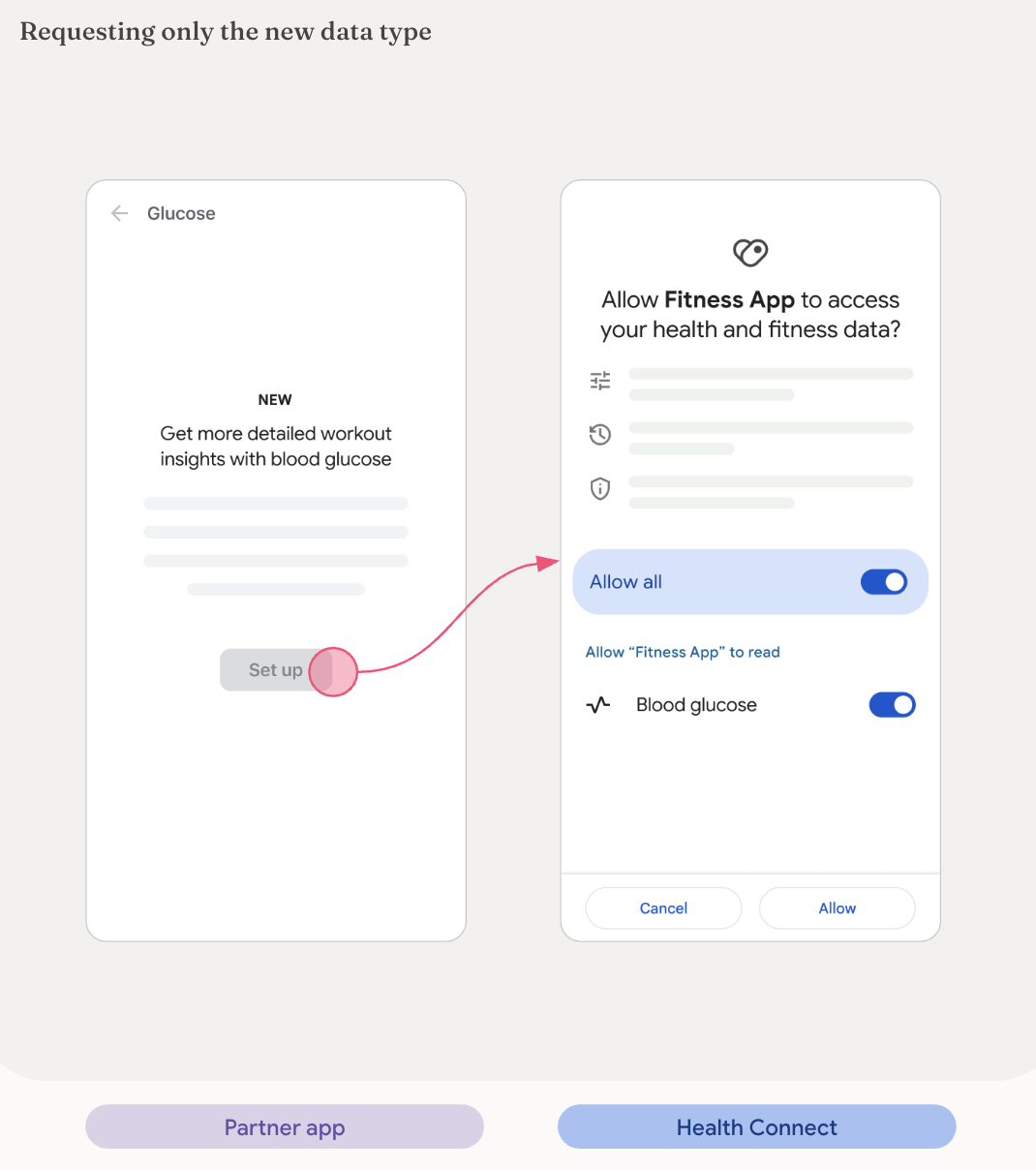
Apps that already have a Health Connect integration can request new data types in addition to the already granted ones.
Only the new data type(s) requested should be shown in the permissions screen, to avoid confusing users.
The following are a few examples of how to promote new data types(s):
If your app already promotes new data in other ecosystems, we recommend doing the same for Health Connect in Android, and adapt the language where relevant.
Why would users want to use this data in your app?
- Examples: reading the data
- Gives users more accurate insights in your app
- Users can see all data in one place in your app
- Example: writing the data
- Users can share this new data from your app with other compatible health and fitness apps on their phone
Ask for new permissions where it makes sense for users, so they know what's being asked of them.
Examples:
- Ask for exercise routes permission after users finish a workout in your app.
- If your app implements new permissions, show these together in one promo on the home screen.
- If you have a dedicated section in your app, for example Sleep, promote the corresponding permission there.
Generated from docs/reference/design/promote.md. Edit it there; changes made here are overwritten.
This wiki mirrors the Markdown in Hale-MTU/OpenVitals on every push to main.
Features
- Features
- Achievements
- Activity And Training Plans
- Activity Metrics
- Apple Health Import
- Beverage Logging And Caffeine
- Bluetooth LE Sensors
- Body Energy
- Body Metrics
- CoMaps Navigation Context
- CSV Import
- Cycle Tracking
- Daily Readiness
- Elevation Correction
- Feature Map
- FIT Files Import
- Food Logging
- GPX/KML/KMZ/TCX Route Import
- Health Connect Metrics Dashboard
- Health Report Export
- Heart And Vitals
- Heart Rate Recovery
- Home Screen Widgets
- Hydration
- Manual Entry Of Metrics
- Medical Records
- Metric Detail Customization
- Mindfulness
- Non Health Connect Metrics Dashboard
- Nutrition
- Offline Maps Support
- Onboarding And Permissions
- Preloaded Beverage Nutrition Reference
- Privacy, Support, And Diagnostics
- Recording Of Activity
- Reminders
- Settings And Preferences
- Sleep Score And Recovery
- Sleep Tracking
- Statistics
- Sync With Another Phone
How-to
App
- App Guide
- FAQ
- Getting Started
- Health Connect
- Install
- Local And Connected Editions
- Permissions
- Privacy
- Screenshots
- Support
Reference
- Design Reference
- Reference
- Design Guidelines for Offline & Sync
- OpenVitals UI Notes
- Reference: Data Capture
- Reference: Data Display
- Reference: Health Connect Matchmaking
- Reference: Health Connect Onboarding
- Reference: Health Connect Permissions
- Reference: Health Connect UX
- Reference: Promoting Health Connect
Engineering
- Code Analysis
- Engineering
- Flutter ↔ Kotlin test-parity matrix
- apple-health-import
- Architecture
- body-cycle-recovery
- Design system conformance
- Development
- Feature Playbook
- Flutter -> Kotlin test parity: domain/data/core/contract/state/navigation/di/bootstrap/l10n/widget_test
- Flutter → Kotlin test-parity matrix: features section
- Flutter → Kotlin test-parity matrix: ui / goldens / integration / fixtures
- Flutter-to-Kotlin test-parity matrix — dashboard + devicesync
- manual-entry
- Translations
Proposals
- Proposals
- Activity Start Flow Analysis
- Activity Start Flow Simplification Proposals
- Caffeine Detail And Future Sleep Insights
- Cycle Tracking: Design and Status
- Medical Records Through Health Connect
- Medical Records: What Is Left
Releases
- OpenVitals 2.16.0
- OpenVitals 2.15.2
- OpenVitals 2.15.1
- OpenVitals 2.15.0
- OpenVitals 2.14.5
- OpenVitals 2.14.4
- OpenVitals 2.14.3
- OpenVitals 2.14.2
- OpenVitals 2.14.1
- OpenVitals 2.14.0
- OpenVitals 2.13.0
- OpenVitals 2.12.0
- OpenVitals 2.11.2
- OpenVitals 2.11.1
- OpenVitals 2.11.0
- OpenVitals 2.10.1
- OpenVitals 2.10.0
- OpenVitals 2.9.1
- OpenVitals 2.9.0
- OpenVitals 2.8.0
- OpenVitals 2.7.3
- OpenVitals 2.7.2
- OpenVitals 2.7.1
- OpenVitals 2.7.0
- OpenVitals 2.6.6
- OpenVitals 2.6.5
- OpenVitals 2.6.4
- OpenVitals 2.6.3
- OpenVitals 2.6.2
- OpenVitals 2.6.1
- OpenVitals 2.6.0
- OpenVitals 2.5.0
- OpenVitals 2.4.1
- OpenVitals 2.4.0
- OpenVitals 2.3.2
- OpenVitals 2.3.1
- OpenVitals 2.3.0
- OpenVitals 2.2.8
- OpenVitals 2.2.7
- OpenVitals 2.2.6
- OpenVitals 2.2.5
- OpenVitals 2.2.4
- OpenVitals 2.2.3
- OpenVitals 2.2.2
- OpenVitals 2.2.1
- OpenVitals 2.2.0
- OpenVitals 2.1.0
- OpenVitals 2.0.4
- OpenVitals 2.0.3
- OpenVitals 2.0.2
- OpenVitals 2.0.1
- OpenVitals 1.9.0
- OpenVitals 1.8.0
- OpenVitals 1.7.7
- OpenVitals 1.7.6
- OpenVitals 1.7.5
- OpenVitals 1.7.4
- OpenVitals 1.7.3
- OpenVitals 1.7.2
- OpenVitals 1.7.1
- OpenVitals 1.7.0
- OpenVitals 1.6.3
- OpenVitals 1.6.2
- OpenVitals 1.6.1
- OpenVitals 1.6.0
- OpenVitals 1.5.1
- OpenVitals 1.5.0
Project