Repository navigation
Disaster recovery
Backing up your resources is only half of "never lose data". The other half is surviving the loss of the machine that runs CBM itself — and being able to bring everything back on new infrastructure. CBM's disaster-recovery (DR) tools cover both.
Two things must survive a total loss:
-
Your backup data — already off-machine on your destinations (S3 / SSH). Use
a remote destination, not
local(a local folder dies with the host). - CBM's own metadata — which instances/destinations exist, the snapshot index, and the keys that decrypt everything. This lives only in the controller's database. DR protects it with a self-backup + a recovery file.
Run exactly one controller replica. The scheduler (and the self-backup) runs in-process — see installation.md.
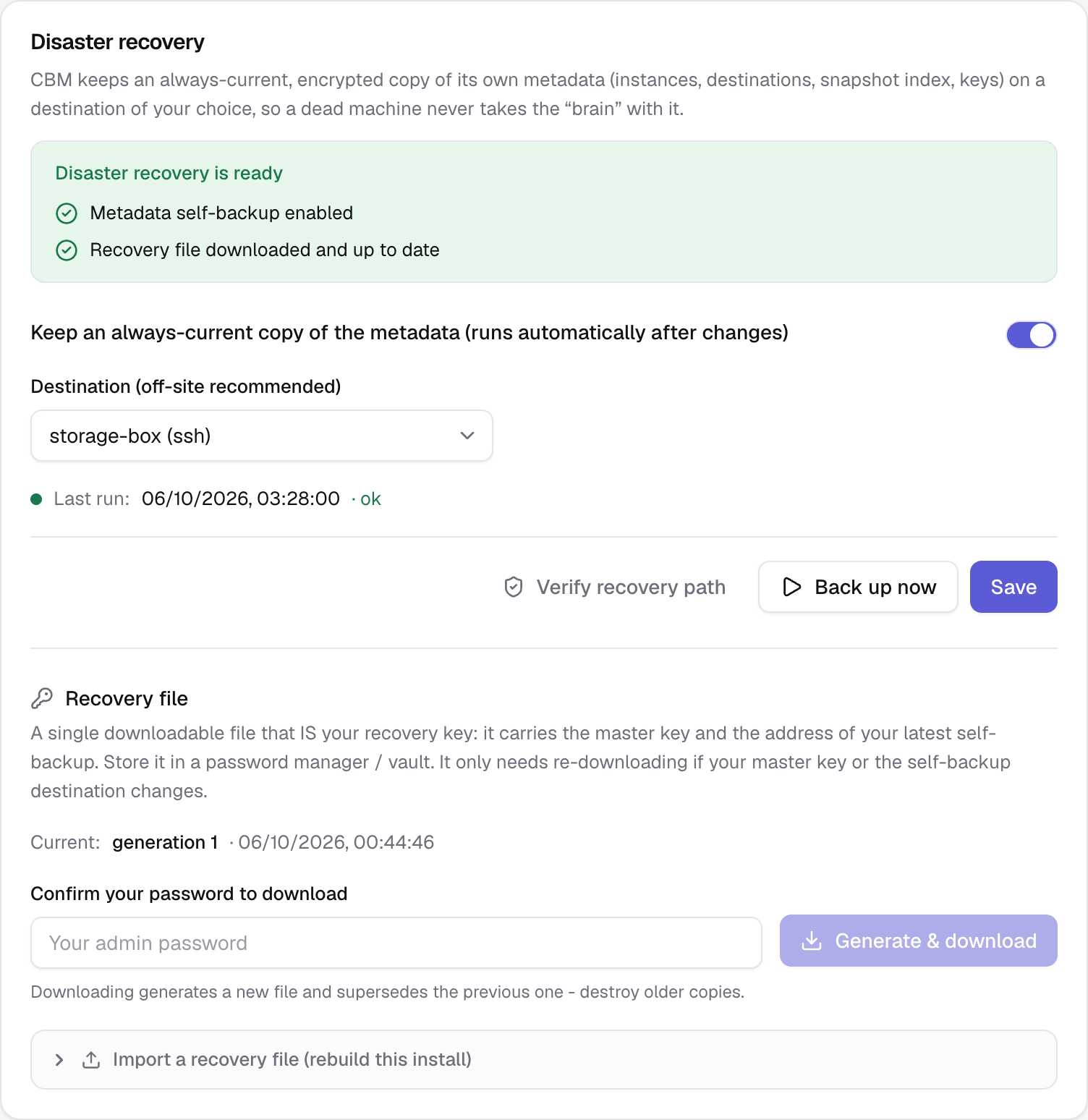
Settings → Disaster recovery (admin only). Pick an off-site destination
(S3 or remote SSH — local destinations aren't offered), turn on the
self-backup switch and Save. From then on CBM keeps a single,
encrypted pg_dump of its own metadata database on that destination
(cbm-self-backup/metadata.dump.enc), overwritten in place:
- No retention — recovery always uses the latest, so one artefact is kept.
- Change-driven + throttled — it runs shortly after any change (throttled so the frequent snapshot writes don't dump every time), plus a daily safety run.
- Alerts — you're notified (via the Failure alerts webhook) if the self-backup fails or hasn't succeeded in over a day.
Back up now runs it immediately; the last run and its status show under the form. Use Verify recovery path to prove it works without a restore: CBM downloads the latest self-backup and decrypts it, confirming it's a valid, recoverable dump.
The self-backup lives on a destination whose credentials are inside the very database you'd be restoring — a chicken-and-egg you break by holding a small recovery file off-machine (a password manager / vault).
Settings → Disaster recovery → Recovery file: confirm your password, then Generate & download (admin only; the self-backup must be enabled first). The file is downloaded once and never stored on the server. It contains:
- your master key,
- the location + credentials of the self-backup destination (so a fresh CBM can fetch the latest metadata),
- an embedded copy of the metadata dump as a last-resort fallback.
Because it carries the master key, the file is the secret — guard it. It only needs re-downloading when your master key or the self-backup destination changes; the page marks the current file out of date when that happens. Generating a new one supersedes the old — destroy older copies.
Freshness comes from the self-backup (updated continuously), not from re-downloading the file. A months-old recovery file still recovers yesterday's state, because it points at the latest self-backup.
Every snapshot is self-describing: at backup time CBM captures the full resource definition (git repo/branch/commit, build pack, image, compose, domains, database image + credentials, environment variables). So a Clone (restore → new) works even when the source Coolify is gone — it reconstructs from the snapshot instead of reading the (dead) source, and it creates any missing project/environment on the target. On a single-server target, every resource lands on that server automatically; for a multi-server target, set a mapping from the instance card's "…" menu → Server mapping for restores (on Coolify instances).
Two complementary ways to send snapshots to a different Coolify (both build on the captured config above):
- Re-point an instance (disaster recovery) — on Coolify instances, open the instance card's "…" menu → Re-point the instance and change the base URL + API token to your new, blank Coolify. Every resource, snapshot and schedule keeps following that instance. Then re-run the agent install command on the new host.
- Restore onto another instance (migration) — when several Coolify instances are connected, the Clone dialog on a snapshot's page offers a Restore onto select, so you can clone a backup from one Coolify onto another.
Machine (Coolify + CBM) is gone. To fully recover:
-
New CBM.
docker compose up -da fresh controller — a newMASTER_KEYis fine (the recovery file carries the old one). -
Import the recovery file. Settings → Disaster recovery → Import a
recovery file (collapsed at the bottom of the section): pick the file, enter
your password, type
IMPORT, then Import & overwrite (on an install that already has instances or destinations, also tick the replace box). CBM fetches the latest self-backup from its destination, restores it, and re-encrypts every secret under the new install's master key. You are signed out — sign back in with your OLD credentials (the imported accounts). Two-factor authentication is turned off for every account (its secrets were encrypted with the old install'sBETTER_AUTH_SECRET): set it up again from Profile — accounts the policy requires it from are asked at sign-in. - Re-point the instance at your new, blank Coolify (instance "…" menu → Re-point the instance).
-
Re-install the agent on the new Coolify host (same per-instance install
command, from the instance "…" menu → Install command). The agent
auto-detects its server; on a brand-new empty host where it can't yet, set
the server on the Agents page or pass
AGENT_SERVER_UUIDat install (see multi-server.md). - (Multi-server) set the server map (instance "…" menu → Server mapping for restores).
- Clone (restore → new) each resource from its snapshot. CBM recreates the project/environment, reconstructs the resource from the captured config (pinned commit/image), re-injects env + database credentials, and the agent restores the data. The source Coolify being dead no longer matters.
- Verify and deploy.
Requirements. DR needs a non-
localdestination for the self-backup, and the controller image ships the PostgreSQL client used for the dump/restore. After importing, the self-backup destination is re-used automatically; its next run overwrites the artefact under the new master key.
Do a dry run: generate a recovery file, stand up a throwaway CBM with a different master key, import the file, and confirm your instances, destinations and snapshots come back and that a destination still connects. That drill is the only real proof your recovery works.