Repository navigation
Installation
CBM has two pieces:
- Controller — the web panel + API + scheduler + metadata database. One per deployment.
- Agent — a small container on each Docker host that does the actual backups. One per host.
Both run from published images: ghcr.io/holo795/cbm-controller and ghcr.io/holo795/cbm-agent.
curl -fsSLO https://raw.githubusercontent.com/Holo795/CBMCoolifyBackup/main/docker-compose.yml
curl -fsSLO https://raw.githubusercontent.com/Holo795/CBMCoolifyBackup/main/packages/controller/.env.example
mv .env.example .env
Edit .env and set at least:
BETTER_AUTH_URL=https://cbm.example.com        # the public URL you open in the browser
BETTER_AUTH_SECRET=<a long random string>       # openssl rand -hex 32
MASTER_KEY=<base64 32 bytes>                     # node -e "console.log(require('crypto').randomBytes(32).toString('base64'))"
Then:
docker compose up -dThe controller runs database migrations automatically on start. Put it behind a reverse
proxy / TLS for production (the compose file exposes port 3000).
Add this repository to Coolify as an application using Dockerfile.controller (or as a
docker-compose resource), attach a PostgreSQL database, and set the same environment
variables. CBM happily backs up the very Coolify it runs on.
See Configuration for the full variable reference.
⚠️ KeepMASTER_KEYsafe and backed up. It encrypts every stored secret (and, with the restic engine, your backups). If you lose it, encrypted data is unrecoverable.
Open your BETTER_AUTH_URL and register. The first account to register becomes the
administrator, and public sign-up closes automatically afterwards. There is no seed user and
no default password.
To add teammates, use Users → Invite with a role (admin / operator / viewer) — see Accounts & roles. For password-reset and verification emails, set up SMTP in Settings → Email (SMTP) (Email).
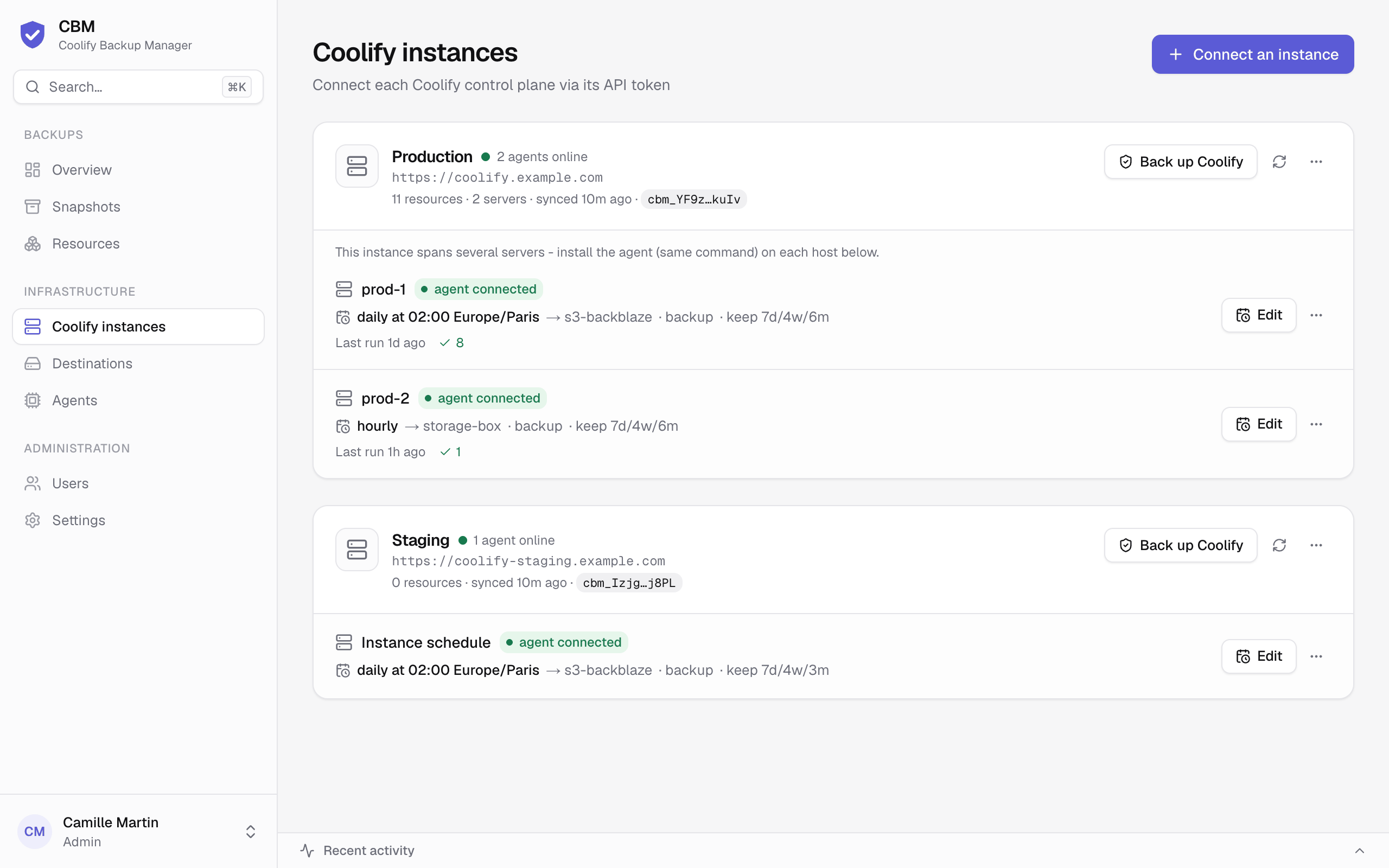
In the UI: Coolify instances → Connect an instance (in the page header), and enter:
- a name for the instance (e.g.
production), - the Coolify base URL (e.g.
https://coolify.example.com), - a Coolify API token (Coolify → Keys & Tokens → API tokens, read access is enough to discover resources; write access is needed for "restore → new" which creates resources).
Connect & sync saves it, syncs the instance and lists its resources. The sync button on the instance card re-syncs on demand; the card's … menu also holds Re-point the instance (point it at another Coolify) and Delete (type the instance name to confirm).
On the instance card, open the … menu → Install command, then click Reveal install command to get the enrollment token (shown once; revealing again rotates it), and run the one-liner on each host you want to back up:
curl -fsSL https://cbm.example.com/install.sh | CBM_TOKEN=cbm_… shOn a host whose DNS resolver is unreliable, give the agent its own DNS servers (passed to
docker run --dns):
curl -fsSL https://cbm.example.com/install.sh | AGENT_DNS="1.1.1.1 9.9.9.9" CBM_TOKEN=cbm_… shThis starts the cbm-agent container with:
- the Docker socket mounted (
/var/run/docker.sock) — required to dump/freeze/inspect, - a persistent
/backupsvolume (used by "local" destinations), - a
cbm-agent-workvolume for its work dir (/var/lib/cbm-agent): staging stays off the container's own layer, and its pending results and its record of the containers it paused survive a reinstall (the next agent resumes anything an interrupted job left paused or stopped), - the enrollment token, which it exchanges for a bearer token on first start.
The agent is installed directly (not through the Coolify API) because Coolify's deploy path would strip the Docker socket mount the agent needs. Re-running the command reconfigures the agent in place. The agent shows up on the Agents page within ~30s.
In a multi-server Coolify instance, run it once per server — each agent auto-detects which Coolify server it serves. See Multi-server.
- Destinations → Add a destination → where backups are stored (local / SSH-SFTP / S3, standard (tar) or restic engine).
- Resources → toggle "Include in scheduled backups" per resource.
- Coolify instances → Set on the instance's schedule row (one row per server in a multi-server instance) → frequency, mode, destination and retention, in a side panel. A resource can override it from its Schedule tab.
You're done. See Backups for what gets captured and how.
Pull the new images and restart:
docker compose pull && docker compose up -d # controller (migrations run on start)Then update the agents from the controller: the Agents page shows each agent's version and marks those behind the controller (2.6.0 available). Update all, or Update to … in an agent's … menu (admin), queues the update:
- the agent finishes the jobs it is running and takes no new one (jobs queued meanwhile wait for the new agent);
- it pulls the controller's version of its own image (
<its repository>:<controller version>, so a registry mirror stays one), and checks that its install token is still valid; - a short-lived
cbm-agent-updatercontainer creates the new agent with the same settings as the current one (environment, volumes, restart policy, DNS, networks and their aliases, labels, limits), stops the current one and starts the new one - a few seconds without an agent; - if the new agent hasn't reached the controller within 2 minutes, the updater removes it and starts the previous one again. The job then fails with the new agent's last log lines.
Turn on Update agents automatically (Agents page, admin) to have agents do this on their own: an agent behind the controller updates while it runs nothing and no scheduled backup of its instance is due in the next 30 minutes (checked every 10 minutes). A version that failed to start is tried again the next day. A failed update is also sent to the alert webhook.
The agent only updates from the repository it runs from. It can't update itself when it was
installed before 2.6.0 (re-run the install command once; later updates work from the
controller), when its container is managed by docker compose or Coolify (update it there:
pull, then up -d), or when it doesn't run in a container; the Agents page says which.
To update an agent by hand, re-run the install command on its host (it recreates the
container with the image the controller names), or docker pull ghcr.io/holo795/cbm-agent:latest
then recreate cbm-agent.
The controller runs the backup scheduler in-process. Running two or more controller replicas against the same database would double-fire scheduled backups (and the metadata self-backup). Deploy a single controller replica; scale by giving it more resources, not more replicas.
As a backstop, the scheduler takes a Postgres advisory lock at startup, so if a second replica is started by accident only one of them runs scheduled work — but this is a safety net, not a supported HA mode.