Repository navigation
Restore
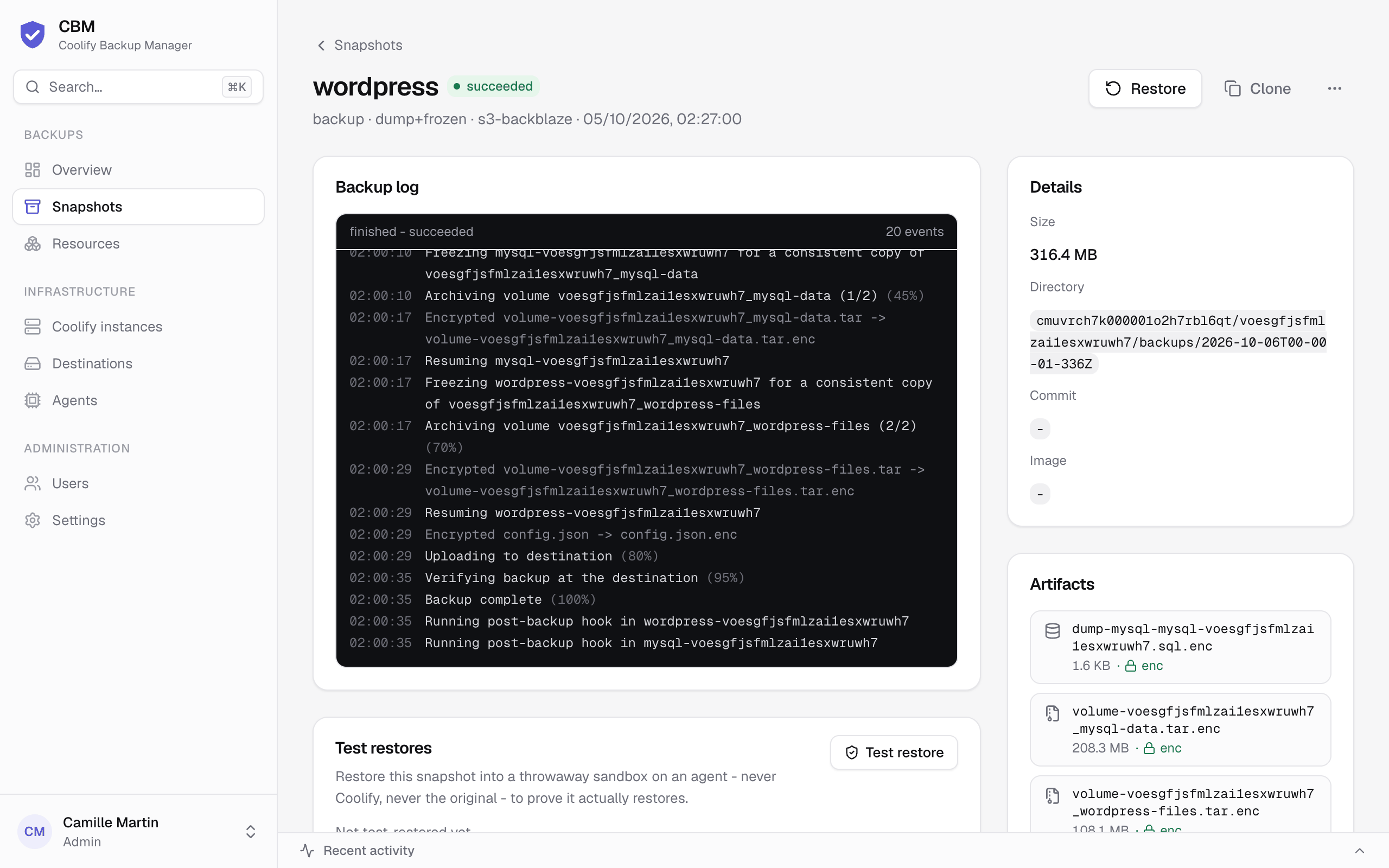
From any successful snapshot you can restore in place (Restore) or to a new resource (Clone). Both buttons sit on each succeeded row of Snapshots and in the header of the snapshot's page (operator+, and they need a live agent on the instance). Each asks for confirmation, then opens the snapshot's page so you can follow the restore log live; past restores are listed in its Restores card.
A clone has no data of its own. Coolify clones the configuration, not the contents — a freshly cloned resource starts empty. The data always comes from the snapshot (a logical dump loaded into the container, or a volume copy written into the resource's volume).
Overwrites the existing resource's data with the snapshot:
- Database dumps are loaded into the running container — no downtime.
- Volumes require a brief stop: the agent stops the containers, overwrites the volume, then restarts them.
- Redis RDB snapshots are written into the data volume and loaded on restart.
- Service-internal databases are additionally re-loaded from their logical dump after the containers are back up (best-effort, on top of the volume restore).
When the running version is no longer the snapshot's, the dialog says so and offers to put the snapshot's version back - see Image versions.
A configuration only snapshot (a resource with no volume, host folder or database — see Backups) has no data to put back: it offers Clone only, and isn't test-restored.
Clone creates a brand-new Coolify resource and restores into it — the original is never touched. Works for all types:
- Databases (dump engines) — the clone is deployed and the dump is loaded into it.
- Redis / volume databases — the clone's (uuid-remapped) volumes are pre-filled.
- Git applications — the captured commit is re-pinned so the code matches the data.
-
Docker-image applications — the exact image tag captured at backup time (a floating
tag like
latestis cloned as a digest-pinned service so it runs the same image). - Docker-compose services — every volume is pre-filled under the clone's names, mounted on first deploy, and each service's image is pinned to the version it ran (see Image versions).
For apps and services, the clone is created but not deployed by default (no domain, by
design) — you review it in Coolify, then deploy. Its data is already in place: an application's
named volumes are recreated on the clone and filled. Environment variables captured in the
snapshot are applied to the clone automatically, including the credentials Coolify generated
for a service (SERVICE_USER_* / SERVICE_PASSWORD_*), since its restored database was created
with them; domains are not copied.
The Coolify control plane ("Back up Coolify") can only be restored in place — its snapshots have no Clone button.
Because each snapshot also captures the full resource definition (git/build pack, image,
compose, domains, database credentials), → new works even when the source Coolify is gone,
and it creates any missing project/environment on the target. When several Coolify instances
are connected, the Clone dialog offers a Restore onto select, so you
can clone the snapshot onto a different Coolify (migration). See disaster-recovery.md.
On a server with several Docker networks (destinations), see
which one the clone uses.
A compose file usually says image: gitlab/gitlab-ce:latest. Restored as written, the clone would
pull the newest version on its first deploy - newer than the data, which the application then
tries to migrate, or refuses to start on when the gap is too large.
Each backup records, for every container of the resource, the image as written, the digest it
actually ran (gitlab/gitlab-ce@sha256:...) and its version when the image declares one
(org.opencontainers.image.version label, or a fixed tag it carries such as 18.2.0-ce.0). The
restore dialog shows them side by side and offers:
-
Snapshot version (default, recommended): every
image:of the compose - or the image of a docker-image application, and the commit of a git application - is pinned to what ran at backup time. Data and code match. The clone stays on that version until you change it in Coolify. - Version as written: the references stay as they are; floating tags pull the newest version. The dialog warns which version the data comes from.
If the registry no longer has a recorded digest, the restore uses the image's version tag instead (same version, possibly a rebuilt image), else the reference as written, and says so in the log. A registry that can't be reached or needs credentials keeps the digest: the host may have them. Snapshots taken before 2.4.6 recorded only the main container's image: it is pinned wherever the compose uses that same image.
In place, the dialog also shows whether each container still runs the snapshot's image (as reported by the agent). When one doesn't - the service was updated since - restoring older data into a newer version can break it, so it offers to put the snapshot's version back: the containers stay stopped after the restore, then CBM pins the service's compose (or the git application's commit) to the snapshot's version in Coolify and redeploys it. The resource stays on that version until you change it in Coolify. A docker-image application can't be changed by CBM: the dialog asks you to redeploy it on the snapshot's version yourself.
Coolify containers reach each other by a hostname derived from the resource uuid — an app's
DATABASE_URL looks like postgres://app:pw@<db-uuid>:5432/app. A plain clone keeps those values,
so a restored app would still talk to the original database: a test copy writing to production.
To avoid that, when you restore an app or service → new, CBM rewires its environment so any
reference to a resource you've already restored → new on the same instance points at that
clone instead of the original. Every rewired variable is listed in the restore log
(Rewired DATABASE_URL: <original> -> <clone>).
- Restore the data tier first (databases, caches), then the apps that use them — rewiring happens when the app is cloned, so the database clone must already exist.
- Only resources restored → new are rewired. An app restored on its own still points at the live originals, as before.
- If a resource was restored several times, the newest clone that still exists is used. Delete test clones you no longer need so a later restore doesn't pick them up.
- Only env values are rewired (not compose files).
Restore is transparent: the agent pulls the exact snapshot from the restic repository (local, S3, or SSH/SFTP — including a jump host), then applies it exactly like the tar engine. Both in-place and → new are supported.
A backup you've never restored is a hope, not a backup. A test restore proves a snapshot is actually restorable — without touching Coolify or the original resource:
- An agent fetches the snapshot back to plaintext (exactly the path a real restore uses — restic or tar, decrypting encrypted artifacts).
- Each artifact is restored into a throwaway sandbox on that agent:
-
PostgreSQL / MySQL / MariaDB / MongoDB dumps are loaded into a fresh container of the
same engine — the exact image recorded at backup time when available — running with
no network at all and random credentials. CBM then checks that every table declared in the
dump exists after the load (
restored 12/12 tables); MongoDB reports its collections. -
Redis RDB exports are loaded by a throwaway
redis-server(key count reported). KeyDB and Dragonfly exports get an RDB header check. -
Volume and bind-mount archives are read back end to end. A folder read in place by restic
and bigger than 20 GB is checked on a sample instead: up to 300 of its files picked at
random (2 GB at most) are restored whole and compared with the sizes the snapshot records -
minutes instead of hours for a few hundred GB. The check says so (
sample read back: 300 of 391586 files); the rest of its data is read by the destination's weekly integrity check, a different twentieth each week. Database dumps are always loaded in full. -
The files of a database that has no dump in the snapshot (its dump failed, see
Backups with warnings) are put back in a sandbox volume
and the same database image (the exact digest recorded at backup time) is started on
them - no network, and no access control since nothing can reach it, so the original
passwords aren't needed. The engine recovers its journal as after a power cut; CBM then counts
its tables (
the database opens: mariadb@sha256:… started on the copy of its files, 3 table(s)). PostgreSQL, MySQL, MariaDB and MongoDB; a copy the engine can't open fails the drill with its error. For snapshots taken before 2.4.7 (the backup didn't record which volume holds a database), the volume is only read back.
-
PostgreSQL / MySQL / MariaDB / MongoDB dumps are loaded into a fresh container of the
same engine — the exact image recorded at backup time when available — running with
no network at all and random credentials. CBM then checks that every table declared in the
dump exists after the load (
- Everything is deleted afterwards; sandboxes left behind by a crashed agent are cleaned up by the next drill.
A test restore runs on the destination's Read with agent when one is set (see Destinations). Like every job, it has a time limit that grows with the size of the snapshot (at least 6 hours, about one hour per 10 GB beyond that). When a job passes its limit, or its agent is lost, the controller marks it failed and tells the agent, which stops the containers the job started: a restic command holding a repository lock doesn't keep it, and a retention purge on the same destination isn't blocked. A result arriving after the limit is logged on the job and ignored.
Run one from a snapshot's page (Test restore in its Test restores card or its "…" menu,
operator+), via the API
(POST /api/v1/snapshots/:id/drill) or the MCP tool cbm_test_restore. Turn on Settings →
Restore drills to test each backup-enabled resource's latest snapshot every week (Saturday 05:00);
each snapshot is drilled once, and a drill that couldn't run (agent offline) is retried. A failed
drill sends an alert. The snapshot's Test restores card keeps every drill with its per-artifact
checks, and the snapshots list shows a shield badge on tested snapshots (hover it for the result:
restore verified, failed, or did not run).
What a drill does not prove: that Coolify can redeploy the application around the data. For that, an occasional real → new restore is still the ultimate check.