Repository navigation
Profile Emoji
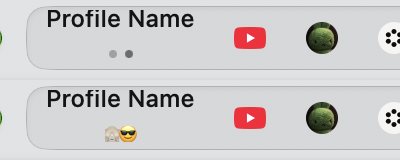
Gives each profile an emoji, which takes the place of its dot in the profile switcher.
| Tabs in the sidebar | Tabs at the top |
|---|---|
 |
 |
It's on by default. To check, open Dia → Settings → Patches and look for Profile Emoji. Or run:
diatweaks enable profileEmojiThen open Dia → Settings → Profiles, choose a profile, and click the Emoji field under Theme Color to pick one. Clear the field to get the dot back.
Does it work with tabs at the top?
Yes. Hover the profile's name beside the pinned tabs and the emoji show where the dots would.