Repository navigation
Tidy Tabs
Groups your tabs by what they're for, like Arc's Tidy Tabs. A broom shows on the line above your tabs, beside Close All, and clicking it puts tabs about the same thing into groups that Dia names.
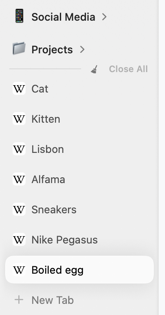
If your sidebar fills up with tabs from a day of research, sorting them by hand is slow. The broom sorts them in one click, and ⌘Z undoes it if you don't like the result. It suits people who open many tabs and want them in named groups. It does nothing for a short list, since the broom only shows with more than 5 tabs below the line, and it needs Apple Intelligence on your Mac.
With tabs in the sidebar, point at the line above your tabs and click the broom. The line ripples while it works. Press ⌘Z right after to put the tabs back where they were.
The broom shows when there are more than 5 tabs below the line. It leaves favorites, pinned tabs and tabs already in a group alone, and only groups tabs that clearly belong together.
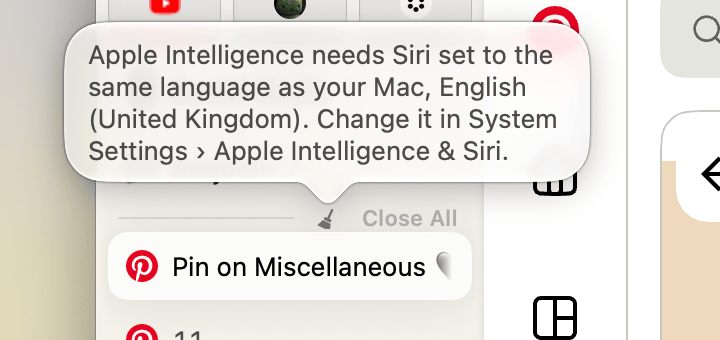
- A Mac with Apple silicon (M1 or later) on macOS 26 or later, with Apple Intelligence turned on. Without it, the broom still shows, and pointing at it or clicking it says why it can't tidy.
- Tabs in the sidebar. With tabs at the top there's no line for the broom.
- Open System Settings and choose Apple Intelligence & Siri in the sidebar.
- Switch on Apple Intelligence.
- Leave your Mac connected to the internet and to power while it downloads the models. Until it's done, the broom says "Apple Intelligence is still downloading".
If a setting stops Apple Intelligence from downloading at all, such as Siri and your Mac using different languages, the broom says which one to change instead.
If the switch isn't there or can't be turned on:
- Set your Mac's language and Siri's language to the same supported language, such as English. Change them in System Settings → General → Language & Region and in Apple Intelligence & Siri.
- Make room: Apple Intelligence needs up to 14 GB free.
- Apple Intelligence isn't available in every country or region, or when your Mac starts up from an external drive.
Apple's own guide is Get started with Apple Intelligence on your Mac. How the broom finds the setting is in Discoveries: Apple Intelligence.
It's off by default. Open Dia → Settings → Patches and switch on Tidy Tabs. Or run:
diatweaks enable tidyTabsDoes it send my tabs anywhere?
No. It sends each tab's title and address, without the part after ?, to Apple's model on your Mac. Dia names the groups itself, as it does for any group.
Why are the same tabs always grouped the same way?
The model is asked for its single most likely answer each time, so the same tabs give the same groups.
Thanks @baginski11 (#129).