Screen Orientation
NM-CYD-C5 and WS-C5-28 only — not available on Classic CYD. CYM can now run in any of four screen orientations — portrait (default), landscape, portrait flipped, and landscape flipped — with dozens of screens redesigned specifically for landscape use. Developed by co-developer @birolt29 over 75+ build/test cycles across every menu in the firmware, for NM-CYD-C5; extended to WS-C5-28 in v2.15.01 on the strength of both boards sharing an identical 240×320 ST7789 panel and touch driver contract.
WS-C5-28 note: confirmed working on physical WS-C5-28 hardware — touch and layout both rotate correctly. (One landscape layout bug found during that testing, the GPS Info card clipping its bottom row on both boards, was fixed in v2.15.02.)
Classic CYD does not support Screen Orientation, and there's no near-term plan to add it. Its ILI9341 panel already needs a board-specific
swap_xy+ mirror transform just to display correctly in native portrait, and its XPT2046 touch runs over software-bit-banged SPI on a separate dedicated bus rather than the shared hardware-SPI setup NM-CYD-C5/WS-C5-28 use — layering LVGL rotation on top of that combination hasn't been attempted or verified. See Classic CYD Support for the full list of Classic-CYD-specific limitations.
- Go to Settings → Screen.
- Under Orientation, pick one of:
-
0 Portrait(default) 90 Landscape180 Portrait flipped270 Landscape flipped
-
- Tap Save.
The device reboots into the new orientation. This is deliberate: every screen is sized from the live display resolution at build time, so a reboot guarantees every screen — including ones you haven't opened yet this session — is laid out correctly for the new orientation from the first frame. A live in-place rotate would leave already-built screens holding stale portrait-sized layouts until you navigated away and back.
The setting is saved to NVS and persists across reboots and firmware updates.
On NM-CYD-C5, touch calibration always runs in native portrait, regardless of your chosen orientation, and automatically restores your orientation afterward — the calibration math is fixed to the physical 240×320 panel, so rotation needs no separate calibration step. WS-C5-28's capacitive CST3530 touch needs no calibration at all, at any orientation.

The home/menu background now scales to fill the entire screen in landscape instead of leaving empty strips on the sides.

The Orientation selector lives in Settings → Screen, alongside Timeout, Brightness, and Recalibrate Touch. In landscape the dialog switches to a two-column layout so all four sections fit without scrolling.
A representative sample of the screens that got dedicated landscape layouts (portrait → landscape):
| Screen | Notes |
|---|---|
| Universal Remote | Button grid reflowed for the wider aspect ratio |
| LED Remote | 28 buttons reflowed to fit landscape without scrolling |
| Bluetooth Lookout | List and controls repositioned |
| Evil Portal | The Start Portal button, previously clipped off-screen in landscape, is now fully visible |
| Timing Settings | Cancel/Save buttons, previously unreachable in landscape, are now on-screen |
| Chameleon Ultra | Device list and detail view rebuilt for landscape |
| GPS Info | Coordinate/status layout rebuilt for landscape |


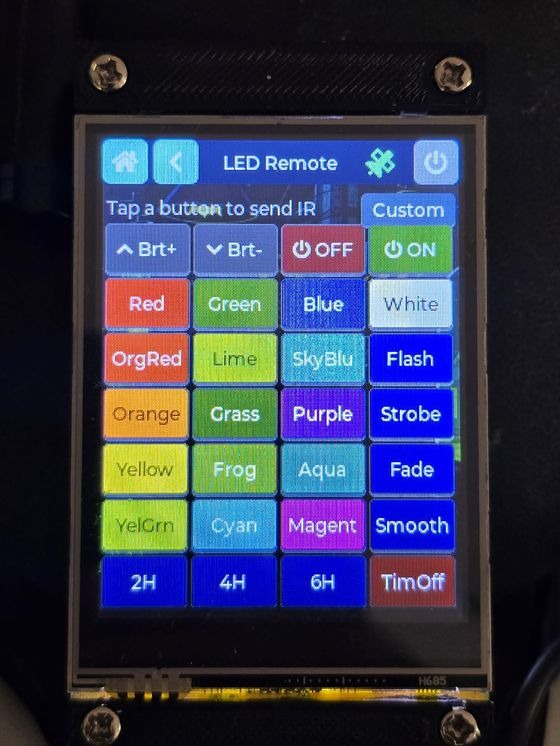


Portrait behavior across the whole firmware is unchanged — landscape support was added as additional branches alongside the existing portrait code, not a replacement for it.
Independent of orientation, the WiFi Scan & Attack list was reworked into a wardrive-style row layout: a fixed band badge (2.4/5 GHz), the SSID flexing to fill available width, and Channel/RSSI/Auth held tight on the right. The Auth column is color-coded by how deauth-able the target is:
- Red — WPA3/OWE (Management Frame Protection active, deauth ignored)
- Amber — WPA2
- Green — Open/WEP/WPA (no MFP)
Multi-select checkboxes let you queue several targets at once. This layout is used in both portrait and landscape.
Alongside the orientation work, this patch (v2.15.00) fixed several standing bugs found during the screen-by-screen landscape testing pass: a MITM active-capture crash from a missing screen teardown hook, PN532 Clone/Write/Emulate crashes from main-task stack exhaustion, and two Chameleon Ultra BLE reconnect bugs (a benign disconnect was incorrectly deleting a valid bond, and a bond-reuse reconnect could hang forever waiting for an encryption event that never fires). See the release notes for the full list.
Screen orientation and all screens on this page were developed and tested by co-developer @birolt29. See Contributors for the full list of people who've helped build CYM.