Repository navigation
Post Processors and Controllers
English | Deutsch
Every controller understands its own G-code dialect. A post-processor translates the calculated toolpaths into that dialect: header, footer, tool change, units, comments, dwell times. It consists of a small text file (TOML settings plus templates in Jinja format). The program generates the movement lines itself, so the output is deterministic: the same input gives identical G-code.
Honest about the status: So far only the Ultimate Bee with xPRO V5 (GRBL, version 0.3.3) has been tested on a real machine. All other profiles have not been tested on a machine. For UCCNC, Centroid, ShopBot, MASSO and PlanetCNC there is more: they are written only from the manufacturers’ documents. Some pages could not be retrieved in the process; excerpts were read. The name and description of these profiles carry the note “untested”. With every controller, first run an air cut before you cut.
| Profile | Controller | Can connect directly? | Notes |
|---|---|---|---|
grbl |
GRBL 1.1 (mm) | yes | tool change as a pause (M0) with a message, arcs G2/G3, extension .nc
|
grblhal |
grblHAL | yes | like GRBL |
fluidnc |
FluidNC | yes | like GRBL, extension .gcode
|
mach3 |
Mach3 and Mach4 | no, export only |
M6 tool change, line numbers, extension .tap
|
linuxcnc |
LinuxCNC | no, export only |
M6, extension .ngc
|
uccnc |
UCCNC | no, export only |
M6, dwell times in milliseconds. Untested.
|
centroid |
Centroid Acorn and Oak (CNC12) | no, export only |
M6, comments with semicolon, program end M30, extension .cnc. Untested.
|
shopbot |
ShopBot PRS and PRSalpha | no, export only |
G-code, not OpenSBP (.sbp). Inches, line numbers, arcs as lines, tool change as a pause. Untested.
|
masso |
MASSO G3 and Touch | no, export only |
T5 M06, dwell times in milliseconds, no G43. Untested.
|
planetcnc |
PlanetCNC TNG (Mk3 and Mk4) | no, export only |
M6, frame made of % lines, program end M2. Untested.
|
Only a GRBL-compatible controller can be connected directly (sending G-code live to the machine): GRBL 1.1, grblHAL or FluidNC over USB or network, see Milling on the machine. For all others you export a file and load it in the controller. The program can not stream profiles with an M6 tool change to a GRBL controller, because GRBL does not know M6. The program refuses this and suggests a GRBL profile.
The profile comes from the machine profile (for example grbl for the Ultimate Bee). In the “Cut” step you can change it under Post-processor. A catalogue entry such as the Onefinity Elite Gen 1 already brings the matching profile (masso).
-
No
G43: No profile sets a tool length offset. Z zero belongs to the workpiece. Anyone who uses the controller’s tool table or changer adds the matching line intool_change_block. -
All axes in every line for the profiles with
M6: this keeps the program correct if the controller moves axes during the change. The files get larger as a result. -
Dwell times in milliseconds for UCCNC and MASSO (
G4 P2000means two seconds there). With UCCNC a separate “M3 Delay” of the controller may be added on top: set one of the two to 0. Anyone who has switched UCCNC to seconds setsdwell_ms = falsein a copy of the profile. -
ShopBot understands G-code only as a subset. ortino.CAM does not output OpenSBP. The arc convention and parenthesis comments are not documented. Anyone who has checked them can set
arcs = truein a copy. -
PlanetCNC: Whether
G4 Pmeans seconds or milliseconds there is not documented. It is built for seconds. The air cut shows it if that is wrong. -
Dust extraction (
M7,M8,M9,M62toM65) works with all profiles. Which output commands your controller knows, the program does not know for the new profiles (the checklist then reports “unknown”).
- Coordinates are rounded individually, so nothing accumulates. In inches the program outputs at least four decimal places for coordinates and two for the feed rate.
-
Arcs are recalculated: GRBL rejects an arc whose start and end radius differ too much after rounding (
error:33), and the job would stop in the material with the spindle running. ortino.CAM recalculates every arc with the rounded output numbers and outputs doubtful arcs as short line segments. After that, a second, independent checker reads the finished G-code once more and refuses it if an arc violated the limit anyway. - If several tools occur and the profile outputs no stop, the program inserts one anyway (
M5, message,M0) and warns. It never carries on with the paths of the next tool without the controller having stopped.
All of this checks what ortino.CAM outputs. Whether your controller accepts the file and runs it correctly is only shown by an air cut.
You can take any profile as a template and change it.
- In the interface: In the post-processor dialog choose a profile as a template, edit it, run the self-test, look at the live preview on the current project and save.
-
As a file: Put a
.tomlfile in the folderpostsin the data folder (under Windows%APPDATA%\ortino.CAM\posts\). It is loaded at start. If it has the sameidas a bundled profile, it overrides it. -
On the command line:
ortino postslists all profiles,ortino gcode projekt.ocam --post meinprofilgenerates code (more under Claude, MCP and API).
The most important settings:
| Key | Meaning |
|---|---|
id, name
|
identifier and display name (required) |
extension, eol
|
file extension, line ending ("\r\n" for Windows controllers) |
units, decimals
|
mm or inch, decimal places |
arcs, arc_tolerance
|
arcs as G2/G3 or resolved into lines |
line_numbers, comments
|
line numbers, comment style (parentheses, semicolon or none) |
tool_change |
pause, m6 or none
|
spindle_wait, dwell_ms
|
wait after spindle start, milliseconds instead of seconds |
spindle_on, spindle_off
|
texts for spindle on and off (M3 S{rpm}, M5) |
header, footer, tool_change_block
|
templates for header, footer and tool change |
In the templates, variables such as project.name, sheet.thickness, tools, safe_z and time_min are available. Undefined variables are an error so that typing mistakes stand out. The self-test generates G-code from a fixed test program with two tools and checks, among other things, spindle on and off, program end, unit, arcs and tool change. It does not replace a test run.
Have you built or improved a profile for a controller? Then we would be glad to get a pull request with the file in the postprozessoren/ folder of the public repository, plus one sentence saying on which controller and firmware you tested it and how (on the machine or only the output checked). The rules are in CONTRIBUTING.md, a short version on the page Contributing and testing. A report on a test with a real controller helps even if something does not work.
-
Save the G-code · 12 s
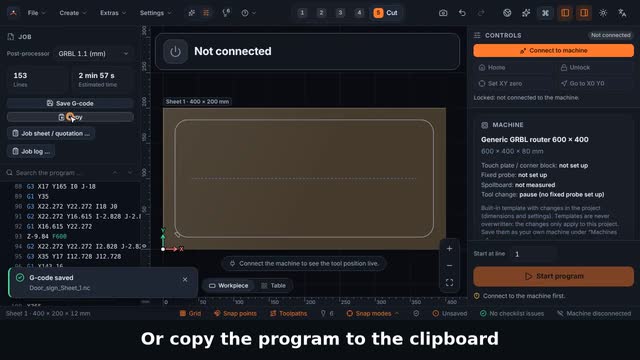
All videos: Videos.