Repository navigation
Tiling Large Parts
English | Deutsch
Honest about the status: The tiling has only been checked against geometry and property tests, the simulation, the built-in machine simulator and Chromium. Never on a real machine and not under Windows (WebView2). How exactly the tiles fit together at the seam depends on how exactly the bit stands over a registration mark, how straight the material lies after moving and how flat sheet and spoilboard are; that is not tested.
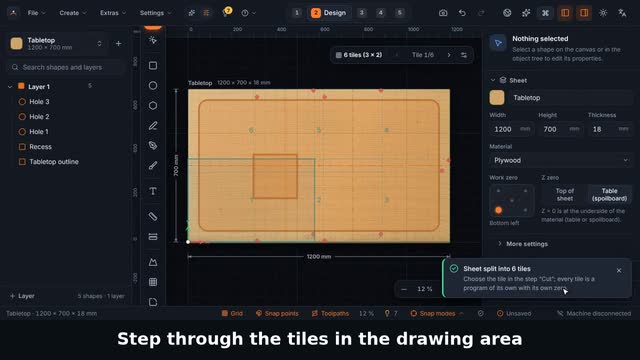
If a workpiece is larger than the travel of your machine (for example 2400 × 1200 mm on a 600 × 400 mm CNC router), ortino.CAM splits it into tiles with overlap and produces a program for each tile. Between two tiles you move the material by the feed distance and clamp it again; two registration marks that the previous tile has drilled determine the XY zero of the new tile.
- Tile 1: Clamp the material so that tile 1 lies within the travel, set the XY zero at the corner of the sheet, probe Z, mill. Afterwards the program drills two small registration marks into the overlap with tile 2.
- Moving: Release the material, move it by the feed distance shown (best against a straight stop bar so that it does not twist), clamp it. The distance does not have to be exact; it only has to bring tile 2 into the travel.
- Tile 2: Move the bit (spindle off) over registration mark 1, centre it and set the XY zero there; then confirm the position at registration mark 2. If it deviates by more than the tolerance (default 0.3 mm), the pre-flight check blocks the tile: then the material is twisted or the bit was not standing centred over mark 1. Mill, and so on up to the last tile.
- 3D relief, adaptive clearing, rest machining and inlay work only if they lie completely within one tile.
- Setup sheet and instructions know the tiles; the simulation runs over all tiles.
- Never skip the check at mark 2. The first time on an offcut with two tiles, running the seam through waste.
Related: Double-Sided Milling (several set-ups with shared reference points), Milling on the Machine, Setup Sheet and Quote.
All videos: Videos.
Sicherheit: CNC-Maschinen sind gefährlich. Teste zuerst ohne Werkzeug und Material, halte den Not-Aus in Reichweite und lass die Maschine nie unbeaufsichtigt. ortino.CAM wird ohne Gewährleistung bereitgestellt, die Nutzung erfolgt auf eigene Gefahr. Siehe den Haftungsausschluss. Dieses Wiki beschreibt Version 0.16.0 (frühe Version, nicht alles an einer echten Maschine erprobt). Fragen und Fehler über GitHub Issues (öffentlich, keine persönlichen Daten); Datenschutz und rechtliche Anliegen zum Portal: Impressum des Portals.
Safety: CNC machines are dangerous. Test first without tool and material, keep the emergency stop within reach and never leave the machine unattended. ortino.CAM is provided without warranty, and you use it at your own risk. See the disclaimer. This wiki describes version 0.16.0 (early version, not everything tested on a real machine). Questions and bugs through GitHub Issues (public, no personal data); data protection and legal matters about the portal: portal imprint.
Sprache wechseln: Deutsch | English
Loslegen
- Installation und Updates
- Erste Schritte
- KI-Modelle und Startseite
- Maschine einrichten
- Videos (English)
Entwerfen und Bearbeiten
- Zeichnen und Importieren
- Eigene Vorlagen und Formen
- Formen- und Muster-Generator (Browser)
- Creator
- Art Designer
- Foto → Relief
- Reliefs modellieren
- 3D-Modelle importieren
- 3D-Körper exportieren (STL, 3MF)
- Bearbeitungen
- Werkzeuge und Schnittdaten
- Prüfen und Simulation
An der Maschine
- Fräsen an der Maschine
- Doppelseitig fräsen
- Große Teile kacheln
- Fester Taster und Opferplatte
- Opferplatte markieren
- Handy-Fernbedienung
- Touch und Stift
- Kamera auf der Arbeitsplatte
Planen und Anbieten
- Platten und Möbel
- Plattenzuschnitt (Sägeplan)
- Werkstatt und Team
- Möbel-Designer
- Web-Designer im Portal
- Küchen-Rendering
- Rüstblatt und Angebot
- Kunden und Angebote
Steuerungen und Vernetzung
Hilfe
Außerhalb des Wikis
English
Getting started
Designing and machining
- Drawing and Importing
- Custom Templates and Shapes
- Shape and Pattern Generator (browser)
- Creators
- Art Designer
- Photo to Relief
- Modelling Reliefs
- Importing 3D Models
- Exporting 3D Bodies (STL, 3MF)
- Operations
- Tools and Cutting Data
- Checking and Simulation
At the machine
- Milling on the Machine
- Double-Sided Milling
- Tiling Large Parts
- Fixed Probe and Spoilboard
- Marking the Spoilboard
- Phone Remote Control
- Touch and Pen
- Camera on the Worktable
Planning and quoting
- Sheets and Furniture
- Sheet Cutting (saw plan)
- Workshop and Team
- Furniture Designer
- Web Designer in the Portal
- Kitchen Rendering
- Setup Sheet and Quote
- Customers and Quotes
Controllers and networking
Help
Outside the wiki