Repository navigation
Getting Started
Download the mod from the GitHub releases.
Put the Vertical Cut jar and Fabric API into your mods folder (Fabric Loader for Minecraft 26.3).
On a server, the mod must be on the server too. Mod Menu is optional; it gives you the settings
screen.
You need 7 cobblestone (blackstone or cobbled deepslate work too), 1 glass pane and 1 torch:
C G C      C = cobblestone, G = glass pane
C T C      T = torch
C C C
The recipe shows up in the recipe book once you pick up cobblestone.
A new CRT is empty. Carry coal or charcoal: the CRT takes one piece from your inventory by itself whenever it runs dry, and you hear it gulp. One coal lasts 4 minutes of scanning. It only burns while the cut is shown.
Hold the CRT in your main hand or offhand and press V. The picture appears in a corner:
- black is air (caves),
- water is grey, lava blinks,
- you are the little stick figure, 16 pixels in from the left edge,
- the picture shows what lies in the direction you look.
Turn around and the cut turns with you. With the Stone CRT the picture lags a little behind when you walk; stand still for a moment and it catches up.
The picture dies like an old TV: snow, grey, a white line, a dot, black. Pick up coal and it comes back on.
Collect copper and make a Copper Picture Tube. On the smithing table: torch (as template) + Stone CRT + Copper Picture Tube gives the Copper CRT, which shows ores. The fuel in the CRT carries over. The advancement tab "Vertical Cut" has a riddle for each tier and shows how far you have come.

| Key | What it does |
|---|---|
| V | Show or hide the cut |
| B | Zoom (Gold, Diamond, Netherite CRT) |
| K | Lock the direction (Compass module) |
| J | Look deeper (Spyglass module) |
| G | Open the module slots of the CRT that draws the cut, wherever it is in your inventory |
Opacity and the settings screen have keys too, but they are unbound. Bind them in Options → Controls → Key Binds → Vertical Cut.
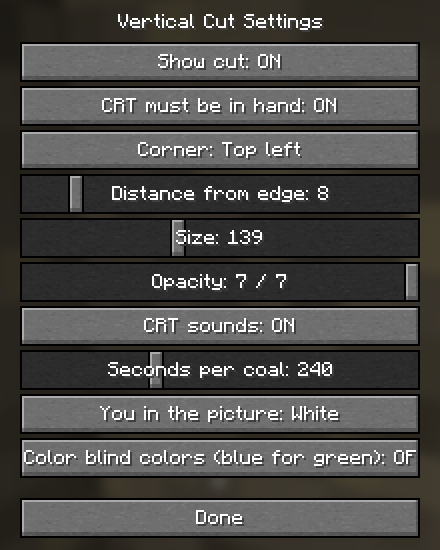
Mod Menu → Vertical Cut → Configure: CRT must be in hand (or anywhere in the inventory), corner, distance from the edge, size, opacity, CRT sounds, seconds per coal (60 to 600), the color of your stick figure, and color blind colors (blue instead of green). Hold Shift over any Vertical Cut item for a short explanation.