Repository navigation
Decorators
A decorator draws around a field. It does not replace the control. Unity runs every DecoratorDrawer on the field, so you can stack them on top of one Property Drawers.
That is the useful part. One field can carry a message, a prefix, a postfix, a read-only lock, and an availability rule at the same time, and still use DropdownList or LayerSelector for the value itself. You can extend this combination yourself.
[InfoBox("Important message about the field.")]
[Postfix(" (s.)")]
[AvailableIf(nameof(_featureEnabled), invert: true)]
[SerializeField] private float duration;
While _featureEnabled is false, the field stays editable. Turn it on and the field is disabled. The message and the postfix stay either way. ReadOnly can join the same stack; it always draws the field disabled and blocks paste.
All of these attributes are in Mane.Unity. They work with or without ManeStyle.
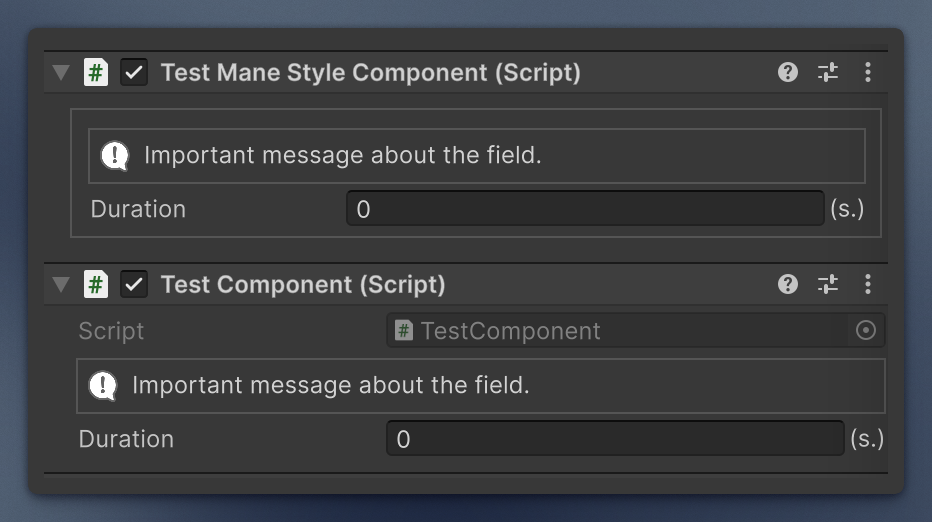
Message above the field. An optional condition member controls visibility, found like the AvailableIf provider: a serialized field (any non-default value counts as true), or a bool field, property, or parameterless method.
Default polarity: the box is shown when the condition is false (the most common case: a warning you hide once the condition is met). invertCondition: true shows it when the condition is true. With several objects selected, the box shows if any of them needs it. If the member is missing, the box stays visible and the Console gets an error, once.
Types: Info, Warning, Error, None.
On a collection the box belongs to the collection, not to each element.
[InfoBox("Assign a prefab or this will spawn nothing.", InfoBoxType.Warning, nameof(IsAssigned))]
[SerializeField] private GameObject prefab;

private bool IsAssigned => prefab != null;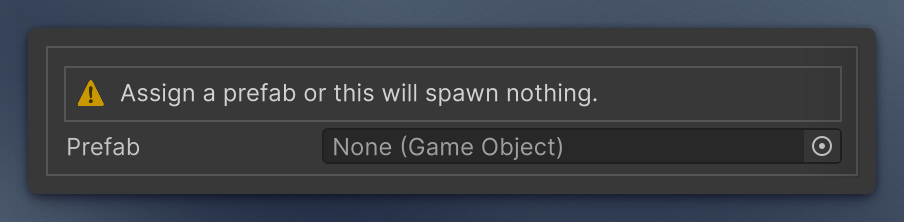
In a custom inspector, InfoBoxDrawer.Create(message, type) builds the same box without an attribute. Pass an action text and a callback, InfoBoxDrawer.Create(message, type, "Add", AddComponent), to get a button at the right edge of the box.
The field is drawn disabled. Editing is blocked, but you can copy the value.
[SerializeField, ReadOnly] private float computedHealth;
Shows a custom name in the inspector. The field keeps its C# name and its serialized data.
On a list or array it replaces the collection title, not the element names. Works in UI Toolkit inspectors, including the default one. It combines with the other decorators and with property drawers. With Prefix / Postfix the result is prefix + Label + postfix. An empty text is ignored.
[Label("Spawn Delay"), Postfix("(s.)")]
[SerializeField] private float d;

[Label("Price List")]
[SerializeField] private int[] prices;Vertical spacing before the field, Space that does not split a ManeStyle block. In the default inspector it looks the same as Space (8 px by default, or pass a height). In a [ManeStyle] inspector Space starts a new framed block, while NonBreakingSpace only adds the gap, so the fields stay in one block.
[ManeStyle]
public class TestComponent : MonoBehaviour
{
    [SerializeField] private float health;

    [NonBreakingSpace]
    [SerializeField] private float armor;

    [NonBreakingSpace(16)]
    [SerializeField] private float speed;
}Text immediately before or after the value. Use both on the same field.
On a list or array they rewrite the collection title (prefix + label + postfix, where label is the field name or the Label text). They do not stamp each element.
On MinMaxInt, MinMaxFloat and MinMaxDouble the text is repeated around both inputs: the prefix goes right before the Min and the Max value, the postfix right after each of them.
On a single ParticleSystem.MinMaxCurve field they are ignored, so the field keeps its custom layout. On a MinMaxCurve list they extend the title like on any other collection.
[Prefix("in "), Postfix(" (s.)")]
[SerializeField] private float startTime;

[Postfix(" (coins)")]
[SerializeField] private int[] prices;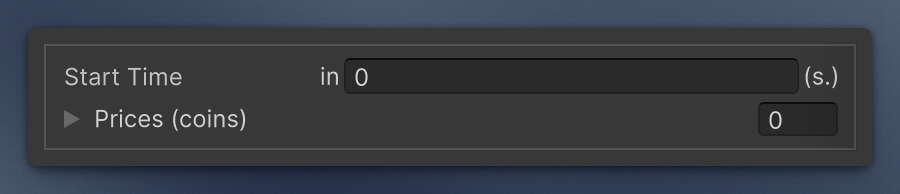
Enable, disable (read only), or hide a field.
- Availability provider: a serialized field next to this one, then one at the top level of the object; any non-default value counts as true (so a bool must be true, a number non-zero, an object assigned). Otherwise a bool field, property, or parameterless method, public or private, static or instance, looked up on the object that holds the field (a nested class or list element) and then on the inspected object, including base types.
-
invertflips the resolved value. -
hide: truehides instead of disabling. - With several objects selected, the field is available only when it is available on all of them.
- A missing member logs an error once and leaves the field available.
[SerializeField] private bool useCustomRadius;

[AvailableIf(nameof(useCustomRadius), hide: true)]
[SerializeField] private float customRadius;