Repository navigation
ManeStyle
[ManeStyle] switches the default inspector to Mane layout: framed blocks, a fixed label column, and foldout groups. Put it on a MonoBehaviour, a ScriptableObject, or a custom inspector type. All ManeEditor subclasses inherit it.
using Mane.Unity;
using UnityEngine;

[ManeStyle]
public class TestComponent : MonoBehaviour
{
    [SerializeField] private string name;

    [Space]
    [SerializeField] private float health;

    [Header("Combat")]
    [SerializeField] private float damage;

    [Foldout("Advanced")]
    [SerializeField] private float critChance;
    [SerializeField] private float critMultiplier;
}In a ManeStyle inspector:
-
Spacestarts a new visual block. -
Header("Title")starts a new block and adds a section title. -
Foldout("Title")starts aFoldoutBlock(persisted in EditorPrefs). Fields stay in that foldout until the nextSpace/Header/Foldout.
Without [ManeStyle], Foldout still draws a stock Unity foldout via the default inspector path.
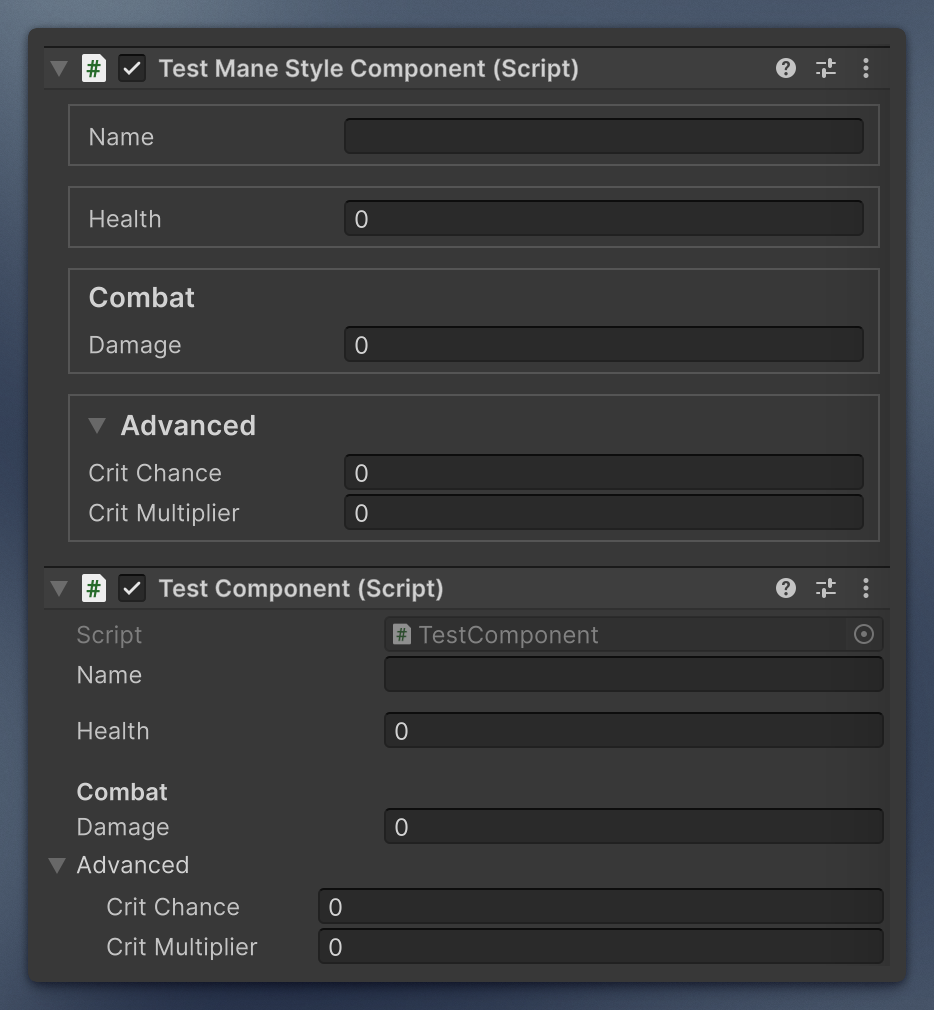
At first glance it can look bulkier and take more space, but for a large component it is a lifesaver that adds a strict visual structure. For a small one, use fewer splitters and you still gain that visual consistency.
Subclass ManeEditor (Mane.Unity.Editor), assign a UXML on the editor script, and override BuildInspector to bind controls. If the UXML field is empty, the inspector logs an error and stays empty.
using Mane.Unity.Editor;
using UnityEditor;
using UnityEngine.UIElements;

[CustomEditor(typeof(MyComponent))]
public class MyComponentEditor : ManeEditor
{
    protected override void BuildInspector(VisualElement root)
    {
        // Query named fields from the assigned UXML and bind them.
    }
}
Do not also put [ManeStyle] on a type that already has a custom ManeEditor with its own USS. The attribute is for default inspectors (or editors that should share Mane chrome).
| Type | Use |
|---|---|
ManeEditorStyles.Apply(root) |
Attach USS (mie-root, optional field layout). |
ManeInspectorLayout.Fill(...) |
Build default Mane blocks from serialized properties. |
FoldoutBlock |
Framed foldout with persisted state. |
HeaderToggle |
Section checkbox that shows/hides content. |
LimitedIntField |
Int field with custom labels for 0 / negative. |
LimitedFloatField |
Same as LimitedIntField, but decimal. |
UIElementsTools.LoadUSS / LoadUXML load assets next to a script type.