Repository navigation
Rewrite Styles and Jargon
In the results of @improve, the rewrites come after lines 1–3, numbered from 4. Rewrites are in the language you
wrote: English for English, Chinese for Chinese. A rewrite that only changes punctuation or repeats another line
isn't shown.
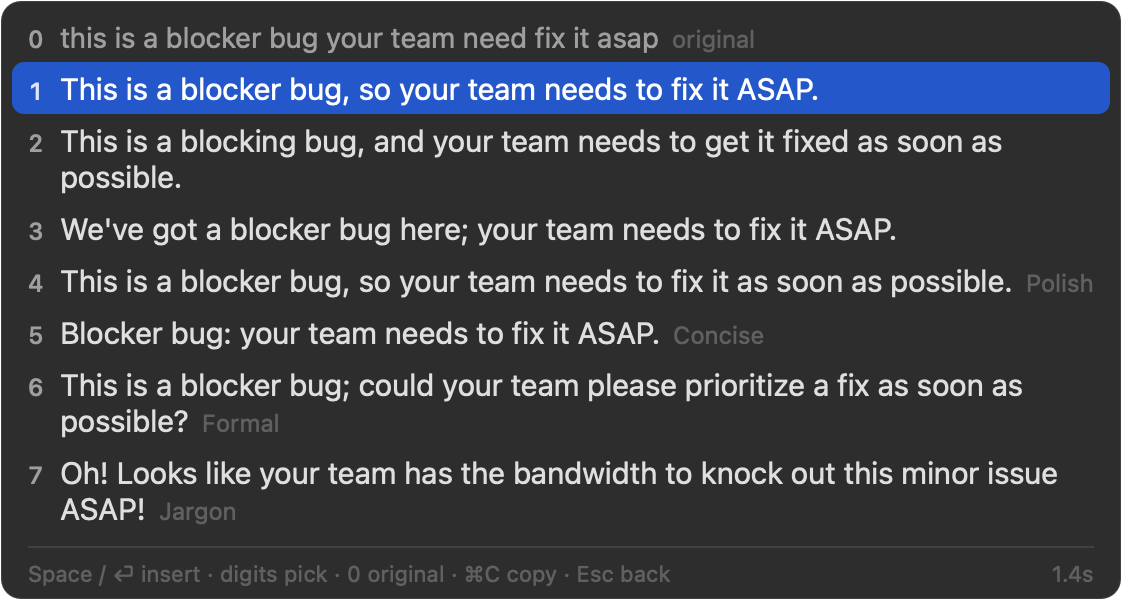
Examples for "this feature is way too hard to use" (real results; they differ each time):
| Style | In config.json
|
What it does | Example |
|---|---|---|---|
| Polish | polish |
Same tone, more natural | This feature is far too cumbersome to use. |
| Concise | concise |
As short as possible, but every point, apology and request stays | This feature is too hard to use. |
| Formal | formal |
For managers and clients; polite, professional wording | This feature presents significant usability challenges. |
| Casual | casual |
Like chatting with a friend | This feature is like, way too hard to use, man. |
| Tactful | tactful |
Politer and softer; criticism is easier to accept | This feature could be a bit more user-friendly. |
| Jargon | jargon |
Big-tech speak, Amazon-style in English; bad news is played down | Oh! Looks like this feature's UX journey has some real opportunities to optimize the user experience! |
Every rewrite adds no information, requests or conclusions that aren't in the original; keeps the strength and rough length unless the style is about changing them; leaves names, numbers, links, code and product names alone; and always fixes typos and grammar.
- Under "Rewrite Styles" in the settings: "Add…" adds one, drag to reorder; the order is the order of the lines from 4 on.
- Or
rewriteStylesinconfig.json, e.g.["concise", "jargon"]. - The default is Polish, Concise and Formal. With none, you get lines 1–3 only.
- An app can have its own styles (Mail formal, Slack casual): Settings → Apps → "Rewrite styles"; see Settings and Configuration → Per-app settings.
More styles take longer to finish and use more output tokens.
The Jargon style has no built-in word list. You can give it your own (your team's abbreviations and in-house phrases): the model prefers these terms where they fit, and the Jargon line notes what the terms it used mean.
Plain text (UTF-8), one term per line, optionally followed by its meaning:
# our team's jargon
PRFAQ = a new-feature proposal: the press release and FAQ, written first
COE = an incident review
two-way door = a decision you can undo at any time
bandwidth: time and energy
LGTM
- Separate the term from its meaning with
=,:, a Tab, or-,—,–with spaces around; a line is split at the first one. Two columns copied from a spreadsheet paste in tab-separated. - Lines starting with
#are comments. A term can go without a meaning (LGTM). - A term that appears more than once (ignoring case) counts the first time only.
- The first 150 terms are read; terms are cut at 60 characters, meanings at 120.
- By default
~/.config/allinoneime/jargon.txt: "New" under "Jargon List" in the settings creates it and opens it. - A file you already have: "Choose File…", or
"jargonFile": "~/Documents/team-jargon.txt"inconfig.json. - Saving the file applies it; no restart.
When the Jargon line uses terms from your list that have a meaning, its comment explains up to two of them, e.g. "Jargon · bandwidth = time and energy". English terms match whole words only, ignoring case.
The list goes to the AI with @improve requests only when the Jargon style is on and the list has terms. The model
is told it's reference material, not instructions, and not to force in terms that don't fit.
make cli
.build/release/allinoneime-cli --styles jargon --jargon ~/.config/allinoneime/jargon.txt "we can't ship this next week"