Implementation Runs
SERP AI Runs turns "which Design Contract blocks aren't implemented yet" into a persisted, resumable batch job that spawns real implementation sessions and tracks their progress — the mechanism that lets an approved architecture become working code across many services without babysitting one chat window per service.
Open it from the SERP AI panel's title bar — icon $(run-all), command serp.ai.openImplementationRuns.
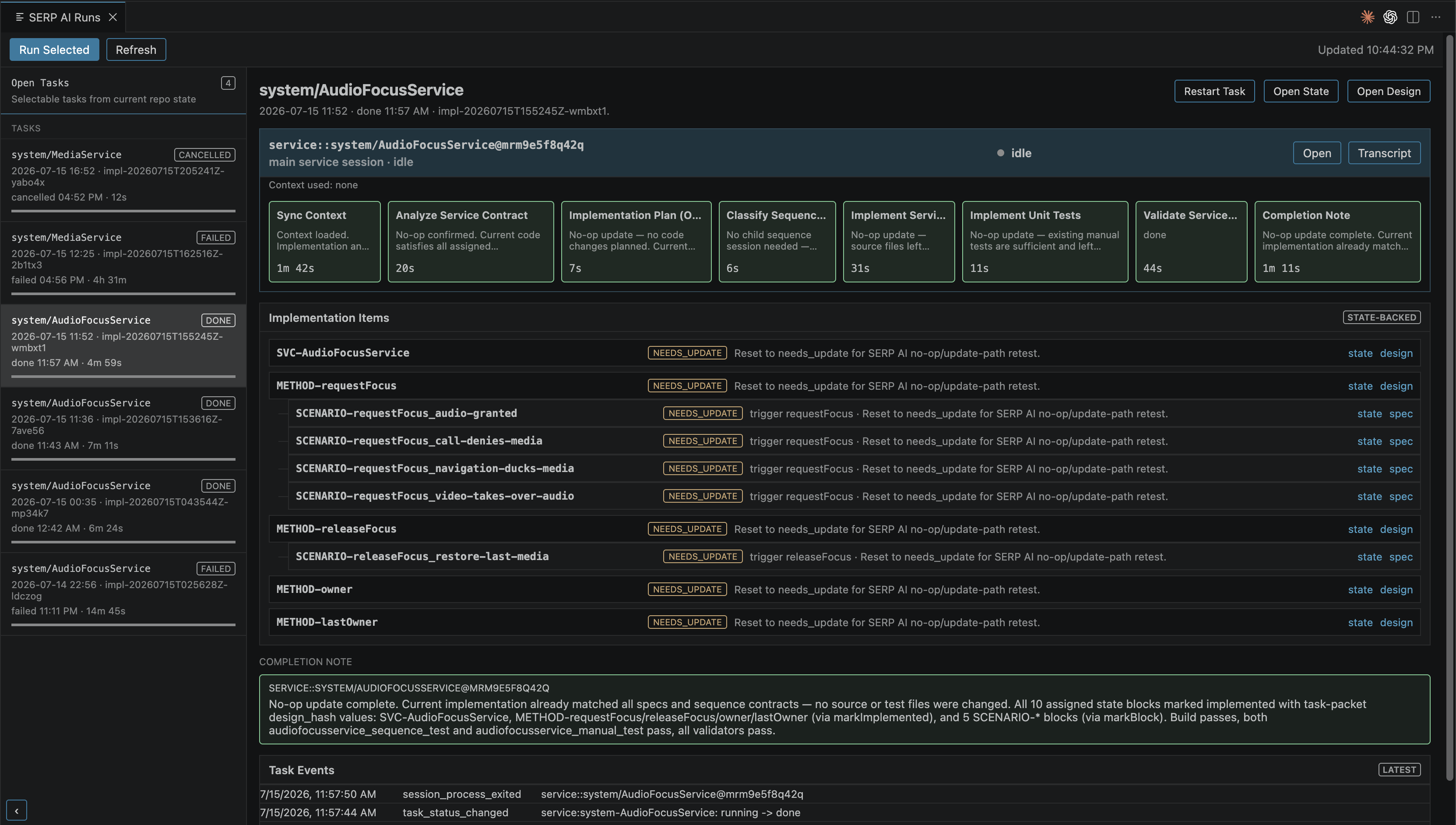
A Run is built directly from design/state drift, not from clicking a button on one block. serp.implementation.plan walks every *.design.yaml and every */sequences/*.suml file under the specs root, computes each trackable block's (SVC-*/METHOD-*) effective state — not_implemented, implemented, or needs_update (its stored design_hash no longer matches the current design text) — and groups everything not-yet-implemented into one task per service, per HMI component, or per standalone sequence. Non-trackable blocks (interfaces, properties, notifications, scenarios) ride along as context for whichever task references them, not as separate tasks.
Starting a Run (serp.implementation.start, or Run Selected in the panel) always runs a preflight first — Validate specs then Generate workspace, streamed to the "SERP AI" output channel — then spawns one implementation session per runnable task.
Each Run has four stages: validate → generate → implementation → final_validation, an append-only event log, and an overall status (planned/running/passed/blocked/failed/cancelled). Runs are plain JSON, not VS Code state: .serp/ai/implementation-runs/<runId>.json, runId like impl-20260715T155245Z-wmbxt1.
A real, completed run (trimmed) looks like this:
{
  "runId": "impl-20260715T155245Z-wmbxt1",
  "status": "passed",
  "stages": [
    { "id": "validate", "status": "done", "message": "Validation OK" },
    { "id": "generate", "status": "done", "message": "Generation complete" },
    { "id": "implementation", "status": "done", "message": "Implementation tasks completed" },
    { "id": "final_validation", "status": "done", "message": "Final validation OK" }
  ],
  "plan": {
    "summary": { "totalBlocks": 10, "needsUpdateBlocks": 10, "taskCount": 1 },
    "tasks": [
      {
        "id": "service:system-AudioFocusService",
        "kind": "service",
        "scopeName": "system/AudioFocusService",
        "status": "done",
        "reason": "needs_update",
        "blocks": [ { "id": "SVC-AudioFocusService", "effectiveState": "needs_update" }, "…" ],
        "sequenceBlocks": [ { "id": "SCENARIO-requestFocus_audio-granted", "trigger": "requestFocus" }, "…" ],
        "sessionIds": ["service::system/AudioFocusService@mrm9e5f8q42q"]
      }
    ]
  }
}Three-pane webview, not a tree: a history column on the left (an always-present, live "Open Tasks" entry, then every task from the last 30 saved runs), a task list, and a detail pane.
For a selected task, the detail pane shows a session card per attempt: live status dot, current workflow step, a backend badge (backend/model/effort/thinking), a context usage line, a per-step workflow strip, and Open/Transcript buttons — plus the Implementation Items card (each design block, its state badge, links to its state/design/spec files) and the last 10 Task Events.
For the live "Open Tasks" entry, the detail pane instead shows a checkbox list of open tasks and, for the selected one, a Task Packet — the literal prompt payload (SERP_IMPLEMENTATION_TASK) that would be sent to the agent if you started it right now: run/task/session id, scope, reason, the target workflow, and every implementation_blocks/sequence_contracts/context_blocks entry the session will be handed.
Only two toolbar buttons actually do anything: Run Selected (spawns whatever's checked in Open Tasks) and Refresh. It auto-refreshes every 5 seconds.
| Button | Shown when | What it actually does |
|---|---|---|
| Cancel Task | task or run is running
|
Cancels the entire current run, not just this task — the label undersells the blast radius. Spawned AI sessions are not killed, only marked cancelled. |
| Restart Task (rework) | task is done/failed/cancelled/blocked/skipped
|
Prompts for a comment, then creates a brand-new Run containing just this one task, spawning exactly one fresh session. Use this even on a task that already passed, if you want it redone with guidance. |
| Continue Step (resume) | task is failed/cancelled
|
Prompts for a comment, finds the most recent failed workflow stage from the task's session history, and spawns exactly one new session starting mid-workflow at that stage — a fresh, compact session, not a continuation of the old chat (the old transcript is offered as a pointer, "open only if truly needed"). |
"Continue Run" and "Final Validation" have no button in the current UI at all — the panel auto-advances once dependent tasks finish, polling every 5 seconds.
A Run doesn't invent a new kind of session. It headlessly spawns the same service/sequence/hmi sessions you'd start by hand, mapped to their normal workflow: service → service-implementation, sequence → sequence-implementation, hmi → hmi-development. "Child sessions" shown stacked under a task's primary card are just that task's other attempts (an earlier or later resume/rework), not concurrent sub-agents — when a resume is in progress, the panel merges the old and new session's workflow steps into one continuous strip.
Every spawned session registers normally in the session registry, so Open/Transcript in the Runs panel go through the exact same path as opening any session from the SERP AI tree.
Backend settings and the sent prompt are snapshotted at spawn time and never rewritten — so if you change model/effort in SERP AI Settings later, the history still shows truthfully what a past attempt actually ran with. Context usage ("Context used: id1, id2" under a session card) reflects which serp.context.readAvailable(Project) entries that session actually read, not just listed — a diagnostic signal for whether a spawned session consulted the context it was pointed at.
Reconciliation keeps status honest against reality: a task marked done with no live worker session gets forced back to failed; if a session's process exits non-zero, the run/task flip to failed and any blocks left running reset to not_implemented/needs_update — which is what makes the resume flow above possible. This runs on nearly every panel action, not just on a timer.
| Tool | Purpose |
|---|---|
serp.implementation.plan |
Build the plan from current design/state drift; createRun: true persists it |
serp.implementation.start |
Create a run and spawn sessions for every runnable task; returns immediately |
serp.implementation.status |
Current or requested run, plus recent history (reconciles first) |
serp.implementation.continue |
Spawn pending tasks whose dependencies just completed |
serp.implementation.cancel |
Cancel a run — marks it and its non-terminal tasks cancelled, doesn't kill processes |
There's no separate "resume" tool — resume and rework are extension-UI actions only, not something an agent calls on itself.
- Design Contracts — the approval/state data a Run's plan is built from
- SERP AI Sessions — the session kinds a Run spawns, and where agent backend/model settings live
- AI-Driven Development — how this fits the overall spec → design → implementation flow