SERP AI Sessions
SERP AI Sessions are scoped development environments for AI agents. Each session is tied to one element — a service, an HMI component, a sequence, a deployment, the architecture as a whole, or a debug target — receives context assembled for that scope, and cannot write outside it.
The SERP AI model is intentionally agent-agnostic. The session system owns scope, context, workflow, validation, summaries, and runtime tools; the agent is a pluggable execution backend. Claude Code is the default backend; Codex can be selected instead, per project, in SERP AI Settings. Any agent that can speak the session's MCP protocol can sit behind the same scope boundary.
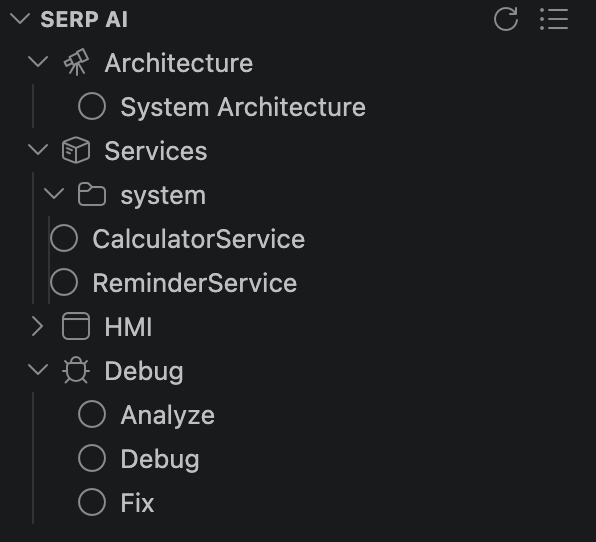
A session ties together:
-
Kind — what the session is for (
architecture,service,sequence,hmi,analyze,debug,fix,exploration,intake,design-draft) — determines its role (what it may write), its workflow, and what context is loaded - Scope — the specific element the session is bound to (a service, an HMI component, a deployment, or the whole system for Architecture/Exploration)
- Workflow — a structured sequence of stages that guides the work from discovery to completion, with validation gates in between
The context guard and scope guard hooks enforce scope automatically on every prompt and every file write — see Hooks below.
The SERP AI panel is a separate tree from the Explorer, with six root sections: Architecture, Services, HMI, Debug, Exploration, and Temp. Every scope — a service, an HMI component, Architecture, each Debug mode, and the freeform Exploration section — is a folder holding a list of sessions, not one linked session. You can have several sessions open against the same service at once (one implementing, one debugging, one being reworked by an Implementation Run).
▾ Architecture                    3 sessions · 1 running
    Jul 4, 10:09 PM      <1h
    Jul 4, 10:32 PM      <1h        (● spinner while working)
    Jul 4, 11:11 PM      <1h        (red ? — waiting on you)
▾ Services
  ▾ cabin
    ▾ ClimateService     2 sessions
        Jul 3, 09:00 AM
      ▾ Sequences
          HandleSetTemp
▾ HMI                              (its own branch, not nested under Services)
    ClimateView          1 session
▾ Debug                            (tied to the active deployment)
  ▾ Analyze               1 session
  ▾ Debug                 2 sessions · 1 running
  ▾ Fix                   0 sessions
▾ Exploration                      (freeform, lightweight context, no write restrictions beyond gen/)
    Jul 5, 09:00 AM
▾ Temp                             (observational only — headless background sessions)
    Drafting design text for system/AudioFocusService...
Temp is different from the other five: it's an always-visible, non-clickable list of in-flight headless sessions — currently the Design Draft session spawned after a Sync Design run. Entries disappear once the draft finishes; there's no history kept there.
Folders are always expandable, even with zero sessions inside — hover for an inline "+" (New Session) button and a history icon for archived sessions. Right-click a session for Rename, Reset Status, Archive; right-click a folder for New Session, Archived Sessions….
| Icon | Meaning |
|---|---|
| Spinner | working |
Red ?
|
waiting_for_user — the agent asked you something and is paused |
| Green | linked and idle |
| Yellow | stale — the backend session behind this entry can no longer be found |
| Plain outline | never linked to a backend session yet |
The row description shows age plus backend, e.g. 20h · Codex or 5d · Claude.
| Tree node | Kind | Write scope |
|---|---|---|
| Architecture | architecture |
specs/ only |
Services → <group> → <name>
|
service |
src/services/<group>/<service>/ + its tests |
Services → … → Sequences → <name>
|
sequence |
same as its owning service (single session, not a list — each sequence is already a distinct scope) |
HMI → [<group> →] <name>
|
hmi |
src/components/<group>/<component>/ |
| Debug → Analyze / Debug |
analyze / debug
|
read-only — no write scope |
| Debug → Fix | fix |
src/services/**, tests/**
|
| Exploration | exploration |
anywhere except gen/ — no persona restriction, meant for open-ended work that doesn't fit any other kind |
| (Intake, Design Draft) |
intake / design-draft
|
specs/**/*.design.yaml only — see Design Contracts
|
gen/ is always blocked, for every kind, no exception.
Debug sessions are tied to the active deployment and go stale when it changes.
SERP treats the AI assistant as a pluggable execution backend for a session, not part of the architecture:
| Layer | Owned by |
|---|---|
| Kind, scope, workflow state | SERP session manager |
| Context assembly, scope enforcement | SERP hooks + MCP context assembler |
| Spec validation, decisions, summaries, runtime calls | SERP MCP tools |
| Code reasoning and edit proposals | The configured agent backend (Claude Code or Codex) |
Claude Code is the default; Codex is available as a per-project alternative. The choice is made once, project-wide, in SERP AI Settings — new sessions (interactive or headless/spawned) use whichever is active. Codex sessions run through the Codex CLI (codex exec --json for headless starts) and open in the native Codex VS Code editor; Claude Code sessions use the claude CLI directly.
- From the Explorer panel: right-click a service/HMI component/deployment → Start AI Session (or open a sequence node under a service). The kind is inferred from what you clicked.
- From the SERP AI panel: hover any folder → click the inline "+" to start a new session in that list.
-
From another session: an agent can call
serp.session.spawnto create and launch a session for a different scope, hand it a task, and move on without waiting — the new session appears in the tree immediately. There's no cap on how many sessions can be spawned this way or how deep they can chain, and no session kind is off-limits, but the model isn't reliably reminded to use it — it's a real capability, not a guarantee.
The selected agent opens with a compact bootstrap prompt (SERP_START <sessionId> → calls serp.session.start), which resolves the full context package for that scope before the agent's first real reply.
| Tool | Purpose |
|---|---|
serp.session.start / serp.session.getContext
|
Bootstrap: role, workflow, project context, knowledge |
serp.session.getStatus |
Stage, staleness, open questions |
serp.session.sync |
Full sync: parent summaries + scope + manifest |
serp.session.setState |
Report live state (working/waiting_for_user/idle) — drives the panel's status icon |
serp.session.spawn |
Create and launch a session for another scope with a task |
serp.scope.checkWrite |
Check whether a file path is writable from this session |
serp.summary.get / .update / .validate / .listInherited
|
Session work summaries (working notes, not durable — see Design Contracts) |
serp.workflow.* |
Start/advance/inspect the session's workflow stages |
serp.validation.run / .runGenerator
|
Run scope validators / serpgen validate
|
serp.runtime.listMethods / .call
|
Call a live service from inside the session — see Runtime & Debug Tools |
serp.design.* |
Design Contracts — propose, approve, sync, drift — see Design Contracts |
serp.implementation.* |
Plan/start/continue/cancel batch implementation runs — see Implementation Runs |
Command "SERP AI Configuration" (serp.ai.openSerpAiConfiguration, $(developer-tools) icon on the SERP AI panel's title bar) opens an editor for the session-kind resource system per project, without touching the extension's shipped defaults.
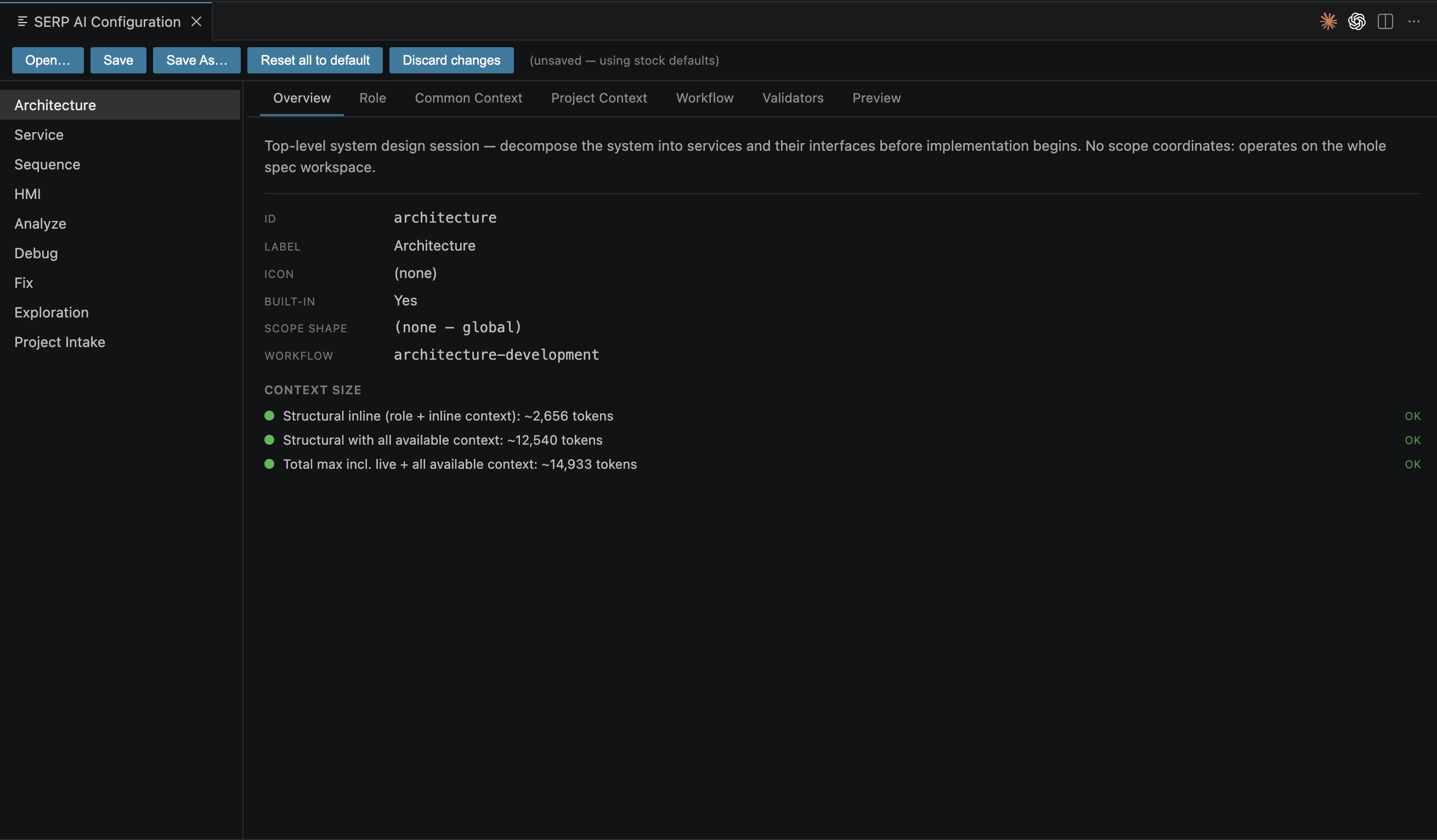
Per-kind tabs: Overview (context-size estimate — structural, with-context, and total token counts), Role (responsibilities, forbidden actions, write allow/deny lists), Common Context (attached docs), Project Context (attached sources), Validators (advisory validator list), Workflow (stage sequence + loop-back branches, with shared Steps Library and Branch Prompts Library editors), Preview (rendered system prompt / chat context).
Edits accumulate in a draft you Save/Save As to .serp/ai/session-configs/; the most recently saved file becomes the active config (current.json). This isn't a display-only mock — the MCP server resolves the same active config at tool-call time, so a customized workflow actually drives real sessions, falling back to the builtin when a project has no override. Reset this type to default / Reset all to default drop the overlay.
Don't confuse this with SERP AI Settings below — Configuration edits what a kind of session is (role, workflow, context); Settings picks which agent runs it and how.
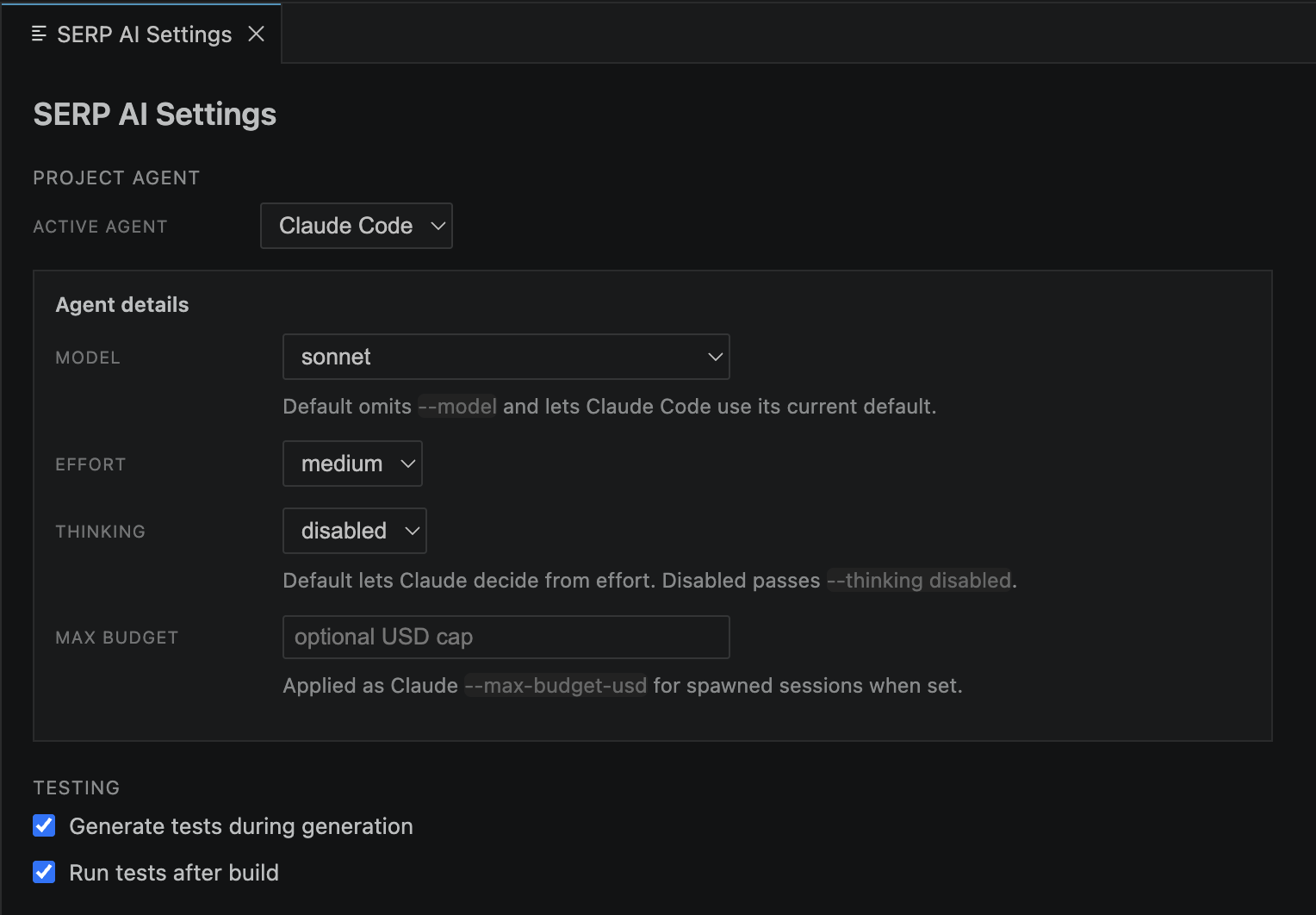
Command "SERP AI Settings" (serp.ai.openPluginSettings, gear icon on the SERP AI panel's title bar) — per-project agent and test-generation preferences, stored under .serp/ai/.
-
Project agent — Claude Code or Codex (
.serp/ai/backend.json). -
Agent details — per-backend Model, Effort, and (Claude only) Thinking/Max budget. These apply to spawned/headless sessions —
serp.session.spawnchildren and Implementation Run workers — not to a session you're driving interactively yourself. -
Testing — Generate tests during generation and Run tests after build, the same two toggles also present on the Configuration Overview tab (
.serp/ai/test-options.json). Turning off test generation passes--no-sequence-teststo the generator — see generated sequence tests. Turning on run-after-build runsctestagainst the active deployment's build directory after every successful Build/Clean Build.
Three Claude Code hooks are installed globally (~/.claude/settings.json) on first activation, self-scoping to SERP projects by walking up from cwd for a .serp/ai/ directory.
Runs before every Edit/Write/MultiEdit. Hard-blocks gen/ always; otherwise enforces the calling session's own allowed paths (see Session kinds above). Scope is resolved per session (via the tool call's own session_id, reverse-looked-up against .serp/ai/sessions.json), not from one shared file — this matters once more than one session is doing real work at the same time.
Runs before each message reaches the agent. Diffs every file in the session's watched scope against a snapshot taken the last time context was loaded, and injects a compact diff (or the full file, past an 80-line/50%-of-file threshold) for anything that changed — including edits made by another session or another developer. Keeps the agent current without re-reading everything on every turn.
Deterministically reports working/idle state regardless of what the conversation contains, so the tree's status icon isn't dependent on the model remembering to call serp.session.setState itself (it's also nudged to call that tool for waiting_for_user, since only the model itself knows it just asked a question).
- Design Contracts — durable, approved specs that gate what a session may claim as "implemented"
- Implementation Runs — batch-spawns service/HMI/sequence sessions from design/state drift
- Explorer — project tree, right-click to start a session
- Runtime & Debug Tools — what Debug/Analyze/Fix sessions call into
- Plugin Overview — extension overview and installation