




Lightweight, probably the fastest PaddleOCR SDK in TypeScript. Multilingual Support. Runs anywhere JavaScript runs: Node.js, Bun, Deno, web browsers, web worker, browser extensions, and React Native (iOS/Android). Docker & CLI supported. The official SDK is browser-only and significantly slower. Compare it for yourself. Fine tune it? fine-tuning on your data.
Need it as HTTP-service? dockerized? we've got you covered! Quickly spins up ppu-paddle-ocr REST API here: ppu-paddle-ocr-serve. Need a CLI instead? sure here: ppu-paddle-ocr CLI support. Adjust the config & model for your use case, see config recommendation. Are you AI Agents? you can learn quickly by using the skill in the skill-ppu-paddle-ocr folder.
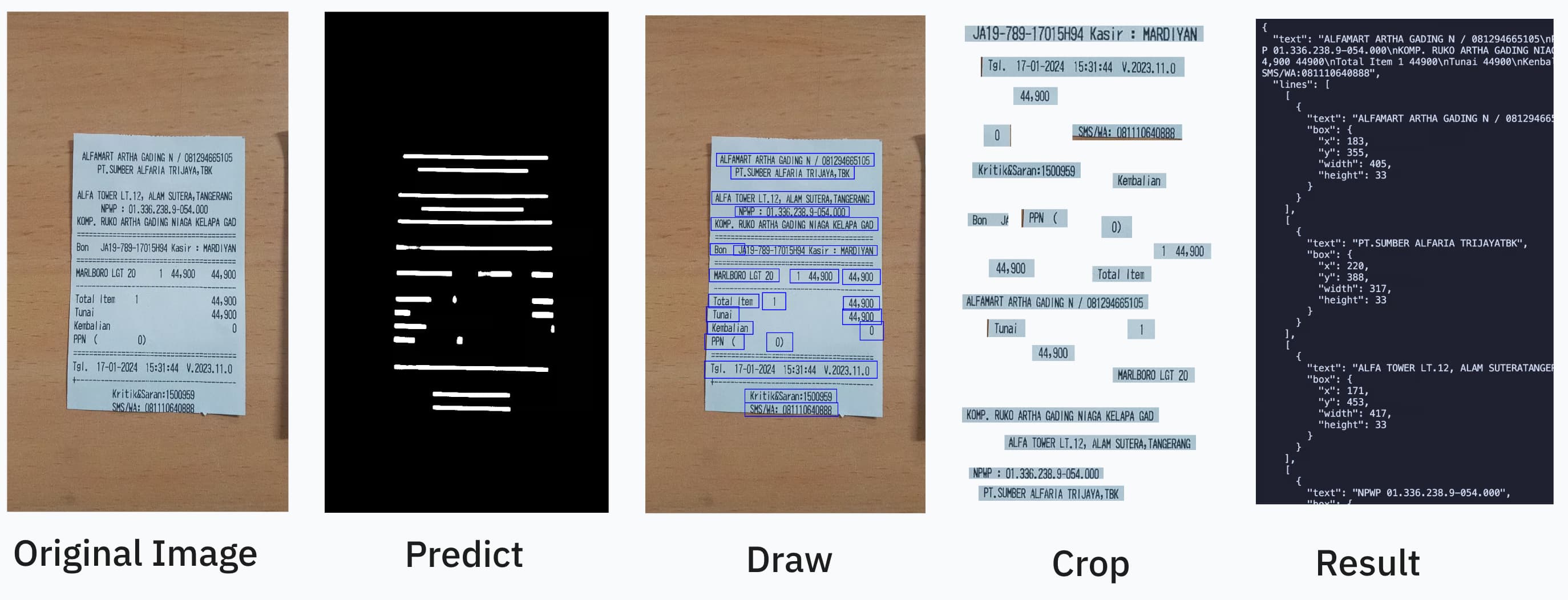
import { PaddleOcrService } from "ppu-paddle-ocr";

const service = new PaddleOcrService();
await service.initialize();

const result = await service.recognize("./receipt.jpg");
console.log(result.text);

await service.destroy();- Quick Start
- Why ppu-paddle-ocr?
- Runtime Support
- Installation
- Core Usage
- Command Line
- Batch Recognition
- Recognition Strategies
- Choosing a Model and Configuration
- Image Preprocessing
- Processing Engine
- Web / Browser Support
- React Native (Mobile)
- Models and Language Support
- Configuration Reference
- Benchmark
- Ecosystem
- Contributing
- License
- Support
- Scripts
- Lightweight, minimal dependencies, optimized for performance.
- Pre-packed models, PP-OCRv6 tiny models (~6 MB, multilingual) are fetched and cached automatically on first run; the full-dictionary small/medium tiers and language-specific variants are one option away. Supports additional variants via ppu-paddle-ocr-models.
- Runs everywhere, Node.js, Bun, Deno, web browsers, web workers, browser extensions, and React Native (iOS/Android). The official SDK is browser-only.
- Customizable, custom models, dictionaries, and per-call overrides.
- TypeScript, full type definitions.
The same package, the same API, every JavaScript runtime:
| Runtime | How to install | Try it |
|---|---|---|
| Node.js | npm install ppu-paddle-ocr onnxruntime-node |
npm package |
| Bun | bun add ppu-paddle-ocr onnxruntime-node |
npm package |
| Deno | deno add jsr:@snowfluke/ppu-paddle-ocr |
JSR package |
| Web browser | npm install ppu-paddle-ocr onnxruntime-web (import /web subpath) |
Live demo |
| Web worker | Same as web; the /web subpath runs in workers and MV3 service workers unchanged. |
Web Workers |
| Browser extension | Same as web; bundle ppu-paddle-ocr/web with your extension's bundler. |
Example extension repo |
| Mobile (React Native) | npm install ppu-paddle-ocr onnxruntime-react-native @shopify/react-native-skia (import /mobile subpath) |
Example app |
npm install ppu-paddle-ocr onnxruntime-node onnxruntime-webOmit onnxruntime-node or onnxruntime-web depending on your target environment (Node/Bun vs browser).
npm install -g ppu-paddle-ocr onnxruntime-node      # or: bun add -g ppu-paddle-ocr onnxruntime-node
ppu-paddle-ocr recognize receipt.jpg
This puts a ppu-paddle-ocr command on your PATH. See Command Line for all commands.
Notes on the global install
onnxruntime-nodeis required. It is an optional peer dependency (~258MB of native binaries), so install it alongside the CLI.- bun: ensure
~/.bun/binis on yourPATH(npm's global bin usually already is). - Updates are manual. Re-run the install with
@latestto upgrade. (bunx/npxalways fetch the latest but can serve a stale cache; a global install pins the version and you own upgrades.) - Node or Bun must be present. This is the Node/Bun build, not a standalone binary. For that, see Standalone Binaries below.
Every release attaches self-contained executables, no Node, Bun, or npm install required. Download, extract, run:
curl -L https://github.com/PT-Perkasa-Pilar-Utama/ppu-paddle-ocr/releases/latest/download/ppu-paddle-ocr-linux-x64.tar.gz | tar xz
./ppu-paddle-ocr-linux-x64 recognize receipt.jpg| Asset | Platform |
|---|---|
ppu-paddle-ocr-linux-x64.tar.gz |
Linux x86-64 (glibc; Debian, Ubuntu, Fedora, ...) |
ppu-paddle-ocr-linux-arm64.tar.gz |
Linux ARM64 (glibc; Raspberry Pi OS 64-bit, AWS Graviton, ...) |
ppu-paddle-ocr-darwin-arm64.tar.gz |
macOS on Apple Silicon |
ppu-paddle-ocr-windows-x64.zip |
Windows x86-64 (contains the .exe) |
Intel Macs and Alpine (musl) are not covered, onnxruntime ships no darwin-x64 or musl builds; use npx/bunx there.
Size, slim variant, and OS warnings
- Size and first run. ~50 MB download, ~140-200 MB extracted (the executable embeds the Bun runtime, ONNX Runtime, and the canvas engine;
tarpreserves the executable bit). Models (~6 MB) still download to~/.cache/ppu-paddle-ocron first run, exactly like the npm CLI. - Slim variant. Each target also ships a
-slimarchive (e.g.ppu-paddle-ocr-linux-x64-slim.tar.gz) that excludes the OpenCV engine: ~28 MB smaller extracted, though only ~5 MB smaller to download (the OpenCV payload compresses well). It always uses thecanvas-nativeengine and rejects--engine opencv; accuracy on the reference receipt is near-identical (see Benchmark). Pick slim for disk and memory footprint; pick full if you want the opencv engine. - macOS Gatekeeper. The binaries are ad-hoc signed but not Apple-notarized. If macOS blocks a downloaded binary, clear the quarantine flag:
xattr -d com.apple.quarantine ./ppu-paddle-ocr-darwin-arm64(or right-click, Open, once). - Windows SmartScreen. Unrecognized-app warning on first run: "More info", then "Run anyway".
Verify a download (Sigstore + SLSA)
Both checks run against the archive, before extraction; both artifacts are attached per release.
# Sigstore signature (bundle is attached next to each archive)
cosign verify-blob ppu-paddle-ocr-linux-x64.tar.gz \
  --bundle ppu-paddle-ocr-linux-x64.tar.gz.sigstore.json \
  --certificate-identity-regexp "github.com/PT-Perkasa-Pilar-Utama/ppu-paddle-ocr" \
  --certificate-oidc-issuer https://token.actions.githubusercontent.com

# GitHub build provenance (SLSA)
gh attestation verify ppu-paddle-ocr-linux-x64.tar.gz --repo PT-Perkasa-Pilar-Utama/ppu-paddle-ocrimport { PaddleOcrService } from "ppu-paddle-ocr";
const service = new PaddleOcrService({
debugging: {
debug: false,
verbose: true,
},
});
await service.initialize();
const result = await service.recognize("./assets/receipt.jpg");
console.log(result.text);
await service.destroy();Using preset models, import constants for quick switching:
import { PaddleOcrService, V6_SMALL_MODEL, V5_EN_MOBILE_MODEL } from "ppu-paddle-ocr";

// PP-OCRv6 small (full dictionary; the default is PP-OCRv6 tiny)
const service = new PaddleOcrService({ model: V6_SMALL_MODEL });

// Switch to PP-OCRv5 English
const service = new PaddleOcrService({ model: V5_EN_MOBILE_MODEL });
Available presets:
- v6:
V6_TINY_MODEL(default),V6_SMALL_MODEL,V6_MEDIUM_MODEL - v5:
V5_EN_MOBILE_MODEL,V5_EN_MOBILE_INT8_MODEL,V5_EN_SERVER_MODEL,V5_MOBILE_MODEL,V5_SERVER_MODEL - v5 languages:
V5_ARABIC_MOBILE_MODEL,V5_CYRILLIC_MOBILE_MODEL,V5_DEVANAGARI_MOBILE_MODEL,V5_GREEK_MOBILE_MODEL,V5_ESLAV_MOBILE_MODEL,V5_KOREAN_MOBILE_MODEL,V5_LATIN_MOBILE_MODEL,V5_TAMIL_MOBILE_MODEL,V5_TELUGU_MOBILE_MODEL,V5_THAI_MOBILE_MODEL - v4:
V4_EN_MOBILE_MODEL,V4_MOBILE_MODEL,V4_SERVER_MODEL,V4_SERVER_DOC_MODEL - v3:
V3_MOBILE_MODEL,V3_JAPANESE_MOBILE_MODEL
Granular override, mix presets with custom paths:
const service = new PaddleOcrService({
  model: {
    ...V6_SMALL_MODEL,
    detection: "./models/custom-det.onnx", // Override just detection
  },
});
Fully custom, pass file paths, URLs, or ArrayBuffers:
const service = new PaddleOcrService({
  model: {
    detection: "./models/custom-det.onnx",
    recognition: "https://example.com/models/custom-rec.onnx",
    charactersDictionary: customDictArrayBuffer,
  },
});

await service.initialize();const service = new PaddleOcrService();
await service.initialize();
await service.changeDetectionModel("./models/new-det.onnx");
await service.changeRecognitionModel("./models/new-rec.onnx");
await service.changeTextDictionary("./models/new-dict.txt");Each recognize() call accepts RecognizeOptions for fine-grained control:
// Custom dictionary for one-off recognition
const result = await service.recognize("./assets/receipt.jpg", {
  dictionary: "./models/new-dict.txt",
});

// Disable caching for fresh processing
const fresh = await service.recognize("./assets/receipt.jpg", {
  noCache: true,
});

// Combine options
const result = await service.recognize("./assets/receipt.jpg", {
  noCache: true,
  flatten: true,
  strategy: "per-box",
});detect() runs only the detection model - no recognition - and returns the
bounding boxes of the text regions it finds. Useful when you only need layout
(where the text is), or want to feed the crops into your own pipeline.
// Just the boxes
const { boxes } = await service.detect(imageBuffer);
// boxes: { x, y, width, height }[] in original image coordinates

// Also return each region as a PNG buffer, index-aligned with boxes
const { crops } = await service.detect(imageBuffer, { crop: true });
await Bun.write("first-region.png", crops![0]!);

// Or write the crops straight to a folder as crop_000.png, crop_001.png, ...
await service.detect(imageBuffer, { saveCropsTo: "./out/regions" });

// DetectOptions extends DetectionOptions, so any tuning field
// can be overridden per call:
const { boxes: bigOnly } = await service.detect(imageBuffer, {
  minimumAreaThreshold: 500,
  maxSideLength: 960,
});
detect() accepts the same inputs as recognize() (ArrayBuffer, canvas,
absolute path, or URL) and works on all entry points. saveCropsTo is
Node/Bun only (ignored on web/mobile); crop: true is not supported on React
Native, where the Skia canvas cannot be encoded to PNG.
Also available as the CLI detect command and the serve app's
POST /v1/detect - see Command Line and
apps/serve.
The package ships a bin, so you can OCR without writing any code. In a project that has ppu-paddle-ocr and onnxruntime-node installed, bunx/npx resolve the local install directly; for zero-install runs use npx -p onnxruntime-node -p ppu-paddle-ocr ppu-paddle-ocr <args> or a global install:
# one image -> recognized text on stdout
bunx ppu-paddle-ocr recognize receipt.jpg

# a URL, as structured JSON
npx ppu-paddle-ocr recognize https://example.com/invoice.png --json --pretty

# detection only: bounding boxes as JSON, optionally saving each region as a PNG
bunx ppu-paddle-ocr detect receipt.jpg --save-crops ./regions --pretty

# zero-install (no local ppu-paddle-ocr): npx can pull both packages
npx -p onnxruntime-node -p ppu-paddle-ocr ppu-paddle-ocr recognize receipt.jpg

# many images (glob), fastest strategy, written to a file
bunx ppu-paddle-ocr batch "scans/*.png" --strategy cross-line --json -o results.json

# print each result as it finishes
bunx ppu-paddle-ocr stream "scans/*.png"

# pick a catalogue preset by name (granular --model-* flags override parts)
bunx ppu-paddle-ocr recognize receipt.jpg --model v6-tiny
bunx ppu-paddle-ocr recognize receipt.jpg --model v5-thai-mobile

# pre-warm / clear the model cache, inspect the active config (+ preset list)
bunx ppu-paddle-ocr download-models
bunx ppu-paddle-ocr clear-cache
bunx ppu-paddle-ocr models --json
Every PaddleOptions / RecognizeOptions field maps to a flag:
Models and engine (all commands):
| Flags | Purpose |
|---|---|
--model <preset> |
Catalogue preset (v6-tiny, v6-small, v5-en-mobile, ...); list: models --json |
--model-detection, --model-recognition, --model-dict |
Raw paths/URLs; each overrides that part of the preset |
--engine, --execution-providers |
opencv | canvas-native; ONNX providers (e.g. cuda,cpu) |
--max-side-length, --padding-vertical, --padding-horizontal, --min-area, --mean, --std |
Detection tuning (--max-side-length accepts auto) |
Behavior and output:
| Flags | Applies to | Purpose |
|---|---|---|
--strategy, --cross-line-width-factor, --flatten, --no-cache |
recognition | Grouping strategy, flat output, result cache |
--image-height, --min-confidence, --max-crop-source-side-length |
recognition | Input height, confidence filter, crop-source cap |
--rec-batch-size, --no-rotate-vertical-crops, --space-recovery |
recognition | Batch size, vertical-crop rotation, space recovery |
--main-thread-yield-ms |
recognition | Pause before each inference (browser only, no-op in the CLI) |
--save-crops <dir> |
detect only |
Write one PNG per detected box |
--concurrency, --settle |
batch, stream |
Images in flight, keep going past a failed image |
--json, --pretty, -o/--output, -q/--quiet, --verbose |
all commands | Output format and destination |
--debug, --debug-folder <dir> |
all commands | Dump intermediate frames to disk |
Recognized text goes to stdout; progress and logs go to stderr, so output pipes cleanly. Exit codes: 0 success, 1 runtime error, 2 usage error.
Run bunx ppu-paddle-ocr help for the full reference. The CLI uses the default v6 tiny models unless you select a --model preset or override the --model-* flags.
batchRecognize() runs recognize() over many images with bounded concurrency: at most concurrency images are decoded and in flight at once, so memory stays in check. Results come back index-aligned to the inputs, whatever order they finish in.
const results = await service.batchRecognize([buf1, buf2, buf3]);
results.forEach((r, i) => console.log(i, r.text));| You want | Use |
|---|---|
| More or fewer images in flight | { concurrency: 8 } |
| One bad image not to kill the batch | { settle: true } |
| Progress or cancellation | { onProgress, signal } |
| Results as they finish | batchRecognizeStream() |
| An input list too big for memory | pass an Iterable or AsyncIterable |
All RecognizeOptions (flatten, strategy, dictionary, noCache) are accepted too and apply to every image. Full surface: BatchRecognizeOptions.
Concurrency. Defaults to "auto": 1 on an accelerator provider (CUDA, WebGPU), 4 on CPU. Set it when you know your hardware:
await service.batchRecognize(images, { concurrency: 8, flatten: true });Why auto picks 1 on an accelerator
A shared ONNX session serializes device work anyway, so parallel runs buy nothing and stack VRAM. On CPU the default overlaps JS preprocessing with native inference, which does help.
Failures. With settle: true the call never rejects; each slot becomes { status, value | reason }:
const results = await service.batchRecognize(images, { settle: true });
for (const r of results) {
  if (r.status === "fulfilled") console.log(r.value.text);
  else console.error("failed:", r.reason);
}
Progress and cancellation use the usual primitives:
const ac = new AbortController();
await service.batchRecognize(images, {
  signal: ac.signal,
  onProgress: (done, total) => console.log(`${done}/${total}`),
});
Streaming. batchRecognizeStream() yields each result as it finishes, so the whole batch is never buffered. Each item carries its input index for reordering:
for await (const item of service.batchRecognizeStream(images)) {
  if (item.status === "fulfilled") console.log(item.index, item.value.text);
}
Both methods accept any Iterable or AsyncIterable of inputs, so a directory walk or a queue never has to be materialized in memory at once.
Recognition strategies control how detected text regions are cropped from the canvas and fed into the recognition model. Fewer inference calls means faster throughput.
| Strategy | Description |
|---|---|
per-box |
Each detected box is recognized individually, n boxes, n inferences. |
per-line |
Boxes on the same line are merged into a single crop, fewer inferences. (Default) |
cross-line |
Crops are bin-packed across lines into uniform-width batches, fewest calls. |
See Choosing a model and configuration for a workload-based selection matrix.
Strategies are set in RecognitionOptions:
const service = new PaddleOcrService({
  recognition: { strategy: "cross-line" },
});
await service.initialize();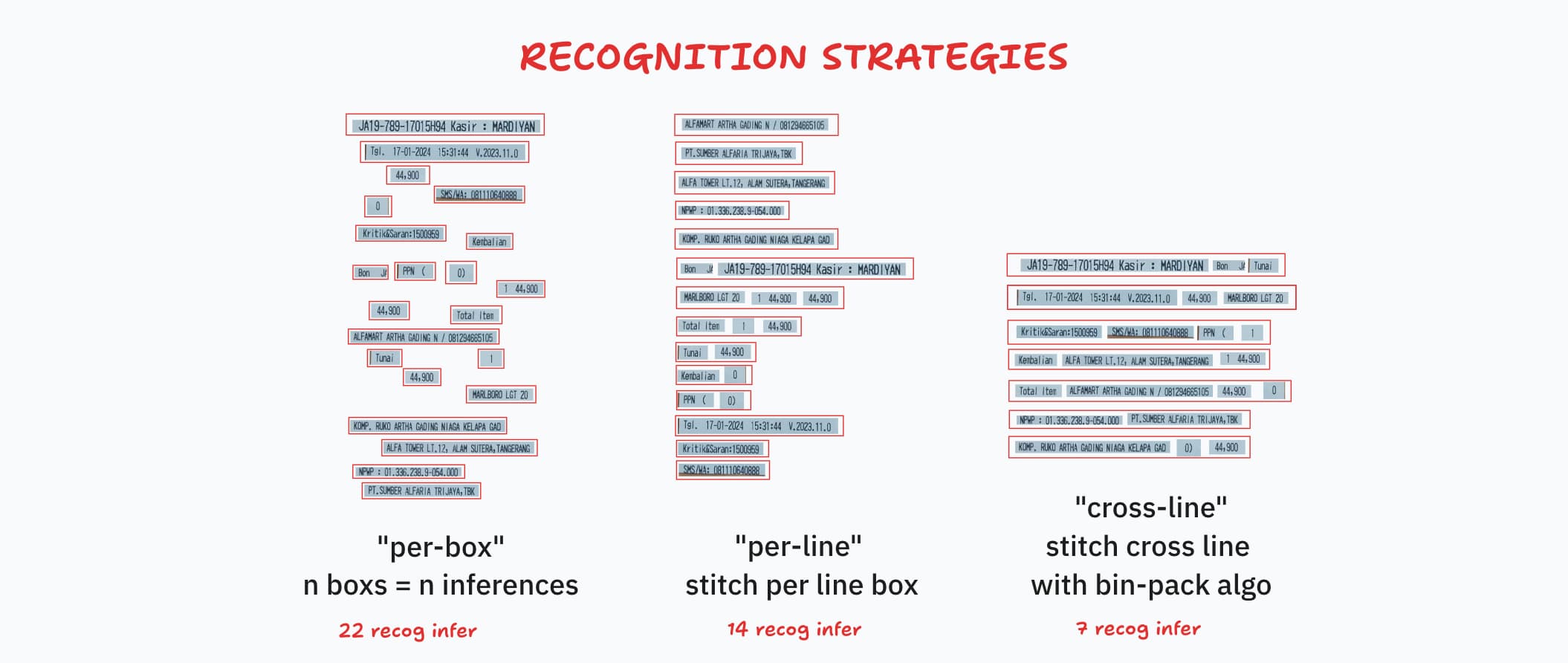
The defaults (PP-OCRv6 tiny, per-line, maxSideLength: "auto", minimumAreaThreshold: 20, minimumConfidence: 0.5, opencv engine) are tuned to be fast and accurate across the tested corpus, including the receipt photo.
For dense document pages or full multilingual coverage, step up to V6_SMALL_MODEL. Each recipe below was validated against the committed example image it names.
v5 models are single-language specialists; v6 models are multilingual (one model, 50+ languages). If your documents are always one known language, the matching v5 model avoids cross-language confusion; if the language varies or mixes, stay on v6.
| Model | Languages | Download | Speed (vs small) | Reach for it when |
|---|---|---|---|---|
V6_TINY_MODEL (default) |
multilingual, ~6.9k-char dictionary | ~6 MB | 3-4x faster | screenshots, UIs, latency-sensitive pipelines |
V6_SMALL_MODEL |
50+ languages, full dictionary | ~30 MB | baseline | dense pages, rare CJK or kana, full-dictionary coverage |
V6_MEDIUM_MODEL |
50+ languages, full dictionary | ~139 MB | ~3x slower | photos, low contrast, the crops other tiers misread |
V5_EN_MOBILE_MODEL and v5 family |
one language each (en, arabic, ...) | ~12 MB | comparable | input language is fixed and known |
Parameter counts, file names, and preset-switching code live in PP-OCRv6 Models.
| Input looks like | What to set | Why |
|---|---|---|
| Dark theme (light text on dark) | nothing, keep defaults | models read inverted text natively; pre-inverting hurt accuracy in our tests |
| Light theme, clean digital render | defaults | high-contrast digital text is the easy case |
| Dense lines (documents, tables) | V6_SMALL_MODEL; cross-line for max throughput |
full dictionary and a more sensitive detector for small body text |
| Sparse short labels (UI, forms) | defaults | merged line context fixes short-label misreads that isolated crops produce |
| Tiny text / fine print | "auto" (default) scales the cap with input size |
text below ~10px after downscale stops being detected; override with a fixed maxSideLength only if it persists |
| Landscape / wide pages | defaults; the cap applies to the longest side | "auto" keeps mid-size pages near native scale instead of downscaling sooner |
| Low contrast | V6_MEDIUM_MODEL if defaults fall short |
weak probability responses need more pixels or a stronger model |
| Photo (camera, uneven lighting) | defaults (99.5% on the receipt); medium for the hardest shots | decode refinements beat small (97.4%) here; "auto" sizing keeps large photos near native scale |
| Tilted / rotated | deskew first with ppu-ocv DeskewService |
every model tier degrades sharply past a few degrees of skew |
| One known language | the matching v5 model | single-language dictionary, no cross-language confusion |
PaddleOCR works best with grayscale or thresholded images. Use ppu-ocv for preprocessing before recognition:
import { ImageProcessor, CanvasProcessor } from "ppu-ocv";
const processor = new ImageProcessor(bodyCanvas);

// For non-OpenCV environments (e.g. browser extensions)
// const processor = new CanvasProcessor(bodyCanvas)

processor.grayscale().blur();
const canvas = processor.toCanvas();
processor.destroy();ppu-paddle-ocr deliberately ships no orientation-classifier models - most inputs don't need them, and skipping them keeps the default path fast. For scans that arrive rotated (90/180/270), curved, or photographed at an angle, compose with ppu-doc-correction, which provides exactly those models as independent, lazy-loading services:
import { DocOrientService } from "ppu-doc-correction";

const orient = new DocOrientService();
const { orientation, correctedImage } = await orient.run(imageBuffer);
// feed correctedImage to service.recognize() - upside-down scans now read correctly
TextUnwarpService (UVDoc) flattens curved or warped pages the same way, and DeskewService from ppu-ocv handles small-angle tilt. Individual vertical text lines need none of this: recognition.rotateVerticalCrops (on by default) rotates tall crops before recognition at zero model cost.
Two image processing backends are available for detection preprocessing and recognition resizing:
| Engine | Default | OpenCV Required | Notes |
|---|---|---|---|
"opencv" |
Yes | Yes | Uses OpenCV.js from ppu-ocv. More accurate boxes. |
"canvas-native" |
No | No | Pure canvas from ppu-ocv/canvas. Lighter weight. |
The browser build (ppu-paddle-ocr/web) always uses canvas-native, OpenCV.js is not bundled in the web entry point.
// OpenCV (default, recommended)
const service = new PaddleOcrService();

// Canvas-native (no OpenCV dependency)
const service = new PaddleOcrService({
  processing: { engine: "canvas-native" },
});Import from ppu-paddle-ocr/web for browser-native capabilities (HTMLCanvasElement, OffscreenCanvas, fetch buffering).
import { PaddleOcrService } from "ppu-paddle-ocr/web";

const service = new PaddleOcrService();
await service.initialize();

const file = document.getElementById("upload").files[0];

const img = new Image();
img.src = URL.createObjectURL(file);
await new Promise((r) => (img.onload = r));

const canvas = document.createElement("canvas");
canvas.width = img.width;
canvas.height = img.height;
canvas.getContext("2d").drawImage(img, 0, 0);

const result = await service.recognize(canvas);
console.log(result.text);The web build runs unchanged inside a Web Worker, a shared worker, or a Manifest V3 extension service worker. Every intermediate canvas comes from OffscreenCanvas, so the pipeline never touches document or HTMLCanvasElement and needs no shims.
Keep the service inside the worker and send image bytes across the boundary, so inference never blocks the main thread:
// worker.ts
import { PaddleOcrService } from "ppu-paddle-ocr/web";

const service = new PaddleOcrService();
const ready = service.initialize();

self.onmessage = async (event: MessageEvent<ArrayBuffer>) => {
  await ready;
  const result = await service.recognize(event.data);
  self.postMessage(result);
};
// main.ts
const worker = new Worker(new URL("./worker.ts", import.meta.url), {
type: "module",
});
worker.onmessage = (event) => console.log(event.data.text);
const bytes = await file.arrayBuffer();
worker.postMessage(bytes, [bytes]); // transferred, not copiedrecognize() also accepts an OffscreenCanvas directly, which is what canvas.transferControlToOffscreen() hands the worker.
Notes:
- WebGPU detection behaves the same way in a worker and falls back to WASM when
navigator.gpuis absent. - Cross-origin isolation still governs WASM threading, see Multithreaded WASM. It is a property of the page, not of the worker.
isWebWorker()is exported if you need to branch on the scope yourself.
import { isWebWorker } from "ppu-paddle-ocr/web";A worker is still the right home for OCR. Call recognize() directly on the page (a plain <script> setup, no bundler, no worker) and WASM inference blocks the main thread: the tab freezes until the whole image is done.
So the web entry pauses ~10 ms before each recognition inference on the main thread. The page paints and handles input between inferences instead of locking up for the full run. The cost is one pause per batched inference, so roughly 10 ms per recBatchSize detected lines (6 by default).
Tune it with recognition.mainThreadYieldMs:
| Value | Effect |
|---|---|
0 |
No pause: fastest total time, page frozen while recognizing. Default in workers. |
10 |
Default on the main thread. |
16-32 |
Longer pauses, smoother page. Use when heavy UI runs around the OCR call. |
const service = new PaddleOcrService({
  recognition: { mainThreadYieldMs: 32 },
});
An explicit value always wins, including 0. Inside a Web Worker the default is 0, there is no UI to yield to. Detection's single inference still blocks briefly either way; only the recognition loop yields.
See the live demo for a complete ESM/CDN setup.
On WebGPU-capable browsers (Chrome/Edge on Windows/Linux/macOS, Firefox Nightly), ONNX inference automatically runs on the GPU, typically 2-5x faster with no code changes. The library silently falls back to WASM if WebGPU is unavailable or fails.
Detection runs once during initialize() and is fully transparent.
import { isWebGpuAvailable, getDefaultWebExecutionProviders } from "ppu-paddle-ocr/web";

if (await isWebGpuAvailable()) {
  console.log("WebGPU supported");
}// Force WASM-only
const service = new PaddleOcrService({
session: {
executionProviders: ["wasm"],
graphOptimizationLevel: "all",
},
});The WASM binaries are always required, even when WebGPU is the primary provider - ONNX Runtime uses them for graph optimization and fallback ops. When ort.env.wasm.wasmPaths is unset, pages and workers load the jsDelivr copy of the exact onnxruntime-web version you loaded, so the loader and the binaries never disagree. To self-host them, set it before initialize():
ort.env.wasm.wasmPaths = "/ort/"; // your copy of the onnxruntime-web dist filesThis only matters on the WASM fallback path (no WebGPU, or executionProviders: ["wasm"]). WebGPU needs no isolation at all.
ONNX Runtime runs WASM multithreaded only if the page is cross-origin isolated; otherwise numThreads is pinned to 1. Isolation needs two response headers:
Cross-Origin-Opener-Policy: same-origin
Cross-Origin-Embedder-Policy: require-corp
If you can set those headers server-side, do that. It is the correct fix and needs nothing from this package.
For static hosts that cannot (e.g. GitHub Pages), the package ships an opt-in coi-serviceworker that injects the headers client-side. Copy it to your served root and load it before anything else:
<script src="/coi-serviceworker.js"></script>Resolve the shipped copy from the package, e.g. in a build step:
// path on disk: node_modules/ppu-paddle-ocr/coi-serviceworker.js
const swPath = import.meta.resolve("ppu-paddle-ocr/coi-serviceworker.js");
The service worker reloads the page once on first visit to apply the headers, and rewrites all fetch responses. Don't use it if you already control your headers or run another service worker that conflicts.
Run the same OCR pipeline on iOS and Android via the ppu-paddle-ocr/mobile entry. It uses onnxruntime-react-native (native JSI inference) and ppu-ocv/canvas-mobile (Skia-backed canvas) instead of their web counterparts.
npm install ppu-paddle-ocr onnxruntime-react-native @shopify/react-native-skiaimport { PaddleOcrService } from "ppu-paddle-ocr/mobile";
const service = new PaddleOcrService();
await service.initialize();
// `imageBuffer` is an ArrayBuffer e.g. from a captured frame or a bundled asset.
const result = await service.recognize(imageBuffer, { flatten: true });
console.log(result.text);
await service.destroy();Requirements. RN >= 0.74 / Expo SDK >= 51 (Hermes). Both peer packages ship native code, so you need a dev client or expo prebuild. Expo Go is not supported.
Hardware acceleration is opt-in, mobile inference runs on CPU by default. There is no WebGPU on React Native:
// Android: ["nnapi"]. iOS: ["coreml"].
new PaddleOcrService({ session: { executionProviders: ["nnapi"] } });
Camera capture is out of scope. Pass a decoded frame from react-native-vision-camera or expo-camera as an ArrayBuffer.
A runnable Expo example lives in a separate repo: ppu-paddle-ocr-mobile-react-native-demo.
Why the mobile entry is on npm but not JSR
onnxruntime-react-native and @shopify/react-native-skia are native React Native modules that only resolve through npm/Metro, and JSR's Deno-based publish cannot resolve them (React Native itself cannot consume JSR packages). So the mobile entry is excluded from the JSR package. Install via npm/yarn/bun as shown above.
PP-OCRv6 ships a single unified model family covering 50+ languages (Simplified/Traditional Chinese, English, Japanese, 46+ Latin-script languages, Arabic, Indic, ...), no per-language model files needed. The package default is the tiny tier; which tier fits which workload is covered in Choosing a Model and Configuration.
| Tier | Det + rec params | Notes |
|---|---|---|
tiny |
~1.5M + ~19.9M | Default. Fastest on all platforms; ~6.9k-char dictionary. |
small |
~5.1M + ~19.9M | Full dictionary. Matches PP-OCRv5 mobile latency. |
medium |
~14.6M + ~19.9M | Server-grade, full dictionary. +5.1% accuracy vs v5 server. |
The default resolves to these files, downloaded and cached on first run:
| Component | File |
|---|---|
| Detection | PP-OCRv6_tiny_det.ort |
| Recognition | PP-OCRv6_tiny_rec.ort |
| Dictionary | ppocrv6_tiny_dict.txt |
Portable .onnx variants are available at ppu-paddle-ocr-models, point model.detection / model.recognition at the .onnx URLs.
Quick switching with presets:
import {
  PaddleOcrService,
  V6_SMALL_MODEL,
  V6_MEDIUM_MODEL,
  V6_TINY_MODEL,
  V5_EN_MOBILE_MODEL,
} from "ppu-paddle-ocr";

// Default (v6 tiny) - same as passing no model option
const service = new PaddleOcrService({ model: V6_TINY_MODEL });

// Full dictionary
const serviceFull = new PaddleOcrService({ model: V6_SMALL_MODEL });

// Server-grade
const serviceServer = new PaddleOcrService({ model: V6_MEDIUM_MODEL });

// Pre-6.0.0 default (PP-OCRv5 English mobile)
const v5 = new PaddleOcrService({ model: V5_EN_MOBILE_MODEL });Models are cached under ~/.cache/ppu-paddle-ocr:
| OS | Path |
|---|---|
| macOS | ~/.cache/ppu-paddle-ocr |
| Linux | ~/.cache/ppu-paddle-ocr |
| Windows | C:\Users\<username>\.cache\ppu-paddle-ocr |
// Warm the cache (e.g. in CI or Docker builds)
PaddleOcrService.downloadModels();

// Clear the cache
service.clearModelCache();
In the browser, model files are fetched via
fetch()on every page load and rely on the browser's HTTP cache. For persistent offline caching, use a Service Worker or store theArrayBufferin IndexedDB.
PP-OCRv5 supports 40+ languages across different script systems. Pre-converted ONNX models are available at ppu-paddle-ocr-models:
- Latin: English, French, German, Italian, Spanish, Portuguese, and 40+ others
- Cyrillic: Russian, Ukrainian, Bulgarian, Kazakh, Serbian, and 30+ related
- Arabic: Arabic, Persian, Urdu, Kurdish
- Indic: Hindi (Devanagari), Tamil, Telugu
- East Asian: Korean, Japanese
- Southeast Asian: Thai
Using presets (easiest):
import { PaddleOcrService, V5_THAI_MOBILE_MODEL, V5_ARABIC_MOBILE_MODEL } from "ppu-paddle-ocr";

// Thai
const service = new PaddleOcrService({ model: V5_THAI_MOBILE_MODEL });

// Arabic
const service = new PaddleOcrService({ model: V5_ARABIC_MOBILE_MODEL });
Manual URLs (advanced):
const MODEL_BASE =
  "https://media.githubusercontent.com/media/PT-Perkasa-Pilar-Utama/ppu-paddle-ocr-models/refs/heads/main";
const DICT_BASE =
  "https://raw.githubusercontent.com/PT-Perkasa-Pilar-Utama/ppu-paddle-ocr-models/refs/heads/main";

// Thai
const service = new PaddleOcrService({
  model: {
    detection: `${MODEL_BASE}/detection/PP-OCRv5_mobile_det_infer.onnx`,
    recognition: `${MODEL_BASE}/recognition/multi/th/v5/th_PP-OCRv5_mobile_rec_infer.onnx`,
    charactersDictionary: `${DICT_BASE}/recognition/multi/th/v5/ppocrv5_th_dict.txt`,
  },
});Using presets:
import { PaddleOcrService, V5_EN_SERVER_MODEL, V5_SERVER_MODEL } from "ppu-paddle-ocr";

// PP-OCRv5 English server
const service = new PaddleOcrService({ model: V5_EN_SERVER_MODEL });

// PP-OCRv5 server (multilingual)
const service = new PaddleOcrService({ model: V5_SERVER_MODEL });
Manual configuration:
const service = new PaddleOcrService({
  model: {
    detection: `${MODEL_BASE}/detection/PP-OCRv5_server_det_infer.onnx`,
    recognition: `${MODEL_BASE}/recognition/PP-OCRv5_server_rec_infer.onnx`,
    charactersDictionary: `${DICT_BASE}/recognition/ppocrv5_dict.txt`,
  },
});The recognition model's transformer MatMul operations can be dynamically quantized to INT8 with no accuracy loss (measured 99.22% -> 99.22%) and a 20-50% speedup on x86-64 CPUs with VNNI and WebAssembly.
On Apple Silicon (M-series), INT8 is not faster, the FP32 NEON/Accelerate kernels outperform the INT8 MLAS path. Stick with FP32 on macOS ARM64.
Using the preset:
import { PaddleOcrService, V5_EN_MOBILE_INT8_MODEL } from "ppu-paddle-ocr";

const service = new PaddleOcrService({ model: V5_EN_MOBILE_INT8_MODEL });
Custom quantization, run the quantization helper:
pip install onnxruntime onnx sympy
python examples/quantize-onnx.py /path/to/en_PP-OCRv5_mobile_rec_infer.onnx
# -> produces en_PP-OCRv5_mobile_rec_infer_int8.onnx
Use the quantized model via model.recognition:
const service = new PaddleOcrService({
  model: {
    recognition: "https://example.com/en_PP-OCRv5_mobile_rec_infer_int8.onnx",
  },
});
INT8 .ort variants are also available in the ppu-paddle-ocr-models repo.
- Tables: Text within table cells is detected, but table structure is not preserved.
- Math formulas: Not optimized for mathematical notation.
- Document layout: For layout detection, see PP-DocLayoutV2/V3 models in ppu-paddle-ocr-models.
See the ONNX conversion guide.
Fine-tune the recognition model when stock accuracy is limited by domain quirks - dropped inter-word spaces, unusual fonts, ID-card hatching - rather than by image quality. If the inputs are blurry, skewed, or warped, fix that first: see Image Preprocessing.
The fine-tuning starter kit walks the whole path, from picking a tier to loading the result:
- Per-tier training configs. The tiny, small, and medium YAMLs differ in neck, head, and dictionary. They are not interchangeable.
- A dataset preparation script that builds train/val/test splits from images with line-level ground truth.
- The train -> export -> ONNX ->
model.recognitionwalkthrough, end to end.
import type { PaddleOptions } from "ppu-paddle-ocr";

export type PaddleOptions = {
  model?: ModelPathOptions;
  detection?: DetectionOptions;
  recognition?: RecognitionOptions;
  debugging?: DebuggingOptions;
  session?: SessionOptions;
  processing?: ProcessingOptions;
};Per-call options for recognize().
| Property | Type | Default | Description |
|---|---|---|---|
flatten |
boolean |
false |
Return flat results instead of grouped by lines. |
strategy |
"per-box" | "per-line" | "cross-line" |
service default | Override strategy for this call. |
dictionary |
string | ArrayBuffer |
null |
Custom character dictionary (disables caching). |
noCache |
boolean |
false |
Bypass the result cache. |
Per-call options for detect(). Extends DetectionOptions,
so every detection tuning field (maxSideLength, minimumAreaThreshold,
paddingVertical, paddingHorizontal, mean, stdDeviation) can also be
overridden for a single call, plus:
| Property | Type | Default | Description |
|---|---|---|---|
crop |
boolean |
false |
Return each detected region PNG-encoded as ArrayBuffer, index-aligned with boxes. |
saveCropsTo |
string |
null |
Folder where each crop is saved as crop_NNN.png (Node/Bun only; ignored on web/mobile). |
Extends RecognizeOptions (applied to every image) for batchRecognize() / batchRecognizeStream().
| Property | Type | Default | Description |
|---|---|---|---|
concurrency |
number | "auto" |
"auto" |
Max images in flight. "auto" = 1 on an accelerator provider, 4 on CPU. |
settle |
boolean |
false |
When true, a failed image yields { status: "rejected", reason } instead of throwing. |
signal |
AbortSignal |
null |
Cancels the batch; pending images are not scheduled and the call rejects. |
onProgress |
(done, total?) => void |
null |
Called after each image settles, with the running count and total (if known). |
| Property | Type | Default / Required | Description |
|---|---|---|---|
detection |
string | ArrayBuffer |
Optional (uses default model) | Path, URL, or buffer for the detection model. |
recognition |
string | ArrayBuffer |
Optional (uses default model) | Path, URL, or buffer for the recognition model. |
charactersDictionary |
string | ArrayBuffer |
Optional (uses default English dictionary) | Path, URL, or buffer of the dictionary file. |
Leave a trailing newline in your dictionary file.
Controls preprocessing and filtering during text detection.
| Property | Type | Default | Description |
|---|---|---|---|
mean |
[number, number, number] |
[0.485, 0.456, 0.406] |
Per-channel mean for input normalization [R, G, B]. |
stdDeviation |
[number, number, number] |
[0.229, 0.224, 0.225] |
Per-channel std dev for input normalization. |
maxSideLength |
number | "auto" |
"auto" |
Longest side limit (px). "auto" = clamp(0.75 x longest, 960, 1920): fixed-960 behavior up to ~1280px inputs, more pixels for large photos. |
paddingVertical |
number |
0.4 |
Fractional vertical padding per detected box. |
paddingHorizontal |
number |
0.6 |
Fractional horizontal padding per detected box. |
minimumAreaThreshold |
number |
20 |
Minimum box area (px^2); smaller boxes are discarded. |
Controls recognition preprocessing and strategy.
| Property | Type | Default | Description |
|---|---|---|---|
imageHeight |
number |
48 |
Fixed height for resized text line images (px). |
strategy |
"per-box" | "per-line" | "cross-line" |
"per-line" |
Recognition strategy (see above). |
crossLineWidthFactor |
number |
1.0 |
Batch width multiplier for cross-line strategy. |
minimumConfidence |
number |
0.5 |
Drop items below this confidence (0 disables). Mirrors upstream drop_score; noise reads at 0.2-0.45, real text at 0.65+. |
charactersDictionary |
string[] |
[] |
Loaded character dictionary for result decoding. |
maxCropSourceSideLength |
number |
2000 |
Longest side (px) the recognition crop source is capped at; independent of detection.maxSideLength. Lower for speed on large sources, raise for full-resolution crops. |
mainThreadYieldMs |
number |
0 (web main thread: 10) |
Pause (ms) before each recognition inference so a browser page keeps painting; 0 disables. See Main-Thread Usage. |
recBatchSize |
number |
6 |
Crops per batched recognition inference (width-bucketed, one tensor per chunk, ~35% faster at equal-or-better accuracy). 1 restores sequential; auto-forced to 1 for fixed-batch models. |
rotateVerticalCrops |
boolean |
true |
Rotate crops with height/width >= 1.5 by 90 degrees CCW before recognition, so vertical text lines read correctly without an orientation model. |
spaceRecovery |
boolean |
false |
Emit inter-word spaces the greedy CTC decode drops when the space class is a strong runner-up. Helps Latin text; may add spurious spaces in dense symbol runs. |
| Property | Type | Default | Description |
|---|---|---|---|
verbose |
boolean |
false |
Detailed console logs of each processing step. |
debug |
boolean |
false |
Write intermediate image frames to disk. |
debugFolder |
string |
"out" |
Output directory for debug images. |
Any valid ONNX Runtime InferenceSession.SessionOptions property is accepted. ppu-paddle-ocr sets these defaults:
| Property | Type | Default | Description |
|---|---|---|---|
executionProviders |
string[] | ExecutionProviderConfig[] |
['cpu'] |
Execution providers for inference. Accepts strings or config objects. |
graphOptimizationLevel |
'disabled' | 'basic' | 'extended' | 'layout' | 'all' |
'all' |
ONNX graph optimization level. |
enableCpuMemArena |
boolean |
true |
Enable CPU memory arena for better memory management. |
enableMemPattern |
boolean |
true |
Enable memory pattern optimization. |
executionMode |
'sequential' | 'parallel' |
'sequential' |
Execution mode for the session. |
interOpNumThreads |
number |
0 |
Inter-op threads (0 = ONNX decides). |
intraOpNumThreads |
number |
0 |
Intra-op threads (0 = ONNX decides). |
const service = new PaddleOcrService({
  session: {
    executionProviders: ["cpu"],
    graphOptimizationLevel: "all",
    enableCpuMemArena: true,
    enableMemPattern: true,
    executionMode: "sequential",
  },
});| Property | Type | Default | Description |
|---|---|---|---|
engine |
"opencv" | "canvas-native" |
"opencv" |
Image processing backend (see above). |
Benches use a small zero-dependency harness (bench/harness.ts): in-process timing, round-robin scheduling across rounds so thermal/GC drift hits every task equally, reporting the median plus min/max/stddev. Run bun task bench.
Representative results on Apple M1 / Bun 1.3.14 (20 rounds, opencv + canvas-native) at the shipped defaults (PP-OCRv6 tiny, "auto" sizing, minimumConfidence: 0.5, decode refinements):
task                                   median      +/-stddev        min        max
--------------------------------------------------------------------------------
[per-box][opencv][noCache]             139.7 ms      18.3 ms   135.3 ms   194.3 ms
[per-line][opencv][noCache]            138.8 ms      10.9 ms   132.9 ms   171.3 ms
[cross-line][opencv][noCache]          139.8 ms       8.0 ms   135.5 ms   168.6 ms
[per-box][canvas-native][noCache]      160.2 ms       7.9 ms   156.6 ms   192.4 ms
[per-line][canvas-native][noCache]     154.6 ms      10.3 ms   150.2 ms   188.0 ms
[cross-line][canvas-native][noCache]   161.9 ms      13.1 ms   156.2 ms   211.4 ms

=== Accuracy on receipt.jpg (ground truth: 383 chars) ===
  [opencv]        per-box=99.48%  per-line=99.48%  cross-line=94.26%
[canvas-native] per-box=99.48% per-line=99.22% cross-line=94.78%bench/batch.bench.ts compares the ways to OCR many images, tracking peak RSS alongside time. Captured on the previous v5 default (the relative comparison between sequential / Promise.all / batchRecognize is model-independent), median over 7 rounds of 16 images each, Apple M1 / Bun 1.3.14, opencv, noCache:
task                          median      +/-stddev        min        max   peak RSS
----------------------------------------------------------------------------------
sequential for-loop          3802.5 ms     300.6 ms  3169.4 ms  3979.7 ms    1059 MB
Promise.all(map(recognize))  3543.5 ms     254.0 ms  3030.0 ms  3768.0 ms    1428 MB
batchRecognize (auto)        3676.1 ms     200.9 ms  3217.1 ms  3761.3 ms    1096 MB
batchRecognize (c=4)         3653.8 ms     239.1 ms  3170.1 ms  3804.1 ms    1027 MB
batchRecognize (c=8)         3605.7 ms     187.6 ms  3202.1 ms  3786.6 ms    1096 MB
On CPU, throughput is bound by ONNX Runtime's native thread pool (which already saturates all cores per inference), so every parallel approach lands within ~4% on time, JS-level concurrency cannot add cores that are already busy.
The real difference is memory: unbounded Promise.all peaks at ~1430 MB and grows with batch size, while batchRecognize stays bounded at ~1030-1100 MB regardless of N.
So batchRecognize matches the fastest approach at lower, bounded peak memory, and the throughput win from concurrency shows up on GPU (overlapping host<->device) or I/O-bound inputs. Tune BATCH_N / ROUNDS via env.
ppu-paddle-ocr is part of a family of document-processing libraries for JavaScript runtimes, all from PT Perkasa Pilar Utama:
| Library | What it does |
|---|---|
| ppu-ocv | Chainable image processing on OpenCV.js, plus canvas utilities that run in Node, Bun, browsers, and extensions. |
| ppu-pdf | PDF text extraction (digital and scanned) with coordinates, line grouping, and page-to-canvas/PNG rendering. |
| ppu-doclayout | Document layout analysis with PaddlePaddle PP-DocLayout (tables, figures, text regions). |
| ppu-doc-correction | Document image correction: page orientation, geometric unwarping (UVDoc), and text-line orientation. |
| ppu-uniface | Face detection, recognition, verification, alignment, and anti-spoofing (a port of Python's Uniface). |
| ppu-yolo-onnx-inference | YOLOv11 object detection in Bun/Node and browsers; no Python or PyTorch required. |
See CONTRIBUTING.md for setup instructions, code-quality requirements, and the pull request process.
MIT. See LICENSE.
Open an issue or join our Slack community.
Recommended development environment is Linux-based. Library template: https://github.com/aquapi/lib-template
| Script | Command | Description |
|---|---|---|
bun task build |
bun run scripts/build.ts |
Emit .js and .d.ts to lib/. |
bun task publish |
bun run scripts/publish.ts |
Stage package.json + README.md to lib/ and publish. |
bun task bench |
bun run scripts/bench.ts |
Run *.bench.ts files. |
bun task bench --node index |
Run benchmark with Node.js for a specific file. |
To run a specific benchmark file:
bun task bench index     # Run bench/index.bench.ts
bun task bench --node    # Run all benchmarks with Node.js