Repository navigation
Game Table
English · Español
The «Jugar» tab is a virtual kitchen table to play a deck from the library: in solitaire, with up to ten players on one computer or online. The screen only paints and sends actions: the game lives in Rust, in a session that wraps the pure engine of the mesa crate (Game Engine), and the screen receives the view and its patches through an ordered channel. This page covers the app side: preparing the images, the session, saving and resuming, the mat, the board geometry, dragging, menus, shortcuts, dialogs, settings and performance.
Source: src/features/mesa/ (screen, with listas/ for game lists), src/stores/mesa-store.ts (the view), src-tauri/src/mesa/ (sesion.rs, preparar.rs, imagenes.rs, guardada.rs, historial.rs, repeticion.rs, encuentro.rs, tapete.rs, dados.rs, originales.rs, ejemplo.rs) and src-tauri/src/commands/mesa.rs (commands).
- No rules engine. As in the engine, nothing checks mana, phases or legality. The player moves cards, taps, counts life and counters, rolls dice; the table records it and lets the player undo. Helpers (draw and untap at the start of the turn, commander tax, counters on entering, life warnings) can be turned off.
-
Solitaire, local or online. Online games (host, guests, spectators, rooms) are in Online Play; the screen is the same, and with several players the player chips switch which board is shown (
mesa-store.mirando,tableroDe; a rival's hand shows as backs).mesa_accionalso takescomo: IdJugador | null(act as another player of a local session); the screen sendscomo: null, because in a local game whoever is shown is whoever plays (see «Several players» below). -
The screen decides nothing. Positions on the battlefield are the engine's
Pos(0–10,000 per axis);disposicion.tsonly converts them to pixels. What a card is, whether it is seen, where it goes after an action: all from Rust.
sequenceDiagram
    participant UI as Tablero / menus / shortcuts
    participant OP as operaciones.ts + acciones.ts
    participant CMD as commands/mesa.rs
    participant S as Sesion (mesa/sesion.rs)
    participant M as mesa crate
    participant ST as mesa-store
    UI->>OP: e.g. op.girar(id)
    OP->>CMD: call("mesa_accion", { accion, como: null })
    CMD->>S: con_sesion(|s| s.accion(accion, como))
    S->>M: Registro::procesar(Intencion, &mut Azar, now)
    M-->>S: Hecho { evento, tocado } or Rechazo
    S->>M: parche(&Partida, &tocado, Mirador)
    S-->>ST: Channel MensajeMesa::Parche { parche, evento }
    ST->>ST: conParche (version + 1?) else mesa_vista
    CMD->>CMD: guardar_si_toca(state, false)
    CMD-->>OP: Ok(()) or AppError Rejected { motivo }
    OP-->>UI: toast with the reason (mensajeDeError)
-
hacer(accion)(acciones.ts) is the only sender. It resolves totrue/false; a rejection becomes a toast. The result of the action does not come back in the command's return value: it arrives through the channel. That keeps one path for every change (own actions, undo, restart and, later, other players' actions). -
operaciones.tsgathers what can be done to cards (tap, face down, transform, counters, move to a zone, attach, arrows, piles, library actions, undo/redo). Menus, shortcuts and drag all call it, so a behaviour is written once. Every operation acts on the selection when the card is in it (objetivo(id)), otherwise on that card alone. - The channel is a
tauri::ipc::Channel<MensajeMesa>opened bymesa_suscribir(conexion.ts::suscribir). It delivers in order, which a patch stream needs. Messages:Vista { vista, registro }(the whole view: on subscribing, after undo and after restart, with the log that still counts),Parche { parche, evento }(what changed and the event, for the log),Cerradaand, online,Rechazo { motivo }(the host did not carry out an intention of this screen; it arrives later, not as the answer tomesa_accion). -
Sesion::accionsends a fullVistawhen the event is aCambio::Restaurar(undo and restart replace the whole game) and aParcheotherwise. -
mesa-store.ts::conParcheonly accepts a patch whoseversionis the current one plus one; otherwise it returnsnullandconexion.tsasks for the whole view (mesa_vista). It copies only what changed: an untouched card stays the same object, so its memoisedCartaMesadoes not repaint. - A rejection (
mesa::Rechazo) converts toAppErrorRejectedwithparams.motivo= the variant name (impl From<Rechazo> for AppError).src/lib/errores.tshas a text per known reason (NoExiste,SinPermiso,ZonaVacia,FueraDeTurno,Limite,NoSePuede, plus the session's own such asespectador,no_anfitrionorrepeticion) and the genericRejectedtext for an unknown one, so a newer engine reason never shows a raw code.
EntradaMesa (entrada.tsx) is the tab when no game is open:
- The deck picker is the Library's own: the same toolbar (search, filters, sort, grouping, grid/list and size), tag sidebar and views, with its own remembered preferences and filters (
ORGANIZADOR_JUGAR; see Deck Library). Decks come fromuseBiblioteca.cargar(). Clicking picks a deck (no checkboxes, no multi-select); the most recently opened deck is preselected, and one that disappears from the library is replaced the same way. Double click on the picked deck starts a solo game. The deck menu offers Open (in the Deck tab), Properties, favourite, tags and language, but not rename, duplicate, export or delete. Ctrl+F focuses the search. The «Historial» button sits in the toolbar. - The format is deduced from
deck_details(...).kind(commander,limited, otherwiseconstructed; «Libre» can be chosen by hand) and the options reset toopcionesDeFabrica(formato, 1), a copy of Rust'sOpciones::de_fabricafor one player (keep both in step). The player can change life, mulligan mode (londres,londresPrimeroGratis,amistoso,libre), draw/untap at the start of the turn, «the first player does not draw», commander tax and counters on entering. - The player name is remembered in
localStorage(proxybuilder.mesa.nombre); the colour is the first ofCOLORES_JUGADOR. Variants are off. «Sparring (rival fantasma)» chooses the intensity the game starts with (remembered asmesa.sparring, also in Settings). - «Lista para jugar» («Game list» in the English UI) picks which cards of the deck go to the game (see Game lists below).
- «Tapete de este deck…» opens the mat dialog for the chosen deck.
- With a saved game, a «Partida a medias» card shows its decks and turn with «Seguir la partida» and «Descartar». Starting another game first asks (
¿Empezar otra partida?), because the new game overwrites the saved file; «Descartar» asks too (¿Descartar la partida?).
mesa_empezar(config: ConfigMesa) is a long job (state.jobs.alta(), the AppState::trabajo() guard) that returns the job id at once and emits mesa://progress (MesaProgressEvent { jobId, mazo, mazos, hechas, total }) and mesa://done (MesaDoneEvent { jobId, error }). On the screen, conexion.ts::conProgreso uses lanzarTrabajo with the trabajo-store type "mesa", folds several decks into one 0–1000 scale, and subscribes when it ends. Inside, abrir calls preparar_mazo for each player, which opens the deck (store::decks::open), checks its list (lista_para_jugar, below), prepares it (deck_de_mesa with that list) and adds its mat; then abrir builds Sesion::nueva, saves it once and stores it in AppState::mesa.
A deck can hold more cards than are played: design variants of the same card, alternatives to try other synergies. A game list chooses which copies go to the game; in Commander, the commander (one concrete copy, so the design variant one wants) and 99 more. The deck itself never changes.
-
Data (
mesa::lista, pure, see Game Engine):ListaDeJuego { id, nombre, comandantes, cartas }holds ids of the deck's copies (DeckCard.id).comprobar(cartas, lista, formato)returnsAvisoListawarnings; only the size, a missing commander, more than two commanders and extra copies stop the game from starting (AvisoLista::impide). Colour identity, a card that cannot be a commander, a pair without partner or background and copies no longer in the deck only warn: the data can be missing (an unlinked custom card) and at home people play as they like. -
Storage (
store/listas.rs, tabledeck_listas, migration 0005): apart from the deck, like tags, so the deck's autosave (which rewrites the deck) never overwrites them and they do not change itsupdated_at; deleted with the deck byON DELETE CASCADE. Names are trimmed, single-spaced and capped at 60 characters; an empty one isInvalidInput/lista_sin_nombre. They travel in the.pbdeck(Deck Package Format). -
Card data (
mesa/preparar.rs::cartas_de_lista): the eligible copies (candidatas_de_lista: all but blank slots, tokens, planes and schemes, marked or not) with name, type, colour identity, whether they can be a commander or go in a pair (comandante_por_texto), whether any number is allowed (basic lands andsin_limite_por_texto), the front blob for the thumbnail and the mark. From Scryfall (cache or network, as for the game) or, failing that, from the card's design. -
Starting (
commands/mesa.rs::lista_para_jugar): with no list, the whole deck is played unless more cards count than the format allows (Construccion::pide_lista; only Commander has a maximum), and thenInvalidInputwithmotivo: falta_lista; a list that does not exist or has a blocking warning ismotivo: lista. With a list,secciones_de_mesa(deck, Some(lista))takes only the chosen copies plus tokens, planes, schemes and the copies marked sideboard.mesa_retomarre-reads the list only to know which images to prepare again (a list deleted since is ignored). -
Commands:
mesa_listas(deck)→ListasDeDeck { listas, cuentan }(cuentan: cards that count without a list),mesa_lista_cartas,mesa_lista_comprobar,mesa_lista_guardar,mesa_lista_borrar;JugadorMesa.lista(optional id) inConfigMesa. -
Entrance (
entrada.tsx): «Lista para jugar» («Game list») lists «Todo el deck (n)» (not offered when the deck needs a list) and the saved lists; the first saved list comes selected. «Nueva lista…» and «Editar…» open the editor («New game list» / «Edit game list» in the English UI). In Commander with more than 100 counted cards and no list, a warning explains it and «Solitario» is disabled. -
Editor (
listas/lista-dialog.tsx): commander candidates on the left, the deck's copies on the right grouped by name (filter by name or type, «Solo las elegidas»), an n/100 counter in Commander. Rust checks the list 250 ms after each change and the warnings are listed below in words; a list can be saved incomplete, but blocking warnings keep the game from starting. A new list starts with the unmarked copies (eleccionDeFabrica). -
Choosing without rules (
listas/eleccion.ts, tested): in singleton, choosing a design variant removes the other copies of the same card; choosing a commander takes it (and its variants) out of the other cards, and with two already the new one replaces the second; basic lands are chosen by number (conCopias).impidemirrorsAvisoLista::impide. The rules themselves are Rust's. - The reasons
falta_lista,listaandlista_sin_nombrehave their texts insrc/lib/errores.ts(MOTIVOS.InvalidInput).
preparar.rs::deck_de_mesa turns a library Deck into the engine's DeckDeMesa:
-
mesa::preparar::secciones_de_mesa(deck, lista)decides where each card starts (deck, commander, sideboard, tokens…; with a list, only what it chose; see Game Engine). -
datos_decollects the Scryfall cards of the deck from the cache; ids not cached, or cached withoutkeywords, are asked through/cards/collectionin batches of 75. A network failure is logged and the game is played with what there is. - Each face gets a
RefImagen, tried in this order:- a designed card: painted by the designer engine (
diseno::pintar) atANCHO_MESAwithSalida::Impresion, keyedd-<design fingerprint>; - an untouched Scryfall print (
CardSource::Scryfall, no design, identity edits,ScryfallPng/ScryfallLargeorigin, ahttps://cards.scryfall.io/URL):RefImagen::Scryfall { id, cara, url }plus a local copy; - anything else:
render_rgbaof the blob with the deck's print settings (edge darkening, card size, corners) and no bleed, keyedr-<RenderSpec::key()>. Edits apply to the front only, as on the sheet. The back is the DFC back face, a custom back (blob) or the deck back (default_back; without one, the app's generic back fromBlobs::generic_back, the same one the sheets print, prepared like any other image).RefImagen::Generica, a back drawn by the screen (DorsoGenerico), is only the fallback if that image cannot be read.
- a designed card: painted by the designer engine (
-
info_defills the engine'sInfoCartafrom the Scryfall card: type, cmc in tenths, cost, colours, land/creature/legendary (from the front face of the type line), power, toughness, loyalty, keywords, the functions ofproxy_core::stats::funcionesandbono_fijo. Without Scryfall data a designed card uses its ownCardData(info_de_diseno, English type and rules); otherwise only the type line ofCardMeta. - Cards are prepared in parallel (
rayon) andprogreso(hechas, total)is called per card.
bono_fijo is a regular expression for «equipped/enchanted creature gets +N/+N» that refuses the match when the same sentence says «for each». It is only an offer (see «Attaching» below): many auras condition their bonus, and the player decides.
Why the final image: the table shows exactly what would be printed (crop, edges, the designed frame), and the session never touches the blob store. Why Scryfall prints are kept apart: in online games the other players can download them from cards.scryfall.io instead of receiving the bytes; a Propia image is named by the SHA-256 of its JPEG bytes for the same reason.
| What | Path (under app_cache_dir) |
|---|---|
Prepared face (Propia { sha256 }), JPEG 85 at 745 px |
mesa/<2 hex>/<sha256>.jpg |
Scryfall print (Scryfall { id, cara }) |
mesa/s/<id>-<cara>.jpg |
Index key → RefImagen
|
mesa/i/<clave>.json |
| Reduced copies served to the screen | renders/m/<sha256 or s-id-cara>-<width>.jpg |
The index is what makes the second game with the same deck paint nothing: a face whose key is already indexed and whose JPEG exists is reused (de_indice). PINTADAS counts real paints for the test tres_cartas_tres_imagenes_y_la_segunda_vez_nada. Everything is cache: if it is deleted, the next start (or resume) prepares it again.
The screen asks for them through pbimg:// (src/lib/image-url.ts::urlMesa): /m/<sha256>/<width> and /m/s/<scryfall id>/<face>/<width>, widths in protocol.rs::ANCHOS_MESA (146, 244, 488, 672, 745, 1000, 1920). A width of 745 or more serves the stored file; smaller widths are reduced once and cached under renders/m/. protocol.rs::leer_ruta only accepts a 64-hex SHA-256, a 36-character hex-and-dash Scryfall id and face 0 or 1 (las_rutas_de_la_mesa), so a path cannot escape the folders. RefImagen::Generica has no URL: imagen-carta.tsx paints DorsoGenerico.
Widths used: battlefield cards at the «quality» setting (146/244/488), raised to 244 above 120 px and to 488 above 200 px on screen; hand and zones 244; large view 488; mat 1920.
Sesion holds the ConfigMesa, the prepared decks (mazos, to restart with the same list), the engine Registro (with ModoDeshacer::SinLimite; UltimaPropia online), its own Azar, the channel, yo (who looks at this screen: IdJugador(0) on start, changed by cambiar_yo in a local game and set to the guest's seat online), sin_guardar, guardada_ms, red (the online role, None in solitaire or local), encuentro (the best-of score) and repeticion (while a replay is watched). It lives in AppState::mesa: Mutex<Option<Sesion>>.
- Seeds come from the system entropy (
getrandom; the clock if that fails): one for dealing the game, another for the session'sAzar. -
Accion::Reiniciar(«Otra partida») is done by the session: a newPartidawith the same config and decks and a fresh seed, thenRegistro::reemplazar. -
AppState::ocupado()is true while a game is open (hay_partida()), even if the user is on another tab. Then blob garbage collection andupdate_installreturnBusy: an update restarts the app in the middle of a game (testcon_partida_la_app_esta_ocupada).update_installchecks the game first and addsmotivo: partida, shown as «Hay una partida abierta: termínala o sal de la mesa para actualizar.» (errores.ts::MOTIVOS.Busy). Rust is the safety net: with the table open the screen does not ask, it queues the install (useActualizacion.alSalirDeLaMesa) and runs it when the player leaves the table (Releases and Auto-Updates). -
mesa_info_carta(carta)(«Inspeccionar») first checks withmesa::visibilidad::vethat the viewer may see the card (Rejected/SinPermisootherwise), then returnsReglasCartafrom the Scryfall cache (oneCaraReglasper face) or, without it, from the card'sInfoCarta(no rules text). - After every event of the player, the sparring (see «Sparring on screen» below).
- Online, acting as another seat is refused (
motivo: como), and a spectator'smesa_accionis refused withmotivo: espectador. -
mesa_origen_scryfall(scryfallId)builds anOrigenCartafor a token or a real card that is not in the deck: the card from the cache or the network, its images downloaded tomesa/s/, andinfo_de.
The game in progress is one file: app_data_dir/partidas/actual.json.gz, a gzip (flate2 with zlib-rs) of PartidaGuardada { versionCatalogo, config, mazos, inicial, eventos, guardadaMs, encuentro }, written atomically (store::blobs::escribir_atomico). It is the engine log, not a snapshot: resuming replays it with Registro::reconstruir, so the undo history survives and the fingerprint is the same (guardar_y_seguir_deja_la_misma_huella).
When it is written:
- at the start of every game;
- after an action, when 50 events are unsaved (
CADA) or when something is unsaved and 20 s passed since the last save (CADA_MS). The 20 s check runs when an action arrives (there is no timer), so idle time adds nothing to lose; - forced (
mesa_guardar) when the tab unmounts, before «Editar este deck», and when the window closes (confirmar-cierre.tsxcallsconexion.ts::guardarboth when checking and when closing); - forced when the next game of a match opens (
mesa_siguiente_partida); -
mesa_salir(true)(«Dejarla para luego»).
Only a session that has the whole game is written (Sesion::guardable): a guest's game is the host's to keep, and nothing is written while a replay is open.
A failed save is logged and never blocks play. mesa_salir(false) («Terminarla», «Descartar», «Salir» after the end) closes the session and deletes the file, except when leaving a replay opened from the history, which never touches the saved game. Online, leaving the table also leaves the game and its room.
mesa_estado returns EstadoMesa { abierta, deckIds, guardada } (abierta is also true while watching as a spectator); guardada (ResumenGuardada: deck names, deck ids, turn, round, save time) only when no game is open. An unreadable file is logged and ignored, so it never prevents starting another game. A file written by a newer catalogue (versionCatalogo > VERSION_CATALOGO) is refused with Unsupported (motivo: version).
mesa_retomar is a job too: if any image of the saved decks is missing from the cache (faltan_imagenes), it prepares those decks again (same keys, same images; decks deleted since are skipped), then rebuilds the session.
Lifetime of a game on the screen:
- Switching tab keeps the session open in Rust.
MesaScreencallsmesa_estadoon mount and, if a game is open and the screen is not subscribed, subscribes again; the new channel starts with a full view. - «Salir de la mesa» asks: «Terminarla» or «Dejarla para luego».
Sesion::cerrarsendsCerradaand the store empties. - Restarting the app opens no game: the saved one is offered at the entrance.
- Closing the window with a game open asks (reason «Hay una partida en la mesa: se guarda y podrás seguirla al volver.»,
Pendientes.partidainsrc/lib/cierre.ts), and saves it either way.
A background image per deck, or a general one for decks without their own. Sources (OrigenTapete): a file (imported to the blob store), the art_crop of a Scryfall card (downloaded into the blob store as ImageOrigin::Upload) or a blob already stored. Tapete { blob, velo (0–90 %), desenfoque (0–20 px) } is stored as JSON in app_settings (mesa.tapete.<deck id> or mesa.tapete) and its blob is protected from garbage collection in blob_refs with owner_kind = 'mesa' and owner_id = the deck id or general. Why not owner_kind = 'deck': store/decks.rs rewrites a deck's deck references on every save and would drop it. Deleting a deck deletes its mat references and setting (store::decks::delete).
At the start of a game, tapete::de_deck picks the deck's mat or the general one and para_mesa reduces it to 1920 px wide as a prepared image (Propia, index key t-<blob>), which travels in DeckDeMesa.tapete and reaches the screen as VistaJugador.tapete. The dialog previews veil and blur. On the board, tablero.tsx::Tapete (given the deck id) reads the stored mat itself with mesa_tapete_get (the deck's, or else the general one), draws its blob through urlArte(blob, 2000) and applies its velo (opacity of the black layer) and desenfoque (filter: blur). It reads it again whenever usePantalla.tapeteCambiado goes up: tapete-dialog.tsx calls avisarTapete() after setting, removing or adjusting a mat, so a change made during a game shows at once. Only without a stored mat does it fall back to the image in the view (VistaJugador.tapete) under a 35 % veil. Why both: the view's mat is the one fixed at the start of the game, which is what other players would see; the stored one is the player's current choice with its screen settings.
flowchart TB
    subgraph Board["Tablero (one player)"]
        F["Battlefield: free positions 0–10,000"]
        subgraph Strip["Bottom strip: 22 % of height, 90–220 px"]
            H["Hand in a fan"]
            Z["Command · (Sideboard) · Library · Graveyard · Exile"]
        end
    end
    T["Mat + veil"] -.-> Board
    B["Bar (top centre)"] -.-> Board
    L["Life, turn helpers (bottom right)"] -.-> Board
    P["Stack (left), phantom (top right)"] -.-> Board
-
disponer(w, h, tamano, conBanquillo)splits the board: the bottom strip is 22 % of the height clamped to 90–220 px; small cards (hand, zones) are the strip minus 26 px high; the zones sit on the right, the hand takes the rest; the sideboard slot only appears when it has cards. A battlefield card ismin(24 % of the field height, 240 px)× the size setting (25–200 %). -
posAPx/pxAPosconvert between the engine's 0–10,000 and pixels of the field, clamped. Because positions are relative, a game looks the same after resizing the window. -
abanicolays the hand out in a fan: overlapping when it does not fit, up to 8° of rotation. - The stack is a column on the left (top card first); arrows are an SVG overlay coloured by player (solid for attack, dashed for target; a player target points to the top centre); coloured «bolitas» are drawn on the field and removed with a double click.
- The phantom (
general.fantasma) is the imagined opponent's life of solitaire: −/+ buttons, commander damage, and a target for arrows.
Engine changes made for this screen (aplicar.rs): a card entering the battlefield without a position takes the first free slot of its row (11 slots 900 apart starting at x = 600, so a card about 8 % wide on a wide screen is never cut at the edge), and drawn cards go to the end of the hand.
CartaMesa is memoised and reads only its own card from the store. It is positioned by its centre with a transform (rotated 90° when tapped, plus the fan angle in the hand). Badges: labels, counters, keyword counters, power/toughness (amber when changed), pile size (×N), «Robada»/«Prestada» when the controller is not the owner, and the text of an ability on the stack. On a tapped card the badges are drawn in a box rotated back by −90°, so they stay upright and readable. A face-down card the viewer knows shows an eye icon (Eye); phased-out cards are faded; highlighted cards glow in one of 16 colours (colores.ts).
pt.ts::ptDe computes the shown power/toughness: the printed values (non-numeric such as * count as 0) plus the power/toughness counters (bonoDeContadores: every +X/+Y or -X/-Y type, such as +1/+1, +2/+2 or -0/-1, times its amount; other types add nothing) plus the «other» and «until end of turn» rows; a fixed value overrides everything.
The «Add counter» dialog (ContadorDialog in dialogos/pequenos.tsx) offers a catalogue in four sections, and its text field is both the counter type and the filter over the catalogue (any other text is accepted as a type of its own; the engine stores the type as free text): «Habituales» (CONTADORES_CARTA, the ten common ones), «Maná» (CONTADORES_MANA: one per colour and colourless, to count the mana a creature has produced), power/toughness (CONTADORES_PT, the +X/+Y and -X/-Y counters that exist on real cards) and other counters (CONTADORES_OTROS, about 200 types taken from the Oracle text of real cards in Scryfall; player counters such as poison, energy, experience or rad are left out). The type is what the game stores (the English rules name, so two players with different languages talk about the same counter); the name shown is translated: colores.ts has the official Spanish name as the source string and every language translates it with the one printed on its cards (nombreContador in contadores.ts). Those names were taken from the printed text of real cards in Scryfall's bulk data in the nine languages with printed cards; where a type was never printed in a language the English name is used, and the same goes for ro, pl, nl and uk, which have no printed cards. A «Temporal» switch turns what is added into a temporary counter (the type gets a ~ prefix, contadores.ts: conTemporal, esTemporal); the engine removes those when the turn passes (see «Game Engine»). It also applies to keyword counters (PALABRAS_CLAVE, a «Hasta el final del turno» submenu next to the permanent ones in the card menu: «gains lifelink this turn»). Power/toughness counters count even when temporary (bonoDeContadores). On the card badge a temporary counter carries a clock and an amber ring, mana counters are a coloured dot with their amount, power/toughness types show whole and the others are shortened to five letters.
«Editar contadores…» in the card menu opens EditarContadoresDialog: the counters and keyword counters of the card in two groups (permanent and temporary), each with − / + buttons, a number field (fijarContador), a clock button to turn it temporary or permanent (the new one is added first and then the old one removed, so nothing is lost if one fails) and a trash button. «Añadir contador temporal…» opens the add dialog with the switch on.
VistaGrande (vista-grande.tsx, hidden while dragging) shows the hovered card large on the right (on the left when the pointer was in the right half of the screen as it started pointing at that card, so it never covers it; the side is decided once per card from the last pointer position; width from Settings, both faces for a double-faced card) with a status panel: ability text, counters, power/toughness and where each bonus comes from, keywords, labels and «controlled by X; owned by Y».
The table uses its own pointer events instead of a drag-and-drop library: the battlefield is free positioning with animation between zones, not ordered lists.
- A drag starts after 5 px (
UMBRAL_ARRASTRE). While dragging,usePantalla.arrastredrivesArrastrado, a copy that follows the pointer without waiting for Rust; the originals fade. - What is attached to a dragged card (equipment, auras, stacked cards:
adjuntaAandagrupadaBajo) travels with it in real time. The geometry of the field is one function,puestos-campo.ts::puestosDelCampo, used byCampoand byArrastrado; at the start of the dragacompananteslists what goes along and it is stored inArrastre.con.Arrastradodraws those cards behind, with their own offsets plus the pointer displacement; the real ones are hidden (and land without sliding, asaterriza) until the main card arrives. What other players see of the drag (vivo.arrastre) still carries only the dragged cards. - On release,
destinoDeSoltarpicks the destination: the library on top (the bottom only with Shift held on release: dropping a card drawn by mistake on the lower half used to hide it at the bottom), graveyard/exile/command/sideboard on top, hand at the end, battlefield at that position. Cards dragged on the battlefield keep their distances (oneMoverper card). While a card is dragged its old place is not drawn (neither the faded copy it used to leave,opacity-0now), and after the drop the card stays where it was dropped: the move goes to Rust and comes back, so for that moment the drag keeps being painted at the drop point (Arrastre.soltado,Arrastrado) while the real card, hidden at its old place (useVivo.soltar, at most 0.8 s), takes over in the same frame it arrives at its new one. A card that has just landed has no CSStransformtransition (CartaMesa,aterriza) and is not animated by FLIP either (flip.ts::marcarArrastradas), so it never slides from its old place. The drag is also sent live to the others in an online game, group included (see Online Play). Dropping on the zone the cards came from does nothing (except the library and the battlefield). -
flip.tsanimates a card from its last on-screen position to the new one (FLIP), also for moves done by the engine (draw, mill, organise); a position older than 5 s does not count. - Click selects; Ctrl/Cmd/Shift-click toggles; dragging on the empty battlefield draws a selection box (cards whose centre is inside; with a modifier it adds); Ctrl+A selects the battlefield, Esc clears.
- «Adjuntar a…» and «Atacar / objetivo» enter a target mode (
usePantalla.modo): the next click on a card (or on the phantom, for arrows) completes it; Esc or a click on the empty field cancels. In a local game the other board is drawn read-only (LecturaGrande) or as a thumbnail, and while an arrow is being chosen clicking it does not switch boards: a card of that board is the target (objetivo.ts::elegirCarta, shared with the main board) and anywhere else on it targets the player (elegirJugador, an arrow toExtremo::Jugador). Attaching only accepts cards. An arrow towards another player's board is drawn to the top centre of the board you are looking at. - Double click: on the battlefield taps, in the hand plays the card. A click on the library draws; with the pointer over it, keys 1–9 draw that many.
- With «Mantener pulsado abre el menú de la carta», holding the left button 500 ms dispatches a
contextmenuevent and swallows the followingpointerupandclick, so releasing does not pick the item under the pointer.
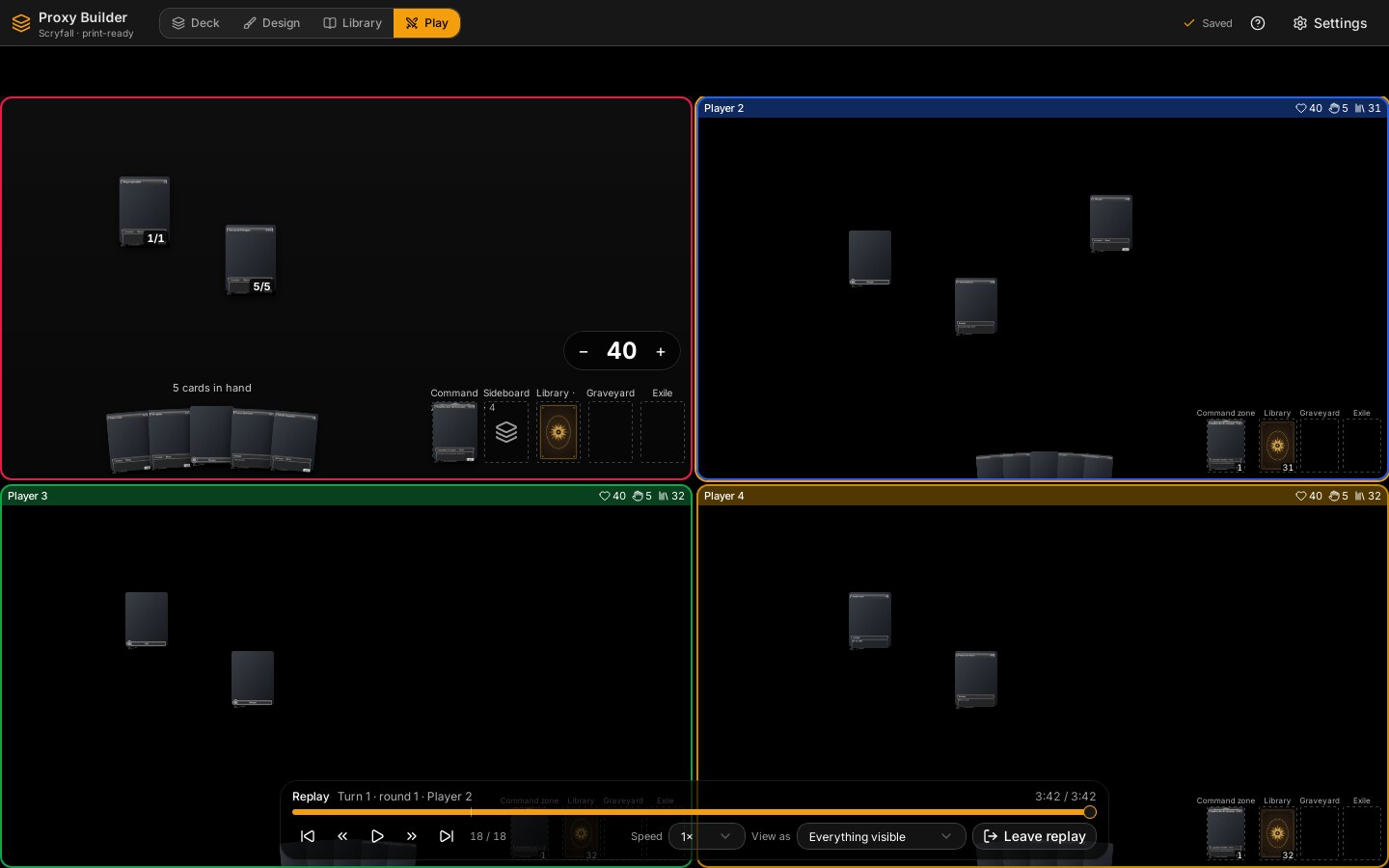
The same screen and the same engine play from 1 to 10 players. Online they are other computers (Online Play); on one computer it is a local game. What the screen adds for several boards is geometry, thumbnails and a few dialogs; who is the opponent of whom, the team life, the turn order and who is out are decided by the engine (Game Engine).
«Partida local…» («Local game…») on the entrance opens PartidaLocalDialog: from 2 to 10 seats, and for each one a name, a colour and a deck of the library (with its game list if it needs one); the format and the options are those of a normal game. config-local.ts only builds the ConfigMesa (construirConfig) from what the dialog fills in: seats, format, how teams are played (ModoEquiposLocal: ninguno, equipos, dosCabezas, archienemigo), seat order (primero) and «al mejor de». problemaDeEquipos says why a team split cannot start (with teams, no team has two players, sinCompaneros; Two-Headed Giant needs an even number of four or more seats, dosCabezasPares); the rest is Rust's (preparar::iniciar validates that every equipo exists).
In a local game whoever is shown is whoever plays: Sesion::cambiar_yo(jugador) (command mesa_mirar_como) changes yo and sends the whole view again, so the player now shown sees their own hand and acts with their own permissions, without touching como. It is refused with Rejected { motivo: "red" } in a networked session, and Sesion::accion refuses a como other than yo there (motivo: "como"). The player chips (SelectorTablero) call mirarJugador (mirar.ts), which chooses between mesa_mirar_como (local game of several: esLocalDeVarios()) and the plain mirar (online: only which board is shown, a rival's hand stays as backs). The setting «En partida local, pasar a mirar al jugador del turno» (seguirTurno, off) makes useSeguirTurno call mesa_mirar_como(activo) whenever the turn changes. A spectator in the «foco» layout always has the active player's board as the large one.
repartir(n, rect, config, grande, equipos) returns one non-overlapping rectangle inside rect per board (the viewer's first); disponer still splits the zones inside one board. Modes (ModoDisposicion, offered by modosPara(n, conEquipos)):
| Mode | What it does |
|---|---|
unico |
One board, the usual one; the others are reached through the chips. |
dividido |
Only with 2: side by side or one above the other, with a draggable divider (proporcion 0.2–0.8, 0.7 by default). |
foco |
One large board and the others as thumbnails in a strip (tira: top, right or bottom); clicking a thumbnail makes it the large one. |
rejilla |
All equal, rows and columns chosen from the aspect ratio and n. |
equipos |
Only with three or more players and teams: a grid with teammates together. |
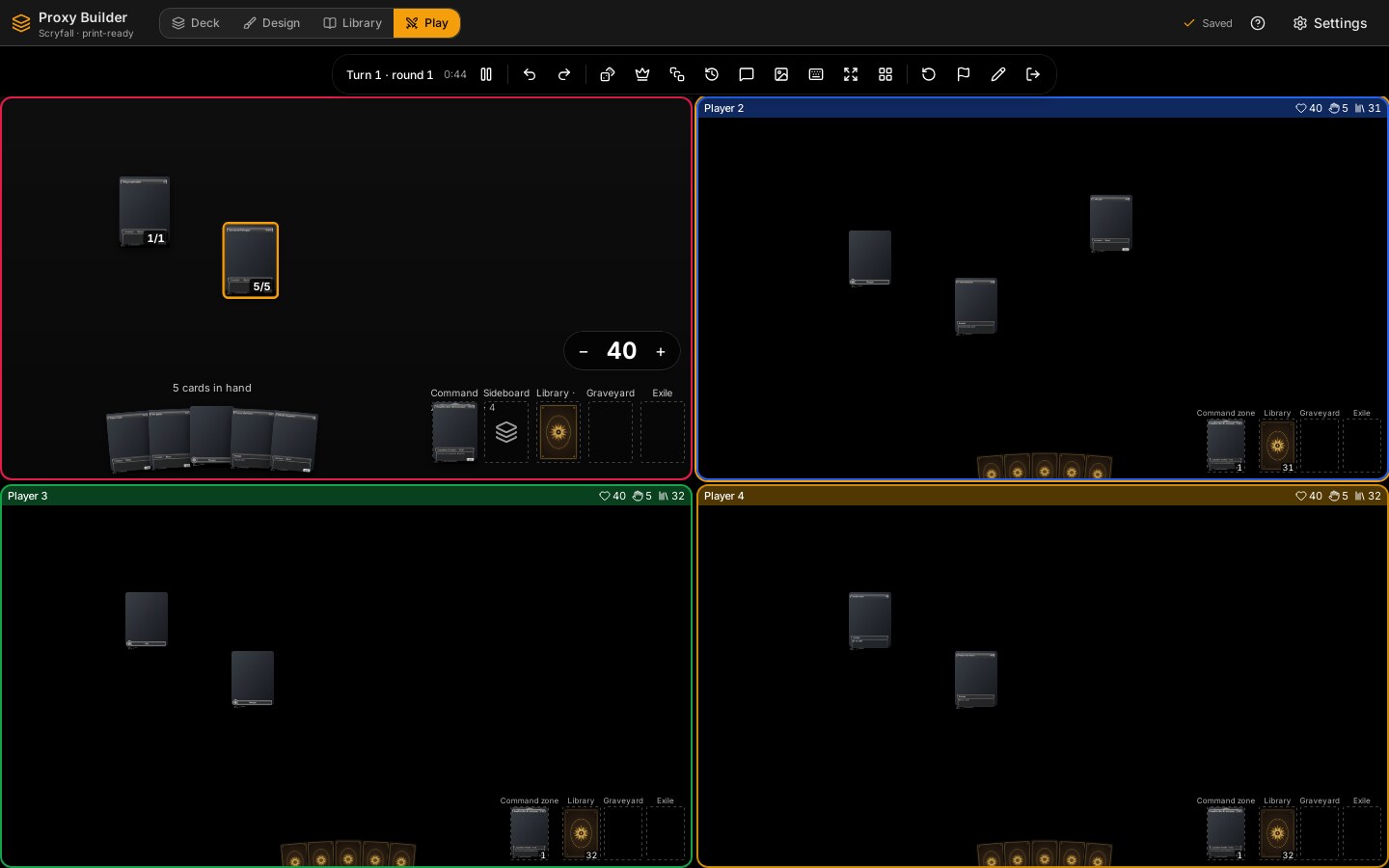
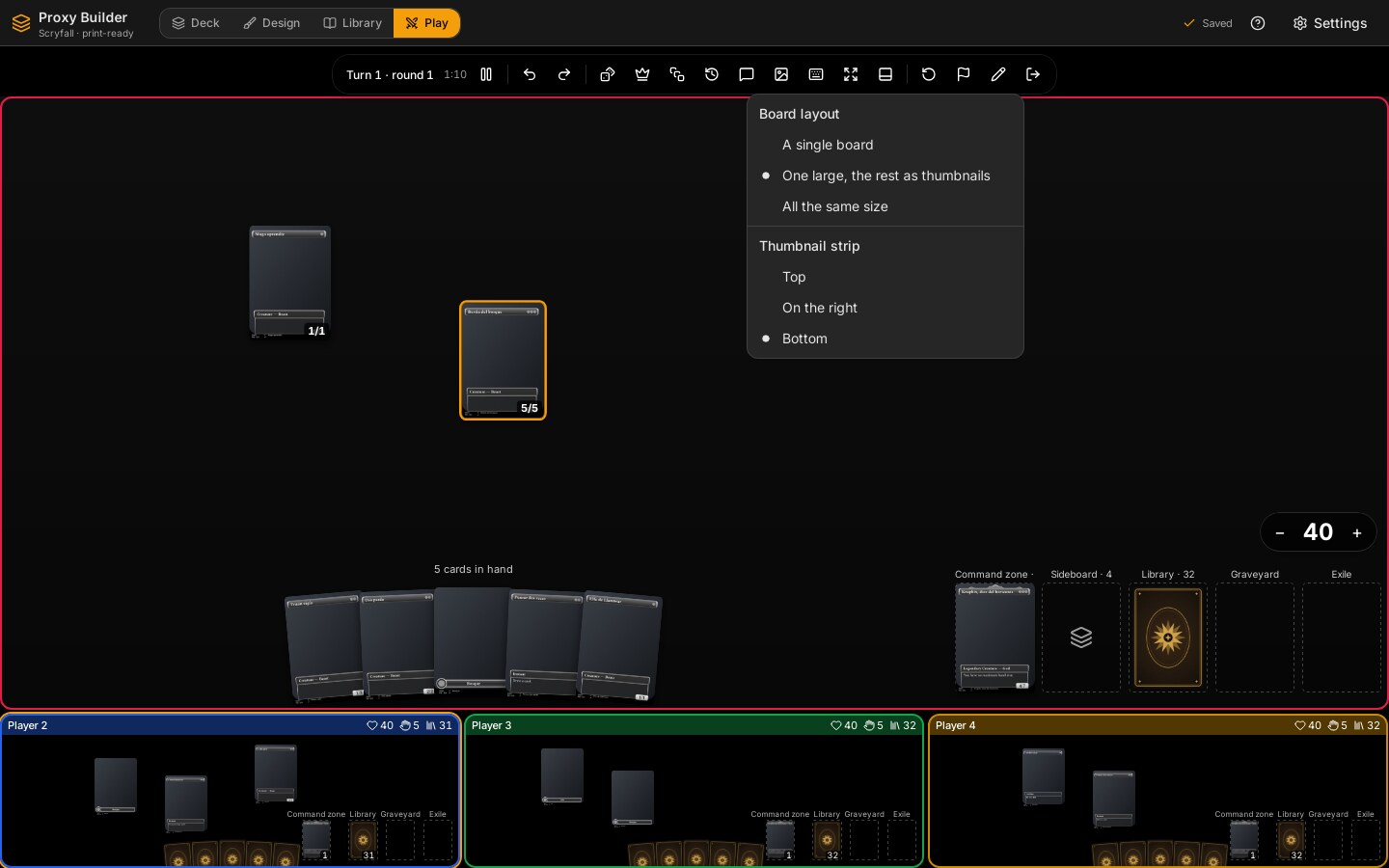
ConfigDisposicion is remembered per number of players (ui-store.mesa.disposicion[n]; a spectator's under -n, claveDisposicion, so it does not overwrite the player's); with one player there is no selector. Without a remembered one, disposicionPorDefecto gives dividido with two players, foco with more, and rejilla for a spectator. Mesas (mesas.tsx) paints the viewer's board as the interactive one and the others as TableroMini. ordenTableros puts the viewer first online; in a local game it keeps the seat order, so the boards do not jump when switching player. The tests (disposicion.test.ts) check for n = 1…10 in every mode that no rectangle leaves the container or overlaps another, that in «foco» the viewer's is the largest and that each has at least 40 × 28 px.
A thumbnail shows the player's colour and team ring, name, life, the number of cards in hand and library, and the battlefield with cards at 146 px (AnchoMiniatura), without animations. useMesaLenta samples the store at most every 100 ms (MS_MINIATURA) and only repaints when the chosen data really changed (igual), so nine small boards do not slow down the large one. Below ALTO_CON_CAMPO (64 px) a thumbnail only draws the numbers, and the hand and library counts only show from 120 px wide. Hovering a card shows the large view. A click switches to that player (mirarJugador; online, Alt+click puts a signal ring on them instead), and its context menu has «Cartas originales en mi idioma».
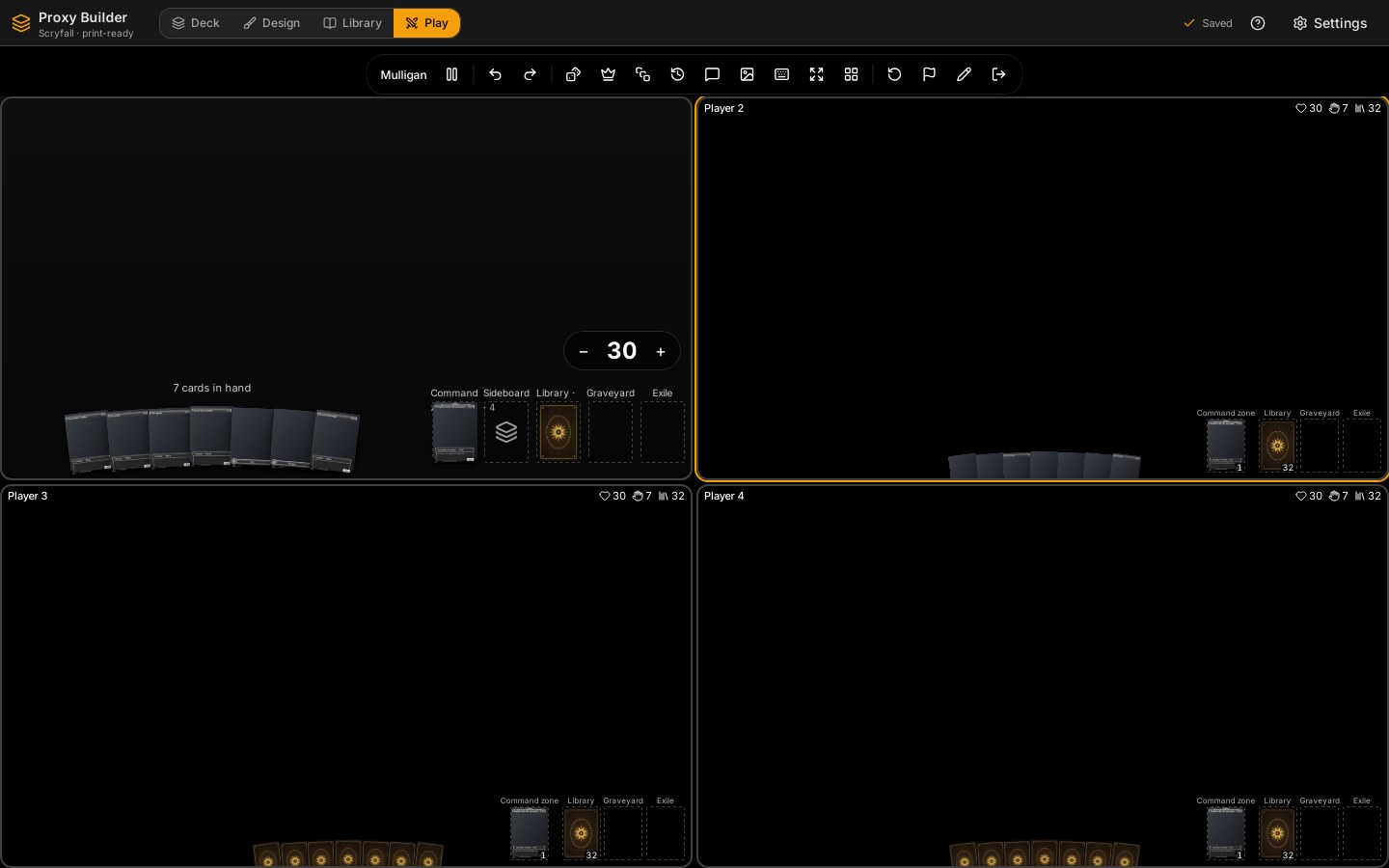
The hand is always visible in a thumbnail, as in the large board when you look at another player: a strip along the bottom edge (ManoMini, up to MAX_MANO_MINI = 20) in the same subtle fan as the large hand (abanico, with the arc and the turn scaled down to the card size), drawn with the back of that player's deck (the chosen one or the generic one) even for double-faced cards, so nobody can tell what is in it. Only the cards the engine says this viewer may see (a teammate's hand, see «Teams») are drawn face up (DatosMini.manoVista). The thumbnail's own layers (isolate) stay below dialogs and side panels, and below the opening-hand screen.
The other zones are always visible too, as on your own board (ZonasMini): the command zone (if it has cards), the library with that deck's back, and the graveyard and exile with their top card (the last in the list) face up when the viewer may see it, each with how many cards it holds. In a thumbnail at least FILA_ZONAS = 400 px wide they go in a row at the bottom right with their names; in a narrower one, in a column on the right. Hovering the top card shows the large view.
Teammates see each other's hand without asking (visibilidad::ve_la_mano_de_un_companero): the option «Los compañeros ven su mano» of the local game (AjustesLocal.manoDelCompanero, on by default) writes Variantes.manoPrivadaEnEquipo (inverted: on means hands stay private). It applies to teams, Two-Headed Giant and the archenemy's opponents. Rivals and spectators only ever see backs.
Teams are the engine's: ModoEquipos::Equipos { fuego_amigo } and DosCabezas (30 shared life per pair). With friendly fire off, Drenar, Extorsion and VidaATodos go through Partida::oponentes, which leaves teammates out; with shared life (Equipo.vida_compartida) damage to one lowers the team's life and both players read the same number. The screen only warns when an arrow or a target points at a teammate (ataqueAUnCompanero), paints the team's colour around the player and groups teammates in the «equipos» layout. A team wins together (Resultado.ganadores). Archenemy is the same machinery: the archenemy (asientoArchienemigo, 40 life) against everyone else as one team without friendly fire.
-
Commander damage (
dialogos/dano-comandante.tsx,dano-comandante.ts): a table with a row per player and a column per commander on the table, and under each commander its casts and its tax (impuestoDe). It is only a record (the cells of a commander with its own owner are disabled: it cannot deal commander damage to them; only what was already recorded can be removed):Accion::DanoComandantelowers life point by point andLanzamientoscounts the casts. Removing more than is recorded leaves the count at 0 and gives back only the life that was actually taken (the engine moves life by what the counter really changed, for the player and for the sparring ghost);deltaSegurokeeps the screen from asking for it anyway. The warning at 21 is the helperavisarVidaCero. -
Planechase (
plano-activo.tsx,planar.ts): the active plane in the middle, «Planeswalk» and the planar die with what the next roll costs (tiradas_planar, one more each time and back to zero with the turn). The plane deck is common (Comun { Planos }). -
Archenemy (
planes.tsx): the scheme deck is the archenemy's; «Poner en marcha» and «Abandonar» are only theirs, and at the start of their turn a notice reminds them.
Turns follow the seat order (Partida.jugadores). In the local dialog the seats are dragged by their handle (ordenTrasMover) or shuffled (ordenAlAzar); the «Empieza» row picks who starts (ConfigMesa.primero; without it the engine draws it from the game seed). Engine rule (aplicar.rs): eliminated seats are skipped and the round goes up when play passes the first player's seat (alive or not), not seat 0; if only one is left every turn is a round (tests/turnos.rs).
An encounter lives in the session, not in the Partida (so Accion and Cambio do not change). mesa::encuentro::Encuentro { al_mejor_de, cerradas } is pure: 1, 3 or 5 are offered (DURACIONES), the scoreboard is computed from the closed results plus the current game if it already ended (so undoing «Terminar partida» never leaves an extra point), a team wins together and the loser of the previous game starts the next (primero_siguiente). cambiar(mazo, banquillo, sale, entra) validates that as many cards leave as enter, that those leaving are in the deck and those entering in the sideboard, and that none is repeated, before touching anything. The session (mesa/encuentro.rs) joins that to the decks and opens the next game with the same replacement as «Otra partida» but with the new decks and the scoreboard up to date. Commands: mesa_encuentro (VistaEncuentro: scoreboard, who starts and why), mesa_banquillo(jugador), mesa_banquillo_cambiar and mesa_siguiente_partida. BanquilloDialog groups the copies by name (encuentro.ts::agrupar), lets each player choose how many to swap and does not let it be sent unless as many leave as enter. In a local game the dialog changes everyone's. Online each player changes only their own deck (Sesion::es_el_mio, otherwise ajeno) and the host opens the next game. The host holds every deck, so a guest asks it: AlHost::PideBanquillo and AlHost::CambiaBanquillo { sale, entra }, answered with DelHost::Banquillo (the deck and sideboard as they are now) or BanquilloNo { motivo }. For that, mesa_banquillo and mesa_banquillo_cambiar are async and wait up to 10 s for the answer (Invitado.banquillo, a oneshot). Guests keep the scoreboard too: the host sends DelHost::Encuentro { encuentro, primero } with the welcome and before each new game of the match, and each guest computes the scoreboard from that plus its own game result. So FinDePartida shows a guest «Banquillo» (not «Siguiente partida») and «El anfitrión empieza la siguiente partida.»; the dialog has «Guardar» instead of starting the game. After a host handover the new host does not have anyone else's deck, so it cannot open the next game of the match (sin_mazos).
-
Who is out.
mesa::fuera_de_juego(&Partida, j) -> Option<Causa>(muerte.rs, pure) says whether someone is at 0 life or less (the team's shared life if there is one), at the poison limit (10) or at 21 from a single commander (Causa::{Vida, Veneno, Comandante { de, carta }}; life wins, then poison, then commander) and is not already eliminated. It travels inVistaJugador.fuera_de_juego. The table never eliminates anyone by itself:Muertesasks that player «¿Confirmas que estás fuera?» (the others see «¿Confirmas que {quien} está fuera?» when it is their screen) with the reason and who caused it, and sendsEliminar { jugador, por }; for everyone else it is a notice that does not block, and after 15 s (ESPERA_APUNTAR_MS) any of them may mark the death. «Sigo en juego» closes the question for that cause (claveCausa); it asks again only if the cause changes or the player recovers and falls again.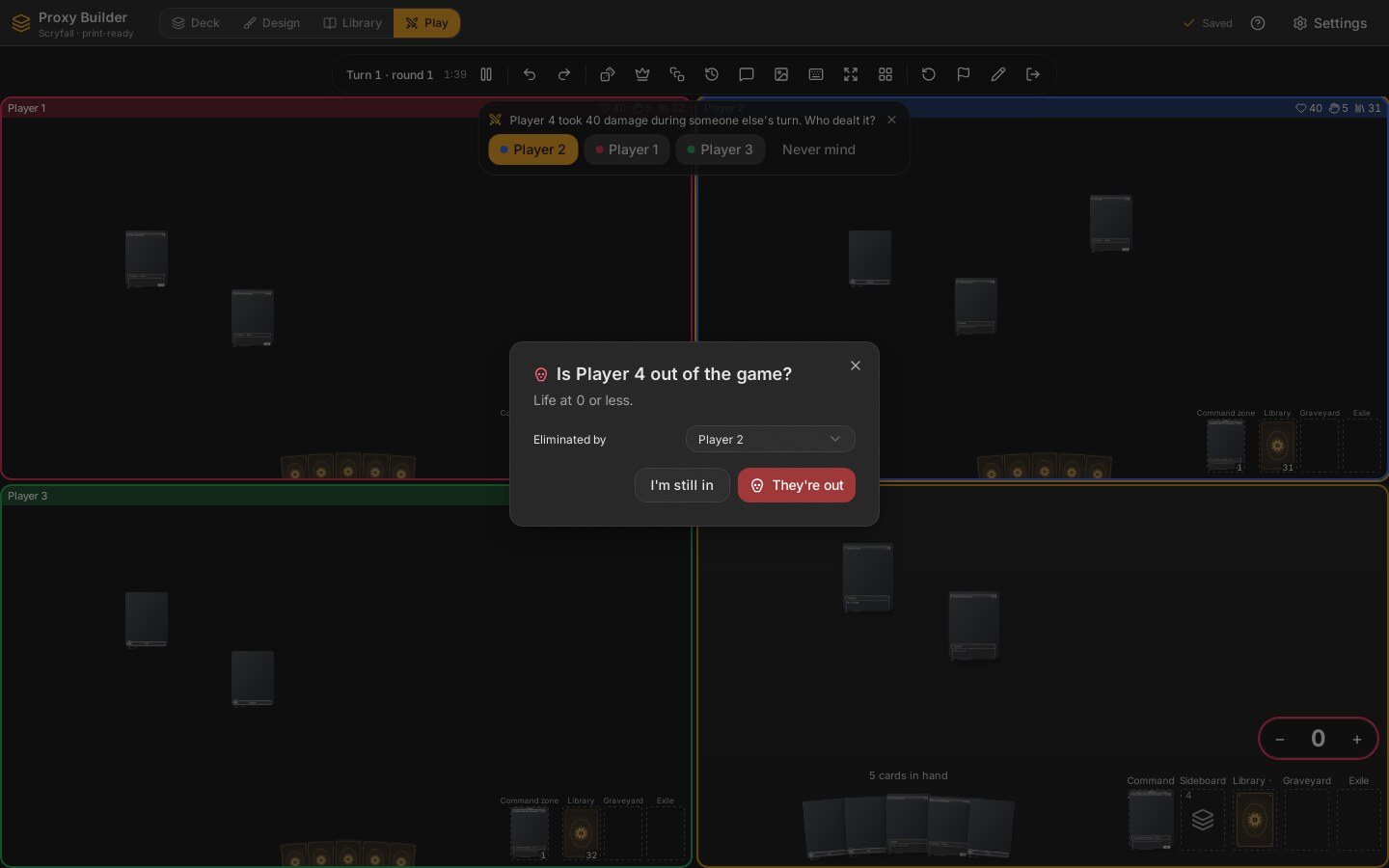
-
Whose damage.
DanoDeQuien: when someone loses 5 or more life (DANO_MINIMO) on another player's turn, the active player gets a one-click question «¿De quién fue?» (12 s,DURA_PREGUNTA_MS); the answer is remembered only on this screen (useDanoDe.ultimo) and is what fillsporwhen that player dies. Without an answer it is recorded as before.debePreguntarDanoandeliminadoPorDefecto(cuentas-muerte.ts) are the counts, with tests. -
Absentees. The host tells everyone who has lost the connection (
AvisoRed::Ausentes, see Online Play).Ausentespaints a notice per absent player who is not eliminated; if the active player has been away for 30 s (ESPERA_SALTAR_MS) the next player still in the game (siguienteVivo) gets «Saltar el turno de {quien}» (Accion::SaltarTurno) and the rest see who can. The hand stays on the table. In the mulligan, once a minute has passed, the host keeps the hand for the absent player (mesa::ausencia::quedarse_por_defecto). -
Expelling. The person who created the room (or the host of a direct-code game) has «Expulsar de la partida» in the player's menu and «Expulsar de la sala» in the lobby: the expelled player is eliminated and cannot come back into that game.
-
Menus (
menus/menu-carta.tsx,menus/menu-zonas.tsx, the life menu invida-jugador.tsx) useContenidoContextual(see Live Preview). The card menu changes by zone (battlefield, hand, stack, command, graveyard, exile) and shows each item's key. Library menu: draw, draw several, mill, exile from the top (face up, face down or hidden), look at top/bottom, scry, surveil, search a card or a land, reveal and cast, manifest, reveal the top, play with the top revealed, wheel, shuffle. Zone menu: view; in the graveyard and exile also a random one to the hand, battlefield or exile («Una al azar…»), shuffle all into the library, all to the bottom in random order and, in the graveyard, exile all. A spectator gets no zone menu. Empty battlefield: untap all, organise, create token, put a «bolita» here, select all, remove my arrows. -
Shortcuts (
atajos.ts): one tableATAJOSwith three contexts,carta(pointer over a card, or the selection),biblioteca(pointer over the library) andmesa. The card wins over the library and the library over the table. Keys are ignored in inputs, with a dialog or a menu open. Examples: T tap, R transform, F face down, C counter, +/= and − for +1/+1, X power/toughness, G graveyard, H hand, E exile (Shift+E face down), S shuffle in, B bottom, I inspect, P highlight, A attach, D attack/target, O take one from a pile; on the library D draw, S scry, U surveil, M mill, E exile the top (Shift+E face down), O look at the top, V view, T tutor, L search a land, H shuffle; on the table U untap all, Ctrl+Z/Ctrl+Y undo/redo, Ctrl+Enter pass the turn, ? the list. A spectator's keys do nothing. A test checks no key repeats in a context. During a replay its bar has its own keys: Space play/pause, ←/→ one event, Home/End the start or the end. -
Dialogs (
dialogos/, one at a time throughusePantalla.dialogo): number and text prompts; counter; power/toughness rows; label;mirar.tsx(look, scry, surveil: spread the cards between top in order, bottom, graveyard and exile and confirm withOrdenar; closing without confirming leaves them);buscar.tsx(search the library with name/type/colour filters, offering to shuffle on close (shuffling does not undo what was put on top during the search: it shuffles first and then puts those cards back on top, in the order they were placed, as in a real game;arribaTrasSacar); view graveyard, exile, command or sideboard with the «Antes» divider);revelar.tsx(reveal and cast: discover, cascade, reveal until, reveal N, Jodah, Sunbird's and a custom excavation; first everyone sees the reveal, then the player decides each card and where the rest goes);fichas.tsx(tokens of the deck, quick ones, helper ones such as dungeons, The Monarch or The Ring, any Scryfall search or a real card to copy throughmesa_origen_scryfall, a free token; quantity and «as a pile»);azar.tsx(coins with «Lanzar la moneda», until losing, Krark's Thumbs, quick rolls, N dice of X, the planar die; Rust decides the result);terminar.tsx(who is out, who won and how; final); the shortcut list;InspeccionDialog(mesa_info_carta). -
Without connection a quick token is still created, generic and named (
crearFichawithOrigenFichalibre). -
Attaching (
operaciones.ts::adjuntar): after a successful attach, if «Ofrecer el bono…» is on and the aura or equipment has abonoFijoand the target is a creature, a toast offers «Sumar», which adds it to the creature's «other» row (MasXMasY). The engine never adds it on its own. The offer is a prominent card (aviso-bono.tsx,avisarBono: atoast.customwith the bonus in large type, the equipment and the creature, «Sumar» and «Ahora no», 20 s on screen), not a plain toast. -
Control (
menus/menu-carta.tsx::Control): in the battlefield menu, on a card you control «Dar el control a…» (a submenu of the other players still in the game) and, on one controlled by another player, «Tomar el control» and «Tomar el control hasta el final del turno»; they act on the selection (operaciones.ts::darControl,tomarControl). A temporary one shows a clock with the name of who gets it back (insignias.tsx, and in the large view). What hangs from a card from another battlefield (my equipment on a creature now controlled by someone else, an aura of another player on mine) is drawn next to its card, which is where it is, and travels with it when dragged (puestos-campo.ts::conLasAjenas); before, it was drawn nowhere. -
Another player's board (
tablero.tsx,menus/menu-zonas.tsx): every zone menu acts on the board being looked at, for its owner when it is not yours (operaciones.ts::hacerPor→porJugador): the library menu (draw, mill, exile, shuffle, look at or search their library), the graveyard and exile menus, «Enderezar todo» and «Crear ficha…» (the token dialog has a «Para» selector: Beast Within, Forbidden Orchard). Their hand has its own menu (MenuManoAjena: look at it, make them reveal it, discard at random or the whole hand, draw); once looked at, the cards you know show face up in their place in the fan and can be moved. Clicking another player's library does not draw (use the menu). -
The token dialog's Scryfall search (
dialogos/fichas.tsx) turns what is typed into a query (consulta-ficha.ts::consultaDeFicha): a token's name does not carry its colour or its power, so «green beast» searchesBeast c:gand «3/3 beast» searchesbeast pow=3 tou=3; what already looks like Scryfall syntax (t:goblin, quotes, operators) is sent as it is. With «Solo fichas» the query gets(t:token OR t:emblem OR t:dungeon)added, and when there is nothing the dialog says so. -
Seeing a whole zone (
dialogos/buscar.tsx::VerZonaDialog): a modal with every card of a graveyard or exile, no need to take them out one by one. It has a tab for each (with its count), a selector with every player (and how many cards each has there, with several players) and the same grid as the library search; from each card it can go to the hand, the battlefield (always the mover's own, so taking from another's graveyard puts it on yours), graveyard, exile or the bottom of the library. It opens from the skull button of the top bar (for the board being looked at), from a zone's menu («Ver») and with a double click on the zone. It also has entries in the context menus: on any card of a graveyard, exile or sideboard («Ver todas las cartas (…)», inmenu-carta.tsx::DeOtraZona, because right-clicking the top card of a zone opens the card's menu, not the zone's), in the zone's own menu («Ver») and in the empty-field menu («Cementerios y exilios»). -
Revealing the top card:
RevelarArribaleaves it seen by everybody (vista_por = Todos,VistaCarta.revelada) andOcultarArriba { n }undoes it (only what was seen by everybody; what someone looks at on their own is untouched; it is in the «can be done for another player» list, catalogue v2). The board draws the top card face up when playing with the top revealed or when it has just been revealed (arriba-biblioteca.ts::cartaDeArribaRevelada, also in the mini boards), and hovering it shows the large view. A revealed card has a small «eye-off» button on the library and the library menu has «Dejar de revelar la de arriba»; it stays revealed until it is moved or the library is shuffled. -
Cascade several times (
dialogos/revelar.tsx::RevelarDialog, library menu «Cascada, varias veces…» and «Revelar y lanzar… (cascada, descubrir)»): the presets Discover, Cascade and Jodah have a «Veces» field (1–20) besides the mana value N. Each round isexcavar+ choose +resolverExcavacion(the hit goes to the stack by default, the rest to the bottom at random), and when it is resolved the next one starts by itself with the same N, revealing from what is left of the library (the earlier ones are already at the bottom or on the stack); the dialog says «Revelación 2 de 4» and the button «Siguiente revelación». No engine change. If a reveal fails (empty library) it stops. -
Showing a card (
menus/menu-carta.tsx::Mostrar,operaciones.ts::mostrar): in the menu of a card in your hand, and of a face-down card of yours on the battlefield, «Mostrar…» offers «A todos» (MostrarATodos: seen by everybody, spectators included, and it shows face up in your hand on their screens), one entry per player (RevelarA) and «Dejar de mostrar» (DejarDeMostrar, catalogue v2). KeyMtoggles it on the card (ATAJOS). A card shown to all has a small amber eye on it in your hand; moving it hides it again. -
Play lists in the local game (
partida-local.tsx): each seat picks its deck and its play list (ListaDeAsiento: a selector with the deck's lists, or «Todo el deck» if it does not exceed the format, and a pencil/plus to edit or create one withListaDialog). A Commander deck over 100 cards starts with its first list but a seat without one cannot start (an amber warning names the players). Solo, «Con amigos…» and «En red…» use the deck and list chosen in the right-hand panel of the entrance. -
Jobs that prepare the table (
mesa_empezar,mesa_retomar,salas_deck,red_unirse,red_empezar) are launched withcommands/mesa.rs::lanzar_trabajo: a second task waits for the first and, if it ended badly (a panic), emitsmesa://donewith an error. Without it the screen stayed on «Preparando la mesa…» forever, because the end event is the only thing that clears it. -
Local game (several players on one screen): the hand of whoever does not have the turn is not shown, its backs come out instead (
privacidad.ts::manoOcultaPorTurno; not during the mulligan, not in network games). Each board uses the tapete of its own player:deckDelTablerogives the deck of the seat in a local game (in network only the host's, when looking at their board); without a deck the prepared tapete of that player is used, never my settings. The mini boards draw that tapete too. -
The other board at full scale: when a board has a big cell (420×340 px or more, as in «dos tableros»),
tablero-mini.tsx::LecturaGrandedraws it with the same geometry as your own (disponer,puestosDelCampo): field cards the same size, counters and power/toughness (Insignias), the hand fan (backs, or face up what the viewer may see) and the zones with their top card, read-only; clicking it still switches to that player. Smaller cells (three or more players) keep the small thumbnail. -
mulligan.tsxcovers the board until the player keeps: the hand large, the rule of the chosen mode, and how many cards go to the bottom (alFondo, the same count as the engine'sQuedarseCon). With several players it shows who starts, drawn with the game seed. -
ayudas-turno.tsx: at the start of the player's turn, if the draw or untap helpers are off, their buttons appear for 10 s (with a rad-counter mill reminder); the monarch gets a permanent draw button; withavisarVidaCero, toasts at 0 life, at the poison limit and at the commander-damage limit. -
vida-jugador.tsx: −/+ or the wheel; clicks within 700 ms are merged into oneVidaevent and shown as «40 + 2 = 42». Its menu: damage, gain, drain, life to everyone, poison, commander damage, trackers, monarch, initiative, the city's blessing, day/night, reveal the hand. «Pasar turno» sits next to it. -
barra-mesa.tsx: «Mirando» when the board shown is not yours, turn and round with a clock (turno.desdeMs, stopped while paused), pause, undo, redo, dice, commander damage (in Commander), tokens, who is watching (online), log, chat (online or with several players), mat, shortcuts, full screen (setFullscreen, which needscore:window:allow-set-fullscreenincapabilities/default.json), the layout selector, the sparring button (not online), restart, end, «Editar este deck» (saves, opens the deck in the Deck tab, the game stays saved) and leave. -
At the end (
general.fin)fin-partida.tsxshows the summary of the game (see «End of the game, history and replay» below), with «Ver la mesa», «Ver repetición», «Salir» and «Otra partida».
Events reach the screen as data and textoDeEvento writes each one with t() in the interface language; Rust never writes prose. Hidden information is written from the viewer's side («draws 2 cards», never which). The store keeps the last 500 events (MAX_REGISTRO). Patches append their event; a full Vista from the channel brings registro, the last 500 (REGISTRO_EN_VISTA) of Registro::vigentes() (the events that still count: without what was undone, without what came before a restart and without the Restaurar events themselves), and recibirVista(v, registro) replaces the list with it. So after undo the undone lines disappear, after «Otra partida» the old game's log is gone, and resuming a saved game shows its log. mesa_vista (asked after a skipped patch) brings no log and the current one stays.
The log lives in the side panel (registro-panel.tsx, PanelLateral): a panel on the right of the table with two tabs, «Registro» and «Chat», opened from the bar and closed with its own button (the large card view moves aside, ANCHO_PANEL in pantalla.ts; the dialogs are not covered). It is not a separate window.
- Each line has the icon and colour of its category (
categorias-eventos.ts:CATEGORIAS_DE_ACCIONis aRecord<Accion["que"], …>, so a new action without a category fails to compile), its time, and the sentence. Card names are marked in the text with private-use markers (\u0001id\u0002name\u0003) thatpiezasDeTextosplits again: hovering a name that is still on the table shows that card large (setSobre). - «Pasar turno» lines say how long the turn took («passes the turn after 2:13»,
duracionDeTurnoincuentas-registro.ts: from the previous pass or the start of the game; none if the beginning is no longer in the list). - On the last 8 lines (
ULTIMAS_PARA_APILAR) a card put straight onto the battlefield and still there has «A la pila» (cartaParaApilar, sendsapilarDespues): for when it should have gone through the stack. In solitaire every line has «Deshacer hasta aquí» (Deshacer { hasta: seq }). - During a replay the panel shows the log of the point being watched and neither button appears.
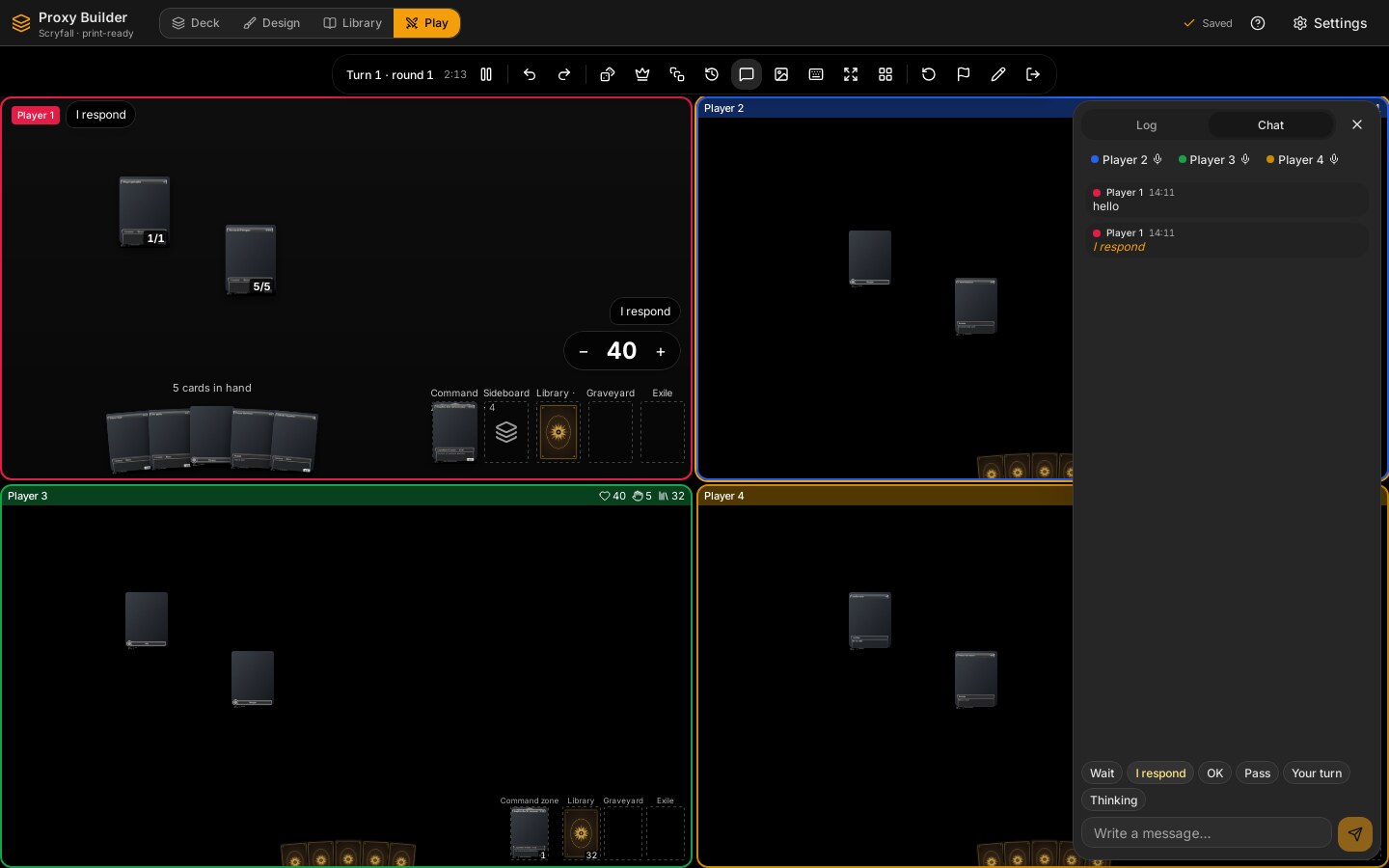
Communication is part of the engine log, so it is online-safe, shows in the log and the replay, and is replayed after resuming: Accion::Chat { texto } (at most MAX_CHAT = 500 characters, trimmed, not empty), Accion::Aviso { tipo } (espera, respondo, ok, paso, tuTurno, pienso) and Accion::Senal { senal } (sinRespuesta, espera, pensando, ausente, or null to clear). After the game has ended the engine accepts only Chat and Aviso (es_comunicacion). Spectators have no seat, so they cannot write: the panel says so.
- The «Chat» tab lists messages and notices (
mensajesDeChat), has one button per notice and a text field (Enter sends, Esc leaves the field). Unread messages show a counter on the tab. Muting someone (stores/chat-store.ts,silenciados) hides them only on this screen; the event still travels and is still in the log. - Each new message or notice from another player also shows as a bubble for 6 s (
BOCADILLO_MS) next to their thumbnail (tablero-mini.tsx) or, for the player whose board is the large one and for everyone in the single-board layout, in a stack at the top left (BocadillosFlotantes). A signal is a badge (InsigniaSenal) next to the player's name or life. - Shortcuts (
ATAJOS, contextmesa): Enter opens the chat and focuses the field; Alt+1…6 send a notice; Ctrl+Shift+1…4 set a signal (choosing the signal you already have clears it,senalTrasElegir). They go by the physical key code (teclaDeComunicacion) because Shift or Alt change a digit's symbol, and the board ignores keys with Alt so they do not collide with card keys. -
reaccion-eventos.ts::reaccionarAEventois the single place where a new event from the channel causes something on the screen other than the store: the bubble, the unread counter and the sounds.
mesa::resumir(&Registro) -> ResumenPartida { puestos, rondas, turnos, duracionMs, empezadaMs, terminadaMs } counts the game from the log: in which place each player ended (Puesto { jugador, puesto, ronda, por }; 1 = won, shared by a tie or a team; the rest by the order they fell), the round in which they fell and who took them out when known, rounds, turns and the time from the first to the last event that still counts. It is pure and has no clock. The dialog «Terminar», the end screen and the history all read the same summary (mesa_resumen), and the screen never recounts anything (cuentas-fin.ts only formats).
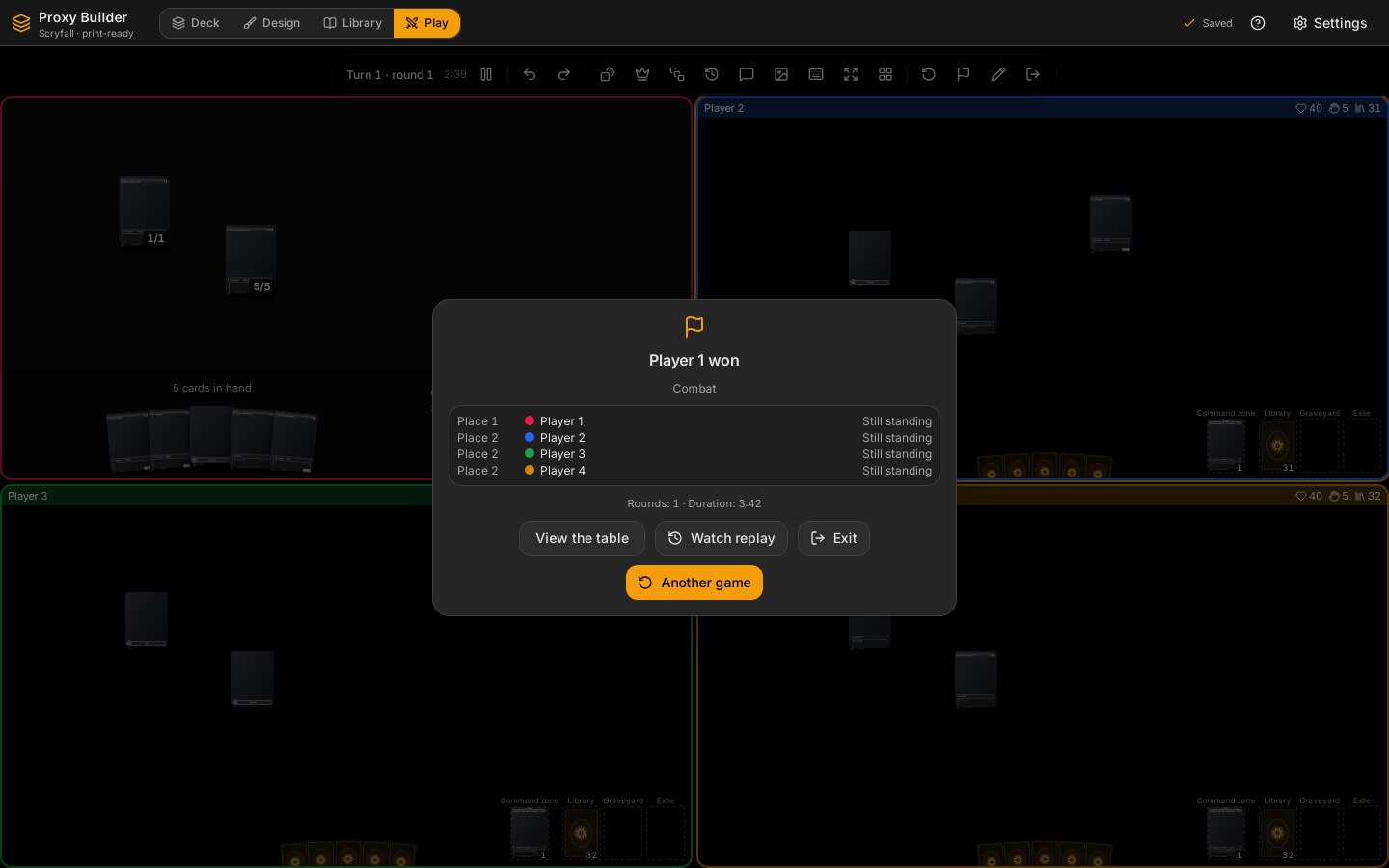
The end screen (fin-partida.tsx) shows the winners and how, each player's place, round and who knocked them out, rounds and duration, and, in a match (best of 3 or 5), the state of the match with «Siguiente partida». Its buttons: «Ver la mesa», «Ver repetición», «Salir» and «Otra partida».
When Terminar arrives the session builds a NuevaPartida (historial::de_sesion) and gives it to a hook (historial::instalar, a OnceLock set once in lib.rs so the session does not know the database; without it, as in the engine tests, nothing happens). store::partidas::guardar writes it to the tables partidas (one row per game: format, mode, players as JSON, winners, how, rounds, duration, the catalogue version and the record) and partida_decks (which deck sat in each seat, for asking by deck), created by migration 0006. They do not hang from the decks: deleting a deck keeps its games with the name it had, and playing never changes the deck's updated_at.
-
What is stored. A player who has the whole game (solitaire, local, or the host of an online game) stores its
PartidaGuardadacompressed inregistro(the same format as the saved game, so it can be replayed). A guest in an online game stores only the summary, withregistroempty, because they never had the whole log; spectators store nothing. -
Commands.
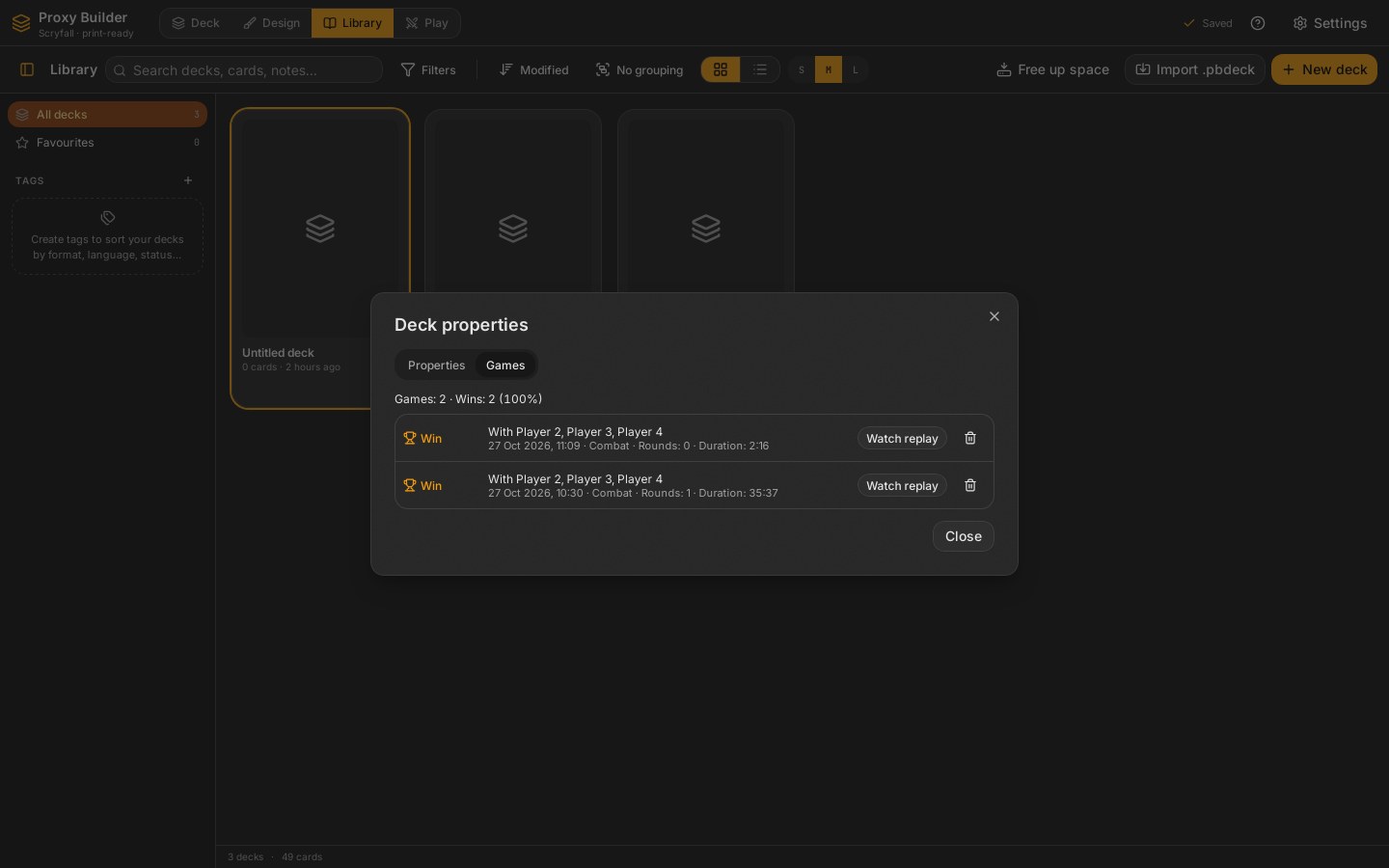
partidas_de_deck(deck)returnsHistorialDeck(games, wins, and each rowFilaPartida: place, whether it was a win, rivals, rounds, duration, date, whether it has a replay);partida_borrar(id)removes the game and its replay. In the deck's properties dialog the tab «Partidas» lists them; rivals are the other seats of that row, so a local game with the same deck in two seats does not show as «solo». -
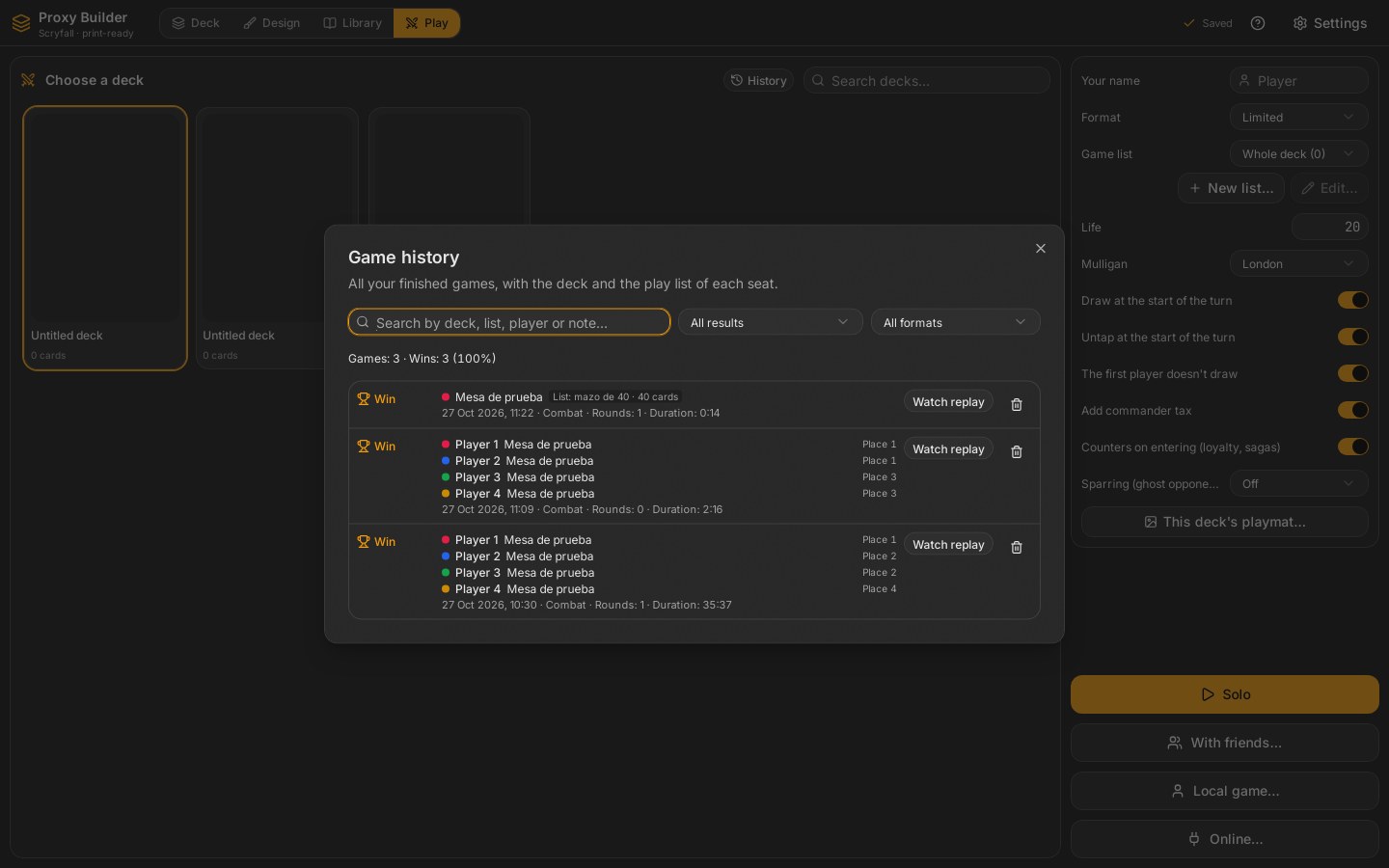
General history (
historial-general.tsx, button «Historial» on the Play screen).partidas_todas(limite, desde)returnsHistorialGeneral { total, victorias, filas }: every finished game of every deck, the newest first, in pages (the screen asks for 100; Rust caps a page atMAX_PAGINA= 500). The place of a row is the best of the seats that have a library deck (0 for a guest online, who counts as neither a win nor a loss). Each seat shows who played it, with which deck and, if it did not play the whole deck, with which play list and how many cards it had (JugadorHistorial.listaId,lista,cartasLista). The name and size are written when the game is saved (completar_listas, fromdeck_listas), so they stay if the list is renamed or deleted later (a list already gone when the game was saved shows as «Lista borrada»); old rows without those fields still read (#[serde(default)], no migration). The dialog filters what is loaded by text (deck, list, player, note; without accents or capitals, every word must appear), result (ganadas/perdidas) and format (cuentas-historial.ts), and has «Ver repetición» and delete on each row. A row shows up to four seats (MAX_ASIENTOS_FILA, then «y {n} más») and «Cargar más» asks for the next page. - It does not stop a game from ending: a failed save is logged and the game goes on.
A replay is the same table in «look only» mode: the same session, channel and images with another game in front, the one Registro::en computes for the point being watched, seen as one player or as everyone (como, since the game is over). There are two ways in: from the end screen (entrar_repeticion, in place) and from the history (repeticion_abrir(id) → Sesion::desde_guardada, a session that exists only to watch and closes on leaving).
- Commands:
repeticion_abrir,repeticion_actual,repeticion_ir { pos, como }andrepeticion_salir(back to the ended game or, from the history, closing the table).VistaRepeticion { total, pos, como, hitos, tMs, desdeHistorial }carries what the bar needs:hitos(Hito { pos, turno, ronda, activo, tMs }) mark where each turn starts. - The bar at the bottom: timeline slider, to the start, previous turn, play/pause, next turn, to the end (
hitoAnterior/hitoSiguiente), speed 0.5×…8× (VELOCIDADES), «Ver como» (a player or «Todo a la vista») and «Salir de la repetición». Playing waits the real gap between two events, limited to 150 ms–1.5 s and divided by the speed (pausaEntre). - While replaying, the table accepts no action (
Rejected,motivo: repeticion), the chat does not write, and no hover shows «A la pila». Each jump arrives as a fullVista, never as a patch, so a replay makes no table sound and no chat bubble. - Rejection reasons added:
partida_abierta(a replay from the history cannot be opened while a game is open),sin_registro(a game saved without a record),sin_terminar(replaying a game that has not ended),repeticion,no_es_repeticion(moving through a replay that is not open) andno_existe(viewing as a player who is not in the game). A record from a newer catalogue is refused withUnsupportedandversion.
In solitaire, the phantom opponent of Game Engine (the «Sparring» section there has the model). The session asks it after every event of the player (Sesion::hacer, behind Sesion::accion: it keeps a copy of the game before the action, only when the intensity is not apagado, calls mesa::sparring::reaccionar and, if there is an answer, puts it right behind as an event of the table with Registro::de_la_mesa), so the screen receives two patches in a row.
-
boton.tsx(BotonSparring, in the bar, only with one seat): «Sparring» and the intensity; it opens a popover with the intensity («Desactivado», «Ligero», «Realista», «Despiadado», sent asAccion::IntensidadSparring, valid from the next occasion), «Reacciones de esta partida» (card,R<round>, what it did and what was decided) and «Cómo funciona». The first time an intensity other than off is chosen,como-funciona.tsxopens with «Empezar el sparring» (mesa.sparringVisto). -
reaccion.tsx(ReaccionPendiente): while a reaction has no decision, a card in the middle of the table (role="dialog", so the table shortcuts stop) with what it does («Exilia tu Metallic Mimic»), the phantom's card and its cost, «¿Por qué ahora?», «Ver el porqué» (thebaselines) and «Resolverla» (Enter), «Tengo respuesta» (A) and «No aplica» (Esc), caught in the capture phase. In an edict, «Resolverla» first lists the player's creatures to choose the one sacrificed. -
carta-fantasma.tsx: the phantom's cards go by name;mesa_sparring_carta(nombre)(Rust) checks the name is in the pool, looks it up once in Scryfall with/cards/collectionby name, remembers its id inapp_settings(mesa.sparring.<name>) and returns anOrigenCartawith the image prepared like any other Scryfall card on the table (origen_de_scryfall, shared withmesa_origen_scryfall). Offline, the name over the generic back. -
textos.tswrites the keys ofExplicacionwitht()and the log lines («El fantasma contrarresta Rhystic Study con Counterspell»; the decision as «… resuelve la reacción del fantasma» and the like). The intensity names avoid «Apagado» and «Suave», which already exist in the settings area with another meaning.
Rust decides every result (Cambio::Dados, Monedas, DadoPlanar, each with a semilla_animacion drawn from the event's seed); the screen only shows it. conexion.ts hands every patch event to useDados.encolar (cola.ts), and tiradaDe turns the change into pieces: one die per die rolled (a d100 is two d10, tens and units, dadosDeTirada), the last batch of coins (with «until losing», the one that lost) or the planar die; at most MAX_PIEZAS = 20 are drawn, the full result is shown anyway. The queue keeps the roll on screen and at most two waiting: rolling very fast drops the ones in between. azar.tsx closes on rolling, so the roll is seen on the table.
capa.tsx (CapaDados, in mesa-screen.tsx) sits between the top bar and the hand (top-[11%] bottom-[26%]), does not take the pointer, and after each roll shows ResultadoAzar (the same block as the dialog) for RESULTADO_MS = 2.2 s; a click dismisses it. Three levels, chosen in settings (mesa.dados):
| Level | Files | How |
|---|---|---|
3D with physics (3d) |
escena3d.ts, fisica.ts
|
three.js (bare, no React wrapper) with a tilted orthographic camera, ambient + directional light with shadows on a ShadowMaterial floor. fisica.ts::simular runs the whole roll with Rapier (@dimforge/rapier3d-deterministic-compat) before showing it, records every frame, and the scene replays the recording. |
Light 3D (css) |
css3d.tsx |
Low poly, flat colour, no WebGL or physics: each face is an element cut with clip-path and placed with matrix3d; the roll is a Web Animations API animation (it falls, bounces once and settles: three random turns and the final pose, with a blurred shadow). Flat light: each face is darkened by its normal in the final pose. Each face's box is the bounding box of its polygon, not a larger square: large boxes (the kites of the d10) cross the planes of other faces and Chromium, when splitting them to sort them, lost pieces. Each piece has its own perspective centred on it (perspective-origin: 0 0), so it looks the same wherever it lands; the position animates in 2D outside and the rotation inside. |
2D (2d) |
plano.tsx |
SVG silhouettes; the numbers flicker every 70 ms and settle in 900 ms. |
auto (default) uses 3D when there is WebGL2 and falls back to CSS 3D; if the 3D scene fails (no WebGL, no WebAssembly) it switches to CSS 3D for the rest of the session. With reduced animations (the setting or prefers-reduced-motion) only the result is shown.
How the shown face matches the engine:
-
geometria.tsbuilds the five solids: d4, d6, d8 from vertices; d12 and d20 as duals (dual()tries the six axis permutations so the faces point outwards); the d10 as a pentagonal trapezohedron. Opposite faces add up to n + 1 (on the d10, 0–9 adding up to 9).planoCaragives each face its centre, normal and in-plane axes withw = cross(u, n), so faces are never mirrored (a test checks the signed area). - The physics only says which face ended up on top (
caraLeida, the face whose normal is closest to up; the d4 is read by the face underneath and its numbers sit in the corners,esquinasD4). ThenconResultadoswaps labels so that face carries the engine's value. The CSS level does the opposite: it computes the final pose that puts the result's face towards the viewer (giroFinal). - The physics table is fixed (
ANCHO14 ×FONDO9, gravity −40,HZ60, at most 4 s) and not the board's size, so the same seed gives the same animation on every machine; the scene scales it to the board. A piece is stopped after 12 still frames; one left on an edge (plana< 0.94) gets a small push, up to three times. 300 random rolls stop in 1.7 s on average (2.2 s at most; 20 dice, 3.4 s). -
azar.ts:generador(mulberry32) andgiroAlAzar(a uniform random rotation without trigonometry), so CSS and 2D are deterministic too. - Coins: a cylinder (3D) or two discs with
rotateX(CSS); heads is a crown and tails a cross (simbolos.ts, SVG paths in a 100 × 100 box, used both on the canvas throughPath2Dand in<svg>). The planar die is a d6 with planeswalk on 1, chaos on 6 and blank faces (piezas.ts::VALOR_PLANAR).
Loading: three (about 526 KB) and Rapier (about 4.3 MB, WebAssembly) are loaded with import() the first time someone rolls in 3D, in their own chunks. Rapier needs 'wasm-unsafe-eval' in the CSP's script-src (it compiles WebAssembly; it does not allow eval of JavaScript). In development vite.config.ts lists both in optimizeDeps.include, otherwise Vite discovers them on the first roll, optimises them and reloads the page; optimizeDeps.entries is index.html so the dependency scan does not read stray .html files.
Each player chooses how their dice and coin look (Settings > «Mesa de juego» > «Dados y monedas»): their own colour or the player's, the colour of the numbers, a finish (Acabado: plain, pearl, marble, glitter, translucent), an image of their own and the coin's metal (Metal: gold, silver, copper). It is paint only; the engine still decides every result.
- Rust keeps it (
src-tauri/src/mesa/dados.rs):AspectoDadosas JSON inapp_settings(mesa.dados). Colours are checked (#rrggbb, elseInvalidInputwithmotivo: color). The image is prepared on import (importar_imagen: the centre square atLADO_IMAGEN= 256 px, JPEG) and stored in the blob store, protected inblob_refswithowner_kind = 'mesa'andowner_id = 'dados', like the mat. Commands:mesa_dados_get,mesa_dados_set { aspecto }andmesa_dados_imagen { ruta }(nullremoves it); the three returnVistaAspectoDados { aspecto, imagen }, with the image as adata:URL. Why adata:URL and notpbimg://: a WebGL texture from another origin taints the canvas and cannot be uploaded;pbimg:sends no CORS headers. - The screen loads it once (
useAspectoDadosinaspecto.ts) and turns it into anEstiloper roll (estiloDe): your look on your own rolls, the default look with the roller's colour on anyone else's (online, each player will send theirs).contorno(the outline around the numbers) is dark or light depending on the number colour. -
texturas.ts::lienzoFondopaints the face background once per style (cached): the colour plus the finish, drawn with a fixed seed so the same colour always gives the same die (marble veins in three strokes from wide and faint to thin and sharp, because WebKitGTK has no canvasfilter), or the image. The 3D draws a different piece of it on each face (trozoDeCara) into its atlas; the CSS 3D and 2D use it as adata:URL (urlFondo). Materials per finish inescena3d.ts::material(translucent = 78 % opacity in 3D, a little transparency in CSS and 2D). - Sound (
sonidos.ts): the die hit (golpeDado) and the shaking of the dice in the hand (agitarDados) are real samples from Kenney's CC0 «Casino Audio» pack (muestras.ts, see «Table sounds»), played with a random variant, a slightly different pitch and a volume that follows the strength of the hit; until a sample is loaded (and if it fails) the synthesised one plays, made with the Web Audio API: band-passed noise with a short «tock» of the body and a low thump of the table. The coin is always synthesised: four metallic partials that fade.fisica.tsrecords every hit during the simulation (Grabacion.golpes: frame, piece and strength, from the change of velocity minus gravity; at most one per piece every 4 frames) and the 3D plays each one when its frame is shown, so the dice sound when and as hard as they hit. The CSS 3D sounds at the two touchdowns of its animation (tiempoDeinverts the easing curve to know when), the 2D shakes the dice and then each one lands. At most 14 hits per 100 ms, nothing with the window hidden, and the audio context resumes on the first click or key (the WebView does not play before a gesture). Sound randomness usesMath.random: it decides nothing. The sounds of the cards and the table are in «Table sounds» below.
The card sounds (shuffle, draw, turn a card, put a card into play, move it) are samples from the CC0 «Casino Audio» pack by Kenney (23 of its 50 files, converted to 16-bit stereo WAV with silences trimmed and levels matched; src/features/mesa/muestras/, with the licence and how they were converted). muestras.ts lists which files belong to each sound (MUESTRAS; a test checks that every one exists), loads them lazily and decodes them with decodeAudioData: each is a separate module imported with ?inline (a data: URL), because the CSP has no connect-src 'self' and fetch cannot read the app's own files. precargarMuestras (on opening the Play tab) loads those of the switches that are on; tocar plays one of the loaded variants at random, with a small pitch change, and returns false if none is ready, in which case the old synthesised sound plays. The rest are synthesised with Web Audio (no files): pass the turn, «it's your turn», a chat message or notice, and the sparring phantom's reaction. audio.ts holds the shared context (it resumes on the first click or key, nothing sounds with the window hidden, at most 14 sounds per 100 ms shared with the dice) and the helpers (envolvente, azar). sonidoDeEvento(ev, yo, activo) is pure and tested: it says what sounds for a new event, and reaccionarAEvento plays it, so the same event sounds the same online. Each sound belongs to a group (GRUPO_DE_SONIDO: cartas, turno, chat) with its own switch in Settings. A muted player makes no sound either. Only events that arrive as patches sound, so a replay (which moves by full views) is silent. Sound randomness uses Math.random: it decides nothing.
src/features/settings/mesa.tsx edits useUi().mesa (PreferenciasMesa), saved in localStorage with the other preferences (proxybuilder.preferencias, key mesa) and merged over MESA_DE_FABRICA on read, so a new setting gets its default.
| Setting | Field | Default |
|---|---|---|
| Offer the bonus of auras and equipment when attaching | ofrecerBono |
on |
| Sparring when starting a solitaire game | sparring |
apagado |
| The sparring explanation was already shown | sparringVisto |
off |
| Show the phantom's life in solitaire | fantasma |
on |
| Holding the button opens the card menu | clicSostenido |
off |
| Size of battlefield cards | tamanoCartas |
100 % (25–200) |
| Size of the large view | vistaGrande |
320 px (200–500) |
| Status panel next to the large view | panelEstado |
on |
| Quality of battlefield images | calidad |
244 (146 low, 488 high) |
| Dice and coins (Automatic, 3D with physics, Light 3D, 2D) | dados |
auto |
Look of the dice and coin (aspecto-dados.tsx, with a CSS 3D sample rolled by «Probar») |
mesa.dados in Rust (app_settings) |
player's colour, white numbers, plain, gold |
| Dice and coin sound | sonidoDados |
on |
| Card sounds (shuffle, draw, turn, play) | sonidoCartas |
on |
| Turn sounds (pass, your turn) | sonidoTurno |
on |
| Chat sounds (messages, notices, phantom) | sonidoChat |
on |
| Volume | volumen |
60 % |
| Reduce animations | reducirAnimaciones |
off |
| Shadows | sombras |
on |
| Frame counter | fps |
off |
| Player counters shown next to life | trackers |
none (chosen from the life menu) |
| Online: see how the others move and show them my cursor | movimientoEnVivo |
on |
| In a local game, switch to the player whose turn it is |
seguirTurnoLocal (was seguirTurno, renamed so everyone gets the new default) |
on |
How the boards are laid out (per number of players: unico, dividido, foco, rejilla, equipos) |
disposicion |
none stored: dividido with 2, foco with more |
«Modo rendimiento» sets MODO_RENDIMIENTO: quality 146, no shadows, reduced animations, no status panel.
- Patches, not views: Rust sends only touched cards and zones, and the store keeps the identity of everything else;
CartaMesaismemoand subscribes to its own id. - Selectors never return a fresh empty array (
NINGUNA) or a fresh list withoutuseShallow, because zustand would see a change on every read and repaint (or loop). - Images are prepared once at their final size and requested at the width they are drawn at, with
loading="lazy"anddecoding="async". -
fps.tsx:ContadorFps(setting) shows frames per second.VigiaFpsmeasures every second and, after 120 consecutive seconds under 30 fps (a hidden window does not count), offers «Bajar la calidad» once, unless everything is already at the minimum. Animations are skipped when the setting or the system (prefers-reduced-motion) asks for it (useSinAnimaciones).
- Cards known to the viewer travel with their image; hidden ones carry only their back (
caraVisiblefalls back todorso). Looking at the library top (scry) does not show it face up on the table; only «play with the top revealed» does. - A selected or hovered card that disappears in a patch (or is missing from a new full view) is dropped from the screen state, so a later shortcut never acts on a card that is gone. A full view that brings a log (undo, restart) always clears the hovered card, because ids are reused across those.
- Dropping cards on the zone they came from does nothing (except the library and the battlefield), so the hand cannot be reordered by dragging.
-
src-tauri/src/mesa/ejemplo.rsis an ignored test that creates an example deck of designed cards without network, to try the table and take screenshots on a machine without Scryfall (PB_DATOS=… PB_CACHE=… cargo test --lib deck_de_ejemplo -- --ignored).
- Rust:
mesa::sesion::tests(50 random actions give the same view by patches as in full, a rejection arrives with its reason, restart deals again with the same list, an open game makes the app busy),mesa::guardada::tests,mesa::preparar::tests(three cards give three images and the second time none),protocol::tests::las_rutas_de_la_mesa. - Engine fixture:
src-tauri/crates/mesa/tests/fixtures.rswritessrc/stores/__tests__/fixtures/mesa-parches.json(a first view, 60 patches and the final view; rewritten withPB_FIXTURES=1 cargo test -p mesa --test fixtures).src/stores/__tests__/mesa-store.test.tsapplies them and must reach the final view; it also checks version jumps, object identity, selection cleanup and that a view with a log replaces it while one without keeps it.tests/registro.rsof the engine checksvigentes(). The fixtures folder is excluded from Biome. - Lists:
mesa::listatests,tests/preparar.rs::con_una_lista_solo_va_lo_elegido,store/listas.rs(save, read, replace, delete, gone with the deck),mesa/preparar.rs::una_disenada_sabe_si_puede_ser_comandante,package.rs::las_listas_para_jugar_viajan_con_los_ids_nuevos,src/features/mesa/listas/__tests__/eleccion.test.ts. - Dice:
src/features/mesa/dados/__tests__/geometria.test.ts(faces, opposite sums, reading, label swap, the d4 corners, the d100, no mirrored faces) andfisica.test.ts(the same seed gives the same recording and the same hits; hits are in order with strength 0–1; 300 rolls stop in time, stay on the table and read the engine's face);mesa::dados::testsin Rust (default look, colours checked, the image prepared square and protected, a missing image refused) andmesa::tapete::tests. - Screen:
src/features/mesa/__tests__/(arrastre.test.tsgeometry and drop targets,atajos.test.ts,buscar.test.ts,pt.test.ts),src/lib/__tests__/errores.test.ts(rejection reasons),src/lib/__tests__/cierre.test.ts,src/stores/__tests__/ui-store.test.ts(table settings merged with defaults). - Several players:
src/features/mesa/__tests__/(disposicion.test.tsfor every mode andn= 1…10,tablero-mini.test.ts,config-local.test.ts,equipos.test.ts,dano-comandante.test.ts,planar.test.ts,encuentro.test.ts,cuentas-muerte.test.ts,limitador.test.ts); in the enginetests/{equipos,formatos,turnos,encuentro,muerte}.rs;mesa::sesion::tests(changing who is shown in a local game, refused online). - End, history and replay:
crates/mesa/tests/resumen.rs(places, ties, teams, conceding, an unfinished game);store::partidas::tests(save and read a deck's games, a deck in two seats counts once, ending again replaces, delete, playing does not change the deck's date, an old database goes from 5 to 6);mesa::historial::tests(an unfinished game is not stored, a finished one carries its record);mesa::repeticion::tests(every point has the fingerprint it had when played, one milestone per turn, no playing during a replay, viewing as a player or everyone); on the screen, insrc/features/mesa/__tests__/,cuentas-fin.test.ts,registro.test.ts(cuentas-registro),cuentas-repeticion.test.ts,chat.test.ts(cuentas-chat),cuentas-historial.test.tsandsonidos.test.ts.
- A new action on the screen: add it to the engine first (Game Engine), run
pnpm bindings, add its operation inoperaciones.ts, its menu item and, if it has one, its key inATAJOS, and its sentence intextos-eventos.ts::FRASES(theRecord<Accion["que"], string>type makes a missing one fail to compile). - A new action's category in the log:
categorias-eventos.ts::CATEGORIAS_DE_ACCION(a missing one fails to compile) and, if it should sound,sonidoDeEvento. - A new rejection reason: its text in
errores.ts::MOTIVOS.Rejected. - A new die or piece: its solid in
geometria.ts(with the tests of faces and orientation), its piece incola.ts/piezas.tsand its silhouette inplano.tsx::SILUETA. - A new setting:
PreferenciasMesaandMESA_DE_FABRICAinui-store.ts, thenfeatures/settings/mesa.tsx. - A new layout: a
ModoDisposicionindisposicion.tswith its case inrepartirand its test of no overlap forn= 1…10; the thumbnails aretablero-mini.tsxand never become interactive. - A new format rule (who is the opponent, team life, turn order, who is out): in the engine, with its test in
tests/; the screen only paints whatVistaMesasays. - New text: through
t()with the Spanish source in themesaarea of the 15 dictionaries (src/i18n/<code>/mesa.json), with the game terms of the «Términos de la mesa de juego» table insrc/i18n/GLOSARIO.md(Internationalization).