Repository navigation
Android Web Widget
Home · Log viewer widget · App settings
If the native widget cannot scroll in the Homey app on Android, use a Homey Web widget on the same dashboard. The native Simple Sys Log widget generates its address. You still need Better Logic Library and the file-backed log.
Privacy: Anyone with the signed address can read the entries it can access. Treat it as a password. Do not share it in posts, messages, logs or screenshots. Use a Local link when you only need it at home.
- First add a native log viewer and confirm it shows an entry. Edit its settings to set the desired design, theme, filters and page size. Enable Using scroll on Android? and save.
- The native tile now shows links instead of entries. Use Copy beside Local link for home-network use, when available. Choose Automatic link if you also need access away from home. It tries Homey's local connection when reachable and uses Homey's cloud connection otherwise.
- Add a Web widget on the dashboard. Paste the copied URL as its address and size the Web widget there. Save, open the dashboard in the Homey app on Android, and scroll the log. If needed, use more entries per page or leave paging off for a longer scroll within the newest entries.
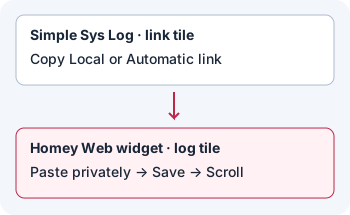
Illustration: copy the address from the link tile, but read and scroll the log in the separate Web tile.
The signature protects the widget configuration from editing in the address. For example, the copied settings include the design/theme selection, minimum severity, facility, app/group and hostname restrictions, and search, filters and paging options. Level and Date choices are live filter state, not part of the signed configuration. They are remembered separately for the source widget instance, and the Web viewer uses them when loading and checking for new entries. They are not a privacy boundary: anyone with the link can change the interactive filters the link permits.
If you change the native tile's widget settings, copy a fresh link and replace the Web widget address. With Automatic light/dark mode, the appearance at the time of copying is used; copy again after changing the Homey app theme. Web widgets check for new entries over the network rather than subscribing to native dashboard updates. A short wait after a connection or Homey restart is normal.
Warning: Resetting invalidates every existing Android log-viewer link from this Homey, not just the one you suspect was shared.
Open the app's log grid, choose Settings → General, and find Android links → Reset Android links. Confirm the reset. Copy a new link from each native source widget and update the corresponding Web widget address. If the link tile was already open, reopen or reload it before copying.
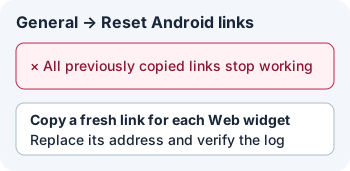
Illustration: one reset stops every old address; each Web widget needs a replacement.
Next: check date, level and search behavior or troubleshoot a Web widget link.