Repository navigation
Settings Reference
Tap Settings (設定) on the left of the station sign to open DEPARTURES 発車 · CONNECTIONS & SETTINGS, an LED departure board. The top lists your connections (see Connections). Below SETTINGS are these rows, top to bottom. Tap any row title with ⓘ for a short explanation. Close returns to the pad.
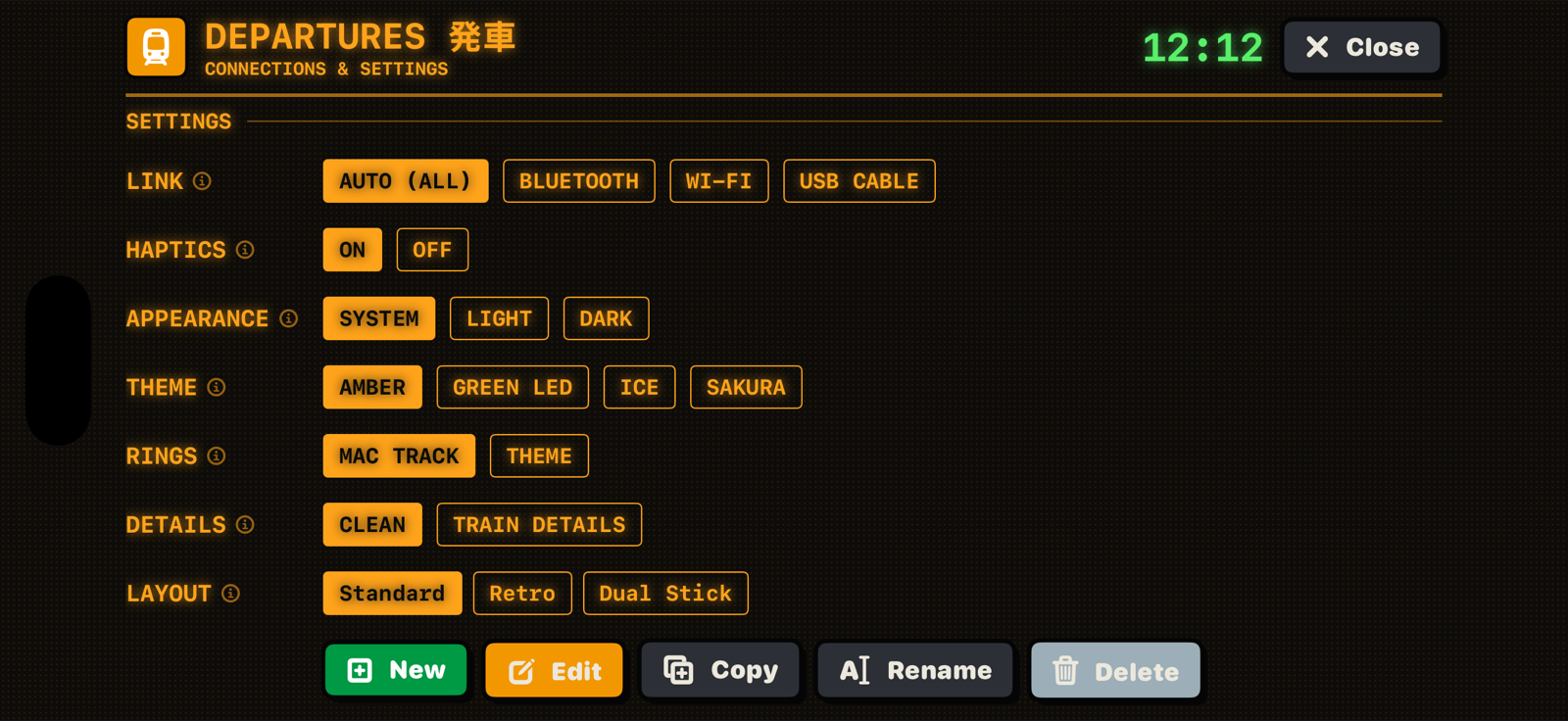
| Row | Choices | What it does |
|---|---|---|
| Link 回線 | AUTO (ALL) · BLUETOOTH · WI-FI · USB CABLE | How the phone reaches the Mac. AUTO uses every link together. With the cable in, Bluetooth and Wi-Fi wait on standby. See Connections. |
| Haptics 振動 | ON · OFF | A tap on every button press, plus rumble from games played with the virtual controller |
| Appearance 外観 | SYSTEM · LIGHT · DARK | Light or dark look. SYSTEM follows the iPhone's setting. |
| Theme 色 | AMBER · GREEN LED · ICE · SAKURA | Colour of the boards, lights and accents. Player colours from the Mac stay the same. |
| Icon 印 (1.1 and later) | THEME · STANDARD | THEME gives the home-screen icon the theme colour; STANDARD keeps the orange icon. iOS shows a short note each time the icon changes. |
| Rings 輪 | MAC TRACK · THEME | The rings around the sticks and buttons. MAC TRACK uses your player colour from the Mac (red for Track 1, blue for Track 2…); THEME uses the theme colour. |
| Details 装飾 | CLEAN · TRAIN DETAILS | CLEAN keeps the pad plain. TRAIN DETAILS adds panel seams, rivets and screws to the background. |
| Layout 配置 | Your layouts, then New · Edit · Copy · Rename · Delete | Tap a layout to use it. See Layouts. |
| Overlay 透過 | 15% to 100% (55%) | How see-through the controls are over the Mac's picture in Screen mode. See Mouse and Screen. |
| Deadzone | 0% to 40% (10%) | How far a stick has to move before it counts. Raise it if a stick drifts. |
| Gyro 傾き | OFF · RIGHT STICK · MOUSE | Aim by tilting the phone. See Gyro Aiming. |
| Aim when (when Gyro is on) | ALWAYS · THUMB ON R STICK · HOLD L2 | When tilting aims |
| Gyro speed (when Gyro is on) | ×0.25 to ×4 (×1), INVERT Y | How much the aim moves per tilt; INVERT Y flips up and down |
| Pointer 速度 | ×0.5 to ×4 (×1.6) | Speed of the trackpad in the Mouse layout |
| Pairing 乗車券 | Shows ★ and the paired Mac, or NOT PAIRED; Scan QR · Pictogram Code · Forget | Pair with a Mac or unpair. See Pairing. |
| Mac app | Send Mac app link | Shares the Ekipad Host download link, for example by AirDrop to your Mac, or Messages or Mail |
| Device 端末 | This phone's name and a short ID; Show tour | Replays the first-launch tour |
| Help 案内 | Help & Support · Privacy Policy | Opens the support page or the privacy policy |
Values in brackets are where each slider starts. The − and + chips move a slider one step.
| Part | Does |
|---|---|
| EK badge | Your track number on the Mac (EK 01 to EK 04), in your player colour |
| Station sign | Settings on the left opens the board. The right end shows the connected Mac's name, or No Mac yet. |
| LED board | One signal lamp and round-trip time per link. See Connections. |
| Pad · Mouse | Switches between your controller layout and the Mouse layout |
| Screen | Shows the Mac's screen behind the controls |
Under the header, a banner shows when something needs your attention, for example WAITING FOR A MAC — OPEN EKIPAD HOST or WAITING AT THE GATE — ALLOW THIS IPHONE ON YOUR MAC. See Troubleshooting and FAQ.
The window is a short train line with three stations. Click a station in the line diagram, or the neighbour names on either side of the station sign, to move between them.
| Page | What's there |
|---|---|
| Gate 改札 | The Boarding Pass (QR and pictogram code, New Code), How to Board, and the Season Passes list of paired phones. See Pairing. |
| Platform 乗場 | Four tracks, one per player, each with the phone's name, a live picture of its buttons, its ROUTE, AUTO-SWITCH BY GAME and Buzz |
| Routes 路線 | The route list and editor, and auto-switch rules for every connected phone. See Routes and Controller Modes. |
Above every page is the status strip:
| Tile | Shows | Button |
|---|---|---|
| Bluetooth 無線 | Scanning · Turned off · Allow in Settings | |
| Direct Wi-Fi 直結 (Wi-Fi + USB with a cable in) | Peer-to-peer · no router needed | |
| Key Output 入力 | Accessibility OK · Needs permission | Allow |
| Virtual Pad 仮想 | HID gamepad ready · Needs Key Output · Unavailable | Allow |
| Screen Share 画面 | Ready · Off · the phone that's watching · Needs Screen Recording | Allow, then an on/off switch |
Ekipad Host keeps running in the menu bar when you close the window. Its menu:
| Item | Does |
|---|---|
| Update available: Ekipad Host x.y… | Appears when a newer version is out; opens the download |
| Connected phones | Each phone with its track and links, or No controllers connected |
| Allow phone at the gate | Lets a waiting phone in |
| Open Ekipad Host | Opens the window |
| Show Boarding Pass (QR) | Opens the window at the Gate page |
| Release all keys | Lets go of every key and mouse button the phones are holding |
| Show Tour | Replays the tour |
| Appearance | System · Light · Dark |
| Open at Login | Starts Ekipad Host with your Mac, quietly in the menu bar |
| Check for Updates… | Checks now |
| Check for Updates Automatically | Checks about once a day (on by default) |
| Quit | Quits Ekipad Host (⌘Q) |
- Ekipad Host → Check for Updates…
- View → Appearance: System · Light · Dark
- Help → Ekipad Tour, Ekipad Help & Support, Privacy Policy
The update check only reads the public list of releases on GitHub; it sends nothing about you. When a newer version is out, a banner says Ekipad Host x.y is available. Click Download, quit Ekipad Host, and replace the app in Applications. Later hides the banner until the next launch or a newer release.