Repository navigation
Level Plans
Pick a level in the Level plan list on the left (or the level selector at the top). Icons show what each level has — ancestry feat, class feat, skill feat, general feat, skill increase, attribute boosts — and a dot shows whether it's filled in.
At each level:
- New class features of that level (click one to read it).
- Feats for each slot: ancestry, class, skill, general, and archetype if the world uses free archetype. Tabs (Class · Archetype · Skill · General · All) and Prerequisites met only narrow the list. Archetypes: the Dedication feat first, then that archetype's feats.
- Skill increase — up to master from level 7, legendary from level 15. An Intelligence increase gives an extra trained skill.
- Attribute boosts at levels 5, 10, 15 and 20 — or one a level at 2–5, 7–10, 12–15 and 17–20 with the Gradual Ability Boosts variant.
- Spells to learn at that level.
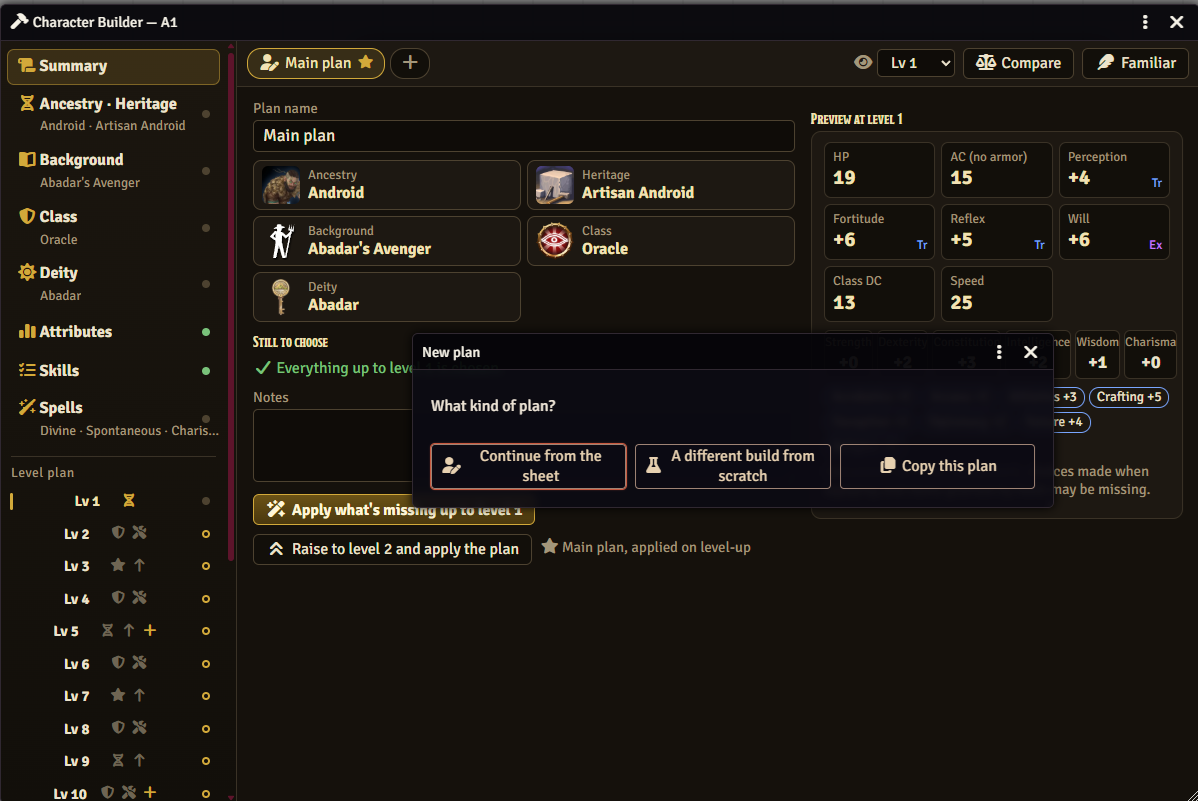
Press + beside the plan tabs:
| Option | What it is |
|---|---|
| Continue from the sheet | Follows the sheet as it is now and plans the levels ahead. Levels already on the sheet are locked (Unlock lets you change their feats, boosts and skill increases). |
| A different build from scratch | Any ancestry, background and class. Put it on the character later with Rebuild with this. |
| Copy this plan | A copy to change a few picks. |
A character can have 5 plans by default (the GM can set 1–10). The ★ plan is the main plan, the one applied on level-up; Make main plan changes it. Plans are saved on the character.
On Summary:
- Apply what's missing up to level N — adds the plan's picks up to the character's current level.
- Raise to level N+1 and apply the plan — levels up and applies (players only if the GM allows it).
A confirmation lists what will be added. Applying only adds — nothing already on the sheet is replaced. If the plan left a choice open, PF2e asks for it.
When a character gains a level (on the sheet or anywhere else), its owners get a whispered chat card listing what the main plan has for the new level, with Apply the plan and Open the builder. The GM can turn the card off.
A from-scratch plan has Rebuild with this (Lv N). It rebuilds the character with that build up to its current level:
- Removed and added again: ancestry, heritage, background, class, feats, spells, attribute boosts, skill ranks.
- Kept: gear, coins, effects, conditions and HP.
- It can't be undone — duplicate the actor first if you want a backup.
Afterwards the plan follows the sheet. To keep the sheet and only take a from-scratch plan's later picks, use Continue from the sheet on that plan instead.
Next: Comparing builds