Repository navigation
CARLA rendering
The rendering modules turn a CARLA world into images. They build a town from the map, give the actors models, apply the weather, and draw CARLA's cameras through ThreeMojo's renderer.
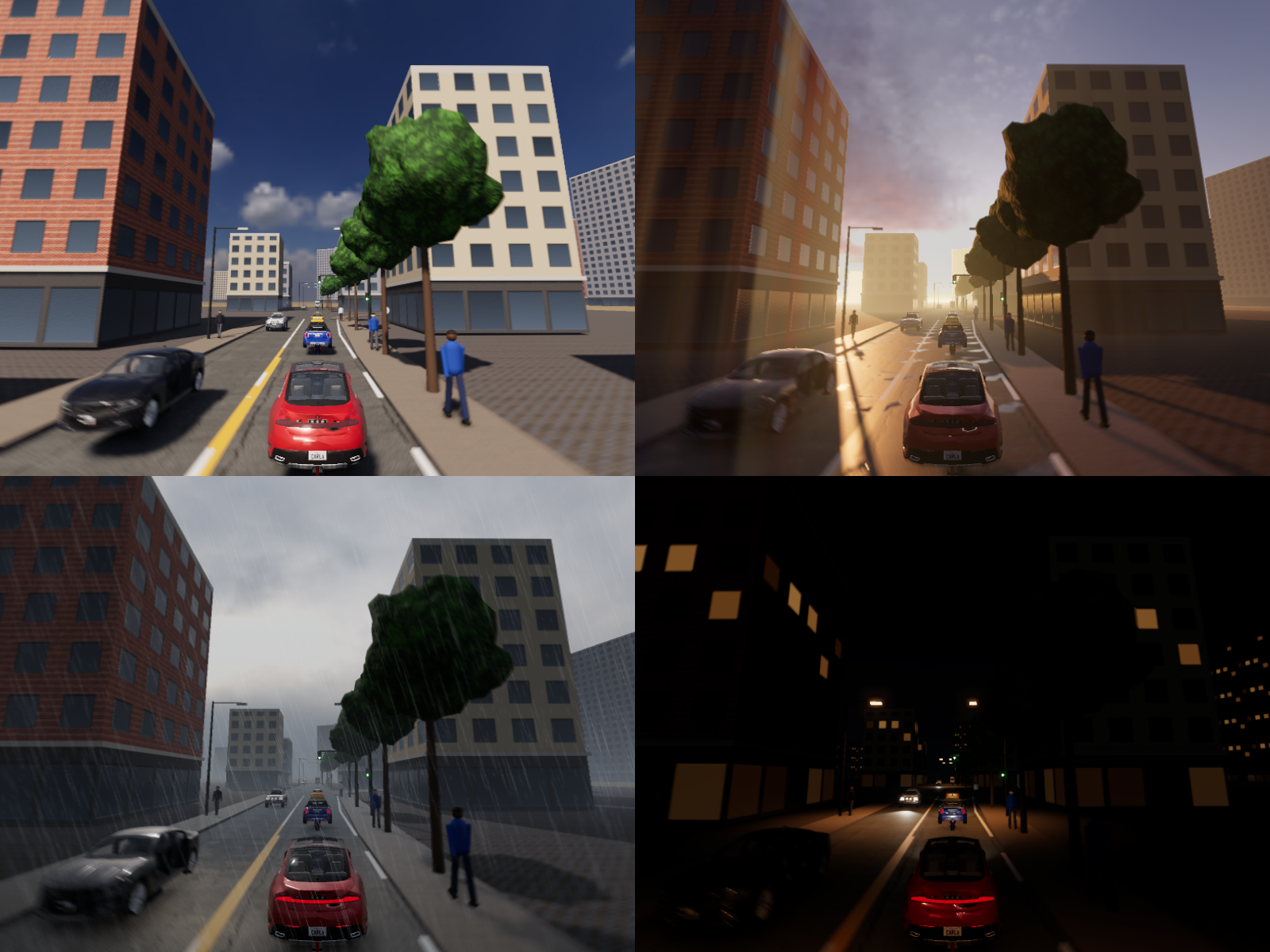
Images can include CC BY 4.0 CARLA vehicles and town content. Keep the asset credits with shared images.
To render the stills, run mojo run -I . examples/carla_town.mojo out/carla_town.png. Each view is also written alone, at 800 by 600: out/carla_town_clear_noon.png, out/carla_town_wet_sunset.png, out/carla_town_rain.png and out/carla_town_night.png.
examples/carla_towns.mojo draws CARLA's Town10HD in the same four weathers.
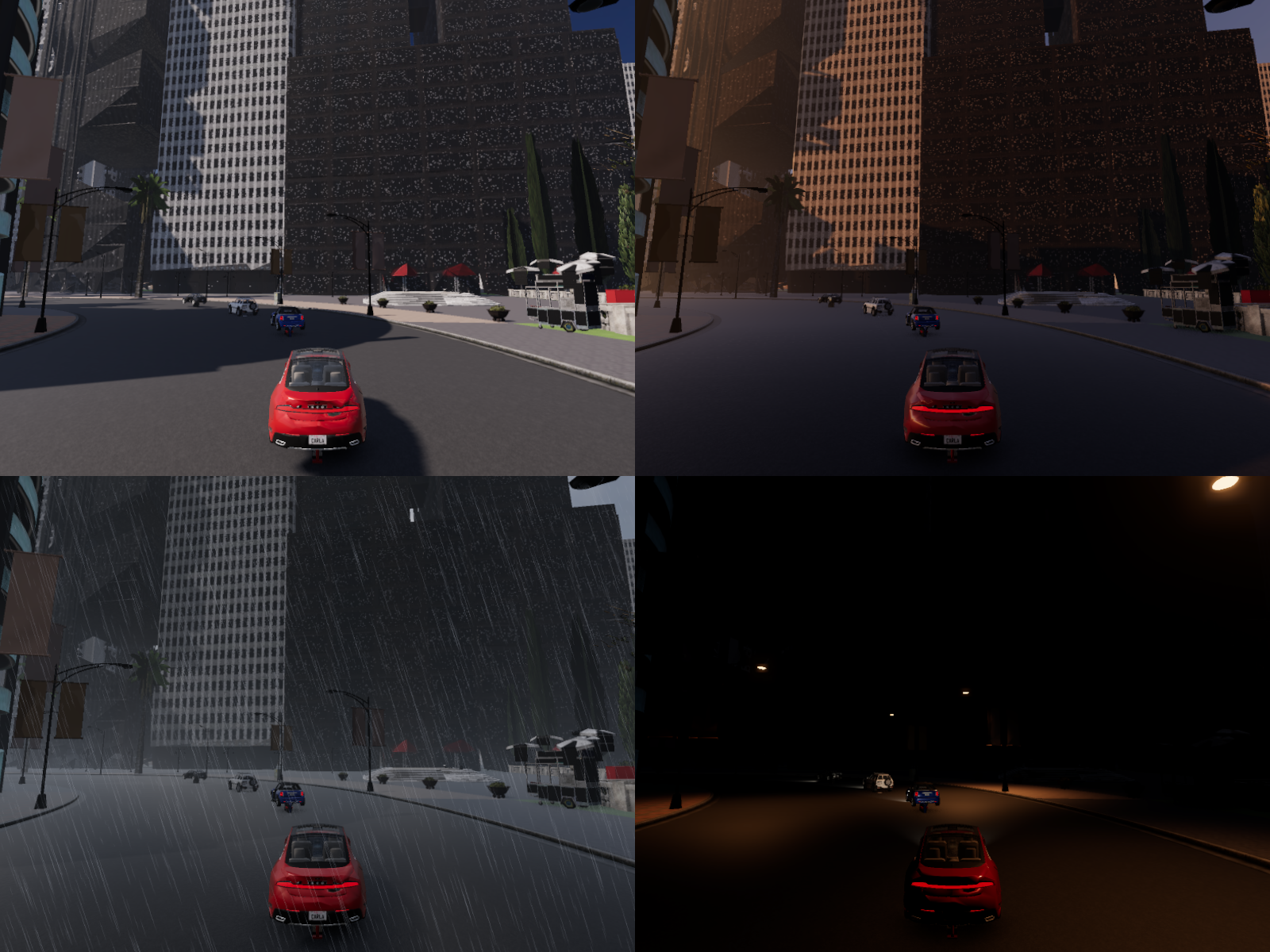
Each of those views is also written alone: out/carla_towns_clear_noon.png, out/carla_towns_wet_sunset.png, out/carla_towns_rain.png and out/carla_towns_night.png.
The town package must be in the asset cache.
See CARLA assets.
The look comes from ThreeMojo's renderer and well-known techniques: physical materials, cascaded sun shadows, a sky model, height fog, screen-space reflections, bloom and tone mapping. The sizes, colors and gains are this port's own choices. See CARLA world for the world and its weather data.
| Module | What it gives |
|---|---|
town |
Town: the road meshes and their materials, crosswalk paint, buildings, trees, street lamps and the ground. |
props |
Props: traffic lights and signs at the map's signals, with lamps that follow the light states. |
render_actors |
ActorVisuals: procedural vehicles and walkers for the world's actors. |
render_weather |
The weather as render settings: the sun, the moon, the sky, the fog, the wet road and the rain. |
render_sky |
build_sky: the sky cube with clouds, for the background and the reflections. |
render_textures |
Procedural asphalt, concrete, grass, foliage and facade textures. |
render_post |
The image effects the composer does not have: height fog, rain, metering, gamma and the lens. |
render_light |
The light effects: the sun's and the sky's share of each pixel, ambient occlusion, cloud shadows and light shafts through the fog. |
assets |
AssetRegistry: the photoscanned textures, the HDRI skies and CARLA's own vehicle models, from the cache. See CARLA assets. |
camera_render |
CarlaRenderer: the RGB, semantic and depth cameras. |
Make a CarlaRenderer from a world. Call update after each change to the world. Then draw a camera actor.
from extensions.carla.camera_render import CarlaRenderer
from extensions.carla.town import TownSettings
from renderers.renderer import available_workers

var view = CarlaRenderer(world, TownSettings(), available_workers())
view.update(world)
var rgb = view.render_rgb(world, camera)
var semantic = view.render_semantic(world, camera)
var depth = view.render_depth(world, camera)
render_rgb returns the image in sRGB, at the camera's image_size_x and image_size_y. render_semantic returns the CityScapes colors. render_depth packs the depth along the camera's axis as CARLA does.
The semantic and depth images come from the rasterizer, not from rays. Each mesh is drawn flat in the color of its semantic tag. The depth comes from the same depth buffer.
Semantic and depth captures reuse one material for each source material and semantic tag. Hash indexes find the material and its coverage texture. These lookups take expected constant time. Override IDs stay stable when a source changes.
A coverage texture owns a white-RGB copy of the source image and its mip levels. The source and the copy do not share writable buffers. Before each capture, the cache compares every stored alpha sample and all mip and sampler fields. Byte alpha, float alpha and mip alpha edits take effect on the next capture. The same applies to offsets, filters, UV transforms, color space, alpha mode and sampler tables.
Float alpha comparisons preserve the exact bits, including signed zero. Source RGB changes do not invalidate a white-RGB copy.
Alpha maps stay linked to the original texture and use its current samples.
An unchanged coverage texture is scanned once per capture. Its pixel and mip buffers are not allocated, copied or whitened again. A changed texture replaces the owned copy in the same texture slot. An unchanged material is not rebuilt. Changes to its coverage, visibility, sidedness and clipping fields refresh the override in its existing slot. Weather updates are not the invalidation mechanism.
These caches retain at most one coverage texture per source texture and one material per source-material/tag pair used by the renderer. They do not reclaim source assets or actor resources. The generated override records and coverage textures are private working data; callers must edit the source assets. Each capture restores mesh materials and the background, including when rendering fails.
bench/carla_sensor_cache_bench.mojo measures full depth captures with byte or float foliage masks and mip levels. It reports live-buffer replacements, copied pixel/mip bytes, retained pixel/mip bytes and capture time. Run it under /usr/bin/time -v to measure peak resident memory. The mask is a synthetic repeated leaf-gap pattern; the result is not a city-scale performance claim.
With Mojo 1.1.0 on Linux x86-64, a coordinated rerun used three alternating pairs of 20 captures and a 1024 by 1024 mask. The candidate binary was built from final #503 source on base 650715e. The comparison used a retained baseline binary whose pre-format benchmark source had no contemporaneous hash. These isolated-child measurements do not establish performance for later combined integrations. Shared-host timing noise remains.
The unchanged byte mask copied 111,848,080 bytes before and zero after. The float mask copied 447,392,320 bytes before and zero after. Median full-capture times were 1,452.332 to 1,349.688 ms for bytes and 1,478.332 to 1,332.748 ms for floats: observed speedups of 1.076 and 1.109.
Median peak RSS fell from 95,912 to 94,392 KiB for bytes and from 141,600 to 128,512 KiB for floats. Retained occupied pixel/mip bytes stayed at 11,184,808 and 44,739,232. The cache removes repeated temporary copies. It retains the owned source and coverage image.
Alternating alpha edits still require 19 copy replacements after warmup. Byte capture medians changed from 1,438.656 to 1,388.720 ms. Float capture medians changed from 1,442.408 to 1,466.265 ms, a 1.65% increase. Their peak RSS medians were 96,104 to 96,992 KiB and 141,584 to 140,464 KiB. These controls do not show a speedup for every workload.
Image checksums are a benchmark sanity check; pixel-wise regressions check output correctness. This completes #503.
Town builds a map into a scene. TownSettings sets the mesh resolution, the texture size, the spacings and the seed. The same seed builds the same town.
| Surface | Material | Semantic tag |
|---|---|---|
| Road | Asphalt: color, roughness and normal maps. | ROAD |
| Sidewalk and curb | Concrete slabs. | SIDEWALK |
| Wall | Darker concrete. | WALL |
| Crosswalk and lane marks | White or yellow paint, roughness 0.55. | ROAD_LINE |
| Ground near the roads | Paving slabs. | SIDEWALK |
| Ground farther out | Grass. | TERRAIN |
| Buildings | Plaster, brick or panel facades over a row of shops. | BUILDING |
| Trees | Bark and foliage. | VEGETATION |
| Street lamps | Painted metal. | POLE |
The road comes from CARLA's mesh factory. Its mesh has one group per surface kind, and the town splits it into one mesh per kind. The textures carry texture coordinates in meters, so each texture repeats at a fixed size in the world.
Buildings stand on lots beside each road, outside the junctions. A lot that comes near a lane or another lot stays empty. A ring of tall buildings far out gives the skyline.
A CARLA town can be drawn from CARLA's own content: its buildings, streets, plants, poles, props and parked vehicles, each where CARLA puts them. Set TownSettings.package to the town's name, such as Town02, and load its OpenDRIVE map. When the registry's cache holds town.Town02, the package stands in for the procedural roads, lane marks, ground, buildings, trees and lamps. See CARLA assets for what a package holds.
-
Each tile of the package is an LOD. Its near meshes show when the camera is nearer than
TownSettings.near_distance(50 m by default) to the middle of the tile's ground. Its far meshes show otherwise. Each camera chooses the levels before it draws. -
A far tree is an impostor: two crossed quads that show a picture of the tree.
-
A far building is a simplified mesh that wears pictures of its near level, so its windows show at a distance.
-
The package's traffic lights and signs are hidden. The props draw the map's signals, which change with the world.
-
Each mesh takes the semantic tag of its kind: a building is
BUILDING, a parked vehicle isCAR, and a prop isSTATIC. -
The rain wets the package's roads, lane marks, sidewalks and ground.
-
Only buildings, walls, plants and parked vehicles cast the sun's shadow. A flat surface only receives it. A pole, a fence or a sign casts a shadow a few texels wide at the cost of a building's.
-
At night,
LAMP_POOL(12) spot lights stand at the package's lamps nearest each camera, and the lamps' glass glows. Every light costs every pixel, and a town has hundreds of lamps.
A traffic light stands at each signal whose type is a traffic light. A stop, yield or speed-limit sign stands where CARLA places one.
A prop faces the traffic that its signal is for. A traffic light has a head on its pole and a second head on an arm over the road. The arm reaches the signal's lateral offset less 2 m, to 6.5 m at most.
Props.set_states reads each light's state from the world. The lamp of the state glows. The other two lamps are off.
When the cache holds the blueprint's model, a vehicle is CARLA's own model, fitted to the actor's bounding box. See CARLA assets. Otherwise a vehicle is a lofted body with a glass cabin, painted pillars and a roof. Its size comes from the actor's bounding box. Its shape is a BodyStyle: sedan, hatchback, SUV or van.
The body wears car paint: a metallic base under a clear coat, in the color of the color attribute. The lamps follow the VehicleLightState.
A destroyed actor's model is hidden, and its beam goes out. A new vehicle or walker takes over the first hidden model with the same key. The key is the blueprint id, the bounding box and the cached model, if there is one. The model's paint takes the new vehicle's color, and a procedural walker's clothes take the new walker's colors. The model's lamps follow the new vehicle's light state.
A cycle of spawns and destroys therefore keeps the same scene nodes, meshes, lights and materials. A destroyed actor's id names no model. Survivors keep their own materials. The physics bodies and the traffic manager's records of destroyed actors are not reclaimed yet. See #306.
| Light state | Head lamps | Tail lamps | Beam on the road |
|---|---|---|---|
| Position | Dim glow | Glow | None |
| Low beam | Bright glow | Glow | Spot light |
| High beam | Brightest glow | Glow | Brighter spot light |
| Brake | No change | Bright glow | No change |
A procedural walker is capsules, a head and shoes. Its clothes use colors from the actor's id. World.tick advances its gait from horizontal speed and simulation time. Rendering only reads the pose. Repeated captures at one tick and a renderer created later see the same pose.
At constant speed, one cycle uses 1.5 meters of horizontal travel. The left leg and right arm swing together. The other limbs swing in the opposite direction. The target amplitude is twelve degrees per meter per second, capped at thirty degrees. An exponential response with a 0.15 second time constant smooths speed changes. At rest the phase holds and the amplitude tends to zero.
Each world tick uses its final horizontal speed for that tick. Vertical falls and teleports do not add a stride. A new actor starts standing; a destroyed actor's model is hidden.
The phase stays within one cycle, including after long simulation times. World.get_walker_gait returns a copy without advancing it. WalkerGait.advance rejects negative or nonfinite speed and duration; a zero duration holds the pose. See replay gait for recorded motion.
This fixes #290. Previously, constant speed produced a fixed limb angle and a sliding walker. The capsule character and its procedural limbs remain separate from the humanoid rig. Bone-control records do not drive these limbs. A cached walker model has no procedural joints and stays rigid.
Each mapping is a pure function in render_weather. The tests check each one against a hand calculation.
| Weather parameter | What it drives |
|---|---|
sun_azimuth_angle, sun_altitude_angle
|
The sun light's direction, and the sky's sun. A negative azimuth keeps the town's sun. |
| Sun altitude | The sun's illuminance, and the sky's, in lux (see Light). The sun's color goes from 1900 K to 5800 K. Below the horizon the moon lights the town. |
cloudiness |
Less direct sun, a grayer sun, higher turbidity, and cloud in the sky. |
rayleigh_scattering_scale, mie_scattering_scale
|
The sky model's Rayleigh and Mie terms, and the haze. |
fog_density, fog_distance, fog_falloff
|
An exponential height fog. |
scattering_intensity |
How much sunlight the fog scatters toward the camera. |
precipitation, precipitation_deposits
|
A darker and smoother wet road, puddles, and screen-space reflections. |
precipitation, wind_intensity
|
The rain streaks and their lean. |
dust_storm |
More fog and a more turbid sky. |
| Sun below the horizon | The street lamps, the lit windows and the car lamps. |
The fog takes the sky's color just above the horizon in each ray's direction. It glows warm toward a low sun and stays blue away from it. The haze dims far surfaces but not the sky.
The town is lit in physical units. The sun gives 127.5 klx outside the air, less exp(-0.21 m) through the Kasten-Young air mass m. A clear sky gives 0.8 + 15.5 sqrt(sin h) klx on level ground at the sun's altitude h, and an overcast sky 0.3 + 21 sin h klx. The cloud cover moves the sky from one to the other. These are the daylight availability formulas of lighting engineering.
The sky cube and an HDRI sky are both scaled so that level ground under them gets the sky's illuminance. The sun, the sky and the reflections then agree.
One unit of the renderer's light is pi times 4000 lux, so a white wall under one unit shines 4000 nits. The camera meters that light as a real camera does. A clear noon meters near EV100 15, so the camera reads CARLA's exposure limits three stops higher.
render_light adds four effects to each pinhole image:
| Effect | What it does |
|---|---|
| Direct share | Splits each pixel's light into the sun's part and the sky's part, from the pixel's normal, the sun's shadow maps and the physical sun and sky. |
| Ambient occlusion | three.js's ground-truth ambient occlusion (GTAOPass), on the frame's own depth and normals. It darkens only the sky's part, so a surface in the sun keeps its sunlight. |
| Cloud shadows | The sun's part dims where the cloud layer over a point is thicker than the mean cover, and brightens where it is thinner. |
| Light shafts | Each ray through the fog is marched through the sun's shadow maps. The fog scatters sunlight only where the sun reaches it, so a building casts a dark shaft through the haze. |
rgb_camera_settings reads the attributes of sensor.camera.rgb and sensor.camera.rgb_fisheye. A missing attribute keeps CARLA's default.
| Attribute | What it drives |
|---|---|
image_size_x, image_size_y
|
The image size. |
fov |
The horizontal field of view. The vertical one is 2 atan(tan(fov / 2) h / w). |
enable_postprocess_effects |
The motion blur, bloom, lens flare, chromatic aberration and lens effects. |
exposure_mode, shutter_speed, iso, fstop
|
The exposure: metered from the frame, or set by the camera's EV100. |
exposure_min_bright, exposure_max_bright, exposure_compensation
|
The limits and the offset of the exposure, in stops. |
calibration_constant |
The meter's constant K. |
bloom_intensity |
bloom_pass. |
lens_flare_intensity |
lensflare_pass. |
motion_blur_intensity |
motion_blur_pass. |
chromatic_aberration_intensity |
chromatic_aberration_pass. |
temp, tint
|
The white balance. |
gamma |
The image's contrast. At 2.2 the image is plain sRGB. |
lens_k, lens_kcube, lens_x_size, lens_y_size
|
A radial lens distortion that keeps the corners in the frame. |
lens_circle_falloff, lens_circle_multiplier
|
The darkening of the rim. |
camera_model and the fisheye attributes |
The fisheye lens, through cameras.WideAngleLens. |
The depth of field, the filmic curve's shape and the adaptation speeds are read and kept. ThreeMojo's passes have no place for them.
A fisheye camera draws a cube of the scene around the camera, then reads each pixel's ray through its lens. The cube has no depth. The fog is then the renderer's exponential fog, and the rain and the reflections are left out.
On 24 threads, an 800 by 600 view takes about 2.7 seconds with procedural vehicles and about 4.2 seconds with seven of CARLA's cars. It is drawn at twice the size and averaged down. The town builds in about 0.6 seconds, or about 2.3 seconds with the photoscanned textures.
Three things keep it fast:
-
AssetRegistry.preloaddecodes every map of the bound texture sets at the same time, one task for each image, and decodes each image once. - The light effects read the shadow maps that the frame drew, from
Renderer.render_into_keeping_shadows. They do not draw the shadow maps again. - The CARLA vehicles are simplified to about 35,000 triangles. See CARLA assets.
- The sun's shadows reach 150 m in front of the camera,
SUN_SHADOW_REACH. Farther out, the light has no shadow.
With the Town02 package, an 800 by 600 view on Town02's roads takes about 2.2 seconds by day and 1.1 seconds at night. The town builds in about 4.5 seconds. Town10HD takes about 4 seconds a view, and builds in about 9 seconds. read_gltf decodes the package's textures workers at a time: the count AssetRegistry.preload was given.
- Without a town package, the buildings are boxes with textured facades, and the trees are noise-shaped spheres or the cached tree model.
- A vehicle is CARLA's own model when the cache holds it, and a procedural shape when it does not. The walkers are procedural shapes.
- The rain is streaks over the image. It does not wet the camera lens.
- The clouds are one flat layer. Their shadows are a screen-space effect, not a volume.