Repository navigation
Materials
materials/material.mojo. A Material is a color, an optional texture, which sides to draw, an opacity, a blend policy, a kind and an emissive term.

three.js: Material, MeshLambertMaterial, MeshPhongMaterial, MeshStandardMaterial, MeshPhysicalMaterial, MeshToonMaterial, MeshMatcapMaterial, MeshBasicMaterial, MeshNormalMaterial, MeshDepthMaterial, MeshDistanceMaterial, LineBasicMaterial, LineDashedMaterial, PointsMaterial, SpriteMaterial. The node materials and ShaderMaterial are on their own page: see Node materials.
Properties: side, opacity, transparent, map, emissive, emissiveIntensity, emissiveMap, specular, shininess, alphaMap, alphaTest, gradientMap, matcap, wireframe, dashSize, gapSize, scale, size, sizeAttenuation, rotation, envMap, reflectivity, combine, fog.
Data properties: depthPacking, referencePosition, nearDistance, farDistance.
Physical properties: roughness, metalness, roughnessMap, metalnessMap, envMapIntensity, ior, specularColor, specularIntensity, specularIntensityMap, specularColorMap, clearcoat, clearcoatRoughness, clearcoatMap, clearcoatRoughnessMap, clearcoatNormalMap, clearcoatNormalScale, transmission, transmissionMap, thickness, thicknessMap, attenuationColor, attenuationDistance, dispersion. Map properties: normalMap, normalScale, bumpMap, bumpScale, aoMap, aoMapIntensity, lightMap, lightMapIntensity, specularMap, displacementMap, displacementScale, displacementBias. Shading properties: flatShading.
Material(color)
Material(color, map)
Material(color, map, side, opacity)
Material(color, map, side, opacity, blending, kind)
Material(color, kind=BASIC)
Material(color, emissive=Color(255, 200, 120))
Material(color, emissive=Color(255, 255, 255), emissive_intensity=0.5, emissive_map=glow)| Argument | Type | Default | Meaning |
|---|---|---|---|
color |
Color |
required | The base color, as authored in sRGB. |
map |
TextureId |
NO_TEXTURE |
The texture that multiplies the color. |
side |
Side |
FRONT_SIDE |
Which faces are drawn. |
opacity |
Float32 |
1.0 |
One is opaque. Less shows what is behind, when transparent. |
blending |
Optional[Blending] |
follows transparent
|
OPAQUE or BLEND. |
transparent |
Bool |
False |
Whether the surface blends over what is behind it, three.js's transparent. |
kind |
MaterialKind |
LAMBERT |
Lit, unlit, or showing data. |
emissive |
Color |
black | Light the surface gives off, as authored in sRGB. |
emissive_intensity |
Float32 |
1.0 |
Scales emissive. |
emissive_map |
TextureId |
NO_TEXTURE |
The texture that multiplies emissive. |
vertex_colors |
Bool |
False |
Multiply color by the geometry's color attribute. |
alpha_map |
TextureId |
NO_TEXTURE |
A texture whose green channel thins the surface. |
alpha_test |
Float32 |
0.0 |
The alpha a fragment must reach to be drawn. |
specular |
Color |
black | How much light a PHONG surface sends to the camera. |
shininess |
Float32 |
0.0 |
How tight that highlight is. |
gradient_map |
TextureId |
NO_TEXTURE |
The ramp a TOON surface steps through. |
matcap |
TextureId |
NO_TEXTURE |
The image a MATCAP surface is looked up in. |
wireframe |
Bool |
False |
Draw the lines of the triangles rather than fill them. |
dash_size |
Length |
zero | How long each dash of a line is. See dashed lines. |
gap_size |
Length |
zero | How long the gap after each dash is. Zero is a solid line. |
dash_scale |
Float32 |
1.0 |
What the distance along the line is multiplied by first. |
point_size |
PointSize |
PointSize(1.0) |
How many pixels across a point is. See points. |
size_attenuation |
Bool |
True |
Whether a point or a sprite shrinks with distance. |
rotation |
Angle |
zero | How far a sprite is turned about the line of sight. See sprites. |
env_map |
CubeTextureId |
NO_CUBE_TEXTURE |
The cube texture the surface reflects, or SCENE_ENVIRONMENT. See Environment map. |
reflectivity |
Float32 |
1.0 |
How much of the reflection joins the surface's light. |
combine |
Combine |
MULTIPLY_OPERATION |
How the reflection joins. |
roughness |
Float32 |
1.0 |
How rough a STANDARD or PHYSICAL surface is. See Standard and physical. |
metalness |
Float32 |
0.0 |
How much of a metal it is. |
roughness_map |
TextureId |
NO_TEXTURE |
A texture whose green channel multiplies the roughness. |
metalness_map |
TextureId |
NO_TEXTURE |
A texture whose blue channel multiplies the metalness. |
env_map_intensity |
Float32 |
1.0 |
What a physical surface's environment is multiplied by. |
normal_map |
TextureId |
NO_TEXTURE |
A texture of tangent-space normals. See Normal maps and bump maps. |
normal_scale |
Vector2 |
Vector2(1, 1) |
What the map's x and y are scaled by. |
bump_map |
TextureId |
NO_TEXTURE |
A texture whose red channel is a height. |
bump_scale |
Float32 |
1.0 |
What that height is scaled by. |
ior |
Float32 |
1.5 |
A PHYSICAL surface's index of refraction. |
specular_color |
Color |
white | What its reflectance head on is tinted by. |
specular_intensity |
Float32 |
1.0 |
What that reflectance is scaled by. |
clearcoat |
Float32 |
0.0 |
How much clear coat lies over a PHYSICAL surface. |
clearcoat_roughness |
Float32 |
0.0 |
How rough the coat is. |
ao_map |
TextureId |
NO_TEXTURE |
A texture whose red channel dims the indirect light. See Ambient occlusion map. |
ao_map_intensity |
Float32 |
1.0 |
How strongly the ao map dims. |
light_map |
TextureId |
NO_TEXTURE |
A texture of baked light added to the indirect light. See Light map. |
light_map_intensity |
Float32 |
1.0 |
What the light map is multiplied by. |
specular_map |
TextureId |
NO_TEXTURE |
A texture whose red channel scales the highlight and the reflection. See Specular map. |
flat_shading |
Bool |
False |
Light each face with its own normal. See Flat shading. |
transmission |
Float32 |
0.0 |
How much of a PHYSICAL surface's diffuse light is the scene behind it. See Transmission. |
transmission_map |
TextureId |
NO_TEXTURE |
A texture whose red channel multiplies the transmission. |
thickness |
Length |
NO_THICKNESS |
How deep the volume under the surface is. |
thickness_map |
TextureId |
NO_TEXTURE |
A texture whose green channel multiplies the thickness. |
attenuation_color |
Color |
white | The color white light becomes inside the volume. |
attenuation_distance |
Length |
NO_ATTENUATION |
How far the light travels to become it. Infinite by default. |
dispersion |
Float32 |
0.0 |
How far the three channels bend apart. |
nodes |
NodeProgramId |
NO_NODES |
A compiled node graph that replaces parts of the shading. See Node materials. |
| Value | Draws |
|---|---|
FRONT_SIDE |
Faces that point at the camera. The default, as in three.js. |
BACK_SIDE |
Faces that point away. The inside of a closed mesh. |
DOUBLE_SIDE |
Both. Use it for an open surface. |
A DOUBLE_SIDE face seen from behind is lit with its normal flipped. This is three.js's rule: its shader flips the normal under DOUBLE_SIDED by which way the face is seen. A BACK_SIDE face is lit with its normal flipped whichever way it is seen. That is three.js's FLIP_SIDED, which defaultnormal_vertex applies when side is BackSide. The inside of a box lit by a lamp inside it is lit. A mirrored mesh, with a negative world determinant, keeps the same convention.
| Value | three.js | Meaning |
|---|---|---|
LAMBERT |
MeshLambertMaterial |
The lights reach the surface. |
GOURAUD |
MeshGouraudMaterial |
LAMBERT, lit at the corners. See Gouraud. |
PHONG |
MeshPhongMaterial |
Lit, and with a highlight that follows the camera. |
STANDARD |
MeshStandardMaterial |
Lit by a roughness and a metalness, with a GGX lobe. See Standard and physical. |
PHYSICAL |
MeshPhysicalMaterial |
STANDARD with an index of refraction and a clear coat. |
VOLUME |
VolumeNodeMaterial |
The light that a ray through the mesh gathers from the point and spot lights. See Volumetric light. |
BASIC |
MeshBasicMaterial, LineBasicMaterial, PointsMaterial, SpriteMaterial
|
The color and texture show as they are. The kind a line, a point or a sprite is drawn with. |
NORMALS |
MeshNormalMaterial |
The normal the camera sees, as a color. |
DEPTH |
MeshDepthMaterial |
How far away the surface is, as a gray or packed. |
DISTANCE |
MeshDistanceMaterial |
How far the surface is from a reference point, packed. |
is_lit() is true for the first five. VOLUME is not lit: its ray reads the lights, and its surface does not. is_physical() is true for STANDARD and PHYSICAL. is_data() is true for the last three, which show data rather than light. See Data materials.
A Gouraud surface is a Lambert surface that is lit at its corners, as three.js's MeshGouraudMaterial is. The renderer lights each corner, and each fragment takes the light between its corners. Build one with the kind:
var clay = assets.materials.add(Material(Color(200, 120, 90), kind=GOURAUD))Each corner holds the direct light of the point, spot and directional lights. It also holds the indirect light of the ambient light, the probes and the hemisphere lights. Each corner also holds the light of its far side, which a DOUBLE_SIDE or a BACK_SIDE surface shows from behind. The shadows darken the direct light per fragment, by the product of every casting light's shadow: three.js's getShadowMask. A spot light's map does not reach a corner, as it does not reach three.js's.
A flat face under a directional light looks the same lit at its corners or at each fragment. A point light near a large face shows the difference. The light between the corners is flat, and a Lambert surface is brightest under the bulb.
A Gouraud surface takes a map, an alpha map, an emissive map and a specular map. It takes an environment map, an ambient occlusion map and a light map too. It refuses a normal map, a bump map and a displacement map, which three.js's material does not have.
A Phong surface is a Lambert surface with a highlight. Build one with its own function:
var plastic = assets.materials.add(phong_material(Color(200, 60, 60)))
var glossy = assets.materials.add(
    phong_material(Color(60, 120, 200), bark, Color(255, 255, 255), 60.0)
)
phong_material(color, map=NO_TEXTURE, specular=Color(17, 17, 17), shininess=30.0, side=FRONT_SIDE, opacity=1.0, blending=None).
The specular and the shininess are three.js's own defaults. Material(color, kind=PHONG) gives the same surface a black specular, because this project's defaults are neutral and three.js's are not.
A black specular is a base reflectance of zero. It is not a highlight switched off. three.js's Fresnel factor rises toward one at a grazing angle, whatever the surface reflects head on. So a Phong surface with a black specular still catches a dim rim where a Lambert surface catches nothing. has_highlight() asks the kind alone for that reason.
| Property | Meaning |
|---|---|
specular |
How much light the surface sends toward the camera, as authored in sRGB. |
shininess |
How tight the highlight is. Zero spreads it over the whole lit side. |
The highlight is light bouncing off the surface rather than coming out of it. So specular tints it and color does not, and neither does the texture. A red plastic ball has a white highlight.
It is Blinn's half vector, as three.js uses: the highlight is brightest where the normal points half way between the light and the camera. Move the camera and the highlight moves. The diffuse term does not, because a Lambert term cannot.
Only the lights that have a direction make one. An ambient light has none, and a hemisphere light is an ambient term with a gradient. Both light a Phong surface diffusely and nothing more.
blinn_phong(toward_light, toward_eye, normal, specular, shininess) is the arithmetic, in lights/lighting.mojo. The GPU kernel calls the same function. Lighting.specular_at(normal, position, specular, shininess) sums it over the lights.
three.js divides both its diffuse and its specular term by pi, and so does this: Lighting scales every sum of arriving light by RECIPROCAL_PI. A white surface square on to a white light of intensity one reflects a third of it. A light meant to read as full white has an intensity of about three, as in three.js's own examples. See Lights.
The highlight can exceed one. That is what a highlight is. Set a tone mapping curve to bring it back. See Render target.
A specular map scales the highlight per texel.
A Phong surface can let a light behind it show through, as three.js's SubsurfaceScatteringShader does. Give the material a thickness map:
var wax = phong_material(Color(230, 210, 180))
wax.set_scattering(subsurface_scattering(thickness, Color(255, 120, 60)))
Each light with a direction adds light through the surface toward the camera. The way to the light is bent along the normal by distortion. The light through is pow(saturate(dot(V, -H)), power) * scale + ambient, times the light's color, the thickness color, the thickness and attenuation. The thickness is the red of the thickness map at the raw coordinates.
The light through joins the direct diffuse light, and the surface's color does not tint it. Shadows darken it, as they darken the light itself. With no thickness map there is no light through, as WebGL reads zero from a sampler with no texture. The thickness map must hold data, and only SHADE_TEXTURE reads it.
| Member | three.js | Default |
|---|---|---|
map |
thicknessMap |
none |
color |
thicknessColor |
white |
distortion |
thicknessDistortion |
0.1 |
ambient |
thicknessAmbient |
0 |
attenuation |
thicknessAttenuation |
0.1 |
power |
thicknessPower |
2 |
scale |
thicknessScale |
10 |
A toon surface is lit like a Lambert one, then stepped through a ramp instead of faded. That is what makes the cartoon look. Build one with its own function:
var cel = assets.materials.add(toon_material(Color(200, 60, 60)))
var banded = assets.materials.add(
    toon_material(Color(60, 120, 200), bark, ramp)
)
toon_material(color, map=NO_TEXTURE, gradient_map=NO_TEXTURE, side=FRONT_SIDE, opacity=1.0, blending=None).
three.js: MeshToonMaterial, gradientMap.
| Property | Meaning |
|---|---|
gradient_map |
The ramp to step through, or NO_TEXTURE for three.js's fallback. |
The cosine between the surface normal and the direction toward a light picks a tone. three.js reads its ramp at dot(N, L) * 0.5 + 0.5, so the whole range of angles maps onto the whole ramp.
A lamp the surface is turned away from still counts. A Lambert term clamps the cosine at zero. A ramp has no zero to clamp at. So a surface facing away reads the ramp's left end rather than nothing, which is what keeps the shaded side flat.
How dark that side is belongs to the ramp. three.js's fallback puts its left end at 0.7, so a default toon surface never goes black. A ramp of your own can put zero there, and then it does. A toon surface with no light reaching it is black either way.
With no gradient_map, three.js's fallback applies: two tones, with the edge where the coordinate reads 0.7, and the low tone at 0.7 as well.
three.js softens that edge with fwidth, a screen-space derivative. The edge is hard here because that antialiasing is not implemented yet. The architecture does not forbid it: this rasterizer already evaluates a triangle's varyings at neighboring pixels, which is how mip_level picks a level. The difference shows on the single row of fragments the edge crosses.
A ramp must be exactly one row high, and that row is read left to right, red channel only. Nothing is filtered and nothing is wrapped: a ramp of three texels gives three flat tones, each covering a third of the range. three.js builds its own gradient maps NearestFilter and ClampToEdgeWrapping for the same reason.
The height is a rule and not a convention. three.js reads its gradient map at vec2(coord, 0.0). Under this project's texture convention a v of zero is the bottom row, because every sampler flips with 1 - v. So "the first stored row" and "v of zero" name different rows in a taller image. There is no way to tell which one the author meant, and one row has only one, so a taller image is refused.
So a ramp holds data, and must say so twice, as an alpha map must. Build it LINEAR, or the sRGB curve changes what its bytes mean. Build it IGNORED, or its own alpha weights them.
A ramp is read at no surface coordinate. So its own repeat, offset and rotation are never applied. They are never asked to agree with the material's other maps either. See Texture transforms.
A highlight. three.js's MeshToonMaterial has no specular and no shininess, and a material of this kind refuses both, as every other non-Phong kind does.
An ambient light and a hemisphere light are not stepped. three.js reflects both through RE_IndirectDiffuse, which no ramp touches, so both reach a toon surface exactly as they reach a Lambert one.
A matcap is a photograph of a sphere, lit however the artist liked. The shader looks a surface up in it by which way the surface is turned. So a whole lighting rig arrives as one image, and the scene's own lights are not consulted at all.
var clay = assets.materials.add(matcap_material(ball))
var tinted = assets.materials.add(matcap_material(ball, Color(255, 200, 160)))
var plain = assets.materials.add(matcap_material())
matcap_material(matcap=NO_TEXTURE, color=Color(255, 255, 255), map=NO_TEXTURE, side=FRONT_SIDE, opacity=1.0, blending=None).
three.js: MeshMatcapMaterial, matcap.
The image comes first, because a matcap surface is the image. The color is a tint over it, and white, the default, leaves it alone.
| Property | Meaning |
|---|---|
matcap |
The image to look the surface up in, or NO_TEXTURE for three.js's gradient. |
three.js builds a frame from the direction toward the camera and the camera's own up axis, then reads how far the normal leans along each:
x  = normalize(cross(up, toward_eye))
y  = cross(toward_eye, x)
uv = (dot(x, normal), dot(y, normal)) * 0.495 + 0.5
matcap_uv is that arithmetic, in render/rasterizer.mojo. Both rasterizers call it. three.js works in view space and this works in world space. The two give the same dot products: the view transform is rigid, and a dot product does not care how the pair is turned. Doing it in world space saves carrying a second normal and a second position per corner.
A matcap turns with the camera. Orbit the camera around a sphere and the image stays where it is on the screen. That is what makes the trick cheap, and what stops it working for anything that has to stay put in the world.
The direction toward the camera is measured from where the camera stands, under either projection. three.js reads vViewPosition in this shader and does not special-case a parallel one, so neither does this. toward_camera is not consulted here.
The 0.495 is three.js's own. It is there to reduce artifacts from an undersized matcap disk. It keeps the lookup a little inside the image, but it does not make the wrap mode irrelevant. On a small image a bilinear footprint at 0.005 can still cross the edge.
With no matcap, three.js falls back to mix(0.2, 0.8, uv.y). That is a gray gradient, dark at the bottom and pale at the top, which reads as a sphere lit from above. matcap_fallback is that mix. It is linear light rather than an authored byte, because three.js writes it straight into the outgoing light.
An emissive term. The image already holds every bit of light the surface shows, so a MATCAP material refuses one, exactly as a BASIC material does. MaterialKind.is_unlit is the question both answer.
The image is sampled at its full-size level and never down a mip chain. A mip chain is only progressively filtered copies of an image, so normal-derived coordinates could use one. What is missing is the screen-space footprint of those coordinates. mip_level measures the footprint of the surface's own texture coordinates, which is a different quantity. Matcap-coordinate derivatives and mip selection are not implemented.
A matcap's own alpha means nothing: three.js reads .rgb and no more. So the texture must be built IGNORED, or filtering would weight its channels by an alpha that says nothing. Its color space is free, because a matcap really is color.
A BASIC, LAMBERT or PHONG material can reflect a cube texture: three.js's envMap on MeshBasicMaterial, MeshLambertMaterial and MeshPhongMaterial. A STANDARD or PHYSICAL material reflects one by its roughness instead; see The environment. The direction the camera sees a fragment along is turned back through the fragment's normal, and the cube is read in that direction. That is what a mirror shows.
var chrome = Material(Color(255, 255, 255), kind=BASIC, env_map=sky)
var glossy = phong_material(Color(200, 40, 40))
var tinted = Material(Color(150, 150, 150), env_map=SCENE_ENVIRONMENT, reflectivity=0.35, combine=MIX_OPERATION)| Property | three.js | Default | Meaning |
|---|---|---|---|
env_map |
envMap |
NO_CUBE_TEXTURE |
The cube texture to reflect. SCENE_ENVIRONMENT reflects the scene's environment. |
reflectivity |
reflectivity |
1.0 |
How much of the reflection joins, from zero to one. |
combine |
combine |
MULTIPLY_OPERATION |
How it joins. See the table below. |
refraction_ratio |
refractionRatio |
0.98 |
The ratio of the two indices of refraction, read under a refraction mapping. |
env_map_rotation |
envMapRotation |
no turn | An Euler that turns the environment before it is read. |
combine |
three.js | The surface's light becomes |
|---|---|---|
MULTIPLY_OPERATION |
MultiplyOperation |
mix(light, light * reflection, reflectivity). A tinted mirror. |
MIX_OPERATION |
MixOperation |
mix(light, reflection, reflectivity). A reflection laid over the surface. |
ADD_OPERATION |
AddOperation |
light + reflection * reflectivity. A gloss on top. |
combine_light in materials/material.mojo is that arithmetic, three.js's envmap_fragment. Both rasterizers call it. The reflection joins after the lights, the highlight and the emissive term, and before the fog, where three.js joins it. Alpha is coverage and is left alone. A white BASIC surface with a multiply is a plain mirror. A colored one is a mirror tinted by its color.
The reflected direction is reflected(toward_eye, normal) in render/cube_texture.mojo, GLSL's reflect. It is measured from where the camera stands under either projection, as three.js reads cameraPosition here. The cube is read at its full size, never down a mip chain; see Textures.
A cube with CUBE_REFRACTION_MAPPING, or a panorama with EQUIRECTANGULAR_REFRACTION_MAPPING, is read along the view bent through the surface. refracted(toward_eye, normal, refraction_ratio) is GLSL's refract. Past the critical angle it gives the zero vector, as GLSL does. Only a BASIC, LAMBERT or PHONG material has a refraction ratio. Every other kind refuses one that is not the default.
env_map_rotation turns the direction last, as three.js's envMapRotation does, on each kind that reflects. env_direction in render/rasterizer.mojo is the whole choice, and both rasterizers call it. A kind that does not reflect refuses a turn. A physical surface that reflects the scene's environment is turned by Scene.environment_rotation instead, as in three.js.
A reflection is a texture. SHADE_TEXTURE draws it and the other two shading modes ignore it, as they ignore every map.
SCENE_ENVIRONMENT is not an id. The renderer replaces it with whatever the scene's environment names when it prepares the frame. A scene with no environment gives the material nothing to reflect, as three.js's material.envMap || scene.environment gives nothing. three.js applies the environment to its physically based materials without asking. Here a STANDARD or PHYSICAL material reflects nothing unless told to, so a material asks. See Scene graph.
No other kind reflects this way. A toon surface steps through a ramp, a matcap surface is an image already, and the data kinds show no light. Each refuses an env map, a reflectivity that is not one, and a combine that is not the default. A physical kind takes an env map and refuses the other two. A wireframe refuses an env map too. So do a line, a point and a sprite, in their own passes: none has a surface to reflect from.
examples/mirror.mojo reflects a scene in a chrome ball, through a CubeCamera.
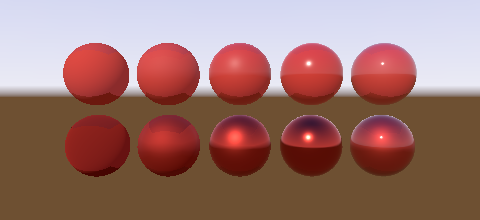
A STANDARD surface is shaded by a roughness and a metalness rather than by a color and a highlight: three.js's MeshStandardMaterial. A PHYSICAL surface is part of three.js's MeshPhysicalMaterial. It adds an index of refraction, a specular color and intensity, and a clear coat. It also adds a sheen, a thin film and a stretched lobe, anisotropy. Build either with its own function:
var chalk = assets.materials.add(standard_material(Color(200, 200, 200)))
var gold = assets.materials.add(
    standard_material(Color(255, 200, 90), roughness=0.3, metalness=1.0, env_map=sky)
)
var lacquer = assets.materials.add(
    physical_material(Color(180, 30, 30), roughness=0.5, clearcoat=1.0, clearcoat_roughness=0.1)
)
standard_material(color, map=NO_TEXTURE, roughness=1.0, metalness=0.0, side=FRONT_SIDE, opacity=1.0, blending=None, transparent=False, env_map=NO_CUBE_TEXTURE, env_map_intensity=1.0, roughness_map=NO_TEXTURE, metalness_map=NO_TEXTURE, normal_map=NO_TEXTURE, normal_scale=Vector2(1, 1), bump_map=NO_TEXTURE, bump_scale=1.0, emissive=black, emissive_intensity=1.0, emissive_map=NO_TEXTURE).
physical_material(color, map=NO_TEXTURE, roughness=1.0, metalness=0.0, ior=1.5, specular_color=white, specular_intensity=1.0, clearcoat=0.0, clearcoat_roughness=0.0, ...) takes the same arguments after those. It also takes the sheen, iridescence and anisotropy arguments below, and the specular and clearcoat maps.
The defaults are three.js's own: a roughness of one and a metalness of zero, a chalky dielectric. Material(color, kind=STANDARD) is the same surface.
| Property | three.js | Default | Meaning |
|---|---|---|---|
roughness |
roughness |
1.0 |
Zero is a mirror, one is chalk. See Three roughnesses. |
metalness |
metalness |
0.0 |
Zero scatters the color, one reflects it. |
roughness_map |
roughnessMap |
NO_TEXTURE |
Its green channel multiplies the roughness. Data: LINEAR and IGNORED. |
metalness_map |
metalnessMap |
NO_TEXTURE |
Its blue channel multiplies the metalness. Data: LINEAR and IGNORED. |
env_map |
envMap |
NO_CUBE_TEXTURE |
The cube texture the surface reflects, or SCENE_ENVIRONMENT. |
env_map_intensity |
envMapIntensity |
1.0 |
What the environment is multiplied by. The scene's environment_intensity replaces it for SCENE_ENVIRONMENT, as in three.js. |
ior |
ior |
1.5 |
The index of refraction, from one to 2.333. PHYSICAL only. |
specular_color |
specularColor |
white | What the reflectance head on is tinted by. PHYSICAL only. |
specular_intensity |
specularIntensity |
1.0 |
What that reflectance is scaled by, from zero to one. PHYSICAL only. |
clearcoat |
clearcoat |
0.0 |
How much clear coat lies over the surface, from zero to one. PHYSICAL only. |
clearcoat_roughness |
clearcoatRoughness |
0.0 |
How rough the coat is. PHYSICAL only. |
The diffuse term is Lambert's, on the color times one minus the metalness. The lobe is three.js's BRDF_GGX: Schlick's Fresnel, Smith's correlated visibility and the GGX distribution. ggx(toward_light, toward_eye, normal, f0, f90, roughness) is that arithmetic, in lights/lighting.mojo. Both rasterizers call it. Lighting.physical_at sums it over the lights that have a direction, and Lighting.indirect_at gathers the ambient and hemisphere light for the diffuse term.
What the surface reflects head on is Material.base_reflectance(). A STANDARD surface reflects four percent, three.js's vec3(0.04). A PHYSICAL surface reflects ((ior - 1) / (ior + 1))^2, tinted by its specular color and scaled by its specular intensity. A metal reflects its own color instead, and the metalness mixes between the two, as lights_physical_fragment mixes them.
The reciprocal of pi is applied once per sum, as it is for every lit kind. See The reciprocal of pi.
The number you set is the authored roughness, from zero to one, times any map. The lobe is evaluated with the BRDF roughness: the authored one floored at ROUGHNESS_FLOOR, three.js's 0.0525, by floored_roughness. three.js applies that floor once and both its lobes read the floored number, the direct lights' included. So a roughness of zero, of 0.01 and of 0.0525 make one lobe under a lamp, there and here. The floor is what keeps ggx finite too: at zero and head on its distribution divides zero by zero. The environment roughness is the BRDF roughness read as a mip level, below.
A physical surface reflects its environment by its roughness, not by a combine. Both refuse a reflectivity or a combine. The reflection is three.js's split sum: dfg_approx fits the lobe's integral, and physical_outgoing in lights/lighting.mojo joins the radiance and the irradiance with Fdez-Aguera's multiple scattering. The radiance is read along rough_reflection, the view turned back and bent toward the normal by the square of the roughness. The irradiance is read around the normal at the coarsest level.
A PMREM gives both as three.js gives them. The radiance is the environment blurred for the roughness. The irradiance is the blurriest copy, which three.js reads for the light around a normal. Build one with pmrem_from_cube, or call prefilter_environments(scene, assets) before the frame, which builds each one the scene needs. A panorama gets its PMREM from the panorama itself.
A cube without a PMREM gives two approximations. The roughness picks a level of the cube's chain: reflection_level(roughness, levels), from the full size at zero to one texel a face at one. Its contract is monotonic: a rising roughness moves a reflection steadily toward its face's average. The irradiance is the coarsest level, each face's average, not the cosine-weighted integral. Under a sky that is one bright patch on black it reads high. A cube built without a chain reflects sharply at every roughness.
A clear coat is a second, colorless GGX lobe over the surface. It lies on the surface's own normal, before any normal map perturbs it, as three.js's nonPerturbedNormal does. A clearcoat normal map gives the coat a normal of its own. It dims everything under it by its own Fresnel and adds its own reflection on top: a red car under a white gloss. clearcoat=0, the default, is no coat.
A curved surface is rougher by how fast its normal turns across one pixel. three.js's lights_physical_fragment adds this geometric roughness to the roughness and to the clear coat roughness. It adds it after the floor of 0.0525 and before the cap at one. A small, shiny, curved thing then keeps a wide enough lobe, and its highlight does not alias.
The formula is three.js's. dxy is the larger of abs(dFdx(n)) and abs(dFdy(n)), for each part of the view space normal n before any map. The geometric roughness is the largest part of dxy. geometry_roughness in lights/lighting.mojo holds it, and floored_roughness(roughness, geometry) adds it.
A GPU takes dFdx from the pixel beside it in a 2x2 quad. The two rasterizers here shade each pixel alone, so they work out the neighbor instead. They interpolate the triangle's normal at the pixel one to the right and at the pixel one up, and normalize each. This is the same measurement that picks a mip level. It is exact for the triangle, and it extrapolates past an edge where a GPU runs a helper pixel. A flat-shaded triangle has one normal, so it adds no roughness.
Transmission, the sheen, the iridescence and the anisotropy are ported.
examples/physical.mojo draws the range: a row of spheres from chalk to mirror, and from dielectric to metal.
A sheen is a second lobe over a PHYSICAL surface, for cloth and velvet: three.js's sheen. It adds a soft rim of light where the surface turns away from the eye.

examples/layers.mojo draws this picture. The left sphere is the sheen, the middle is the film, and the right is the stretch.
var velvet = assets.materials.add(
    physical_material(Color(60, 10, 40), sheen=1.0, sheen_color=Color(255, 120, 200), sheen_roughness=0.4)
)| Property | three.js | Default | Meaning |
|---|---|---|---|
sheen |
sheen |
0.0 |
How much sheen there is, from zero to one. Zero is no sheen. |
sheen_color |
sheenColor |
black | The sheen's color, as authored in sRGB. Black is no sheen. |
sheen_color_map |
sheenColorMap |
NO_TEXTURE |
Its color multiplies the sheen color. Its alpha must be IGNORED. |
sheen_roughness |
sheenRoughness |
1.0 |
How rough the sheen is, from zero to one. |
sheen_roughness_map |
sheenRoughnessMap |
NO_TEXTURE |
Its alpha multiplies the sheen roughness. It must be LINEAR and COVERAGE. |
The sheen color is decoded to linear light and multiplied by sheen, as three.js fills its sheenColor uniform. So a sheen of one with a black color adds nothing, and so does a sheen of zero with any color.
The lobe is three.js's BRDF_Sheen: the Charlie distribution of Estevez and Kulla, times Neubelt's visibility term, times the sheen color. charlie_sheen in lights/physical_layers.mojo is that arithmetic. It drops three.js's reciprocal of pi, as ggx drops it; see The reciprocal of pi.
The sheen roughness is clamped to 0.07 through one, then multiplied by the map's alpha, as lights_physical_fragment does it. A map texel of zero alpha makes a roughness of zero. three.js divides by zero there. This port returns no sheen, which is the lobe's limit.
An environment lights the sheen through ibl_sheen, three.js's IBLSheenBRDF. It is a curve fit to the Charlie lobe's integral over the hemisphere. The ambient occlusion map dims it, as it dims a clear coat's reflection.
The light under the sheen is dimmed by three.js's albedo scaling: one minus 0.157 times the brightest channel of the sheen color. sheen_scaling is that number. The emissive term is dimmed with the rest, as in meshphysical_frag. A clear coat lies over the sheen.
Iridescence is a thin film over a PHYSICAL surface, like soap or oil on water: three.js's iridescence. The film's color changes with the angle to the eye and with its thickness.
var bubble = assets.materials.add(
    physical_material(
        Color(20, 20, 20),
        roughness=0.1,
        iridescence=1.0,
        iridescence_ior=1.3,
        iridescence_thickness_minimum=Length(100.0, NANOMETER),
        iridescence_thickness_maximum=Length(400.0, NANOMETER),
        iridescence_thickness_map=swirls,
    )
)| Property | three.js | Default | Meaning |
|---|---|---|---|
iridescence |
iridescence |
0.0 |
How much film there is, from zero to one. Zero is no film. |
iridescence_ior |
iridescenceIOR |
1.3 |
The film's index of refraction, from one to 2.333. |
iridescence_thickness_minimum |
iridescenceThicknessRange[0] |
100 nm | The film's thickness at a thickness texel of zero. |
iridescence_thickness_maximum |
iridescenceThicknessRange[1] |
400 nm | Its thickness at a texel of one, and everywhere without a thickness map. |
iridescence_map |
iridescenceMap |
NO_TEXTURE |
Its red channel multiplies iridescence. Data: LINEAR and IGNORED. |
iridescence_thickness_map |
iridescenceThicknessMap |
NO_TEXTURE |
Its green channel mixes the two thicknesses. Data: LINEAR and IGNORED. |
The thicknesses are Length values. NANOMETER in units/si.mojo is the unit a film is measured in. A range whose minimum is above its maximum is accepted, as three.js accepts it.
The film replaces Schlick's Fresnel term with Belcour and Barla's. Light reflects off the top of the film and off the surface under it, and the two reflections interfere. iridescence_fresnel in lights/physical_layers.mojo is three.js's evalIridescence. It sums the first two orders of interference and converts the eye's response to linear sRGB.
The term depends on the angle to the eye and not on the light. So it is calculated once per fragment, from the surface's reflectance head on after the metalness. ggx mixes it into each light's Fresnel term by iridescence. physical_outgoing mixes it into the split sum's reflectance the same way, as three.js's computeMultiscatteringIridescence does.
A film of zero thickness is no film, as in three.js.
three.js also calculates iridescenceF0, a head-on reflectance fitted to the film. Its physical shader reads no copy of it, so this port does not calculate it.
Anisotropy stretches a PHYSICAL surface's lobe along one direction of the surface: three.js's anisotropy. Brushed metal and hair have a highlight that is long in one direction and narrow in the other.
var brushed = assets.materials.add(
    physical_material(
        Color(200, 200, 210),
        roughness=0.3,
        metalness=1.0,
        anisotropy=0.8,
        anisotropy_rotation=Angle(90.0, DEGREE),
    )
)| Property | three.js | Default | Meaning |
|---|---|---|---|
anisotropy |
anisotropy |
0.0 |
How far the lobe is stretched, from zero to one. Zero is no stretch. |
anisotropy_rotation |
anisotropyRotation |
0 |
Which way the stretch goes, counterclockwise from the direction along which u grows. |
anisotropy_map |
anisotropyMap |
NO_TEXTURE |
Red and green turn the stretch, blue scales it. Data: LINEAR and IGNORED. |
The renderer turns the strength and the rotation into three.js's anisotropyVector: the strength times the cosine and the sine of the rotation.
The lobe is three.js's anisotropic GGX: V_GGX_SmithCorrelated_Anisotropic times D_GGX_Anisotropic, from lights_physical_pars_fragment. anisotropic_ggx in lights/physical_layers.mojo is that arithmetic. The roughness along the stretch rises toward one with the square of the strength. The roughness across it stays the surface's own.
The stretch follows the tangent frame, which a normal map also uses. tangent_frame in render/rasterizer.mojo builds it from how the position and the coordinates change across one pixel. So a surface with anisotropy needs texture coordinates, even without a map. The frame is measured on the normal before a normal map perturbs it, as three.js's tbn is.
An anisotropy map's texel turns and scales the material's vector. Red and green are unpacked from zero to one into minus one to one and normalized, as a direction. Blue scales the strength. A texel of (1, 0.5, 1) leaves the vector as it is.
The environment is read along a bent normal, as three.js's getIBLAnisotropyRadiance reads it after Filament. bent_normal bends the normal toward the plane of the stretch and the eye. It bends less on a rough surface and less with a weak stretch.
A face seen from behind turns its stretch with its frame. The renderer negates the anisotropy vector on a corner it turns around, as it negates normal_scale. See The far side.
- A rect area light reads no sheen, no film and no stretch. three.js's
RE_Direct_RectArea_Physicalreads none of them either. - three.js takes the tangent frame from the base texture coordinates when there is no normal map. This port takes it from the coordinates every map shares, through the material's transform. The two agree when the material names no map, or when its maps are not turned.
- A layer map with no layer to multiply is refused. So a sheen map needs a
sheen, an iridescence map aniridescence, and an anisotropy map ananisotropy. three.js ignores such a map. - Where three.js normalizes a zero vector, this port keeps the zero. That happens for an anisotropy texel whose red and green are both one half, and for an eye that looks straight along the stretch.
Only SHADE_TEXTURE reads the five layer maps, because the other two shading modes ignore every texture. The numbers are read in every lit mode. The maps are sampled at the same coordinate as map, so their transforms must agree.
Five maps vary a PHYSICAL surface's reflectance and its clear coat per texel, as three.js's MeshPhysicalMaterial varies them.

examples/coats.mojo draws this picture.
var lacquer = assets.materials.add(
    physical_material(
        Color(180, 30, 30),
        clearcoat=1.0,
        clearcoat_map=flakes,
        clearcoat_normal_map=orange_peel,
        clearcoat_normal_scale=Vector2(0.5, 0.5),
        specular_color_map=tint,
    )
)| Property | three.js | Default | Meaning |
|---|---|---|---|
specular_intensity_map |
specularIntensityMap |
NO_TEXTURE |
Its alpha multiplies specular_intensity. It must be LINEAR and COVERAGE. |
specular_color_map |
specularColorMap |
NO_TEXTURE |
Its color multiplies specular_color. Its alpha must be IGNORED. It can be SRGB. |
clearcoat_map |
clearcoatMap |
NO_TEXTURE |
Its red channel multiplies clearcoat. Data: LINEAR and IGNORED. |
clearcoat_roughness_map |
clearcoatRoughnessMap |
NO_TEXTURE |
Its green channel multiplies clearcoat_roughness. Data: LINEAR and IGNORED. |
clearcoat_normal_map |
clearcoatNormalMap |
NO_TEXTURE |
Tangent-space normals for the coat alone. Data: LINEAR and IGNORED. |
clearcoat_normal_scale |
clearcoatNormalScale |
Vector2(1, 1) |
What the coat's normal map's x and y are multiplied by. |
The two specular maps change what the surface reflects head on. specular_reflectance in lights/physical_layers.mojo calculates it again for each fragment, in three.js's order. The texel color multiplies the specular color. The product multiplies ((ior - 1) / (ior + 1))^2, and the result is capped at one. Then the intensity, times the map's alpha, scales it. The same intensity is the reflectance at a grazing angle, before the metalness mixes it toward one.
The clearcoat map's red multiplies the coat, and clearcoat_of clamps the product to zero through one. The roughness map's green multiplies the coat's roughness before floored_roughness floors it.
The coat's normal map follows three.js's clearcoat_normal_fragment_maps in its order of operations. The texel is unpacked from zero to one into minus one to one. Its x and y are multiplied by the scale. Then the three are summed along the tangent frame and normalized. mapped_normal does all three steps, as it does for normal_map.
The frame is measured on the normal before any normal map, as three.js's tbn2 is. So the coat and the surface under it can have different normals.
A face seen from behind turns the coat's frame too. The renderer negates clearcoat_normal_scale on a corner it turns around, as it negates normal_scale. See The far side.
- A clearcoat map, a clearcoat roughness map or a clearcoat normal map with no
clearcoatis refused. three.js ignores such a map. - A
clearcoat_normal_scalethat is not one with no clearcoat normal map is refused, as anormal_scalewithout a normal map is. - The five maps share the one coordinate every map shares, through the material's transform. three.js gives each map a transform of its own.
Only SHADE_TEXTURE reads the five maps. Under the other two modes, the surface keeps its own numbers.
A normal map is a texture whose texels are tangent-space normals: three.js's normalMap. A bump map is a texture whose red channel is a height: three.js's bumpMap. Either perturbs the normal every lit shader reads, so every lit kind and a MATCAP surface can carry one.
var brick = assets.materials.add(Material(Color(200, 120, 90), normal_map=bricks))
var leather = assets.materials.add(
    standard_material(Color(60, 40, 30), roughness=0.8, bump_map=grain, bump_scale=0.05)
)| Property | three.js | Default | Meaning |
|---|---|---|---|
normal_map |
normalMap |
NO_TEXTURE |
Red is x, green is y, blue is z, each unpacked from zero to one into minus one to one. |
normal_scale |
normalScale |
Vector2(1, 1) |
What the unpacked x and y are multiplied by. |
bump_map |
bumpMap |
NO_TEXTURE |
Its red channel is a height. |
bump_scale |
bumpScale |
1.0 |
What the height is multiplied by. |
normal_map_type |
normalMapType |
TANGENT_SPACE_NORMAL_MAP |
Which frame the normal map's texels are in. |
OBJECT_SPACE_NORMAL_MAP, three.js's ObjectSpaceNormalMap, holds each normal in the mesh's own space. The texel replaces the geometry's normal, turned into the world by the mesh's normal matrix. normal_scale is not read, as in three.js. A face seen from behind negates it, as three.js's faceDirection does. object_space_normal in render/rasterizer.mojo is that arithmetic, and both rasterizers call it. A material refuses OBJECT_SPACE_NORMAL_MAP without a normal map.
Both are data. A texture named as either must be LINEAR and IGNORED, as an alpha map must. Both are sampled at the same coordinate as map, so their transforms must agree with it. A material names one or the other, not both: three.js reads the normal map and ignores the bump map.
Neither needs a tangent attribute. The frame is built from how the world position and the texture coordinates change across one pixel, as three.js's getTangentFrame builds it without one. The tangent is the direction along which u grows, the bitangent the direction along which v grows, both made perpendicular to the normal. Both rasterizers evaluate the change one pixel to the right and one pixel up from the triangle's own functions, as they evaluate a mip footprint. tangent_frame in render/rasterizer.mojo builds the frame, and mapped_normal perturbs the normal along it. The GPU kernel calls the same two functions.
An anisotropic lobe is stretched along the same frame.
A bump map's slope is three.js's perturbNormalArb. The height one pixel over and one pixel up, less the height here, tilts the normal against the rise. bumped_normal is that arithmetic. The position changes are normalized first, so the bump looks the same however the texture is scaled.
A DOUBLE_SIDE or BACK_SIDE face seen from behind is lit with its normal flipped. Its frame flips with it: the far side's perturbed normal is the front's, negated, as three.js negates the tangent and the bitangent by faceDirection. The renderer does that by negating normal_scale and bump_scale on a corner it turns around. So a bump that rises toward the light on the front falls away from it on the back.
A BASIC surface reads no normal and a DEPTH surface reads none. A NORMALS surface reads one in the camera's frame, and the frame a map is measured in is the world's. Each refuses both maps. A wireframe is BASIC, so it refuses them too. A normal_scale that is not one and one needs a normal map, and a bump_scale that is not one needs a bump map.
Only SHADE_TEXTURE reads either. A normal map is a texture, and the other two shading modes ignore every texture.
An ambient occlusion map dims the indirect light and leaves the direct lights alone: three.js's aoMap. Its red channel says how much of the light with no direction reaches each texel. A lamp still lights a crevice, but the ambient light and the sky do not.
# Two texels of occlusion, stored as data: dark on the left, clear on the right.
var baked = data_texture(2, 1, [0.3, 1.0], channels=1, alpha=IGNORED)
baked.channel = UV_CHANNEL_1
var ao = assets.textures.add(baked^)
var wall = assets.materials.add(
    standard_material(Color(200, 200, 200), ao_map=ao, ao_map_intensity=0.8)
)| Property | three.js | Default | Meaning |
|---|---|---|---|
ao_map |
aoMap |
NO_TEXTURE |
Its red channel is the fraction of the indirect light that arrives. |
ao_map_intensity |
aoMapIntensity |
1.0 |
How strongly the map dims. Zero switches the map off. |
The occlusion is three.js's aomap_fragment: (red - 1) * intensity + 1. ambient_occlusion in lights/lighting.mojo is the arithmetic. Both rasterizers call it.
What the occlusion multiplies:
| Kind | What it dims |
|---|---|
BASIC |
The whole color, which is all indirect light. |
LAMBERT, PHONG, TOON
|
The ambient light, the hemisphere lights and the light map. |
STANDARD, PHYSICAL
|
The same, the environment's diffuse term and the clear coat's reflection. |
A physical surface's reflection of the environment is dimmed by three.js's computeSpecularOcclusion of the occlusion, specular_occlusion here. A surface that faces the eye keeps more of its reflection than of its diffuse light. A smooth surface keeps more than a rough one.
The map is data. Its texture must be LINEAR and IGNORED, as a normal map must.
The reflection of a BASIC, LAMBERT or PHONG surface is not dimmed. three.js adds that reflection after the occlusion, and so does this port.
A light map is a texture of baked light that joins the indirect diffuse light: three.js's lightMap. It holds the light that bounced around the scene when the scene was baked.
var baked = assets.materials.add(
    Material(Color(255, 255, 255), light_map=bounce, light_map_intensity=2.0)
)| Property | three.js | Default | Meaning |
|---|---|---|---|
light_map |
lightMap |
NO_TEXTURE |
Light added to the ambient and hemisphere light, per texel. |
light_map_intensity |
lightMapIntensity |
1.0 |
What the texel is multiplied by. |
On a lit kind the texel joins three.js's irradiance, so it is divided by pi like every lit term. On a BASIC surface the texel replaces the white indirect light, divided by pi, as three.js's meshbasic_frag does. The ao map dims the light map with the rest of the indirect light. occluded_light in lights/lighting.mojo does both for every kind that is not physical.
The map holds light, so its texture can be SRGB or LINEAR. Its alpha means nothing, so it must be IGNORED, as an emissive map must.
Every map reads the coordinates its texture's channel names: three.js's Texture.channel. UV_CHANNEL_0, the default, reads the geometry's uv. UV_CHANNEL_1 reads its uv1, the UV1 attribute. A baked map is usually laid out apart from the color map, which is why the second set exists.
Each map has its own transform and its own channel, as in three.js. So the ao map, the light map and every other map can differ in both. See Textures.
A geometry with no uv1 falls back to its uv. three.js reads zero there instead, which samples one texel everywhere. This port reads the first set, because a map on the first set is the usual case.
A MATCAP, NORMALS, DEPTH or SHADOW surface has no indirect term, and refuses both maps. A wireframe, a line, a point and a sprite refuse both too. An intensity that is not one needs its map. Only SHADE_TEXTURE reads either map.
A specular map scales how much light a surface sends toward the camera, per texel: three.js's specularMap. Its red channel is three.js's specularStrength. A BASIC, LAMBERT or PHONG material can carry one.
var worn = assets.materials.add(
    Material(Color(180, 40, 40), kind=PHONG, specular=white, shininess=30, specular_map=scratches)
)
The red channel scales two terms, as three.js's shaders scale them:
- The
PHONGhighlight. three.js multipliesdirectSpecularbyspecularStrengthinRE_Direct_BlinnPhong. - The
reflectivityof an environment map, on all three kinds. three.js'senvmap_fragmentjoins the reflection byspecularStrength * reflectivity.
Red at zero removes the highlight and the reflection. Red at one leaves both as they are. Green, blue and alpha have no effect.
The map is data. It must be LINEAR and IGNORED, as an alpha map must. It is sampled at the same coordinate as map, so their transforms must agree. Only SHADE_TEXTURE reads it, because the other two shading modes ignore every texture.
A TOON, MATCAP, STANDARD, PHYSICAL, NORMALS, DEPTH or SHADOW material refuses one. three.js gives none of them a specularMap. A physical surface reflects by its roughness and metalness instead. A wireframe refuses one too, because a line has no surface coordinates.
A flat-shaded surface lights every fragment of a face with the face's own normal: three.js's flatShading. A sphere then shows its facets.
var gem = assets.materials.add(Material(Color(90, 200, 160), kind=PHONG, flat_shading=True))three.js computes the normal in the fragment shader, from the screen-space derivatives of the view position. This port computes the same normal once per face in Renderer.prepare. It is the cross product of the triangle's world-space edges, the normal a geometry with no normal attribute already takes. The renderer puts it on all three corners. So both rasterizers light every fragment of the face with one normal, and need no rule of their own.
The face normal follows the same rules as a supplied normal:
- A mirrored mesh negates it, so it points out of the surface.
- A face seen from behind turns it around, as it turns a supplied normal. The normal then faces the camera, as three.js's derivative normal does.
- A
NORMALSmaterial shows it in the camera's frame. - A normal map or a bump map perturbs it, with the tangent frame built as for any other normal.
Every kind that reads a normal can be flat shaded: LAMBERT, PHONG, TOON, MATCAP, STANDARD, PHYSICAL and NORMALS. A BASIC, DEPTH or SHADOW material refuses it, because its shader reads no normal. A wireframe is BASIC, so it refuses it too.
Flat shading changes the normal and nothing else. The positions, the depth and the texture coordinates are interpolated as before.
A displacement map moves each vertex along its normal: three.js's displacementMap, displacementScale and displacementBias. The vertex moves by the map's red channel times the scale, plus the bias. The drawn surface, its shadow and the surface the raycaster picks all move.
var hills = assets.textures.add(data_texture(64, 64, heights, channels=1, alpha=IGNORED))
var ground = standard_material(Color(90, 120, 60))
ground.set_displacement(hills, Length(2.0, METER), Length(-0.5, METER))
var paint = assets.materials.add(ground)| Property | three.js | Default | Meaning |
|---|---|---|---|
displacement_map |
displacementMap |
NO_TEXTURE |
Its red channel is a height. |
displacement_scale |
displacementScale |
Length(1.0, METER) |
How far a red of one moves a vertex. |
displacement_bias |
displacementBias |
Length(0.0, METER) |
How far every vertex moves in addition. |
set_displacement(map, scale, bias) sets the three and checks them. The fields are also open, as three.js's are. The renderer and the raycaster call check_displacement when they read them. The scale and the bias are lengths in the geometry's own space, so a bare float does not compile.
The map is data. It must be LINEAR and IGNORED, as a bump map must. The geometry must have normals.
displaced_positions in core/deform.mojo does the arithmetic. It follows three.js's vertex shader in this order:
- The morph targets move the vertex and its normal.
- The bones carry both.
- The map moves the vertex along that normal, made unit length.
The map is sampled at the vertex's uv through the map's own uv_transform, as three.js's vDisplacementMapUv. So the map's transform does not have to agree with the other maps. The sample reads the full-size image with the map's own filter. A geometry with no uv samples at zero, as a vertex shader reads a missing attribute.
The normals do not change. three.js does not compute them again, and this port does not either. Give the geometry normals that agree with the displaced shape if the lighting must follow it.
-
The renderer.
Renderer.preparemoves the vertices before it clips and projects them. The CPU and the GPU rasterizers draw the same triangles. A displaced mesh draws the same image, pixel for pixel, as a geometry lifted by hand. - Shadows. A light's view uses the same vertex stage, so a displaced caster casts the shadow of its moved surface. three.js copies the three properties to its shadow depth material for the same result.
-
The raycaster.
Raycasterpicks the moved surface, through the same call. See Raycasting. - Culling. A displaced mesh leaves the bound of its geometry. A draw that the bound culls is kept if its material names a displacement map. A morphed mesh is kept for the same reason.
The shading mode does not change the shape. SHADE_LIT and SHADE_UV displace the vertices as SHADE_TEXTURE does, because the raycaster has no shading mode.
A BASIC or SHADOW material refuses a displacement map, as three.js gives neither one. A wireframe is BASIC, so it refuses one too. Every other kind takes one: the five lit kinds, MATCAP, NORMALS and DEPTH. A scale that is not one meter or a bias that is not zero needs a map. A scale or a bias that is not finite is refused.
- three.js's raycaster picks the geometry and ignores the map. This port picks the displaced surface, so a click agrees with the image.
- three.js culls a displaced mesh by the bound of its geometry. This port keeps it, so the culling does not change the image.
- Points, lines and sprites do not read the map. Their materials are
BASIC, as in three.js. - Object JSON reads and writes the three properties. See Scene JSON. The other loaders and exporters do not read or write them.
A transmissive PHYSICAL surface shows the opaque scene behind it through itself, bent by its index of refraction: three.js's transmission. Glass, water and gems are transmissive.

examples/gem.mojo draws this picture.
var glass = assets.materials.add(
    physical_material(
        Color(255, 255, 255),
        roughness=0.05,
        ior=1.5,
        transmission=1.0,
        thickness=Length(0.5, METER),
        attenuation_color=Color(200, 230, 255),
        attenuation_distance=Length(2.0, METER),
    )
)| Property | three.js | Default | Meaning |
|---|---|---|---|
transmission |
transmission |
0.0 |
How much of the diffuse light is replaced by the light seen through the surface, from zero to one. |
transmission_map |
transmissionMap |
NO_TEXTURE |
Its red channel multiplies the transmission. Data: LINEAR and IGNORED. |
thickness |
thickness |
NO_THICKNESS |
How deep the volume is, in the geometry's own units. |
thickness_map |
thicknessMap |
NO_TEXTURE |
Its green channel multiplies the thickness. Data: LINEAR and IGNORED. |
attenuation_color |
attenuationColor |
white | The color white light becomes after attenuation_distance, as authored in sRGB. |
attenuation_distance |
attenuationDistance |
NO_ATTENUATION |
How far the light travels to become that color. Infinite dims nothing. |
dispersion |
dispersion |
0.0 |
How far the three channels bend apart, from zero. |
ior |
ior |
1.5 |
The index the light is bent at, from one to 2.333. |
The renderer draws a frame that transmits in two passes, as three.js's renderTransmissionPass does:
-
Renderer.render_intodraws every run that neither transmits nor blends into a target of its own. It clears to the clear color, or to white at half alpha when the clear color is not opaque. It paints the background and turns no tone mapping on. - It builds a mip chain of that target, a box filter of linear floats.
TransmissionTargetinrender/transmission.mojoholds the chain and the matrix from a world position to a place on it. - It draws the back faces of every two-sided transmissive mesh into the same target, each looking through the first chain. Then it builds the chain again.
- It draws the frame. The transmissive runs come after every opaque run and before every blended run, furthest first. A transmissive run that blends is drawn with the transmissive runs, as three.js puts it on its
transmissivelist.
Renderer.transmission_target(scene, assets, camera) returns the target without the frame. A caller that draws the frame on the GPU passes it to GpuRenderer.draw as transmission.
A transmissive fragment follows three.js's getIBLVolumeRefraction:
- The view is refracted at
1 / iorand made a unit vector. It is scaled along each world axis by the thickness, times the map's green, times the length of that axis of the mesh's world matrix. - The point where the ray leaves is projected onto the target. The target is read there with a bicubic filter, three.js's
textureBicubic. The level islog2(width) * roughness * clamp(ior * 2 - 2, 0, 1), so a rough surface shows a blurred scene. - Beer's law dims each channel by
attenuation_color ^ (length / attenuation_distance). - The light is multiplied by the diffuse color and the dimming, and by one minus what the surface reflects, three.js's
EnvironmentBRDF. - The diffuse light, direct and indirect, is mixed toward that light by the transmission, times the map's red. The reflection, the clear coat and the glow stay as they are.
- The alpha is mixed toward
1 - (1 - a) * t, whereais the target's alpha andtis the mean dimming. This only matters on a surface that blends.
With a dispersion above zero, each channel is refracted at its own index: ior less and more half of (ior - 1) * 0.025 * dispersion. Red reads the red of its own sample, green the green, blue the blue.
volume_refraction is the arithmetic, over any TransmissionSource. The host reads the target's texture, and the GPU kernel reads its copy of the target. So both backends run one function.
A surface transmits under SHADE_TEXTURE alone, because the scene behind it is read from a texture. The other two shading modes draw it as a plain physical surface and draw no transmission pass. A transmissive triangle drawn with no target under SHADE_TEXTURE is refused. A kind that is not PHYSICAL refuses every transmission property that is not its default.
- The target is the renderer's size, where three.js sizes it to the viewport. With the viewport the whole target, as it is by default, the two agree.
- A read past the chain's last level reads the last level. WebGL leaves
textureSizeof a missing level undefined. - A ray of no length is not dimmed. three.js divides zero by zero there for a black attenuation color.
- The GPU does not draw the pass itself. The host draws it and uploads the target with the frame.
A node material replaces parts of the shading with a compiled node graph: three.js's colorNode, opacityNode, emissiveNode, normalNode, positionNode and outputNode. Give the program's id as nodes. The kind keeps its own lighting for every part that the graph does not set.
var graph = NodeGraph()
graph.set_output(COLOR_NODE, graph.uniform("tint", Color(255, 120, 40)))
var program = assets.programs.add(graph.compile())
var paint = assets.materials.add(Material(Color(255, 255, 255), kind=PHONG, nodes=program))
shader_material(program) is three.js's ShaderMaterial: an unlit surface whose color the graph computes. A NORMALS, DEPTH, DISTANCE or SHADOW material and a wireframe refuse a node program. See Node materials for the nodes, the outputs, and what three.js offers that is not ported.
A SHADOW material shows the shadows falling on it and nothing else: three.js's ShadowMaterial. It is transparent wherever the lights that cast reach it and shows its color wherever they are blocked, by how much. A floor drawn with one catches a shadow on whatever is behind it.
var catcher = assets.materials.add(shadow_material())
var faint = assets.materials.add(shadow_material(Color(20, 0, 40), 0.6))
scene.add_mesh(Mesh(floor, catcher, node, receive_shadow=True))
shadow_material(color=Color(0, 0, 0), opacity=1.0, side=FRONT_SIDE). Black at an opacity of one is three.js's default.
The alpha is opacity times one minus Lighting.shadow_mask, three.js's opacity * (1.0 - getShadowMask()), the product of what every casting light lets through. The material always blends, as three.js's is built transparent, and refuses to be made opaque. It is unlit, so it refuses an emissive term, and it refuses every map, vertex colors, a wireframe and an environment. See Shadows.
A normal, a depth and a distance material write bytes that a display must show as they are. Build one with its own function:
var shown = assets.materials.add(normal_material())
var seen = assets.materials.add(depth_material())
var pane = assets.materials.add(normal_material(DOUBLE_SIDE))
var cut = assets.materials.add(depth_material(mask))
var packed = assets.materials.add(
    depth_material(depth_packing=RGBA_DEPTH_PACKING)
)
var measured = assets.materials.add(
    distance_material(
        Vector3(0, 2, 0), Length(0.5, METER), Length(20.0, METER)
    )
)| Builder | Meaning |
|---|---|
normal_material(side=FRONT_SIDE, opacity=1.0, blending=None, alpha_test=0.0) |
The view-space normal as a color. |
depth_material(map=NO_TEXTURE, side=FRONT_SIDE, opacity=1.0, blending=None, alpha_map=NO_TEXTURE, alpha_test=0.0, depth_packing=BASIC_DEPTH_PACKING) |
The depth as a gray, or packed. |
distance_material(reference_position=Vector3(0, 0, 0), near_distance=1 m, far_distance=1000 m, map=NO_TEXTURE, side=FRONT_SIDE, alpha_map=NO_TEXTURE, alpha_test=0.0) |
The distance from a point, packed. |
All three take side. The normal and the depth material take opacity and blending. The depth and the distance material take a map and an alpha_map. None can blend: see What they refuse.
NORMALS writes the normal as three.js's packNormalToRGB does. Each component is halved and moved up by a half. A surface square on to the camera is (128, 128, 255). One turned to the camera's right is redder. One turned up is greener.
The normal is the one the camera sees, three.js's vNormal, not the one the world sees. Moving the camera changes the colors of a surface that never moved. The renderer carries each normal through the view matrix for this material alone.
A DOUBLE_SIDE face seen from behind shows its normal flipped, as it is lit flipped. A BACK_SIDE face shows its normal flipped too, as three.js's FLIP_SIDED flips it. The normal is made unit length at every fragment, as it is for a lit surface. A geometry with no normals falls back to its face normal.
DEPTH writes one minus the window-space depth in every channel. The near plane is white and the far plane is black. This is three.js's MeshDepthMaterial under BasicDepthPacking, the default. depth_packing selects the other three packings. See Depth packing.
Set the camera's near and far close together to see anything. A range of one to a thousand meters puts almost every surface within a few levels of black.
A map's alpha cuts the surface out, as three.js's does. Its color is not read. Give the material an alpha_test to throw the cut fragments away. Such a fragment claims no depth, so what is behind it draws. A depth material cannot blend, so blending is not the way to show the cut.
A DepthPacking says how a DEPTH material writes its depth. A byte holds only 256 steps, so one gray keeps eight bits of the depth. The packings spread the window-space depth across two, three or four channels, eight bits each. render/packing.mojo holds the arithmetic, and both rasterizers call it.
| Value | three.js | What the pixel holds |
|---|---|---|
BASIC_DEPTH_PACKING |
BasicDepthPacking, 3200 |
One minus the depth in red, green and blue. The alpha is the fragment's alpha. |
RGBA_DEPTH_PACKING |
RGBADepthPacking, 3201 |
pack_depth_to_rgba: the depth in all four channels. |
RGB_DEPTH_PACKING |
RGBDepthPacking, 3202 |
pack_depth_to_rgb: the depth in red, green and blue. The alpha is one. |
RG_DEPTH_PACKING |
RGDepthPacking, 3203 |
pack_depth_to_rg: the depth in red and green. Blue is zero and the alpha is one. |
Red holds the top eight bits. Each next channel holds the next eight bits. The last channel holds the fraction that is left. unpack_rgba_to_depth, unpack_rgb_to_depth and unpack_rg_to_depth read the depth back from the channels.
The functions are three.js's packing.glsl, step for step, in Float32. Each step multiplies by a power of two or takes a fraction, so each step is exact. The bytes are the bytes three.js writes. For example, a window depth of 0.3 packs to the bytes (76, 204, 205, 0).
A packed depth reads no opacity, as three.js's does not. So a packing other than the basic one refuses an opacity below one. A packing other than the basic one on a kind that is not DEPTH is refused. DepthPacking(9) is refused where the material or a triangle is read.
A packed alpha is data, and it is often zero. A depth of one half or more leaves no fraction for the alpha. So a pixel that holds data is stored straight, not premultiplied. Otherwise an alpha of zero would erase the three other channels. See Where a data pixel differs.
DISTANCE writes how far each fragment is from reference_position, in world space. This is three.js's MeshDistanceMaterial. The distance is a fraction of the way from near_distance to far_distance, clamped to zero to one. pack_depth_to_rgba packs the fraction into four channels.

examples/distance.mojo draws this picture.
var measured = distance_material(
    Vector3(0, 2, 0), Length(0.5, METER), Length(20.0, METER)
)
The defaults are three.js's uniform defaults: the origin, one meter and a thousand meters. three.js sets the three from a point light when it draws that light's shadow. Here they are the material's own fields. The renderer does not draw point-light shadows with this material. See Shadows.
A distance material reads no opacity, no color and no normal. It takes a map and an alpha_map, whose alpha cuts the surface out, and an alpha test. A near distance below zero is refused. A far distance that is not past the near distance is refused. A reference position or a distance that is not finite is refused. A reference position or a distance that is not the default is refused on any other kind.
This port writes the distance as three.js r180 writes it, with packDepthToRGBA. three.js r186 writes the distance unpacked into red, for a float target. The targets of this port hold eight bits a channel, so the packed form keeps more of the distance.
No data shader reads a color, an emissive term or the vertex colors. A material of any data kind refuses all three rather than ignoring them. Pass opaque white as the color, or use the builders, which do. A normal material refuses a map and an alpha map as well. All three take an alpha test, as three.js's do.
None is lit, fogged nor tone mapped. A veil of light over a normal, or a curve that compresses it, would make the image lie about its own numbers. Both rasterizers decide this per pixel. See Why a normal is not a color.
None can blend. One pixel holds its own bytes or the scene's light. A mixture of the two is neither. So a NORMALS or DEPTH material whose blending resolves to BLEND is refused, stated or taken from transparent. Both rasterizers refuse a blended data triangle as well, from the same function. That is what lets RenderTarget.blend say a mixture is always light.
A RenderTarget stores light premultiplied by its alpha. A pixel that holds data is stored straight instead: write keeps the channels as they are, and resolve shows them as they are. RenderTarget.light_at and color_at return a data pixel premultiplied, as every other pixel is. blend premultiplies a data pixel before it mixes light over it. The GPU kernel keeps its running color the same way.
A downsample or a supersample averages every pixel as premultiplied light. A block that is data throughout is then stored straight again. The average of packed channels is not a packed depth, so do not antialias a packed image.
A post-processing pass reads the frame as premultiplied light. The per-pixel functions that the CPU and GPU composers share take premultiplied light. So both composers premultiply the data pixels before such a pass and store the pixels still flagged as data straight after it. EffectComposer.run_step does this on the host, and GpuComposer does it on the device with one kernel. reads_frame_as_light names the passes that do not need it: a mask, a render, SSAA, TAA and the output pass.
The output pass leaves a data pixel as it is, so a render pass and an output pass keep every packed byte. A data pixel of alpha zero keeps no color through any other pass.
fog says whether the scene's fog veils a surface. This is three.js's fog property. It is on for every kind that shows light, as in three.js. Turn it off to keep one surface clear in a foggy scene:

examples/unfogged.mojo draws this picture.
var sign = assets.materials.add(
    Material(Color(255, 255, 255), kind=BASIC, fog=False)
)
The switch works on a mesh, a line, a wireframe, a wide line, a point and a sprite. Both rasterizers read it per primitive, from the same field. The GPU kernel reads it from the state table of each primitive.
The data kinds are never fogged. three.js's normal, depth and distance shaders read no fog. So fog is off for NORMALS, DEPTH and DISTANCE, and a data material with fog on is refused. The field is open, so Material.check_data checks it again where the renderer reads it.
Object JSON writes "fog": false for a material with the switch off, as three.js's Material.toJSON does. The loader reads it back. The JSON does not carry depthPacking or the distance range, as three.js's does not.
vertex_colors=True multiplies the material color by the geometry's color attribute at every vertex. three.js: Material.vertexColors. The attribute holds three or four floats per vertex, in linear light. A fourth float multiplies the alpha.
The colors are interpolated across each face. Then the lights and the texture apply, as they apply to the material color. A vertex alpha below one blends only when the material blends. Pass blending=BLEND for that.
The renderer raises when the material asks and the geometry has no color attribute. It raises when the attribute has neither three nor four floats per vertex, or fewer colors than vertices. A color attribute on a geometry whose material does not ask is ignored.
var tints = List[Float32]()
for vertex in range(count):
    var linear = FloatColor(srgb=Color(255, 128, 0))
    tints.append(linear.r)
    tints.append(linear.g)
    tints.append(linear.b)
geometry.set_attribute(String(COLOR), BufferAttribute(tints^, 3))
var painted = assets.materials.add(Material(Color(255, 255, 255), vertex_colors=True))The emissive term is light the surface gives off. Both rasterizers add it after the lights, and the lights do not change it. A glowing surface shows in a dark scene. The term adds to red, green and blue. It does not change alpha.
emissive is the color, as authored in sRGB. emissive_intensity scales it. emissive_map multiplies it per texel, so a map over a black emissive adds nothing, as in three.js. SHADE_LIT ignores the map and keeps the color.
An emissive map must ignore its alpha. Build it with alpha=IGNORED, or copy one with ignoring_alpha(). The renderer refuses a map that reads alpha as coverage, because filtering would darken it wherever its alpha is low. See Textures.
The emissive map is sampled at the same coordinate as map. When a material names both, their transforms must agree. See Textures.
The term changes the surface's own appearance. It does not light nearby objects, and it does not bloom.
A BASIC material refuses an emissive term. three.js's MeshBasicMaterial has none. An unlit surface already shows its own color.
var lamp = assets.materials.add(
    Material(Color(40, 40, 40), emissive=Color(255, 220, 160), emissive_intensity=0.8)
)
var glow = assets.textures.add(texture_from(image, alpha=IGNORED))
var screen = assets.materials.add(
    Material(Color(0, 0, 0), emissive=Color(255, 255, 255), emissive_map=glow)
)An alpha map thins a surface and an alpha test cuts it away. Together they make a shape out of a rectangle: a leaf, a fence, a chain link.
var mask = assets.textures.add(
    Texture(width, height, bytes, REPEAT, NEAREST, LINEAR, False, IGNORED)
)
var leaf = assets.materials.add(
    Material(Color(255, 255, 255), bark, alpha_map=mask, alpha_test=0.5)
)
three.js: Material.alphaMap and Material.alphaTest.
The map's green channel multiplies the surface's alpha. three.js reads .g and nothing else. Red, blue and the map's own alpha say nothing. The map multiplies whatever alpha reached it, so a half opacity through a half map is a quarter.
An alpha map holds data, not color. Build it with color_space=LINEAR and alpha=IGNORED. The renderer refuses any other pair, on both backends. A linear texture hands back the byte as it was stored, which is what a coverage means. An sRGB one would turn a byte of 128 into 0.216. A coverage-weighted filter would weight the green by an alpha that means nothing.
The map is sampled at the same coordinate as map and emissive_map. A material naming more than one must give them all one transform. See Textures.
SHADE_LIT and SHADE_UV ignore the map, as they ignore every texture.
alpha_test is the alpha a fragment must reach to be drawn at all. Zero, the default, draws every fragment, as in three.js. Above zero, a fragment whose alpha falls below it is thrown away.
A thrown-away fragment writes no color and claims no depth. So the hole shows whatever is behind it. Without the test, a fully transparent fragment still claims the depth and hides what is behind it.
The test reaches every kind, a translucent surface and a data material included. The SHADE_UV view cuts nothing out: it shows the nearest surface's coordinates and samples no texture.
The comparison is strict, as three.js's is. A fragment whose alpha equals the test survives.
wireframe=True draws the lines of a surface's triangles rather than filling them, three.js's material.wireframe.
var wire = Material(Color(120, 220, 255), kind=BASIC, wireframe=True)
scene.add_mesh(Mesh(shape, assets.materials.add(wire), node))
The mesh goes through the pipeline every other mesh goes through: morph, skin, instance, cull, transform. It then assembles its own triangle edges as segments rather than filling them. A wireframe of a morphed, skinned or instanced mesh therefore needs no further word about any of the three. The segments are drawn by the line pass.
The edges come from the mesh, not from the filled triangles. Cutting prepared fill into lines looks equivalent and is not. Clipping a triangle leaves a polygon that has to be fanned. The fan's diagonal and the cut along the near plane both become edges the mesh never had. Each edge is clipped with clip_segment instead.
A wireframe is submitted as lines, so it has no facing. A front-sided wireframe shows its far side, as three.js's does.
The kind must be BASIC and there must be no map. A line has no surface, so it has no normal for a light to reach and no coordinate to sample an image at. A lit or mapped wireframe is refused rather than drawn with one of the two quietly dropped.
An edge shared by two triangles is drawn once. triangle_edges pairs them by vertex index, as three.js's getWireframeAttribute does. Drawing it twice is not free even though it is the same pixels: a blended segment drawn over itself is twice as opaque.
To keep only the edges that show the shape, build a geometry with edges_geometry and draw it with a Line.
line_dashed_material(color) is three.js's LineDashedMaterial: a BASIC material with a dash of three, a gap of one and a scale of one. Material(color, kind=BASIC, dash_size=..., gap_size=...) spells the same material out. Only a line reads the dashes. See dashed lines for what they measure and where they are refused.
points_material(color) is three.js's PointsMaterial: a BASIC material with a PointSize of one pixel and its attenuation on. sprite_material() is three.js's SpriteMaterial: a white BASIC material with no rotation, its attenuation on and transparent=True. Both can carry a map and an alpha map. Only a point reads the size and only a sprite reads the rotation. A size that is not the default, attenuation off or a rotation is refused on any other kind. See Points and sprites.
transparent=True makes the material blend, as in three.js. A blended surface tests depth and writes it while depth_write is on, as in three.js. The renderer draws it after every opaque mesh, furthest first. Its alpha is opacity times the color's alpha, the texture's alpha and the alpha map.
A material that is not transparent is drawn opaque whatever its opacity or its maps say. Every fragment is written with an alpha of one, as three.js's opaque_fragment writes it. The opacity and the maps still feed the alpha test. A DEPTH material keeps its opacity as its alpha, as three.js's does.
Pass blending=BLEND or blending=OPAQUE to state the policy outright. A NORMALS or DEPTH material must be opaque either way.
render/blend.mojo holds the arithmetic of every mode, and both rasterizers call it. three.js: NormalBlending, AdditiveBlending, SubtractiveBlending, MultiplyBlending and CustomBlending. premultiplied_alpha, the constant factors and the other material flags are in Renderer hooks and material flags.
| Mode | Color | Alpha |
|---|---|---|
BLEND |
src * a + dst * (1 - a) |
a + dst_a * (1 - a) |
ADDITIVE |
src * a + dst |
a + dst_a |
SUBTRACTIVE |
dst * (1 - src) |
dst_a |
MULTIPLY |
dst * src |
dst_a * a |
custom_blending(src, dst, equation, src_alpha, dst_alpha, equation_alpha) builds a custom mode. The factors are the eleven BlendFactors, ZERO_FACTOR to SRC_ALPHA_SATURATE_FACTOR. The equations are the five BlendEquations: ADD_EQUATION, SUBTRACT_EQUATION, REVERSE_SUBTRACT_EQUATION, MIN_EQUATION and MAX_EQUATION. The alpha parts take the color parts when left out. A custom mode packs its six parts into the one integer a Blending holds, so it travels the same path as a named mode.
Every mode but OPAQUE mixes. A mixing surface tests depth without claiming it and is drawn in the translucent pass, furthest first. three.js draws an additive material that is not transparent in its opaque pass, and this port does not.
The pixel is stored premultiplied. The factors read it as WebGL reads its framebuffer. Over an opaque pixel, stored and straight color are the same numbers, so every mode agrees with three.js there. The result's alpha stays between zero and one, and its color stays at zero or above.
Under BLEND, a fragment with an alpha of zero changes nothing. Under the other modes a clear fragment still acts, as in WebGL: a clear subtractive fragment still darkens.
| Method | Meaning |
|---|---|
is_lit() -> Bool |
kind is LAMBERT, PHONG or TOON. |
is_unlit() -> Bool |
kind is BASIC or MATCAP. Neither has an emissive term. |
has_highlight() -> Bool |
kind is PHONG. A black specular is a reflectance of zero, not a switch. |
specular_light() -> FloatColor |
The specular color decoded to linear light. |
has_gradient_map() -> Bool |
gradient_map != NO_TEXTURE. A TOON material without one steps through the fallback. |
has_matcap() -> Bool |
matcap != NO_TEXTURE. A MATCAP material without one takes the gradient. |
is_data() -> Bool |
kind is NORMALS, DEPTH or DISTANCE. |
check_data() |
Refuses a depth packing, a distance range or a fog switch that the kind cannot use. |
has_alpha_map() -> Bool |
alpha_map != NO_TEXTURE. |
is_alpha_tested() -> Bool |
alpha_test > 0. |
is_textured() -> Bool |
map != NO_TEXTURE. |
is_transparent() -> Bool |
blending.mixes(): any mode but OPAQUE. It follows transparent unless stated. |
is_dashed() -> Bool |
gap_size is above zero. A dash with no gap is a solid line. |
is_emissive() -> Bool |
Whether the emissive color at its intensity adds any light. |
emissive_light() -> FloatColor |
The emissive color decoded to linear light, times the intensity. |
A material decides how its fragments meet the depth, color and stencil buffers. The fields are three.js's, with three.js's defaults. Set them after you build the material, as you set them in three.js. render/raster_state.mojo holds the arithmetic, and both rasterizers call it.
var mask = Material(Color(255, 255, 255), kind=BASIC)
mask.color_write = False
mask.depth_write = False
mask.stencil_write = True
mask.stencil_ref = 1
mask.stencil_z_pass = REPLACE_STENCIL_OP
var shown = Material(Color(255, 0, 0), kind=BASIC)
shown.stencil_write = True
shown.stencil_func = EQUAL_STENCIL_FUNC
shown.stencil_ref = 1
Draw the mask first, with a lower render order. The second material then draws only inside the shape of the first.
| Field | Type | Default | Meaning |
|---|---|---|---|
depth_test |
Bool |
True |
Compare the depth. Off, every fragment passes and writes no depth. |
depth_write |
Bool |
True |
A fragment that passes writes its depth, blending or not. |
depth_func |
DepthFunc |
LESS_EQUAL_DEPTH |
How the depth is compared. |
color_write |
Bool |
True |
A fragment that passes writes its color. Off, it still writes depth and stencil. |
polygon_offset |
Bool |
False |
Push the filled triangles back. |
polygon_offset_factor |
Float32 |
0 |
What the depth slope is multiplied by. |
polygon_offset_units |
Float32 |
0 |
What the smallest depth step is multiplied by. |
stencil_write |
Bool |
False |
Run the stencil test and write the stencil. |
stencil_write_mask |
Int |
255 |
The bits an operation can change. |
stencil_func |
StencilFunc |
ALWAYS_STENCIL_FUNC |
How the reference is compared. |
stencil_ref |
Int |
0 |
The reference value. |
stencil_func_mask |
Int |
255 |
The bits the test compares. |
stencil_fail |
StencilOp |
KEEP_STENCIL_OP |
The operation when the stencil test fails. |
stencil_z_fail |
StencilOp |
KEEP_STENCIL_OP |
The operation when the depth test fails. |
stencil_z_pass |
StencilOp |
KEEP_STENCIL_OP |
The operation when both tests pass. |
The depth functions are NEVER_DEPTH, ALWAYS_DEPTH, LESS_DEPTH, LESS_EQUAL_DEPTH, EQUAL_DEPTH, GREATER_EQUAL_DEPTH, GREATER_DEPTH and NOT_EQUAL_DEPTH. They keep three.js's numbers, zero to seven. The stencil functions are NEVER_STENCIL_FUNC to ALWAYS_STENCIL_FUNC, in WebGL's order. The operations are ZERO_STENCIL_OP, KEEP_STENCIL_OP, REPLACE_STENCIL_OP, INCREMENT_STENCIL_OP, DECREMENT_STENCIL_OP, INCREMENT_WRAP_STENCIL_OP, DECREMENT_WRAP_STENCIL_OP and INVERT_STENCIL_OP. The stencil functions and the operations count from zero, not from three.js's WebGL values.
The order is OpenGL's. The stencil test runs first, and a fragment that fails it takes stencil_fail and is discarded. The depth test runs next, and a fragment that fails it takes stencil_z_fail and is discarded. A fragment that passes both takes stencil_z_pass and is drawn.
stencil_write turns the whole stencil test on, as three.js's stencilWrite does. Off, the stencil buffer is neither read nor written. The test compares stencil_ref & stencil_func_mask with the stored value under the same mask, the reference on the left. An operation changes only the bits stencil_write_mask sets. The increment and the decrement stop at 255 and at zero.
An alpha test runs before the stencil and the depth are written. A fragment that the alpha test discards changes no stencil value, as a GPU's discard changes none.
The reference and the masks must be from 0 to 255, because the stencil buffer is eight bits deep. WebGL masks a larger value, and this port refuses it.
A light's view of the casters ignores these fields. three.js draws a shadow with its own depth material, so a mask that writes no color still casts its shadow.
polygon_offset pushes a filled triangle back by factor * m + r * units, as OpenGL defines it. m is the larger of the depth's slopes across x and across y, per pixel. r is the smallest depth step. This port stores depth as a Float32 NDC depth, so r is one unit in the last place of the deepest corner. A positive offset pushes the triangle away, and a negative one pulls it nearer.
The renderer adds the offset to the corners before either rasterizer sees them. So both backends receive the same depths. Lines and points are not pushed, as OpenGL's POLYGON_OFFSET_FILL pushes neither.
The constructor raises for:
- A texture id or an emissive map id below zero that is not
NO_TEXTURE. - An opacity outside zero to one.
- A negative emissive intensity.
- A color that is not opaque white on a
NORMALSorDEPTHmaterial. - An emissive term or vertex colors on either of those two kinds.
- A map or an alpha map on a
NORMALSmaterial. - An alpha map id below zero that is not
NO_TEXTURE. - An alpha test outside zero to one, or not finite.
- A negative or non-finite shininess.
- A specular that is not black, or a positive shininess, on a kind that is not
PHONG. - A gradient map on a kind that is not
TOON, or a gradient map id below zero that is notNO_TEXTURE. - A matcap on a kind that is not
MATCAP, or a matcap id below zero that is notNO_TEXTURE. - An emissive term on an unlit material, which is a
BASICor aMATCAPone. - A
NORMALSorDEPTHmaterial whose blending resolves toBLEND, stated or inferred. - A wireframe on a kind that is not
BASIC, or beside a map or an alpha map. - A dash or a gap that is negative or not finite, or a dash scale that is not finite.
- A gap with no dash before it, which would draw nothing.
- Dashes on a kind that is not
BASIC, or on a wireframe. - A point size that is not a positive number, or a rotation that is not finite.
- A point size that is not the default, attenuation off, or a rotation, on a kind that is not
BASIC. - An env map id below zero that is not
NO_CUBE_TEXTUREorSCENE_ENVIRONMENT. - A reflectivity outside zero to one or not finite, or a
Combinethat is none of the three. - An env map, a reflectivity that is not one, or a combine that is not the default, on a kind that does not reflect.
- An env map on a wireframe.
- A roughness, metalness, clearcoat, clearcoat roughness or specular intensity outside zero to one, or not finite.
- An index of refraction outside one to 2.333, or not finite. A negative or non-finite env map intensity.
- A roughness that is not one or a metalness that is not zero on a kind that is not
STANDARDorPHYSICAL. A roughness or metalness map, or an env map intensity that is not one, on such a kind. - A reflectivity that is not one, or a combine that is not the default, on a
STANDARDorPHYSICALmaterial. - An index of refraction that is not the default, or a specular color that is not white, on a kind that is not
PHYSICAL. A specular intensity that is not one, or a clear coat, on such a kind. - A normal map or a bump map on a
BASIC,DEPTHorNORMALSmaterial, which a wireframe is. Both on one material. - A normal scale that is not one and one with no normal map. A bump scale that is not one with no bump map. A scale that is not finite.
- A
DepthPackingthat is none of the four. A packing other than the basic one on a kind that is notDEPTH, or beside an opacity below one. - A reference position, near distance or far distance that is not the default on a kind that is not
DISTANCE. An opacity below one on aDISTANCEmaterial. A range thatcheck_distance_rangerefuses. -
fogon on aNORMALS,DEPTHorDISTANCEmaterial. - A roughness, metalness, normal or bump map id below zero that is not
NO_TEXTURE. - An ao map or a light map id below zero that is not
NO_TEXTURE. An intensity for either that is negative or not finite. - An ao map intensity that is not one with no ao map. A light map intensity that is not one with no light map.
- An ao map or a light map on a
MATCAP,NORMALS,DEPTHorSHADOWmaterial, or on a wireframe. - A specular map id below zero that is not
NO_TEXTURE. A specular map on a kind that is notBASIC,LAMBERTorPHONG, or on a wireframe. - Flat shading on a
BASIC,DEPTHorSHADOWmaterial, which a wireframe is. - A transmission outside zero to one, or not finite. A thickness that is negative or not finite. An attenuation distance that is not above zero. A dispersion that is negative or not finite.
- A transmission or thickness map id below zero that is not
NO_TEXTURE. - A transmission property that is not its default on a kind that is not
PHYSICAL. The seven are the transmission, the thickness, their two maps, the attenuation color and distance, and the dispersion. - A sheen, sheen roughness, iridescence or anisotropy outside zero to one, or not finite. An iridescence index of refraction outside one to 2.333.
- A film thickness that is negative or not finite. An anisotropy rotation that is not finite.
- A sheen, iridescence or anisotropy map id below zero that is not
NO_TEXTURE. - A sheen map with no sheen, an iridescence map with no iridescence, or an anisotropy map with no anisotropy.
- A sheen, a sheen color that is not black, or a sheen roughness that is not one, on a kind that is not
PHYSICAL. - An iridescence, or an iridescence index or range that is not the default, on such a kind. An anisotropy or a rotation on such a kind.
Renderer.prepare raises for a depth function, a stencil function or a stencil operation that is none of the eight. It raises for a stencil reference or mask outside 0 to 255, and for a polygon offset that is not finite. Material.raster_state and Material.depth_offset make these checks.
Renderer.prepare raises for an emissive map that reads its alpha as coverage. It raises for an env map, or a scene environment, that is not in the assets. It raises for a roughness, metalness, normal, bump, specular, transmission or thickness map that is not in the assets or is not stored as data. It raises for an ao map that is not in the assets or is not stored as data. It raises for a light map that is not in the assets or reads its alpha as coverage. It raises for an ao map and a light map whose transforms or channels differ, and for the second channel on any other map.
Material.set_displacement and Material.check_displacement raise for a displacement map id below zero that is not NO_TEXTURE. They raise for a displacement scale or bias that is not finite. They raise for a scale that is not one meter or a bias that is not zero with no map. They raise for a map on a BASIC or SHADOW material. Renderer.prepare and the raycaster make the same check.
Renderer.prepare and the raycaster also raise for a displacement map that is not in the assets or is not stored as data. They raise for a displaced geometry with too few normals.
Renderer.prepare raises for a sheen color map that reads its alpha as coverage. It raises for a sheen roughness map that is not linear or ignores its alpha. It raises for an iridescence, thickness or anisotropy map that is not stored as data.
- A
Side,BlendingorMaterialKindthat is none of its named values. The type stops a bare integer at compile time.is_validstopsSide(99)at run time.
assets.materials.add(material) returns a MaterialId. get(id) returns a copy.
var glass = assets.materials.add(
    Material(Color(255, 80, 80), NO_TEXTURE, DOUBLE_SIDE, 0.45, transparent=True)
)
var sky = assets.materials.add(Material(Color(120, 170, 255), kind=BASIC))