Repository navigation
The HUD
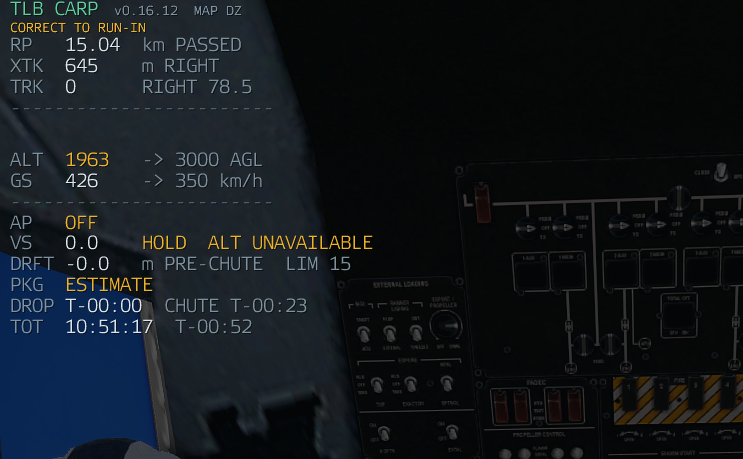
The HUD is the instrument you fly. It appears once guidance is armed and stays up through the drop and the load's descent.
If it is missing, check HUD Enabled under Settings → Display.
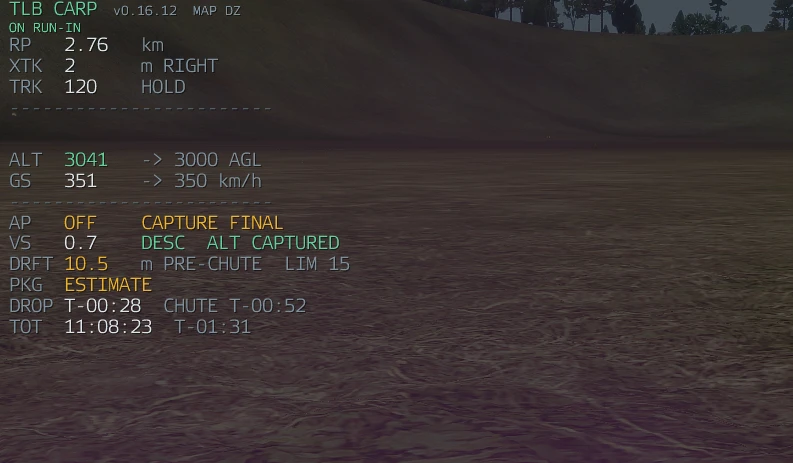
| Row | Meaning |
|---|---|
| RP | Range to the release point, counting down. Shows PASSED once it is behind you. |
| XTK | Cross-track: how far off the run-in line you are, and which way. CENTRE when you are on it. |
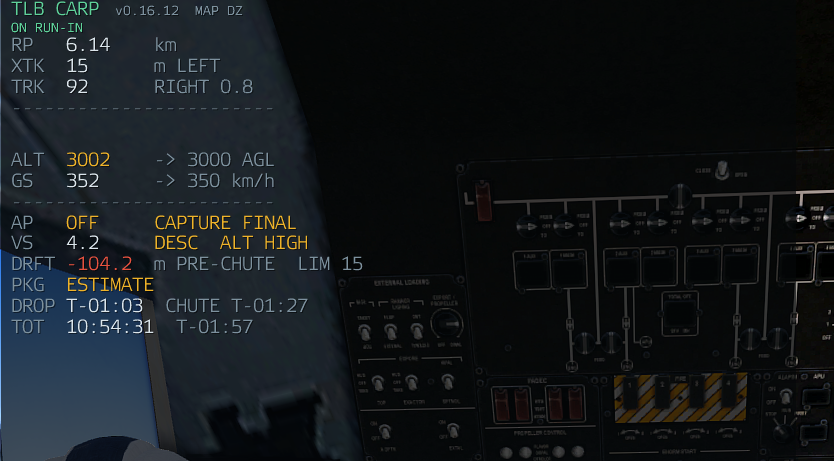
| TRK | The locked run-in heading, with the correction to fly. RIGHT 0.8 means turn 0.8° right. HOLD means stay as you are. |
| ALT | Height above ground against the target, e.g. 3041 → 3000 AGL. |
| GS | Ground speed against the target. |
| AP | Autopilot state, and the path phase. |
| VS | Commanded vertical speed, with ALT CAPTURED, ALT HIGH or ALT UNAVAILABLE. |
| DRFT | Predicted sideways drift the load would inherit at release, against the limit. |
| PKG | Package state, once something has left the aircraft. |
| DROP / CHUTE | Countdown to release, and to canopy opening. |
| TOT | Time on target — clock time the load arrives, and the countdown to it. |
| STK | Stick size, when you are dropping more than one. |
Three marks, centred above the rows:
- a fixed
|centre post — the locked run-in heading, - a moving
^caret — where you are actually tracking, - and the block they sit in.
Fly the caret onto the post. It is the same information as TRK, read faster.
These appear on the AP row and describe what the path manager is doing, whether or not the autopilot is flying.
| Phase | What it is |
|---|---|
INTERCEPT |
Heading for a capture gate upstream on the locked final line. |
CAPTURE FINAL |
Turning onto the line and settling on it. |
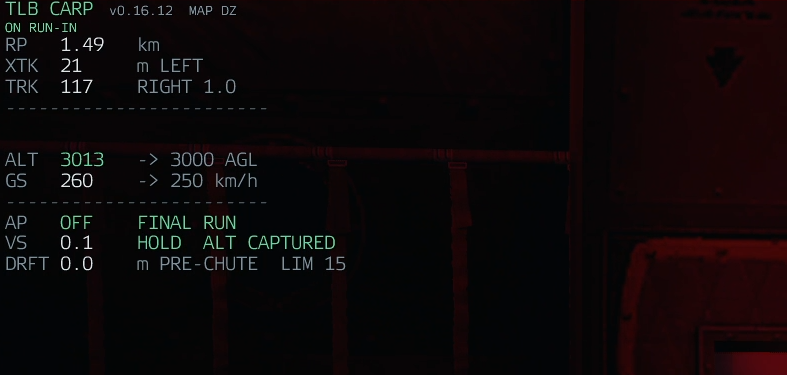
FINAL RUN |
Holding the locked heading, tracking the line. |
RELEASE STABLE |
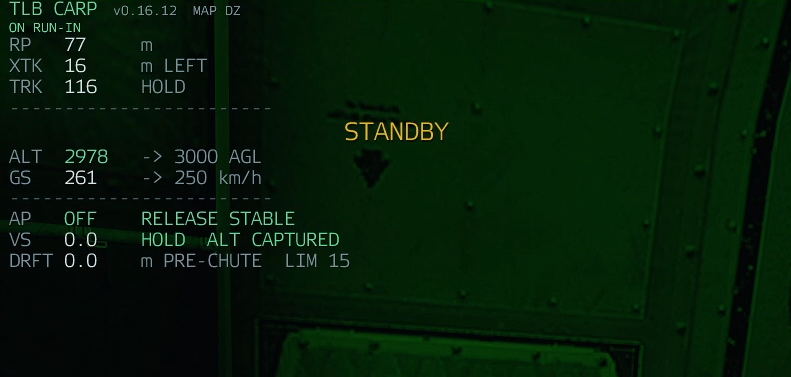
Inside the final envelope and within every limit. This is the pass the gate accepts. |
POST DROP |
The load is away. |
The HUD turns green at RELEASE STABLE.
Once a load leaves, the PKG row tracks it independently of whether a release solution still exists.
| State | What it is |
|---|---|
IDLE |
Nothing in progress. |
ESTIMATE |
Predicted, before anything has left. |
RELEASED |
The load is out and in freefall. |
CHUTE |
The canopy has attached. Time on target is rebased here on the real event rather than the prediction. |
ARRIVED |
On the ground — low-AGL contact held for half a second after airborne confirmation. |
LOST |
Tracking gave up on it. |
| Message | Meaning |
|---|---|
CORRECT TO RUN-IN |
You are not on the line yet. |
ON RUN-IN |
On the line, inside tolerance. |
STANDBY |
Release is approaching. |
NO DROP — GO AROUND |
The gate refused this pass. The HUD says which limit failed. |
ALT HIGH |
Above the target height. Advisory — it does not block a drop. |
ALT UNAVAILABLE |
No valid vertical solution. |
INVALID |
No solution at all. Nothing will drop. Usually an unsupported aircraft or a failed solve. |
The AP row names the reason it disconnected. All of these come straight from the autopilot:
| Reason | Meaning |
|---|---|
PILOT OVERRIDE |
You moved a control past the override threshold. This is the normal way to take it back. |
PILOT SEAT LOST |
You are no longer flying the aircraft. |
GUIDANCE DISARMED |
Guidance was switched off. |
RUN-IN UNLOCKED |
The run-in lock was released. |
UNSTABLE RUN-IN |
The run-in could not be held. |
INVALID SOLUTION |
There is no release solution to fly to. |
INVALID PATH |
The path manager could not build a route. |
AIRCRAFT NOT LOCAL |
This machine does not own the aircraft, so it cannot fly it. See Crew and Multiplayer. |
Opening the map, using freelook, the ACE interaction menu, Zeus or the CARP panel does not disconnect the autopilot. Arma reports mouse motion as flight input in those modes, so CARP suppresses override detection while something else owns the mouse, plus half a second afterwards.
| Message | Meaning |
|---|---|
JPADS REMOTE |
Another machine is flying this canopy. Normal on a server — you still see a true closing error. |
UNSTEERED — NO OWNER |
No machine is flying it. This is a fault worth reporting. |
The difference between those two is the whole reason the heartbeat exists: from the cockpit, "somebody else is flying this correctly" and "nobody can fly this" otherwise look identical.
With Map Trajectory on you also get the run-in line, the release point, the predicted canopy point and the predicted touchdown, drawn on your own map.
Those markers are local to you. CARP never creates a global marker, so two aircraft running CARP in the same mission cannot write over each other's map.