Repository navigation
Jump Run
CARP works the same problem for people as it does for cargo: where the aircraft has to be when the stick leaves, so they arrive over the drop zone.
- Set the DZ as usual.
- Set MODE to HALO JUMP.
- Set STICK (how many are jumping) and OPEN m (the height they plan to open at).
They are on the panel, not in options, because they change every serial. Leave STICK at
0to count everyone aboard except the pilot when the run is armed. - Roll out on your run-in heading and press RUN-IN to lock it, exactly as for cargo.
- Press ARM JUMP RUN.
The aircraft's own run altitude is TARGET AGL on the panel — there is no separate field for it.
Everyone aboard gets the readout, whether they are in a seat or standing at the ramp.
| Readout | Meaning |
|---|---|
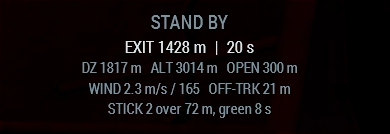
STAND BY |
Armed and inbound. Shows distance and time to the exit point. |
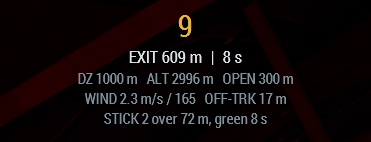
| A counting number | The audible countdown, 10 s by default. |
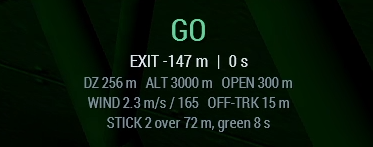
GO |
Green light. Get out. |
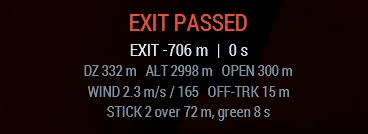
EXIT PASSED |
The exit point is behind the aircraft. |
The lines underneath are the jump itself: distance to the DZ, aircraft height, planned
opening height, wind, how far off track the aircraft is, and how the stick is spread —
STICK 2 over 72 m, green 8 s.
The readout is broadcast, not drawn locally. It goes to the roster taken when the run was armed, unioned with whoever is aboard now — deliberately not just the crew list, because a jumper standing on the ramp has already left the crew as far as the engine is concerned.
The light in the back goes green at the exit point and stays green long enough for the last man out, worked out from your stick size and jumper interval.
Driving the light needs Free Fall Off The Ramp. Without it the readout and the countdown still work.
If the aircraft is not tracking the run-in, the exit point can be a kilometre off to one side — and a green light there is worse than none.
CARP holds the light red, says so, and asks the pilot to correct. Fix the cross-track and the track error and it goes green.
All under Settings → Jump Run, and all server-forced so a unit can standardise them.
| Setting | Default | Why you would change it |
|---|---|---|
| Jump Opening Altitude | 600 m | Higher opening leaves more room to glide onto the DZ; lower needs a more accurate exit. |
| Jumpers In Stick | 0 (count aboard) | Fix it when some passengers are not jumping. |
| Jumper Interval | 1 s | Longer interval spreads the stick further along the run-in. |
| Jump Countdown | 10 s | How much warning the stick gets. |
| Green Light Duration | 8 s | How long the light stays green after the exit point. |
| Early Exit Bias | 250 m | Exit early on purpose — see below. |
| Jump Exit Bias | 0 m | Only if jumpers consistently land long or short along the run-in. |
Flying downwind to the DZ is far faster than flying upwind to it. So a timing error that puts the stick out early is recoverable, and the same error late usually is not. The default bias of 250 m puts the error on the side you can fix under canopy.
Two cue-flown jumps landed 7 m and 12 m from the mark, inside a 200 m box.
As with everything else here those are measurements rather than estimates — both were flown, and the numbers are what the recorder reported. Two data points, so read them as "this works" rather than as a distribution.