Gesture-controlled video kiosk for Raspberry Pi Lite ultilizing Mediapipe and MPV's powerful and configurable video player.
Based on a professionally developed kiosk system, this repository represents my experimental, MediaPipe-based evolution of the original project.
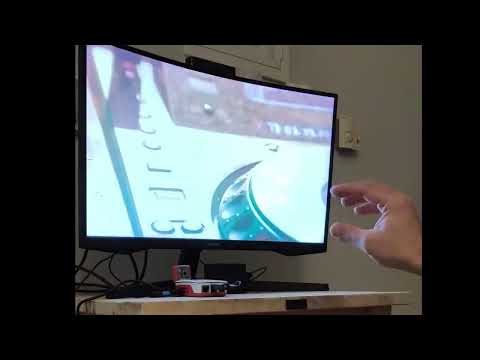
HandPi Kiosk is an open-source video kiosk system that uses hand gestures to control video playback.
It is optimized for Raspberry Pi OS Lite (Bookworm), but also supports desktop systems.
The system runs automatically on boot, plays a looping MAIN video, and allows users to:
- Open a menu using hand gestures
- Browse other videos
- Play, pause, and switch videos without touching
No mouse, keyboard, or screen interaction is required once installed.
- Headless Raspberry Pi operation
- MediaPipe hand tracking
- MPV video playback with IPC control
- Automatic startup via systemd
- Fully offline after setup
- MPV starts in fullscreen
- MAIN video loops infinitely
- Menu auto-closes after inactivity
- Secondary videos do not loop
- When a secondary video ends, playback returns to MAIN automatically
Videos must be placed exactly like this:
handpi-kiosk/
└── pi/
    ├── install_pi.sh
    ├── main_pi.py
    ├── camera_server.py
    ├── models/hand_landmarker.task
    └── videos/
        ├── main/
        │   └── main_video.mp4
        └── secondary/
            ├── 01_video.mp4
            ├── 02_video.mp4
            └── ...
Rules:
- Only ONE video in videos/main/
- Any number of videos in videos/secondary/
- Secondary videos are loaded in alphabetical order, name them starting with 01_, 02_, etc.
- Filenames are used as menu titles
Tested on Raspberry Pi OS Lite (64-bit Debian Bookworm)
Camera: USB webcam (V4L2 / OpenCV)/Raspberry Pi Camera Module
Use Raspberry Pi Imager to configure:
- Wi-Fi / Ethernet credentials
- Enable SSH
- Username:
e.g. pi
cd /home/pi
git clone https://github.com/Thanos3G/HandPi-Kiosk.git
cd handpi-kiosk/piFrom your desktop machine, copy your videos folder into the Pi:
scp -r ./videos pi@kiosk:/home/pi/handpi-kiosk/piIf edited on Windows run:
sed -i 's/\r$//' install_pi.shMake it executable and run it:
chmod +x install_pi.sh
./install_pi.sh
The first time the script runs, it downloads the appropriate Mediapipe model from Google.
systemctl --no-pager status handpi.service
journalctl -u handpi.service -fMAIN video state
- Thumb + Index (hold) → Open menu 🤏
Menu state:
- Thumb + Middle (hold) → Scroll menu
- Thumb + Ring (hold) → Play selected video
- Thumb + Pinky (hold) → Play next video
Secondary video playback
- Palm (hold) → Pause / Resume ✋
- Thumb + Index (hold) → Return to MAIN video 🤏
- Thumb + Pinky (hold) → Next video
- Thumb + Middle (hold) → Volume Up
- Thumb + Ring (hold) → Volume Down
Notes:
- Gesture sensitivity can be tuned in main_pi.py
- All gestures use stability frames + hold time
- Cooldowns prevent accidental double-triggering
- Thresholds are tuned separately for Pi and desktop
- Gestures are time-debounced (looked more natural) but one-shot behavior can be enabled via the repeat parameter.
Keyboard controls (optional)
- M: Toggle menu
- Enter: Play selected
- Esc: Return to MAIN
- N: Next video
- Space: Pause / Resume
- Q: Quit (desktop only)
- <-/->: Fast Forward
Tested cameras:
- USB webcams, Accessed via V4L2 / OpenCV
- Raspberry Pi Camera Module V3, accessed via libcamera / Picamera2. Automatically detected when no USB camera is available
Board support:
- HandPi Kiosk has been tested and works reliably on Raspberry Pi 400 and Raspberry Pi 5.
- On Raspberry Pi 3B+, the full gesture pipeline using MediaPipe did not perform.
- A simplified, non-gesture prototype was previously tested successfully on Raspberry Pi 3B+ and it was the base for this.
Audio:
HandPi Kiosk prioritizes USB audio devices at runtime via MPV configuration. If no USB device is available, HDMI audio is used as a fallback and can be adjusted in the main_pi if needed.
Sofware:
For Rasberry Pi 5 compatibility, HandPi Kiosk runs directly on the Linux console (tty1).
The virtual environment created by install_pi.sh must allow access to system Python packages:
- python3-picamera2
- python3-evdev
- system-installed OpenCV and NumPy
Gesture thresholds are tuned separately for Raspberry Pi, and desktop systems. All MediaPipe gesture parameters including stability frames, hold durations, and distance ratios are defined in:
- main_pi.py for Raspberry Pi
- main_desktop.py for desktop systems
Users can adjust these values to better match their specific hardware setup.
HandPi Kiosk automatically adapts to the display resolution via MPV scaling. While it works at various resolutions, the on-screen menu is tuned for 1920×1080 and may require OSD size adjustments on very small or unusual displays (adjust OSD dictionary in main app).
This project is licensed under the Apache License, Version 2.0.
You are free to use, modify, and distribute this software under the terms of the license.
This project builds upon the following open-source software:
- MediaPipe (Google) Used for real-time hand landmark detection
- MPV Media Player Used for robust and configurable video playback
All third-party licenses are respected and remain with their respective owners. See the NOTICE file for full attribution details.