Repository navigation
Four Part System Infographic
The current .SYSTEMX field guide is four separate 3840 × 2160 pages:
one full-system overview followed by three detailed views. Read page 1 for the
connections, then pages 2–4 for execution, reference routing, and storage/scope
boundaries. Click any image to open its full-size export.
The diagrams describe the 1.10.0-alpha.2 feature contract, published as a media/manual update with 1.10.0-alpha.3. A diagram is a navigation aid, not proof of a running worker, a permission grant, or a deployed application. First-time setup explains installation before use.
| Page | Read it to answer |
|---|---|
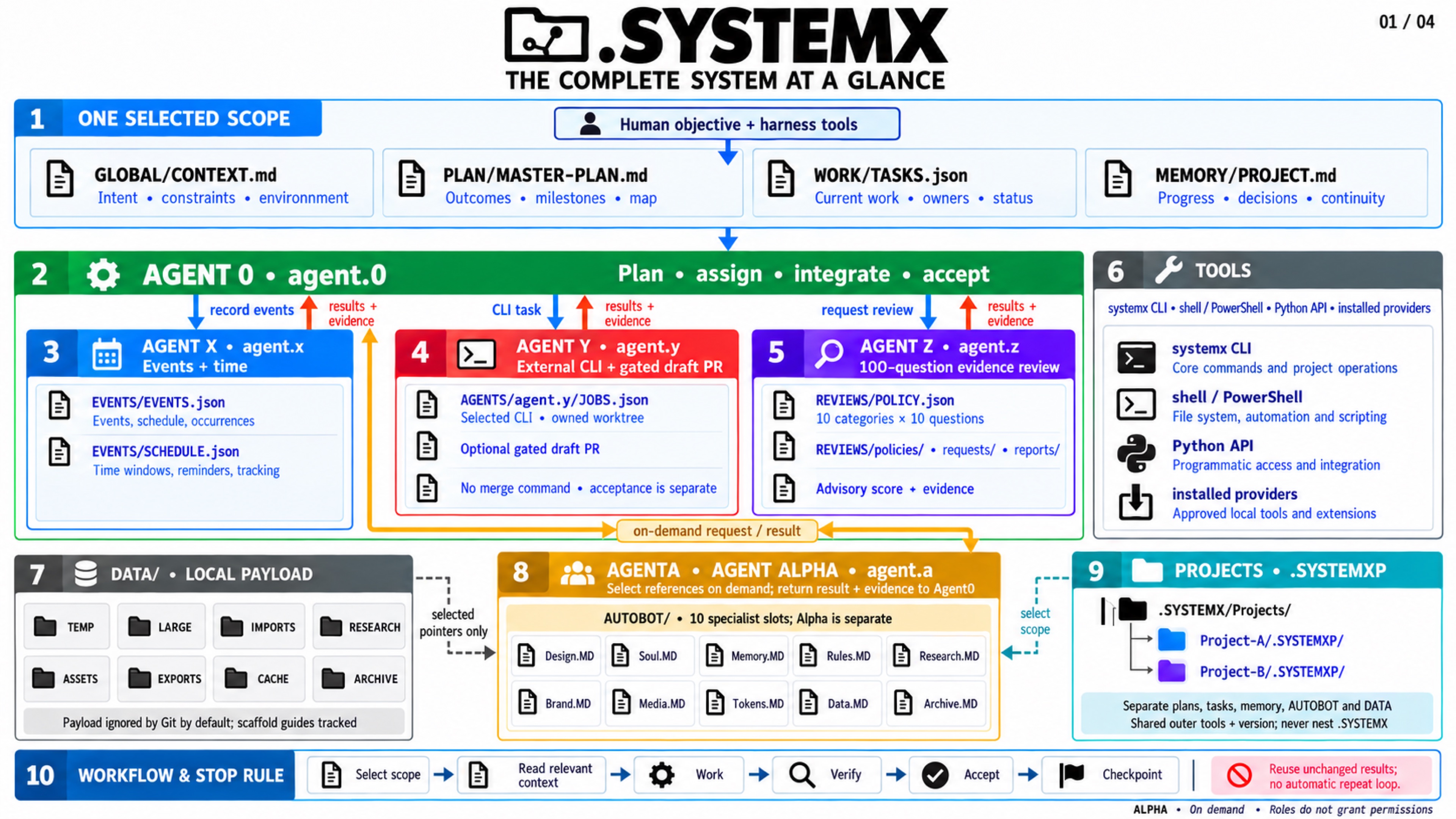
| 1. Full-system overview | How do Agent 0/X/Y/Z, AGENTA, all ten AUTOBOTS, DATA and .SYSTEMXP connect? |
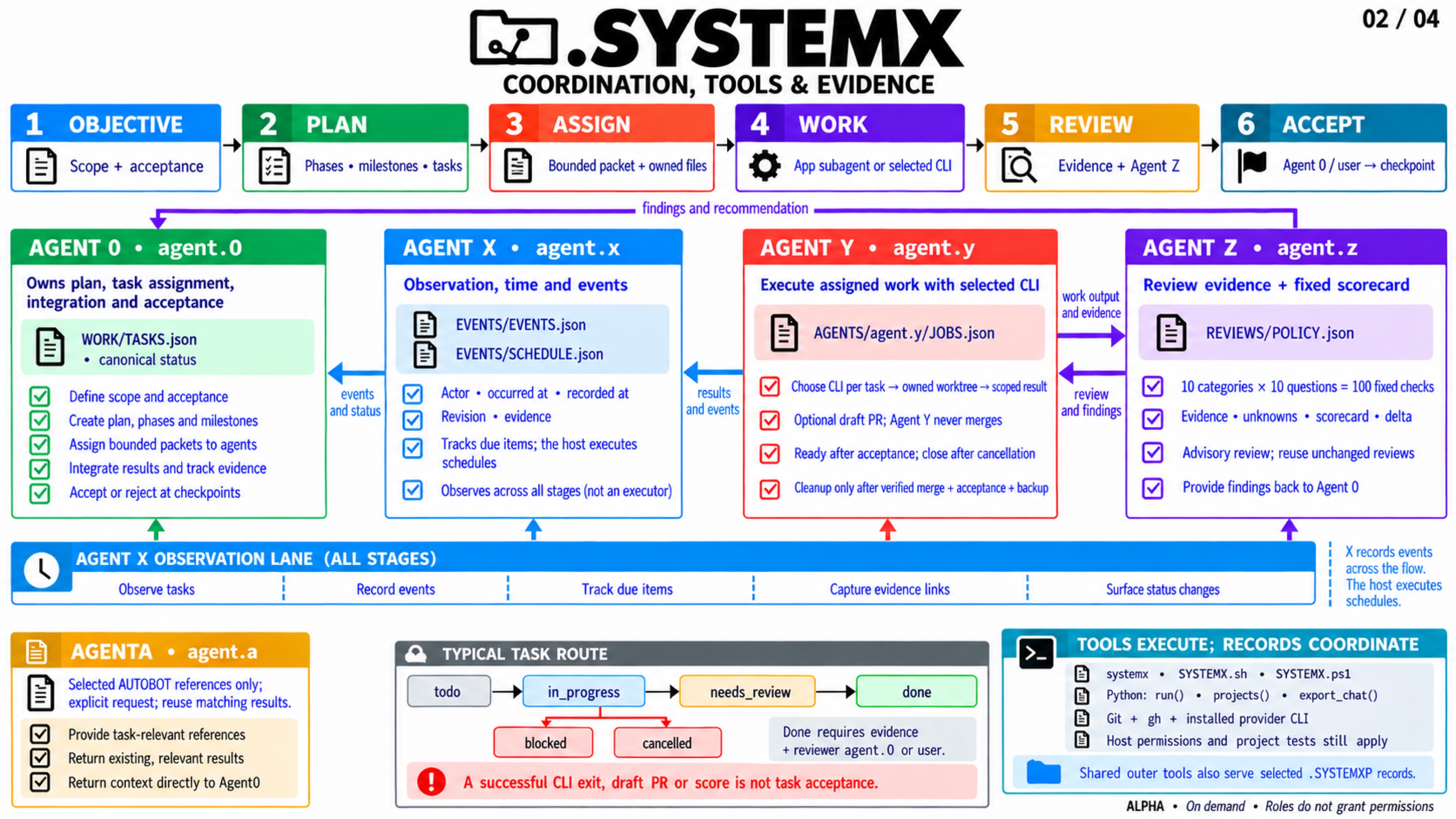
| 2. Agent coordination and CLI tooling | Who assigns, executes, verifies, reviews, accepts and records a task? |
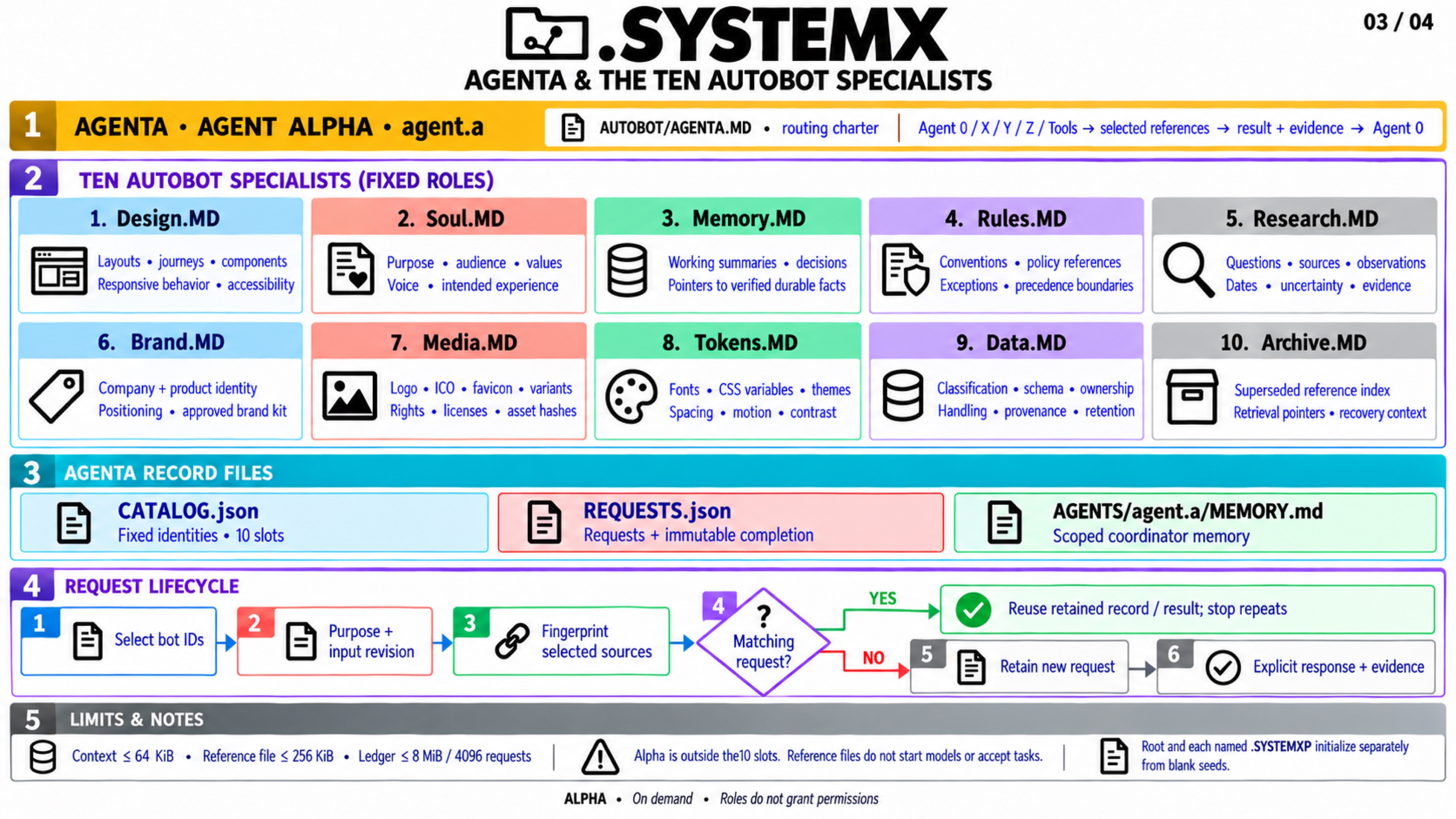
| 3. AGENTA and the ten AUTOBOTS | How does an on-demand detail request select specialists and reuse results? |
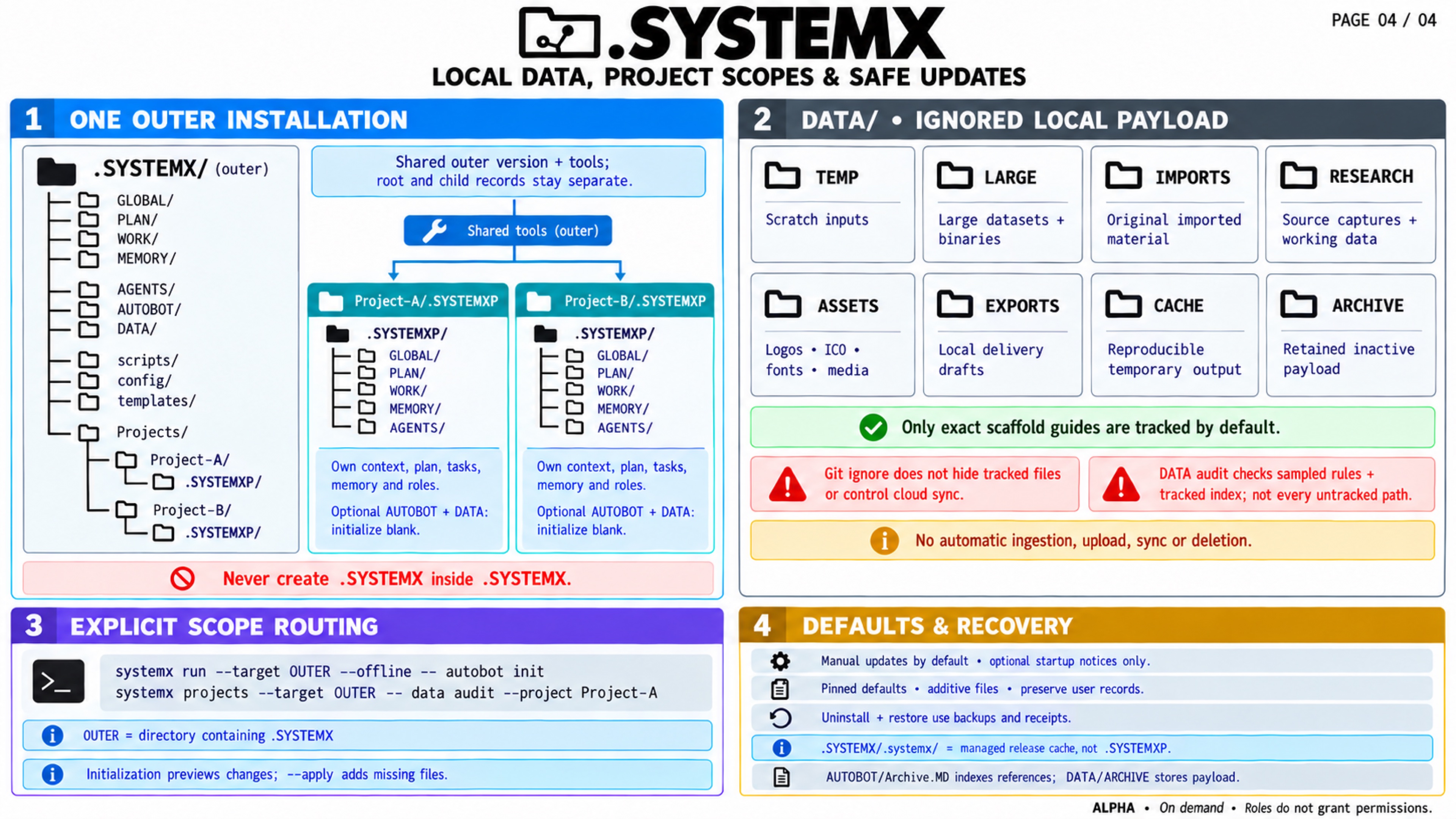
| 4. DATA and named project scopes | Where do private/large payloads go, and how do multiple projects stay separate? |
Open / download the full 4K JPEG
Text equivalent: start with one authorized objective in one explicit scope.
Global context and the Master Plan define accepted purpose and outcomes;
WORK/TASKS.json owns task status and evidence. Agent 0 routes work, integrates
results, and retains acceptance with the user. The harness supplies real tools,
processes, permissions, and native workers. Agent X records actual events/time;
Agent Y carries a bounded task through one selected installed external CLI;
Agent Z applies the same versioned 100-question policy. Agent Alpha (AGENTA,
agent.a) returns selected reference detail from ten named AUTOBOTS. DATA keeps
local payloads behind default Git-ignore rules, with exact scaffold exceptions.
Named .SYSTEMXP children share outer tools while retaining separate records.
Useful detail remains in its canonical home. CURRENT.md and the six work-state
views are generated from task/focus records; Memory and Archive do not create
competing status lists. Select only the context needed for the current task.
Planning and memory · Task workflow ·
Standard format · System MAP.
Open / download the full 4K JPEG
Text equivalent: Agent 0 turns the accepted brief into phases, milestones, and bounded tasks. Each assignment identifies its scope, task ID, source revision, permitted files, dependency boundary, acceptance evidence, budget, and return format. Independent tasks may use authorized app/IDE workers or an explicitly selected Agent Y CLI lane. The two execution lanes need separate write scopes; a CLI role is not another invisible app subagent.
| Role or tool | Responsibility and boundary |
|---|---|
| Agent 0 | Maintain the selected plan and canonical task ledger, assign bounded work, integrate, and accept within user authority. |
| App / IDE workers | Execute scoped work with tools and permissions actually supplied by the harness; return changes and original evidence. |
| Agent X | Record events, actors, occurrence times, attempts, revisions, evidence, and due items. External tools execute schedules. |
| Agent Y | Use one task-selected, already installed CLI provider and isolated Git scope; return its commit/worktree and optional opted-in draft PR. |
| Agent Z | Review the fixed policy of 10 categories × 10 questions; preserve unknowns and evidence. A score does not accept a task. |
| Agent Alpha / AGENTA | Select relevant AUTOBOT reference material and retain bounded request/result pointers. It does not execute the task. |
| Management CLI / local launcher | Select defaults, installation or root/child records, and explicit commands; it does not install a model provider. |
| Configured project tools | Run actual check/dev/build/deploy commands when configured and authorized, retaining real exit status and evidence. |
Agent Y's optional draft PR is a handoff. Accepted-ready state, cancellation of an unmerged PR, and cleanup of a verified merged-and-accepted branch are separate lifecycle decisions. No review score grants merge authority. Agent 0 cites or runs independent project checks before acceptance and retains a precise remaining delta when criteria are unmet. Save reviewed facts and a checkpoint; do not repeat unchanged reviews or open a new work loop merely because an event was recorded.
Agent 0 and subagents · Agent X · Agent Y · Agent Z · CLI and Tools · Evidence and acceptance.
Open / download the full 4K JPEG
Text equivalent: Agent 0, X, Y, Z, or an explicitly configured Tools step
submits a scoped purpose and input revision to Agent Alpha. Alpha selects only
the necessary fixed slots; the coordinator is outside the ten-specialist
limit. Exact file names, including uppercase .MD, are part of the format.
| Specialist | Exact file | Selected project detail |
|---|---|---|
| Design | Design.MD |
Layout, user journeys, components, responsive behavior, accessibility, design rationale |
| Soul | Soul.MD |
Product purpose, audience, values, voice and experience; no claim of consciousness |
| Memory | Memory.MD |
Bounded working summaries and pointers to accepted durable project facts |
| Rules | Rules.MD |
Project conventions, cited policy, constraints, exceptions and precedence boundaries |
| Research | Research.MD |
Questions, original sources, observation dates, corroboration and uncertainty |
| Brand | Brand.MD |
Legal/trading/product names, identity, positioning and approved brand-kit references |
| Media | Media.MD |
Logo/ICO/favicon inventory, dimensions, variants, provenance, rights, licenses and exports |
| Tokens | Tokens.MD |
Semantic design tokens, CSS variables, typography, themes, spacing, states and contrast |
| Data | Data.MD |
Classification, ownership, definitions, schemas, retention and safe payload pointers |
| Archive | Archive.MD |
Superseded-reference index, dates, predecessor identity and recovery context |
AGENTA.MD is the routing charter, CATALOG.json identifies the fixed panel,
and REQUESTS.json retains selected requests/results. Initialize agent.a
explicitly; X/Y/Z roles-init is separate. The public template starts with only
Agent 0 registered and blank reusable specialist records.
A request fingerprint includes its selected local reference inputs and declared
revision. Identical requests reuse the saved identity and any completed result,
including original evidence time. Changed inputs justify a new bounded request;
identical completion is reusable and a conflicting second completion is refused.
A deliberate refresh needs an honest new --input-revision, not a polling loop.
The tools cannot independently establish that a caller's external revision is true.
autobot context reads only the charter and selected specialist documents, with
a 64 KiB packet limit and 256 KiB per specialist file. It does not read
DATA payloads or fetch URLs. An authorized human/LLM performs any actual research,
file edits, or model calls through the available harness. Rules and imported
research remain lower-authority project data; caller labels are attribution,
not authentication. Request completion never changes task acceptance.
AUTOBOT and Agent Alpha contains activation, request, completion, reuse, and child-scope command examples.
Open / download the full 4K JPEG
Text equivalent: one outer installation provides selected standards, tooling,
version policy, and a registry. Explicitly select the root or one named child:
.SYSTEMX/Projects/Project-A/.SYSTEMXP. Project B has its own named child path.
Each owns separate context, plan, task ledger, focus, memory, and optional role,
AUTOBOT and DATA records. Children do not inherit parent/sibling private facts,
request results, brand, or payloads. Do not create nested .SYSTEMX, a nameless
Projects/.SYSTEMXP, a second manager, or recursive child Projects trees.
| DATA folder | Intended local payload use |
|---|---|
TEMP/ |
Temporary work and scratch inputs |
LARGE/ |
Large binaries or datasets |
IMPORTS/ |
Authorized incoming originals |
RESEARCH/ |
Local source material and working research data |
ASSETS/ |
Private/draft brand, design, fonts, images and media |
EXPORTS/ |
Generated local outputs |
CACHE/ |
Rebuildable local cache payloads |
ARCHIVE/ |
Retained superseded payloads and recovery material |
Only exact README/policy scaffolds are intended to be tracked; payloads are
ignored by Git by default. data audit inspects sampled ignore rules and the
tracked index without reading payload contents. It is not exhaustive verification
of every actual path, history, another clone, or a custom unignore exception.
Already tracked/force-added files remain publishable. Check the actual path and
tracked state before exporting anything sensitive. Ignore rules do not govern
Drive/cloud/backup sync, encryption, access permissions, or credentials.
A named source URL describes a location; it does not grant access or transport bytes. Git/Drive/cloud connectors need real authorized access, one record writer, conflict handling, saved revisions and readback. Child setup and updates add missing scaffolds without replacing adopted records or deleting local folders. TEMP/CACHE names authorize no cleanup. Whole-install uninstall/restore includes local DATA and the Projects tree in the reviewed external backup, so stop writers and inspect the preview before a lifecycle change.
SYSTEMX PROJECTS · Local DATA storage · Shared workspaces, clouds, and bots · Uninstall and cleanup.
The built-in imagegen native outputs are 1672 × 941 pixels. The selected
outputs were resized with macOS sips to 3840 × 2160 and JPEG quality 85.
No native detail is created by that export; native dimensions are recorded
separately from the 4K canvas. All four final images were visually reviewed
against the source contracts.
The four JPEG outputs are linked to the fixed v1.10.0-alpha.3 tag so this
manual's illustrations can be reproduced. 4K describes the 3840 × 2160 export
canvas; resizing does not create native detail. Exact native dimensions,
export method, byte sizes, SHA-256 checksums, and generation prompts are retained
in the asset metadata and media reference library.
The portable text companion
and generation prompts
travel with the release. The text on this page supplies an accessible explanation
and exact file names; use the current command manuals as the authority for
syntax and limits.
| Page | Bytes | SHA-256 of exact 4K JPEG |
|---|---|---|
| 1 — Complete system overview | 1,789,030 | d62e59186efcddce53799027a52f3817d9f38c154c8ffb6a9659724a91826283 |
| 2 — Coordination, tools and evidence | 1,825,911 | fa355d18c7edf51703de2bab7edb7baab2862ff339bf7b01f3279b8051a6e036 |
| 3 — AGENTA and the ten AUTOBOT specialists | 1,754,811 | fe3819592990a7927dd4771124db2fb89791ca1c6b35c580a27ac3c7938b94d7 |
| 4 — Local DATA, project scopes and safe updates | 1,739,691 | 2f83730562bd2020566926bb22f2f924362d4193158f90b1da2cd5b186d724a8 |
Earlier full-system and environment-card artwork is historical. The current four-part series adds the Agent Alpha/AUTOBOT/DATA tier; the white paper remains an explicitly frozen edition. Media files never become canonical task records, launch workers, supply a scheduler, or prove runtime health.
The four raster pages retain their stated 1.10 baseline. The newer optional ROOT planning, rules, and task delta page adds Mermaid views for milestone → wave → phase → task planning and the observed SYSTEMX/harness/cloud-bot reconciliation path. Its diagrams describe references and coordination, rather than extra running agents or a continuous connector.