Repository navigation
Home
Digital Wellbeing for Linux — screen-time tracking, daily app limits and focus mode, for GNOME Wayland and every X11 desktop.
ScreenGuard is a free, privacy-first desktop wellbeing app for Linux. It measures how long you spend in each application, lets you cap how long you can use the apps that steal your attention, and runs Pomodoro focus sessions that block distractions while you work.
Everything stays on your machine. There is no account and no cloud sync. Your screen-time data never leaves your computer; optional anonymous diagnostics (crash traces and a once-daily active-install ping) can be turned off in Settings → Diagnostics.


| I want to… | Go to |
|---|---|
| Install it |
Installation — APT, Copr, Arch, .deb, .rpm or tarball |
| Set it up in 5 minutes | Getting Started |
| See what it does | Features |
| Understand how it works | Architecture |
| Fix something that is broken | Troubleshooting |
| Know what is coming | Roadmap |
| Give feedback | Feedback |
Package repositories are stable-only. The APT, Arch and Copr repositories only carry stable releases, so betas are not delivered by your package manager. Pre-release packages are available from GitHub Releases, and every beta's source is public on the
betabranch.
Next milestones: v1.2 is a major UI and experience refresh; v1.5 targets a C port of the daemon. See Roadmap.
See today's screen time next to your 30-day totals and daily average, with an interactive weekly bar chart, an app-share donut chart and a per-day breakdown of every tracked application.

Slide back week by week and tap any bar in the chart to open that specific day's app breakdown.

Set a daily cap per application — presets of 30m, 1h, 2h, 4h or any custom value. You get a desktop warning at 90% of the limit, and a full lockout screen at 100% with the option to add 15 minutes, edit the limit or return to the dashboard.

An animated Pomodoro timer (15m, 25m, 45m, 60m or custom) with a live countdown ring. Pick the apps that distract you and ScreenGuard minimises them if they open during a session. Focus sessions can loop automatically through several work/break cycles.
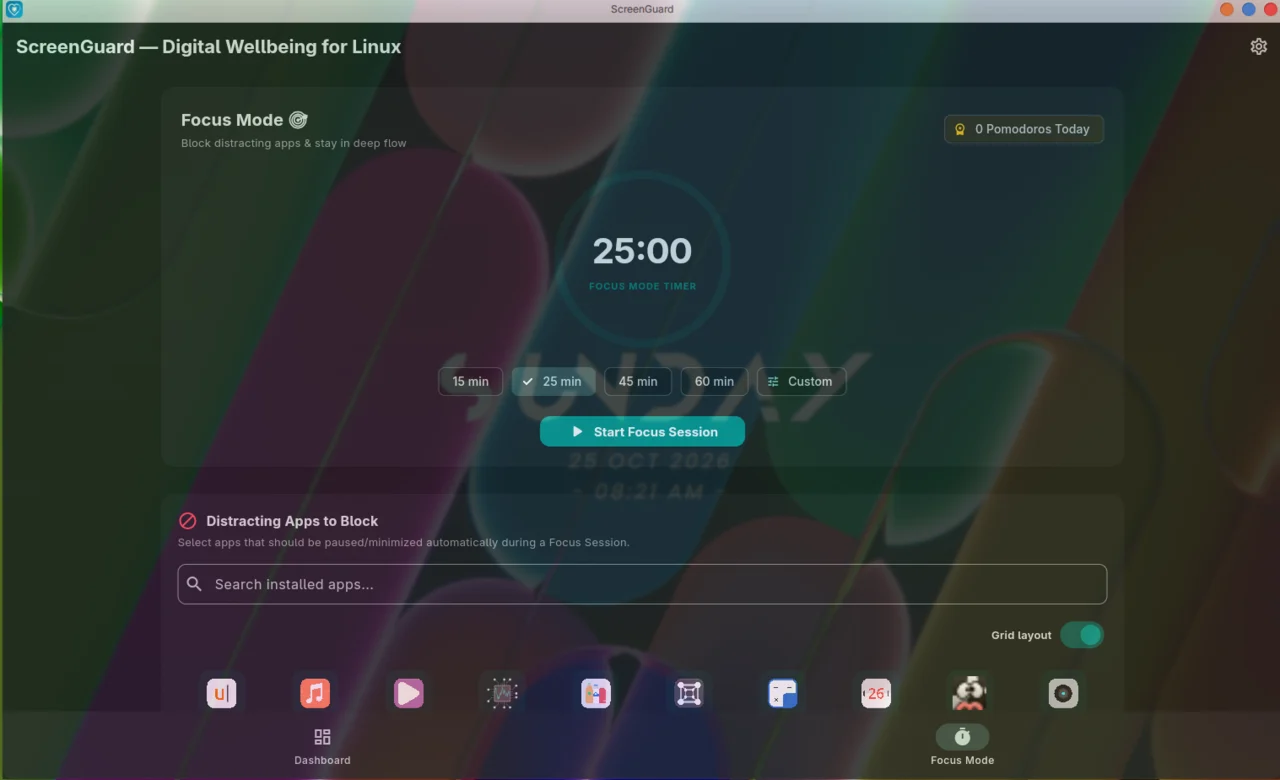
Window transparency is done by Blur My Shell.

Steam games resolve to their real names from your library manifests, with per-game icons from your icon theme. Usage is tracked like any other app, and limits and focus rules apply to games too.
Set a daily screen-time target from the dashboard and get milestone alerts as you approach it. Choose one of three built-in sound themes — Gentle Chime, Classic Bell, Digital Alert — or drop in your own audio file, and switch between adaptive, light and dark themes.
Session logs live in SQLite on your own machine. No cloud sync, no accounts, and no usage data leaves your machine.
| Desktop environment | Session type | Status |
|---|---|---|
| GNOME (Fedora, Ubuntu, Debian, Arch) | Wayland | Supported natively via the ScreenGuard GNOME Shell extension |
| Any X11 desktop (GNOME, KDE, XFCE, MATE, Cinnamon, LXQt, i3, Openbox…) | X11 | Supported out of the box |
| KDE Plasma | Wayland | Not yet — planned |
| Hyprland / Sway | Wayland | Not yet — planned |
X11 window tracking is in active community testing. When you report an X11 bug, please attach a screenshot or video and name your desktop environment and version.
| Page | What it covers |
|---|---|
| About ScreenGuard | What the project is for, and what it deliberately is not |
| Installation | Every supported install path |
| Getting Started | Daemon, shell extension, first limits and first focus session |
| Features | Every feature in detail |
| Architecture | GUI, daemon, GNOME extension, X11 backend and the database |
| Troubleshooting | Symptom-by-symptom fixes |
| Roadmap | Shipped, in progress and planned work |
| Feedback | How to reach the maintainer |
| Development | Build and run from source |
| Packaging and Releases | How the packages and repositories are produced |
| Contributing | How to help, and the rules of the road |
License — GPLv3. Maintained by Aditya Krishnan.