V. Environment background
What's an environment background in Lumiere ?
An environment background is a world environment that give you the ability to use an image texture for lighting your scene in a realistic way using image based lighting. Think of it as a dome that will surround all your scene and will project light from any direction on 360°. If a realistic image of a landscape with light information (High Dynamic Range or HDR) is used, then each pixel will potentially contribute to the lighting of your objects. The sun will have the stronger light information, and will give lot of light and sharp shadows, when the blue sky will contribute to the lighting in a soft way, giving the shadows a nice bluish coloration.
You can find many free HDR image. For example :
- hdrihaven.com
- cloud.blender.org (need subscription)
- www.hdrlabs.com
- www.openfootage.net (check the low-res)
- hdrmaps.com
- www.ronenbekerman.com
- noemotionhdrs.net
If an HDR image is recommended, you can use any image in any format known by Blender, but the quality of the lighting will be much lower.
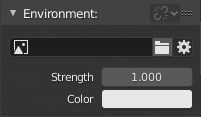
By default, the scene will be light by the color. You can choose an image texture by clicking on the folder icon.
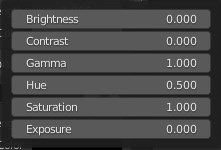
By clicking on the wheel icon, you will have access to the following options relevant to the image texture :
- Brightness :
- Increase the overall brightness of the image.
- Contrast :
- Make brighter pixels brighter, but keeping the darker pixels dark.
- Gamma :
- Apply an exponential brightness factor to the image.
- Hue :
- Specifies the hue rotation of the image from 0 to 1.
- Saturation :
- A saturation of 0 removes hues from the image, resulting in a grayscale image. A shift greater than 1.0 increases saturation.
- Exposure:
- Exposure values (EV's) is the overall brightness of the image. Increasing values shift the image value toward the brightest point.